mini-lsm: three weeks, twenty-one chapters, and three copies of the same engine
learn database internals by building a storage engine in Rust
At a glance
- What is it?
- mini-lsm is a Rust course that builds an LSM-tree storage engine from a memtable through compaction, a write-ahead log and serializable snapshot isolation. It ships the reference solution, the MVCC extension and the student starter crate as separate workspaces, and its two learning paths have very different shapes.
- Who is it for?
- Take mini-lsm if you have basic Rust and want to understand what happens under the API of a database you already use, and if you can commit three weeks to the guided path or three days to the agent track. Work in mini-lsm-starter rather than the reference crates, and remember that cargo x sync is what carries a reference API change back to the starter.
- Can I use it commercially?
- Yes. Apache-2.0 is a permissive licence: you can use, modify and sell software built on it, as long as you keep its copyright and licence notices.
- Is it still maintained?
- Yes. The repository last received commits 7 days ago.
- What is it written in?
- Mainly Rust, according to GitHub's language statistics.
Answers come from the project's GitHub data, last synced on November 14, 2026, and from our analysis. They are not legal advice.
Star history
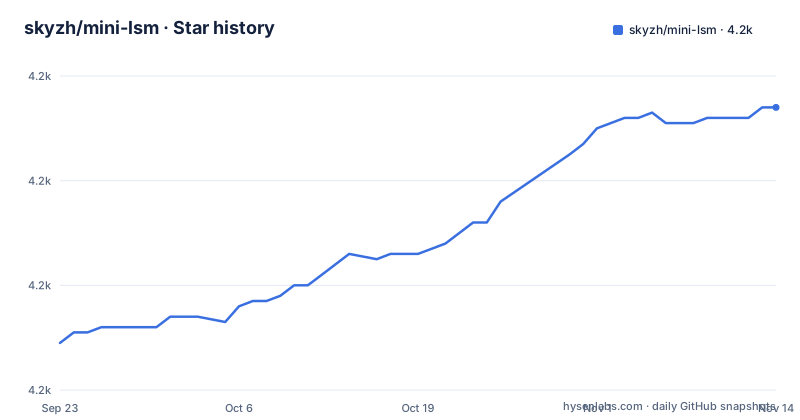
- skyzh/mini-lsm4,214 ★ · +45
| Repository | 2026-09-23 | 2026-11-14 |
|---|---|---|
| skyzh/mini-lsm | 4.2k | 4.2k |
45 Stars in the last 52 days, measured from the daily GitHub snapshot. Compare with other projects
Editorial analysis
Week 1 is seven chapters from memtable to bloom filters
The guided path is three weeks of seven chapters each, plus a closing chapter on expansion paths. The first week is storage format and engine skeleton, and its chapter order is the read and write path of an LSM tree from the inside out.
The sequence is 1.1 memtable, 1.2 merge iterator, 1.3 block, 1.4 sorted string table, 1.5 read path, 1.6 write path, and 1.7 SST optimizations with prefix key encoding and bloom filters.
By the end of the week the engine is expected to hold an ordered in-memory write buffer plus immutable SST files, and to answer point lookups and range scans over the merged memory and disk state.
The reference solution and the starter crate are separate copies
The workspace holds four members: mini-lsm, xtask, mini-lsm-starter and mini-lsm-mvcc. mini-lsm is the final solution through week 2, mini-lsm-mvcc holds week 3's MVCC work, and the starter crate is what students are told to modify.
cargo x install-tools
cargo x copy-test --week 1 --day 1
cargo x scheck
cargo run --bin mini-lsm-cli
cargo run --bin compaction-simulator
copy-test is how the exercises arrive: you name the week and day and the tool brings over the tests for that session. scheck is the student's check, and the course developers get a different one, cargo x check, alongside cargo x book for building the course.
Keeping three copies of the same engine is what creates the maintenance step. If you change a public API in the reference solution, the starter crate has to be updated to match, and that is what `cargo x sync` is for. Nothing runs it automatically, which is why the documentation phrases it as something you might also need to do.
Demo binaries carry a -ref suffix so they cannot shadow your work
You can run the finished engine before you write anything, and the naming keeps that copy separate from yours. Every demo binary ends in -ref.
cargo run --bin mini-lsm-cli-ref
cargo run --bin mini-lsm-cli-mvcc-ref
The compaction simulator exists as a separate binary for both halves of the course, so you can watch a strategy behave before implementing one.
cargo run --bin compaction-simulator-ref
cargo run --bin compaction-simulator-mvcc-ref
So there are four reference binaries and two student binaries, with and without the suffix. It is a small naming convention, but it means a session that accidentally runs the reference build still produces the expected output, and nothing tells you that you did not test your own code. If you are following an exercise, check the binary name before you read the result.
The solution checkpoint repository is updated rarely
The published solution lives in a second repository, mini-lsm-solution-checkpoint, and the README is blunt about its maintenance: each commit in that checkpoint repository corresponds to a chapter in the course, and the checkpoint is not updated very often.
That is a deliberate trade. Committing a working solution per chapter is what makes the checkpoint worth having, since you can compare your week 2 result against a known good state. The cost is that the two repositories drift, and nothing in the tooling reconciles them for you.
The same is true in a smaller way inside this repository. SOLUTIONS.md is a community list, and adding to it is a pull request, available once you have finished at least one full week. So there are three ways to compare your work: the checkpoint repository for a known good commit, the reference crates in the workspace for the current state, and SOLUTIONS.md for what other people wrote.
Two paths with the same goal and different shapes
The project offers a guided course and a coding-agent track, and the comparison table is blunt about who each is for.
The guided course takes three weeks at seven chapters per week, and its status is complete. It is aimed at learners who want to implement each subsystem themselves and reason through it.
The coding-agent track is three planned days, with days 1 to 3 currently available. Its stated aim is narrower: an agent handles the mechanical implementation without taking over the system design. The format is described as decision stops, focused code slices and adversarial tests, which is three different things from reading a chapter and writing the code yourself.
Both paths assume basic Rust and explicitly do not require prior knowledge of LSM trees, compaction, MVCC or transaction isolation. The intended reader is someone who has used PostgreSQL, MySQL, Redis or RocksDB and wants to know what is underneath the API, which is also why those four systems are the ones named.
Apache 2.0 covers the code, not the course material
The license line is narrower than the repository. The starter code and the solution are under Apache 2.0, and the author reserves the full copyright of the course materials, meaning the markdown files and the figures.
So the diagrams and chapter text in mini-lsm-book/ are not covered by the LICENSE file, even though both live in the same tree. Anyone wanting to reuse the written material, or to translate it, or to lift a figure into a slide, has to ask.
The code side has its own tooling for keeping headers correct. There is a .licensesnip file at the root and a licensesnip.config.jsonc beside it, which appear to configure a licence-header tool.
The workspace package metadata matches the code license, with license declared as Apache-2.0 in Cargo.toml alongside a homepage and a repository URL, so the tooling and the manifests agree with what the README says about the code.
The workspace asks for a recent toolchain
The workspace declaration is short and the constraints in it are strict. Members are mini-lsm, xtask, mini-lsm-starter and mini-lsm-mvcc, the resolver is version 3, and the package edition is 2024.
[workspace]
members = ["mini-lsm", "xtask", "mini-lsm-starter", "mini-lsm-mvcc"]
resolver = "3"
The minimum compiler is Rust 1.97.1, which is a much newer floor than a course README would normally assume, and the workspace version is 0.4.0-alpha.1 rather than a chapter number. The two shared dependencies are minimal, anyhow and bytes, each pinned to major version 1, so the rest of the crates come from the individual package manifests.
There is a rust-toolchain.toml at the root as well, which means a checkout pins its own compiler for cargo commands. On a machine with an older default toolchain, that file is what decides whether the workspace builds at all, and it is worth reading before the first build rather than after the first error.
What the course deliberately leaves out
The scope statement is short and worth reading before you commit three weeks. The course covers the storage layer of a database. It does not cover SQL parsing, query optimization, replication or distributed consensus.
That is a narrower product than a database, and the week 3 material makes the boundary concrete: timestamp key encoding, snapshot reads over memtables and timestamps, a transaction API, watermarks and garbage collection, optimistic concurrency control, serializable snapshot isolation, and compaction filters. Everything there is about versions and visibility inside one engine.
Two projects that grew out of this work are named as production users of the ideas. SlateDB is an LSM engine over object storage, and Tonbo stores parquet files directly on object storage and organizes them in an LSM tree structure. Both are the direction the course stops short of, since object storage changes what an SST is allowed to be.
For community, there is a Discord server where you can study with the mini-lsm community.
Editorial conclusion
Take mini-lsm if you have basic Rust and want to understand what happens under the API of a database you already use, and if you can commit three weeks to the guided path or three days to the agent track. Work in mini-lsm-starter rather than the reference crates, and remember that cargo x sync is what carries a reference API change back to the starter. Do not treat the license as covering the whole repository: Apache 2.0 applies to the starter and solution code, while the course text and figures stay with the author. Before you start, check your toolchain against the workspace floor, which asks for edition 2024 and Rust 1.97.1, and do not plan to learn SQL parsing, query optimization, replication or consensus here, because the course deliberately stops at the storage layer.
Frequently asked questions
How does an LSM tree work?
In the shape this course teaches it, writes go into an ordered in-memory memtable, which is flushed into immutable sorted string table files, and reads merge the memory state with the disk state through a merge iterator. Background compaction and a manifest with a write-ahead log keep that structure correct across restarts.
What is a B tree and an LSM tree?
The project teaches the LSM side and does not present a B tree comparison, so it is not the place to answer the contrast. Its own assumption is that you need no prior knowledge of LSM trees: chapters start at the memtable and work through blocks, SSTs, the read and write path, bloom filters, compaction strategies, a manifest, a write-ahead log, and MVCC.
Does RocksDB use LSM tree?
The course models its compaction work on RocksDB. Chapter 2.3 is the tiered strategy described as RocksDB Universal Compaction and chapter 2.4 is RocksDB Leveled Compaction, and RocksDB is named as one of the systems the course assumes you have used.
Official sources
Add this badge to your README
If you maintain this project, the badge below links readers to this analysis and shows its maintenance status from the daily GitHub snapshot. Paste the markdown into your README; add ?metric=license or ?metric=stars to the image URL for a different field.

[](https://hysenlabs.com/projects/skyzh-mini-lsm)Star history chart for your README
[](https://hysenlabs.com/projects/skyzh-mini-lsm)Was this useful?