opencode-quota: a quota and token monitor for OpenCode, kept out of the context window
OpenCode quota & tokens usage with zero context window pollution. Supports OpenCode Go, Cursor, GitHub Copilot, OpenAl, Kimi Code, Alibaba Coding Plan, Chutes Al, Google Antigravity, Z.ai Coding Plan and more.
At a glance
- What is it?
- opencode-quota is an MIT-licensed TypeScript plugin that shows quota, pricing and token usage for the model providers OpenCode talks to, through a sidebar panel, a status line, a popup and slash commands. It reads credentials from OpenCode 2 and never writes to your auth file.
- Who is it for?
- opencode-quota fits an OpenCode user who subscribes to several model providers and has no idea which plan is being consumed, and who wants the numbers in the terminal without spending context window on them. It does not fit someone on API key billing, where the provider's own dashboard already answers the question, and it is tied to OpenCode's own version history, having dropped OpenCode 1 support in 5.0.
- Can I use it commercially?
- Yes. MIT is a permissive licence: you can use, modify and sell software built on it, as long as you keep its copyright and licence notices.
- Is it still maintained?
- Yes. The repository last received commits 1 day ago.
- What is it written in?
- Mainly TypeScript, according to GitHub's language statistics.
Answers come from the project's GitHub data, last synced on November 7, 2026, and from our analysis. They are not legal advice.
Star history
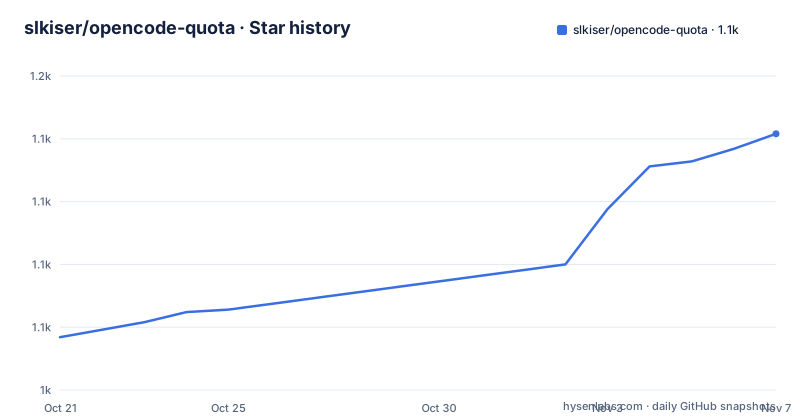
- slkiser/opencode-quota1,127 ★ · +81
| Repository | 2026-10-21 | 2026-11-07 |
|---|---|---|
| slkiser/opencode-quota | 1k | 1.1k |
81 Stars in the last 17 days, measured from the daily GitHub snapshot. Compare with other projects
Editorial analysis
A usage meter for the coding plans you already pay for
opencode-quota shows quota, usage and token visibility in OpenCode and your terminal, and the key phrase in the package description is zero context window pollution.
That phrase is the design constraint that makes the project interesting. The natural way to answer "how much of my quota have I used this month" inside an AI coding tool is to ask the model, which adds a request to your quota and burns context to give you a number. This plugin takes the opposite approach and reads the usage data directly, so the answer costs you nothing and takes up no tokens.
The provider list is the scope of the project. The description names OpenCode Go, Cursor, GitHub Copilot, OpenAI, Kimi Code, Alibaba Coding Plan, Chutes AI, Google Antigravity and Z.ai Coding Plan, and the manifest description is a slightly different list naming GitHub Copilot, OpenAI with Plus and Pro, Chutes AI, Synthetic, Google AGY and the Z.ai coding plan.
Those are all subscription-style plans where the provider exposes a remaining allowance, which is the case where a consumer dashboard is genuinely useful. A user on a metered API key does not need this, because the provider's own billing page tells them the same thing, and that is the main case where the plugin will not add much.
The licence is MIT, the primary language is TypeScript, and the last push was on 2026-10-15 with v5.0.2 tagged on 2026-10-06, alongside a v4.10.8 from the same day for the OpenCode 1 line.
Installing it in one command
The quick start is a single command:
npx @slkiser/opencode-quota initThen you restart OpenCode and type `/quota`.
The requirements are stated as an important note rather than buried. You need OpenCode 2.0.16 or later and Node.js 22.13 or later, or 23.4 or later. If you are still on OpenCode 1, the note tells you to run `npx @slkiser/opencode-quota@4 init` instead, so the 4.x line is still maintained for the older host.
The manifest shows the package is a normal Node package with a `bin` entry for `opencode-quota` and three export paths, the root, `./server` and `./tui`, which matches the three surfaces the project has: the OpenCode plugin side, the server side that fetches usage, and the terminal UI.
The package is built with TypeScript and the build script runs a clean step, then `tsc`, then two data copy steps for the bundled data and the TUI distribution. The `files` array ships only `dist`, the README and the licence, so the published package is the compiled output rather than the source tree.
Four surfaces, and what each one is for
The README shows four screenshots, and they are the four ways the information reaches you.
The sidebar panel is the persistent view in the TUI. The popup toast is the transient notification. The status line is a single line in the TUI status area. The token report is the longer-form output.
The distinction that matters is between the terminal and the chat. The README says that in Web and Desktop the slash commands post the report in the chat, while in the TUI reports open in a popup, and there is a configuration option `tuiCommandDisplay: "inline"` to keep them in the chat instead. So the same command behaves differently depending on which OpenCode surface you are in, which is a detail that will otherwise surprise you.
There is also a path that does not need OpenCode at all. `npx @slkiser/opencode-quota@latest show` works even with OpenCode closed, which makes it usable from a shell alias or a status bar script in another tool.
Beyond the visual surfaces there is the integration path. The README mentions JSON, an export file, and metrics for scripts and status bars, documented under external integration, plus configuration for how the numbers are displayed, whether a number is used or left as is, a reset style, and a runs-out estimate.
The last feature on the list is the one with real behavioural consequences. When a request hits a limit and that provider's quota shows a used-up window, OpenCode retries after the quota resets. You can turn that off with `waitForQuotaReset: false`.
The slash commands and the CLI
The slash commands are the main interface, and there are enough of them that the division of labour is worth spelling out.
`/quota` shows the current quota. `/quota_status` is a setup check covering logins, providers, pricing and notices, and `/quota_announcements` shows maintainer notices, which is how the author communicates things like a provider changing its login method.
The token commands cover time windows. `/tokens_today` is tokens used today, `/tokens_daily` is the last 24 hours, `/tokens_weekly` the last 7 days, `/tokens_monthly` the last 30 days with pricing, `/tokens_all` across all local history, `/tokens_session` for the current session, and `/tokens_session_all` for this session plus its subagent sessions. There is also `/tokens_between YYYY-MM-DD YYYY-MM-DD` for an arbitrary range, and the README notes that you can add dates after a command in the same way.
`/pricing_refresh` refreshes token pricing from `models.dev`, which is the source of the cost figures. That is a separate command because the pricing data is external and goes stale, and the manifest has a matching script, `pricing:refresh`, along with a variant `pricing:refresh:if-stale`.
The CLI commands are `init`, `provider add`, `show`, `status` and `update`. The README explains that `show` and `status` work with OpenCode closed, and points at a troubleshooting section for how the two differ. `provider add` is for a custom provider, which is the escape hatch when a provider is not built in.
The distinction between `show` and `status` is worth noting: `show` gives you the quota, `status` is the diagnostic for setup and provider problems, and keeping them separate means the number you glance at and the number you debug are different commands.
Version 5.0 and the OpenCode 2 migration
The 5.0 release is a breaking change and the README lists what changed, which is also a description of how tightly this plugin is coupled to its host.
OpenCode 1 is no longer supported, and `init` and `update` keep OpenCode 1 users on the 4.x line by pointing them at `@slkiser/opencode-quota@4`. So the 4.x branch is not abandoned, it is a separate line for a separate host version.
Logins now come from OpenCode 2 and never from `auth.json`. If a provider is missing you log in again, which is a change in where credentials live rather than a change in the plugin's behaviour. This is the piece that connects to the security question.
Web and Desktop get the slash commands, but no toasts or panels. TUI reports open in a popup by default, with the `tuiCommandDisplay: "inline"` option to keep them in the chat. And OpenCode Zen uses your OpenCode Console sign-in, obtained with `opencode auth login opencode`.
The updating story is handled carefully, which is the right approach for a tool that touches your credentials. You close OpenCode, then preview and apply the update:
npx @slkiser/opencode-quota@latest update --dry-run
npx @slkiser/opencode-quota@latest update
Then you restart OpenCode. The README makes a point of it: the updater never moves or deletes secrets.
One provider detail is worth flagging, because it is the kind of thing that produces a support question. The OpenAI ChatGPT quota needs a Codex login, through `/connect` to OpenAI and either the Codex browser or Codex device code option, both marked legacy. OpenAI does not share ChatGPT usage with Sign in with ChatGPT logins or with API keys, so those show a ChatGPT quota that is not the number you want.
How the project is built and maintained
The repository is a pnpm workspace with `src/`, `tests/`, `docs/`, `scripts/`, `references/` and `contributing/` directories, a `tui.ts` at the root, and a `biome.json` for formatting and linting. There is a `lefthook.yml` for git hooks and a `vitest.config.ts` for the test runner.
The `scripts/` directory is unusually large for a plugin, and the manifest shows what is in it. There are packaging scripts including `pack-release-package.mjs` and a `smoke:package` script that smoke tests the packed artifact, and a `build:check` script that builds and then runs `pnpm pack --dry-run` to see what would be published.
There are also upstream management scripts, `upstream:check`, `upstream:prepare-review` and `upstream:sync`, plus a `references/` directory at the root. Those are the scripts for tracking changes in upstream plugins, which is what a plugin that reads another project's provider implementations needs.
The test setup shows the shape of the project. There is a `test:four-surfaces` script that runs a file named `tests/v4-phase5-cross-surface.test.ts`, which suggests the test suite is organised around verifying that the same behaviour works across the TUI, web, desktop and terminal surfaces, and the filename suggests it comes from a phased plan for the 4.x work.
On releases, there are two version lines being published, v5.0.2 and v4.10.8 on the same day, which is the OpenCode 2 and OpenCode 1 split showing up in the release history. The project also has a badge asking for listing in the OpenCode plugin directory, at opencode issue 38281, which tells you the plugin is not yet in the official list.
Editorial conclusion
opencode-quota fits an OpenCode user who subscribes to several model providers and has no idea which plan is being consumed, and who wants the numbers in the terminal without spending context window on them. It does not fit someone on API key billing, where the provider's own dashboard already answers the question, and it is tied to OpenCode's own version history, having dropped OpenCode 1 support in 5.0. Before installing, run `npx @slkiser/opencode-quota@latest status` to check your provider logins, and note that the updater needs OpenCode closed and never moves or deletes secrets.
Frequently asked questions
What does opencode-quota do?
It shows quota, usage and token visibility for the model providers OpenCode talks to, in the TUI sidebar, a status line, a popup and slash commands, plus a CLI that works with OpenCode closed. The package description calls it quota and tokens usage with zero context window pollution.
How do I install opencode-quota?
Run `npx @slkiser/opencode-quota init`, then restart OpenCode and type `/quota`. You need OpenCode 2.0.16 or later and Node.js 22.13 or later, or 23.4 or later. On OpenCode 1, use `npx @slkiser/opencode-quota@4 init`.
Which providers does opencode-quota support?
The description names OpenCode Go, Cursor, GitHub Copilot, OpenAI, Kimi Code, Alibaba Coding Plan, Chutes AI, Google Antigravity and Z.ai Coding Plan, and the manifest names GitHub Copilot, OpenAI Plus and Pro, Chutes AI, Synthetic, Google AGY and the Z.ai coding plan. Custom providers can be added with `provider add`.
What changed in opencode-quota 5.0?
OpenCode 1 is no longer supported, with init and update keeping those users on the 4.x line. Logins now come from OpenCode 2 and never from auth.json, Web and Desktop get the slash commands but no toasts or panels, TUI reports open in a popup unless you set tuiCommandDisplay to inline, and OpenCode Zen uses your OpenCode Console sign-in.
Which slash commands does opencode-quota provide?
There are /quota, /quota_status, /quota_announcements, /pricing_refresh, and the token reports /tokens_today, /tokens_daily, /tokens_weekly, /tokens_monthly, /tokens_all, /tokens_session, /tokens_session_all and /tokens_between with two dates.
Official sources
Add this badge to your README
If you maintain this project, the badge below links readers to this analysis and shows its maintenance status from the daily GitHub snapshot. Paste the markdown into your README; add ?metric=license or ?metric=stars to the image URL for a different field.

[](https://hysenlabs.com/projects/slkiser-opencode-quota)Star history chart for your README
[](https://hysenlabs.com/projects/slkiser-opencode-quota)Was this useful?