Smocker: a mock server and proxy you can drive from a YAML file
Smocker is a simple and efficient HTTP mock server and proxy
At a glance
- What is it?
- Smocker is a Go HTTP mock server with a separate administration port, so mocks are registered as YAML or JSON over an API rather than being code. The same server also records and replays real traffic as proxy mocks, and the mock format is described by a JSON Schema generated from the Go types.
- Who is it for?
- Adopt Smocker if your integration tests need mock definitions that live in version control as data rather than as code, or if you need to capture real traffic and replay it. Do not adopt it if you need per-test isolation inside a Go test binary, since Smocker runs as a separate service.
- Can I use it commercially?
- Yes. MIT is a permissive licence: you can use, modify and sell software built on it, as long as you keep its copyright and licence notices.
- Is it still maintained?
- Yes. The repository last received commits 1 day ago.
- What is it written in?
- Mainly TypeScript, according to GitHub's language statistics.
Answers come from the project's GitHub data, last synced on November 7, 2026, and from our analysis. They are not legal advice.
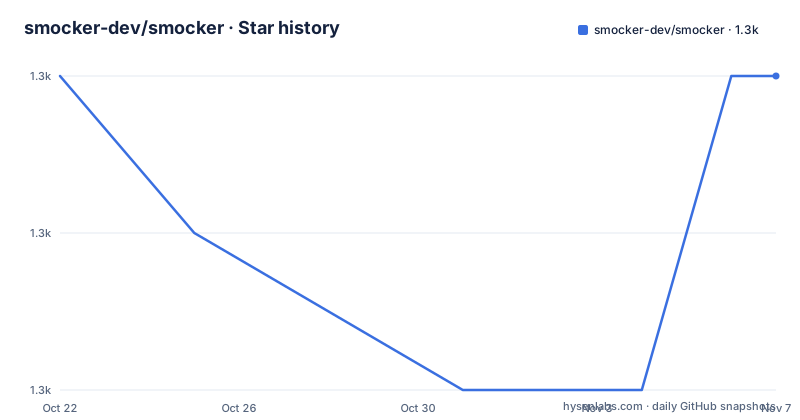
Star history
- smocker-dev/smocker1,289 ★ · +0
| Repository | 2026-10-22 | 2026-11-07 |
|---|---|---|
| smocker-dev/smocker | 1.3k | 1.3k |
0 Stars in the last 16 days, measured from the daily GitHub snapshot. Compare with other projects
Editorial analysis
Two ports, one idea
Smocker stands for server mock and is described as a simple and efficient HTTP mock server. The design decision that defines it is the split into two ports.
Port 8080 is the mock server port, and it exposes the routes you register through the configuration port. Port 8081 is the configuration port, the one you use to register new mocks, and it also exposes a user interface you can reach at http://localhost:8081/.
That separation is the point. A mock server that you configure over the same port it serves is awkward to use from a test, because registering a route and calling it would have to share a base URL and could recurse. With a separate administration port, the test registers a route on one port and calls the other.
The interface is a React application. The repository has screenshots of the history view and the mocks view, and the front end is written with TypeScript and React, bundled with Vite, using Ant Design, React Query for server state, React Router, and CodeMirror for editing. The dependency list also has mermaid, which is how a flow diagram of a mock is likely to be rendered.
The project is MIT licensed, the primary language is TypeScript for the front end with a Go backend, the home page is smocker.dev, and the last push to the repository was on 2026-10-11. The recent releases are all pre-releases, v1.1.2-preview from 2026-07-19, v1.1.1-preview the same day, and v1.1.0-preview the day before.
Running it with Docker, or from a release tarball
The Docker route is a single run command with a restart policy and two published ports:
docker run -d \
  --restart=always \
  -p 8080:8080 \
  -p 8081:8081 \
  --name smocker \
  ghcr.io/smocker-dev/smocker
The manual route downloads a release tarball and runs the binary directly, with the two listen ports given as flags:
# This will be the deployment folder for the Smocker instance
mkdir -p /opt/smocker && cd /opt/smocker
wget -P /tmp https://github.com/smocker-dev/smocker/releases/latest/download/smocker.tar.gz
tar xf /tmp/smocker.tar.gz
nohup ./smocker -mock-server-listen-port=8080 -config-listen-port=8081 &
There is a healthcheck for scripted deployment, and it hits the version endpoint on the configuration port rather than the mock port:
curl localhost:8081/versionThe Dockerfile is worth reading because it explains how the image is built. The images are assembled from pre-built, static, client-embedded binaries, and no compilation happens in the image, just packaging. Buildx sets the target platform variables, which selects the matching binary, and the per-architecture stage is COPY-only, so no QEMU emulation is needed. The base is scratch, and the certificate bundle is copied in from a separate alpine stage because scratch ships none, which is what makes the proxy mock type's HTTPS backends work.
Two details in that file are the kind of thing that only appears after a real deployment. The COPY uses an explicit --chmod=0755 because GitHub artifacts do not preserve the executable bit and the downloaded binary arrives as 0644, which scratch cannot exec. And the image runs as nobody, with the ports above 1024 chosen so that an unprivileged user can bind them and a mounted persistence directory has to be writable by that user.
Writing a mock and registering it
A mock is a request and a response, and the format is YAML or JSON. The example in the README registers two routes at once:
# helloworld.yml
# This mock register two routes: GET /hello/world and GET /foo/bar
- request:
    # Note: the method could be omitted because GET is the default
    method: GET
    path: /hello/world
  response:
    # Note: the status could be omitted because 200 is the default
    status: 200
    headers:
      Content-Type: application/json
    body: >
      {
        "hello": "Hello, World!"
      }

- request:
    method: GET
    path: /foo/bar
  response:
    status: 204
The file is a list, so one file is a set of routes, and the method and status are both optional with GET and 200 as the defaults. The body is a folded scalar, so the JSON payload is written inline.
Registering it is a POST to the configuration port with the content type set to application/x-yaml:
curl -XPOST \
  --header "Content-Type: application/x-yaml" \
  --data-binary "@helloworld.yml" \
  localhost:8081/mocks
And then the mock server answers on the route:
$ curl -i localhost:8080/hello/world
HTTP/1.1 200 OK
Content-Type: application/json
Date: Thu, 05 Sep 2019 15:49:32 GMT
Content-Length: 31

{
  "hello": "Hello, World!"
}
There is a reset endpoint for cleaning up without restarting, which is the piece that makes a mock server usable in a test suite where each test needs a clean registry:
curl -XPOST localhost:8081/resetBecause the configuration is a file format rather than an API call per mock, a suite can keep its mocks in a directory and register them wholesale, and a human can read and edit them without running anything.
The schema, and why it is generated rather than written
A JSON Schema describing the mock format lives at docs/mock.schema.json, and the README explains how it stays accurate. It is generated from and kept in sync with the Go types in server/types, the example mocks under tests/data are validated against it in CI, so it stays accurate, and the documentation references this file as the canonical schema.
That is a design decision worth pausing on, because hand-written schemas drift. The usual failure is that the schema describes version 1 of the format, the code grows a field, and the schema quietly stops matching. Here the schema is derived from the same types the server parses with, and the CI check on the example mocks is what makes the derivation true rather than aspirational.
The payoff is that editors can use it for autocompletion and validation. The README gives the YAML language server line to add at the top of a mocks file, which works in VS Code and Neovim:
# yaml-language-server: $schema=https://raw.githubusercontent.com/smocker-dev/smocker/main/docs/mock.schema.json
- request:
    path: /hello
  response:
    body: '{"message": "Hello, World!"}'
So a mock file gets completion and inline validation for free, and a typo in a field name is caught while you are writing it rather than when the test fails. The schema being served from raw.githubusercontent.com rather than from the documentation site is a practical choice, since the language server needs a stable, direct URL.
The Go side validates too, using the santhosh-tekuri/jsonschema library, so a mock that is structurally wrong is rejected at registration rather than at request time.
The proxy side, and the scripting engine behind it
The repository description calls Smocker a mock server and proxy, and the proxy side is the part that goes beyond static responses.
The mechanism the Dockerfile comment refers to is the proxy mock type, and it exists because the certificate bundle is copied into the image specifically for the HTTPS backends of that type. A proxy mock records real HTTP traffic through the server and replays it, which is a different problem from hand-writing a response. The question is no longer what should the body be, it is which recorded exchange should this request map to.
That is where the Lua dependency comes in. The go.mod lists gopher-lua, layeh.com/gopher-luar, and layeh.com/gopher-json, and a script can presumably compute the response from the request. The related Go libraries in the list support that: gopher-json for JSON handling in Lua, and gluamapper for mapping between Go structs and Lua tables. The Masterminds/sprig dependency is the template function library, which is what a templated response body needs.
There is a JSON Schema library in the dependency list too, santhosh-tekuri/jsonschema, which is the validator for the mock format. The HTTP framework is labstack/echo, and the YAML handling is gopkg.in/yaml.v3.
The one thing the README does not spell out in the section provided is the exact semantics of a proxy mock, so the honest position is that the capability is present in the codebase and the documentation site is where the details live. What can be said from the code is that it is a distinct mock type with its own backend handling, that it can talk to HTTPS upstreams, and that it is scriptable rather than purely declarative.
The integration tests use a local proxy target, and the Makefile installs a venom binary at a pinned version for them, which is a separate integration testing tool used here to drive the server end to end.
Running the development loop, and the Caddy and TLS options
The backend is Go, and the Makefile targets cover the whole lifecycle: make start for development mode with live reload, make build and make VERSION=xxx build for a compiled binary, make lint, make format, make test, and make test-integration.
The front end is TypeScript and React bundled with Vite, and its npm scripts mirror that: npm install, npm run dev for the Vite dev server with hot reload, npm run build, npm run lint, npm run format, npm test, and npm run test:watch. The dev server proxies the admin API to the backend, so you run make start alongside it, and the target can be overridden with SMOCKER_DEV_PROXY if the backend is elsewhere.
There are also two deployment shapes for testing the application behind something else. If you need to test Smocker with a base path, the repository ships a Caddyfile for Caddy v2, and make start-caddy starts Caddy to make Smocker reachable at http://localhost:8082/smocker/.
And for HTTPS, the documentation suggests generating a locally signed certificate with mkcert:
# Install the local certificate authority
mkcert -install

# Create a certificate for localhost
mkcert -cert-file /tmp/cert.pem -key-file /tmp/key.pem localhost
Then Smocker is started with TLS enabled and the certificate paths passed in:
./smocker -mock-server-listen-port=44300 -config-listen-port=44301 -tls-enable -tls-cert-file=/tmp/cert.pem -tls-private-key-file=/tmp/key.pemThe two listen ports move to the 44300 and 44301 range so the local ports do not collide with anything already running, and the same flags used in the manual deployment are reused with the TLS additions.
The build stamps the version into the binary with linker flags, taking the app name from the package path, the version, the commit hash, and the build date, and the release build adds -s -w to strip debug information.
Editorial conclusion
Adopt Smocker if your integration tests need mock definitions that live in version control as data rather than as code, or if you need to capture real traffic and replay it. Do not adopt it if you need per-test isolation inside a Go test binary, since Smocker runs as a separate service. Verify first that your mock responses fit the schema, since the schema is generated from the Go types and validated in CI.
Frequently asked questions
What is Smocker and how does it differ from a typical mock server?
Smocker is a Go HTTP mock server with a separate configuration port, so mocks are registered as YAML or JSON over an API rather than defined in code. The mock format is described by a JSON Schema generated from the Go types, and the server also records and replays real traffic as proxy mocks.
How do I run Smocker with Docker?
Run docker run -d with --restart=always, publish 8080 and 8081, and the image ghcr.io/smocker-dev/smocker. The image is assembled from pre-built static binaries with no compilation inside, uses scratch as the base, and runs as an unprivileged user.
How do I register a mock in Smocker?
Write the mock as YAML or JSON and POST it to the configuration port with the content type set to application/x-yaml, for example curl -XPOST with --data-binary at localhost:8081/mocks. The mock server then serves it on port 8080, and POSTing to localhost:8081/reset clears the registry without a restart.
How does the Smocker mock format stay documented?
The JSON Schema at docs/mock.schema.json is generated from the Go types in server/types, and the example mocks under tests/data are validated against it in CI. You can point the YAML language server at that schema to get autocompletion and validation while editing a mocks file.
Can Smocker serve over HTTPS for testing?
Yes. Generate a locally signed certificate with mkcert, then start the server with -tls-enable, -tls-cert-file, and -tls-private-key-file, along with the two listen ports. A Caddyfile is also included for testing Smocker behind a base path.
Official sources
Add this badge to your README
If you maintain this project, the badge below links readers to this analysis and shows its maintenance status from the daily GitHub snapshot. Paste the markdown into your README; add ?metric=license or ?metric=stars to the image URL for a different field.

[](https://hysenlabs.com/projects/smocker-dev-smocker)Star history chart for your README
[](https://hysenlabs.com/projects/smocker-dev-smocker)Was this useful?