PaperTodo: !p on the first line turns a note into a script capsule
A minimalist Windows desktop sticky note tool. It puts a few quiet, usable, and unobtrusive sheets of paper on your desktop. Native WPF, with support for to-dos and Markdown.
At a glance
- What is it?
- A Windows sticky note application built natively on .NET 10 and WPF, where each note is its own desktop window, papers collapse into capsules that dock to screen edges, and a prefix line converts a note into something clickable that runs PowerShell. The data layout, the MCP flag and the version numbers are where it explains itself.
- Who is it for?
- Use PaperTodo if you want notes that live directly on the desktop as independent windows rather than inside an application, and if you are prepared to read what the script capsule feature does before you write notes on a machine you care about. Four things to know.
- Can I use it commercially?
- Check first. The repository uses a licence we do not classify automatically, so read its LICENSE file before any commercial use.
- Is it still maintained?
- Yes. The repository last received commits 2 days ago.
- What is it written in?
- Mainly C#, according to GitHub's language statistics.
Answers come from the project's GitHub data, last synced on November 15, 2026, and from our analysis. They are not legal advice.
Star history
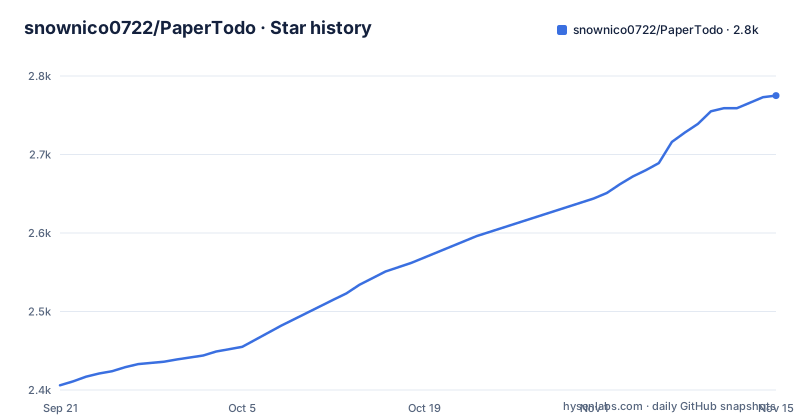
- snownico0722/PaperTodo2,775 ★ · +369
| Repository | 2026-09-21 | 2026-11-15 |
|---|---|---|
| snownico0722/PaperTodo | 2.4k | 2.8k |
369 Stars in the last 55 days, measured from the daily GitHub snapshot. Compare with other projects
Editorial analysis
Versions go 3.3, then 3.31, then a 4.0.0 beta
Three releases are listed and their names do not follow one scheme. v3.3 is dated 2026-08-23, v3.31 is dated 2026-08-30, and v4.0.0-beta1 is dated 2026-09-15. Going from 3.3 to 3.31 adds a digit rather than a decimal step, so neither is obviously the successor of the other, and the fourth major line arrives as a beta rather than a release. The last recorded push is dated 2026-09-25, ten days after the beta tag, so the branch is ahead of the newest artifact. There are two changelog files, one English and one Chinese, which is where the actual change list lives, since the tag names carry no description of their own.
A note with !p on the first line becomes a runnable script
The script capsule feature is the one to read twice. Putting !p or !power on the first line of a note turns that note into a script runner, and when the paper is collapsed it becomes a lightning capsule that executes the script when clicked. The text is PowerShell. So a note is not necessarily a note: the same surface holds text and something that will be run with the privileges of whoever clicks it, and the click that expands a capsule in every other case is the click that runs code here. Nothing in the visible text asks for confirmation, describes a signing step for the note contents, or lists which scripts are currently installed as capsules.
Starting with --mcp hands the notes to an external assistant
The advanced labs section lists a local MCP interface among its preview items. Starting PaperTodo with the --mcp flag exposes a standard MCP service, and the stated purpose is to let authorized external AI assistants such as Claude or Cursor securely read, write and manage todos and notes. So the application's two halves, the todos and the notes, are exposed over a protocol intended for other programs rather than for the desktop user. The word authorized is in the description and the mechanism for it is not described in what is visible, which means the trust boundary is a flag on the command line and whatever the service does about access control.
The data lives in the application directory, not in a profile
The data ownership section states that data and images stay in the application directory, as a JSON file named data.json and an LMDB file named note-assets.lmdb, with automatic snapshot backups taken before writes and full offline operation. Three consequences follow. The application directory is the profile, so moving or backing up the installation moves or backs up your notes. Images live in a key value database rather than as loose files, which is faster to read and less pleasant to inspect by hand. And the snapshot before every write is a fixed scheme rather than a retention policy, so the number of backups present depends on how often you have written.
The plugin system is marked preview and already has a manual
Two sections carry a preview label: the new plugin system and the advanced labs features. The plugin system is described as desktop micro-app expansion, with a paper switchable into a clock, a focus timer, a review pool and similar, presented as a next generation take on Windows desktop widgets. It also has capsule integration, so a plugin can collapse into its own capsule, provide an edge-hover card and custom top-bar actions, while keeping its data stored independently. And it has a drop-in installation path: put a folder in the plugins/ directory and the application recognises it, with the development manual in plugin-samples/README.md. A feature described as a preview that already has a stable folder convention and a separate abstractions project is further along than the label suggests.
Two paper types and three levels of Markdown rendering
Everything in the app is a paper, and there are two kinds. The todo paper is a checklist with drag-and-drop ordering, continuous swipe multi-selection and smart splitting of a multi-line paste, and completed items can be cleared automatically or pushed to the bottom. The note paper holds Markdown and visual notes with three levels of real-time rendering, a natural editing and reading flow, and support for pasting or dropping local images. Rendering long notes is handled by localized incremental parsing, which the performance section pairs with input method composition staying smooth, so a note with a lot of text and images in it does not have to be re-rendered as a whole.
Escape cancels a selection, and collapses the paper when nothing is selected
The shortcut table gives each key more than one job, and the escape key is the clearest case. Escape cancels multi-selection and drag, and when no other interaction is active it collapses the current paper instead. Collapse and hide is Control plus W, or a middle click on the top bar, where the outcome depends on whether collapsing is enabled for that paper: it becomes a capsule when enabled, and otherwise the paper is hidden. Undo and redo are Control plus Z and Control plus Y, available in both paper types, with a history of up to one hundred steps. Note formatting begins at Control plus B, Control plus I and Control plus K.
A bilingual repository with folders the README does not describe
The tree is broader than the documentation. There are two readmes and two changelogs, English and Chinese, a user manual at doc/USER_GUIDE.en.md and a website/ directory, and a HelloGitHub badge in the readme pointing at a Chinese curated list of open source projects. Alongside that sit folders with no explanation in the visible text: native/, vendor/, tools/, tests/ and assets/, plus a PaperTodo.Plugin.Abstractions project that is the contract plugins build against. Two build files are worth naming. FodyWeavers.xml means the build runs an IL weaving step, and app.manifest is the Windows application manifest. There is a LICENSE.md and a THIRD-PARTY-NOTICES.md, while the project metadata records no licence identifier.
Editorial conclusion
Use PaperTodo if you want notes that live directly on the desktop as independent windows rather than inside an application, and if you are prepared to read what the script capsule feature does before you write notes on a machine you care about. Four things to know. A note whose first line is the power prefix stops being text and becomes a runnable script when clicked, which is a different trust model from a note. The MCP flag turns the same notes into a service other assistants can read and write. Your data is a JSON file and an LMDB file inside the application directory rather than in a profile location, so that directory is the profile. And the version sequence does not follow a scheme you can guess at.
Frequently asked questions
How do I install PaperTodo?
The README gives no install command. It points to the official website at snownico0722.github.io/PaperTodo, a user manual at doc/USER_GUIDE.en.md, and a changelog, and it carries a HelloGitHub badge.
What is the difference between a Todo Paper and a Note Paper in PaperTodo?
A todo paper is a checklist with drag-and-drop ordering, continuous swipe multi-selection and smart splitting of a multi-line paste, with completed items cleared automatically or moved to the bottom. A note paper holds Markdown and visual notes with three levels of real-time rendering and support for pasted or dropped images.
What does the --mcp flag do in PaperTodo?
Starting the application with --mcp exposes a standard MCP service, which allows authorized external AI assistants such as Claude or Cursor to securely read, write and manage todos and notes.
How do I turn a note into a script in PaperTodo?
Put !p or !power on the first line of the note. When the paper is collapsed it becomes a lightning capsule, and clicking that capsule executes the script, which the documentation describes as PowerShell.
Where does PaperTodo store its data?
In the application directory, as data.json and an LMDB file named note-assets.lmdb, with automatic snapshot backups before writes and full offline operation.
How do plugins work in PaperTodo?
Drop a plugin folder into the plugins/ directory and the application recognises it. Plugins can collapse into dedicated capsules, provide edge-hover cards and custom top-bar actions, keep their data stored independently, and the development manual is at plugin-samples/README.md.
Official sources
Add this badge to your README
If you maintain this project, the badge below links readers to this analysis and shows its maintenance status from the daily GitHub snapshot. Paste the markdown into your README; add ?metric=license or ?metric=stars to the image URL for a different field.

[](https://hysenlabs.com/projects/snownico0722-papertodo)Star history chart for your README
[](https://hysenlabs.com/projects/snownico0722-papertodo)Was this useful?