whisper-ctranslate2: the OpenAI Whisper command line on CTranslate2
Whisper command line client compatible with original OpenAI client based on CTranslate2.
At a glance
- What is it?
- A Python wrapper that keeps OpenAI Whisper's argument names and moves execution to CTranslate2, faster-whisper and int8 quantization. The flag surface is faithful, but batched decoding drops seven inherited parameters, translation targets English only, and speaker labels need a gated model.
- Who is it for?
- Adopt it when your scripts already speak the OpenAI Whisper command line and you want those same flags on quantized CTranslate2 without rewriting a call. Pass on it if you need a translate target other than English, if your accuracy tuning depends on the seven parameters batched mode drops, or if speaker labels matter below segment level.
- Can I use it commercially?
- Yes. MIT is a permissive licence: you can use, modify and sell software built on it, as long as you keep its copyright and licence notices.
- Is it still maintained?
- Yes. The repository last received commits 33 days ago.
- What is it written in?
- Mainly Python, according to GitHub's language statistics.
Answers come from the project's GitHub data, last synced on November 7, 2026, and from our analysis. They are not legal advice.
Star history
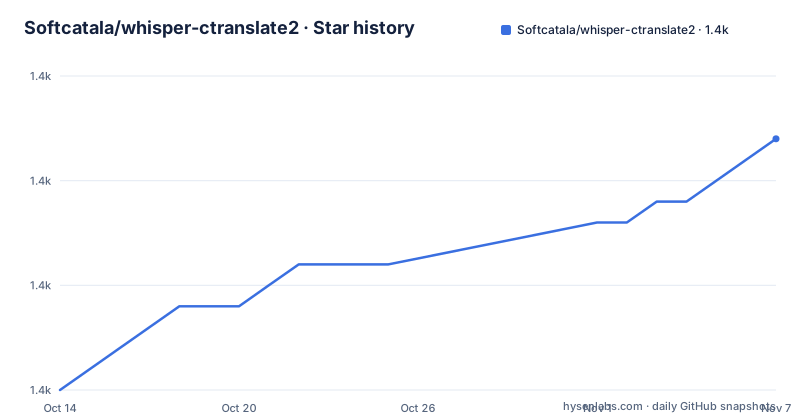
- Softcatala/whisper-ctranslate21,372 ★ · +12
| Repository | 2026-10-14 | 2026-11-07 |
|---|---|---|
| Softcatala/whisper-ctranslate2 | 1.4k | 1.4k |
12 Stars in the last 24 days, measured from the daily GitHub snapshot. Compare with other projects
Editorial analysis
Same command line, different runtime, one translate target
whisper-ctranslate2 is a Python command line client for speech to text that keeps the argument names of OpenAI's Whisper CLI while moving execution to CTranslate2 and faster-whisper. The README states the client runs up to 4 times faster than openai/whisper at the same accuracy while using less memory, and the feature list raises that claim to up to 16X with batched inference. Neither figure comes with a hardware list, a model name or a sample file, so the repository does not let you reproduce either number.
Translation exists but the target is fixed. The translate task turns a transcription into English, described as the only target language supported, so nothing here returns Catalan, Spanish or any other language as output. Teams that only need a transcript never reach that limit. Anyone assembling subtitles between two non-English languages stops at this line.
Two small defects in the project's own text show a wrapper maintained by hand. The topic list carries openai- with a trailing hyphen, a leftover from renaming a topic, sitting beside the usable openai-whisper, speech-recognition, speech-to-text and whisper entries. And the section explaining the added options introduces them as provided by CTranslate2 or whiper-ctranslate2, misspelling the project in the one place that describes what it adds.
Installing from PyPI and running the first transcription
The shortest route is a single pip command, because the package is published on PyPI under the name whisper-ctranslate2:
pip install whisper-ctranslate2Transcribing a file keeps the OpenAI Whisper shape, with the model named on the command line:
whisper-ctranslate2 inaguracio2011.mp3 --model mediumAdding `--task translate` runs the English pass over the same file:
whisper-ctranslate2 inaguracio2011.mp3 --model medium --task translateTwo flags cover the interactive cases. `--print_colors True` prints the transcript with color coding based on word confidence, a strategy borrowed from whisper.cpp, and `--live_transcribe True --language en` captures from a microphone instead of a file:
whisper-ctranslate2 --live_transcribe True --language enBecause the option set only adds to the original CLI, `--help` is the one complete inventory of what the wrapper accepts. There is no configuration file in the repository layout, nothing to mount, and no environment variable documented for ordinary transcription. Every choice travels as a flag, which is what makes the swap from openai/whisper a one-line change in a script that already works.
The published image bakes three models into a CUDA base
The second install route is a prebuilt image on GitHub Container Registry, and the published tag carries the small, medium and large-v2 models:
docker pull ghcr.io/softcatala/whisper-ctranslate2:latestRunning it mounts the working directory at /srv/files/ and points the client at a file inside the container:
docker run --gpus "device=0" \
    -v "$(pwd)":/srv/files/ \
    -it ghcr.io/softcatala/whisper-ctranslate2:latest \
    /srv/files/e2e-tests/gossos.mp3 \
    --output_dir /srv/files/
Two details in that command are easy to miss. The GPU flag is optional, since the README says to remove `--gpus "device=0"` when there is no GPU, yet the image itself is built `FROM nvidia/cuda:12.3.2-cudnn9-runtime-ubuntu22.04`, so the CUDA runtime is in the base layer whether or not you pass the flag. And the docker-run target in the Makefile hardcodes that same flag, which means a CPU-only machine cannot use the target as written:
docker run --gpus "device=0" -v "$(shell pwd)":/srv/files/ -it --rm whisper-ctranslate2 /srv/files/e2e-tests/gossos.mp3 --output_dir /srv/files/That line also names the image whisper-ctranslate2, the tag the docker-build target produces, not the ghcr.io path the README tells you to pull. The two workflows are separate: the registry image is for users, the local build is for changing source.
Models are fetched while the image is built, in a single line that pulls all three at once:
RUN python3 -c 'from faster_whisper import WhisperModel; WhisperModel("small"); WhisperModel("medium"); WhisperModel("large-v2")'Anything outside those three needs a derived image or Docker volumes, which is the documented way to persist and share model files.
Batched inference drops seven inherited parameters and forces VAD
Decoding segments in parallel is the second speed lever, and it changes behaviour as well as timing. The flag takes a boolean value in the same style as the other options:
whisper-ctranslate2 inaguracio2011.mp3 --batched TrueThe README puts the gain at an additional 2x-4x on top of the base speed, and `--batch_size` sets the maximum number of parallel requests made to the model for decoding. The price is a fixed list of seven parameters that batched inference ignores: compression_ratio_threshold, logprob_threshold, no_speech_threshold, condition_on_previous_text, prompt_reset_on_temperature, prefix and hallucination_silence_threshold. Each of those steers decoding away from runaway or repetitive output, so a script that tuned them loses that tuning the moment the flag is added.
The same section states that batched inference uses the Voice Activity Detection filter, which removes `--vad_filter` as a choice inside batched mode. Audio is cut into speech and non-speech before the model sees it, whether or not you asked for it.
The documentation gives no default for `--batch_size`, so the level of parallelism on a given machine is not pinned anywhere. Reading that setting on the first long recording is the only way to learn what it does there.
The VAD filter removes audio before the model sees it
Voice Activity Detection is built on the Silero VAD model and switched on with a flag:
whisper-ctranslate2 myfile.mp3 --vad_filter TrueThree options set its behaviour, each documented as a short block of its own:
--vad_threshold VALUE (float)
--vad_min_speech_duration_ms (int)
--vad_max_speech_duration_s VALUE (int)
The threshold decides which probabilities count as speech. Chunks shorter than the minimum speech duration are thrown out, and chunks longer than the maximum are split at the timestamp of the last silence. Both settings can remove or break material before any decoding happens, and removed audio leaves no marker in the output. No option exists to list what was filtered.
The documentation for the minimum is written as Final speech chunks shorter min_speech_duration_ms are thrown out, dropping the --vad_ prefix the option actually carries, and the maximum is written with VALUE before (int). Small slips, but they are the difference between a flag you can paste and one you have to reconstruct from the argument name.
Quantization and device selection decide speed without a GPU
Compute type is the flag the project is most opinionated about. `--compute_type` takes default, auto, int8, int8_float16, int16, float16 or float32, and the stated rule is that int8 gives the best performance on CPU:
whisper-ctranslate2 myfile.mp3 --compute_type int8Hardware selection is automatic in the default path, where the best available hardware is used for inference, and `--device` with `--device_index` overrides that choice. On CPU the README records compatibility with x86-64 and AArch64/ARM64 through the CTranslate2 backends, naming Intel MKL, oneDNN, OpenBLAS and Apple Accelerate, and no separate command is needed to change architecture. GPU execution needs libraries installed on the host instead: cuBLAS for CUDA 12 and cuDNN 9 for CUDA 12, the same pair already present in the 12.3.2 container base.
The model path is equally explicit. `--model_directory` reads a model from a directory you name, and it is the only route to a quantized Whisper build or to your own fine-tuned weights, because the model must already be in CTranslate2 format. No conversion script ships in this repository, so that conversion happens somewhere else before the flag points at the directory.
A pinned PyAV ceiling and the versions the tests install
The dependency list carries one deliberate pin and one duplication. faster-whisper is required at 1.2.0 or above, while av is held to `av>=11,<19` over one specific call: the comment in requirements.txt records that faster-whisper 1.2.1 passes metadata_errors to av.open(), a keyword PyAV 19 removed. numpy then appears twice in the same file, at the top and at the bottom, which pip tolerates. The ceiling outlives the reason for it. Because the package accepts any faster-whisper above 1.2.0 but never an av above 18, a later faster-whisper that dropped the call would still be held back by this line until somebody removes it.
What the tests install is narrower than what the package allows:
pip install --force-reinstall -e . faster-whisper==1.2.1 "ctranslate2==4.7.1"
pip install --force-reinstall -e . "pyannote.audio==4.0.4"
The Makefile pins faster-whisper to exactly 1.2.1 and ctranslate2 to 4.7.1, so the declared floor of 1.2.0 is never exercised, and it pins pyannote.audio to 4.0.4 against the 4.0 the README tells users to install. The end-to-end suite runs on CPU with the vendor math libraries turned off:
CT2_USE_MKL="False" CT2_FORCE_CPU_ISA='GENERIC' KMP_DUPLICATE_LIB_OK="TRUE" nose2 -s e2e-testsReference output directories such as e2e-tests/ref-small-transcribe/ are regenerated by the update-e2e-tests target instead of edited by hand, which is how a dependency bump gets checked. setup.py advertises Python 3.6 through 3.14 and a dev extra of ruff==0.16.10, nose2 and twine, with ruff.toml sitting at the root.
setup.py declares `license="MIT"` and a LICENSE file sits at the repository top level, while the third-party packages pulled in through requirements.txt, pyannote.audio among them, carry their own terms that the README never discusses. The last push was on 2026-10-05, the repository carries no GitHub releases, and setup.py reads the package version at build time from src/whisper_ctranslate2/version.py.
Speaker labels need a gated model and stop at segment level
Speaker identification is the one feature that does not work from a plain install. Three steps stand between you and a transcript with labels: install pyannote.audio at the version given, accept the user conditions for pyannote/speaker-diarization-community-1, and create an access token at hf.co/settings/tokens.
pip install "pyannote.audio==4.0"The model is gated on the HuggingFace hub, so the acceptance and the token are not optional, and both happen in a browser before any audio is processed. In the project's own end-to-end run the token travels as a flag on the command line:
$(E2E_COMMAND) e2e-tests/dosparlants.mp3 --temperature_increment_on_fallback None --device cpu --model medium --compute_type float32 --output_dir e2e-tests/ref-medium-diarization/ --hf_token ${HF_TOKEN}Even with all three steps done, diarization works at segment level only, and no more than that. No documented option labels individual words or splits a segment into turns, so word-level speaker attribution has to be built on top of the segment output.
Editorial conclusion
Adopt it when your scripts already speak the OpenAI Whisper command line and you want those same flags on quantized CTranslate2 without rewriting a call. Pass on it if you need a translate target other than English, if your accuracy tuning depends on the seven parameters batched mode drops, or if speaker labels matter below segment level. Before changing flags, diff your own audio against the reference directories under e2e-tests/ and re-read the list of parameters batched mode ignores, because that list changes what a flag means rather than only how fast it runs.
Frequently asked questions
Does whisper-ctranslate2 accept the same commands as OpenAI Whisper?
The command line is the same as OpenAI Whisper, with additional options from CTranslate2 and from the wrapper layered on top of it. Running the client with `--help` prints all supported options with their help text.
Which languages can whisper-ctranslate2 translate into?
Only English. The translate task converts the transcription from the source language into English, which is described as the only target language supported.
Which Whisper models are included in the Docker image?
The small, medium and large-v2 models, downloaded while the image is built. For any other model the docs point to a derived image with it preloaded, or Docker volumes to persist and share the model files.
Does batched inference change what the other options do?
Yes. Batched inference uses the Voice Activity Detection filter, and it ignores compression_ratio_threshold, logprob_threshold, no_speech_threshold, condition_on_previous_text, prompt_reset_on_temperature, prefix and hallucination_silence_threshold.
Which compute_type should I use on a machine without a GPU?
int8, which the README says gives the best performance on CPU. The option also accepts default, auto, int8_float16, int16, float16 and float32.
How do I enable speaker diarization?
Install pyannote.audio at version 4.0, accept the user conditions for pyannote/speaker-diarization-community-1, and create an access token at hf.co/settings/tokens. Support is at segment level only.
Official sources
Add this badge to your README
If you maintain this project, the badge below links readers to this analysis and shows its maintenance status from the daily GitHub snapshot. Paste the markdown into your README; add ?metric=license or ?metric=stars to the image URL for a different field.

[](https://hysenlabs.com/projects/softcatala-whisper-ctranslate2)Star history chart for your README
[](https://hysenlabs.com/projects/softcatala-whisper-ctranslate2)Was this useful?