creator-buddy ships 31 skill folders for Chinese platform publishing
Creator Buddy: orchestrated Agent Skills for cross-platform content search, creator analysis, and viral trend research
At a glance
- What is it?
- SpaceZephyr/creator-buddy is a bundle of Agent Skills for WeChat Official Accounts, Xiaohongshu and video work, installed by URL or by npx. The access chain needs a token for one platform and a tool you supply for another, the risk section never names the watermark step, and the MIT line has no LICENSE file next to it.
- Who is it for?
- Use creator-buddy if you publish on WeChat, Xiaohongshu or short video and want a repeatable workflow rather than a button. Skip it if you need a version you can pin, a LICENSE file you can rely on, or platform access that works with no configuration.
- Can I use it commercially?
- Not without permission. GitHub finds no licence file in the repository, and without a licence all rights are reserved by default: you may read the code but not reuse it. Check the README, or ask the authors, before using it.
- Is it still maintained?
- Yes. The repository last received commits 89 days ago.
- What is it written in?
- Mainly Python, according to GitHub's language statistics.
Answers come from the project's GitHub data, last synced on November 22, 2026, and from our analysis. They are not legal advice.
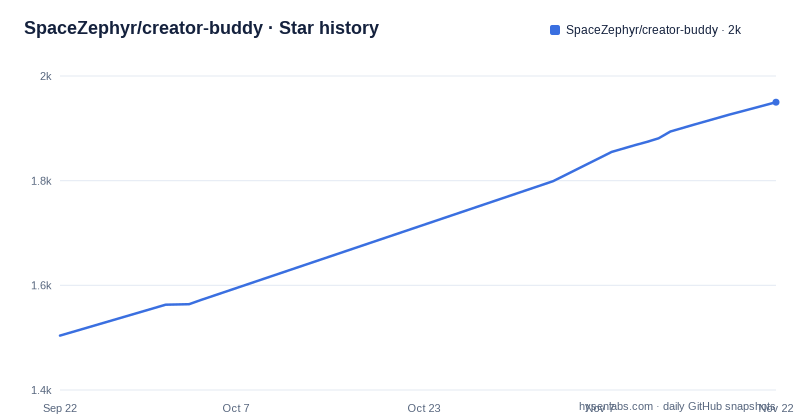
Star history
- SpaceZephyr/creator-buddy1,950 ★ · +446
| Repository | 2026-09-22 | 2026-11-22 |
|---|---|---|
| SpaceZephyr/creator-buddy | 1.5k | 2k |
446 Stars in the last 61 days, measured from the daily GitHub snapshot. Compare with other projects
Editorial analysis
Thirty-one skill folders, each one a SKILL.md
The repository root holds four things: `.gitignore`, `README.md`, a root `SKILL.md`, and three skill directories, `gzh-Skills/`, `xhs-Skills/` and `video-Skills/`. Every subdirectory inside them is an independent Agent Skill, which the docs define as one `SKILL.md` plus optional scripts and references. Counting the tables gives eleven skills under gzh-Skills for WeChat Official Accounts, ten under xhs-Skills for Xiaohongshu, and ten under video-Skills, so thirty-one in all, with the root `SKILL.md` acting as an extra entry point.
That layout is why the install instructions can be so short. The recommended path is one line handed to whatever agent you already use:
帮我安装这个 skill:https://github.com/SpaceZephyr/creator-buddyor the generic installer, which detects the runtime and puts the files in the right place:
npx skills add SpaceZephyr/creator-buddyAdd `-a codex`, `-a claude-code` or `-a cursor` when you want to name the target. Nine runtimes are named as compatible: Claude Code, Codex, Cursor, OpenClaw, Hermes Agent, CodeBuddy, Workbuddy, Gemini CLI and OpenCode. Manual installation is a clone followed by copying whichever skill directories you want, which matters when you only need one platform.
The instructions ship in Chinese only
Everything a skill tells the agent to do is written in Chinese. The three section tables are Chinese, the six long-form writing routes are Chinese (访谈, 大纲, 续写, 整合, 破题, 重写), and every sample prompt shown to a user is Chinese too. The repository root carries `README.md` and `SKILL.md` and no English variant of either.
English appears in identifiers rather than prose: `gzh-positioning`, `space-xhs-note-analytics`, `space-video-broll-sketch`, and the path of the one script the docs invoke. Anyone running these skills on a non-Chinese account has to decide whether to keep the Chinese instruction set or translate it, and the repository offers no guidance either way.
Two consequences are worth stating plainly. The style rules are written for a specific register, since `gzh-short-post` is described as a plain text push of at most 1000 characters with 去 AI 腔 rules and a pre-output self-check list. A translation pass has to preserve that register or the rule loses its point. And the output language is implied by the instructions rather than declared anywhere, so it follows whatever language the prompt is written in.
Xiaohongshu needs a token, Douyin needs a CLI you bring
The intelligence half of the toolkit reads public platform content, and its access chain has two links that need something from you. `global-content-search` tries Agent Reach first and falls back to the Guaikei API, and that fallback needs `GUAIKEI_API_TOKEN` for Xiaohongshu. Bilibili goes through `bili-cli` or a public API. Douyin is the third link and it is a stub: the docs reserve `DOUYIN_COMMAND` for a read-only CLI and state that 抖音当前是扩展入口, meaning the repository supplies the interface and you supply the tool.
Out of the box, the four platforms named in that search skill do not all return data. Xiaohongshu needs a token before the fallback works, and Douyin returns nothing until a local read-only CLI is wired in. Both conditions are written down rather than hidden, which is what lets the boundaries section say 不做账号动作 without ambiguity.
The same gap reappears on the video side. `space-video-transcript` advertises YouTube, Xiaoyuzhou, Bilibili, Douyin and Xiaohongshu links turned into Markdown and SRT, but its real coverage inherits whichever of those access paths are actually wired up. The subtitles are only the first half of the job, because the same row describes downloading the source file afterwards, which is where the watermark question comes in.
One Python script is the only thing you can invoke directly
A single script appears in the documentation, and it belongs to the WeChat skill for sector analysis:
python3 gzh-Skills/baokuan-article-analysis/scripts/daily_sector_trends.py \
  --sector "AI Coding=Codex,Claude Code,AI编程" --days 7 --output-dir ./reports
The `--sector` value carries a small syntax of its own: a sector name, an equals sign, then a comma separated keyword list. `--days 7` sets the window, and `--output-dir ./reports` says where the structured report lands, which matches the two-half design where the intelligence stage writes a file and the agent reads it back to pick a direction.
Everything else in the repository is instruction level rather than executable. `space-wechat-layout` turns an article into WeChat HTML for copying, `xhs-html` produces a single file holding six or more 3:4 frames in 62 styles, and `space-chart-image` covers ten chart families from flowcharts to mind maps and SWOT. Those are prompts and templates the agent follows, so their output depends on the runtime you install into as much as on this repository. The sample run in the docs shows the resulting shape: 39 Xiaohongshu notes over seven days filtered down to ten, with a written conclusion about what that audience responds to.
The risk section never names the watermark step
Most of the risk section is specific and checkable: read only public pages, public APIs, read-only CLIs or tools already authorized on your machine; never post, like, favorite, comment, follow, send a private message or batch add contacts; never bypass login, captcha, permission checks, paywalls, platform risk control or anti-scraping; keep `GUAIKEI_API_TOKEN`, API keys, cookies, session state and `.env` out of the repository; work in small batches at low concurrency; and scrub `xsec_token`, cookies, email addresses, phone numbers and backend links out of any report before sharing it.
One feature appears on neither list. `space-video-topic` is described as downloading reference material 去水印, meaning with the watermark removed, alongside the verbatim transcript, title and body text. That is not login bypass, not a paywall and not a captcha, so it does not contradict the stated boundaries, but it is a modification of platform-produced media and the risk section never names it. That gap belongs in the skill text rather than in the reader's judgement.
The rest of the boundaries section is the part most tooling leaves out. It says the data is not real-time backend data but comes from public pages, third-party sources or stored snapshots; that a trending post only shows what is spreading and cannot replace your own positioning; that generated images and video can carry wrong characters or visual defects and need a human check before delivery; and that Xiaohongshu detail pages usually require the full URL returned by the search results because of `xsec_token`.
Read-only access shapes the output, not just the input
Because nothing can be posted, the last step of every workflow is a file or an HTML block you copy yourself. `space-wechat-layout` ends with one-click copy, `space-xhs-cover` and `space-chart-image` end with an image from the built-in image model of Codex or workbuddy, and the video pipeline ends with a file named `broll_final.mp4`. The docs are consistent here and say so directly, with the line that the content stays yours.
The same restraint shows in what the analytics skills decline to promise. `space-xhs-account-audit` scores eight dimensions and benchmarks against competitors, `space-xhs-note-analytics` attributes results across six funnel layers, and `space-xhs-writer` runs a fourteen-item check before publishing. Those are frameworks for reading numbers scraped from public pages, not measurements of your own account, because nothing here ever touches an account.
One practical consequence for sharing: a report that worked on your machine can carry `xsec_token` values and cookies that keep a detail URL working for whoever receives it. The instruction to scrub them sits under risk control rather than under usage, which is the right place for it, and it is the step most easily skipped when a report is handed to a colleague.
MIT in the README, no LICENSE file, and no release to pin
Three facts about licensing and versioning do not line up. The README closes with a 许可证 section reading MIT. Nothing else in the repository identifies a license, and the top-level entry list contains `.gitignore`, `README.md`, `SKILL.md` and the three skill directories, with no LICENSE file among them. The documentation claims a license the tree does not ship, so read MIT as an unverified statement rather than a fact you can rely on before copying a skill folder into your own repository.
Versioning is thinner still. The repository has no GitHub releases, so `npx skills add SpaceZephyr/creator-buddy` resolves whatever is on the default branch at the moment you run it, and a fresh manual clone initially follows the default branch. A manual clone can be checked out at a specific commit for reproducibility even without a release tag. No version argument is documented for the installer. The last commit on the default branch is dated 2026-08-26.
None of that makes the project unusable. It does mean that when a skill stops behaving the way the docs describe, the way to tell a documentation change from a behaviour change is to read the file history, because there is no version number to compare against.
Deterministic rendering and generative models sit in one pipeline
Image and video generation run through two different contracts inside the same project, and they need different checking. The deterministic path is described as HTML turned into a fixed MP4, credited to the approach used by HyperFrames, with multiple styles and an Anti-PPT goal, so the same input yields the same file. The generative path is `space-video-broll-sketch`, which turns an article into hand drawn explanatory frames and calls Seedance or libtv to produce them, with those models reached through 火山方舟 Ark.
The credited dependencies split the same way. The three WeChat illustration skills, `space-gzh-cover`, `space-chart-image` and `space-text-logic-diagram`, come from the same author's design-buddy project and are described as taking content in and returning HTML, or an image from the runtime's built-in model. Fixed constraints do appear where they are measurable: `gzh-positioning` adds a WeChat character count check on the profile, follow reply and menu, and `space-gzh-cover` adds a 2.35:1 header with a share safe-area check and a crop preview.
The sample run shows the generative path end to end: five source images extracted, split into eight storyboard frames, generated as hand drawn line art, animated, cut together with the music lowered, and written out as a 4:3 file of 48 seconds. A pipeline with a generative step in the middle has the error rate the boundaries section already warns about, so the human pass before publishing is not optional.
Editorial conclusion
Use creator-buddy if you publish on WeChat, Xiaohongshu or short video and want a repeatable workflow rather than a button. Skip it if you need a version you can pin, a LICENSE file you can rely on, or platform access that works with no configuration. Before the first run, decide where `GUAIKEI_API_TOKEN` comes from, what read-only CLI you will point `DOUYIN_COMMAND` at, and whether watermark-stripped reference footage is acceptable in your workflow, because the risk section does not cover it.
Frequently asked questions
How many skills does creator-buddy contain and how are they laid out?
Thirty-one in three directories: eleven under gzh-Skills for WeChat Official Accounts, ten under xhs-Skills for Xiaohongshu and ten under video-Skills, plus a SKILL.md at the repository root. Each subdirectory is an independent Agent Skill made of one SKILL.md with optional scripts and references.
What do I need before the Xiaohongshu search path in creator-buddy works?
The fallback path needs GUAIKEI_API_TOKEN. Agent Reach is tried first, Bilibili goes through bili-cli or a public API, and Douyin is only an interface: the docs reserve DOUYIN_COMMAND for a read-only CLI you supply yourself, so no Douyin data arrives until you wire one in.
Does creator-buddy post anything on its own?
No. The risk section says it reads only public pages, public APIs, read-only CLIs or tools you have already authorized, and explicitly rules out posting, liking, favoriting, commenting, following, direct messages and batch contact adding. The last step of every workflow is a file or HTML you copy.
Can I pin a version when installing creator-buddy?
There is no version to pin. The repository has no GitHub releases, so `npx skills add SpaceZephyr/creator-buddy` installs whatever the default branch holds, and a manual clone gives the same unpinned state. The last commit on the default branch is dated 2026-08-26.
What license does creator-buddy use?
The README closes with MIT, but no LICENSE file sits at the repository root and nothing else in the tree names a license. Treat the MIT line as a documentation claim to verify before you copy any skill folder into your own project.
What language are creator-buddy skills written in?
Chinese. The section tables, the writing method names and every sample prompt are Chinese, while skill directory and file names are English. The only directly runnable script the docs show is Python 3, under gzh-Skills/baokuan-article-analysis.
Official sources
Add this badge to your README
If you maintain this project, the badge below links readers to this analysis and shows its maintenance status from the daily GitHub snapshot. Paste the markdown into your README; add ?metric=license or ?metric=stars to the image URL for a different field.

[](https://hysenlabs.com/projects/spacezephyr-creator-buddy)Star history chart for your README
[](https://hysenlabs.com/projects/spacezephyr-creator-buddy)Was this useful?