eepp: a C++ framework where the user interface is the point
eepp is an open source cross-platform game and application development framework heavily focused on the development of rich graphical user interfaces.
At a glance
- What is it?
- eepp, the Entropia Engine++, is a cross-platform C++ framework for games and applications whose centre of gravity is a widget and layout system with draw invalidation, XML layouts and CSS. It also carries five OpenGL renderer backends, a native HTML and CSS renderer, a virtual file system, an HTTP and FTP client, and two optional modules. Half the documentation is written and the default branch is develop.
- Who is it for?
- Use eepp if you are writing a C++ application or game whose interface is the hard part, and you want layout, styling and a browser-grade HTML and CSS renderer from the same toolkit that draws your sprites. Pass if you need only a window and a graphics context, since this is a large framework with a large surface.
- Can I use it commercially?
- Yes. MIT is a permissive licence: you can use, modify and sell software built on it, as long as you keep its copyright and licence notices.
- Is it still maintained?
- Yes. The repository received new commits within the last day.
- What is it written in?
- Mainly C++, according to GitHub's language statistics.
Answers come from the project's GitHub data, last synced on November 14, 2026, and from our analysis. They are not legal advice.
Star history
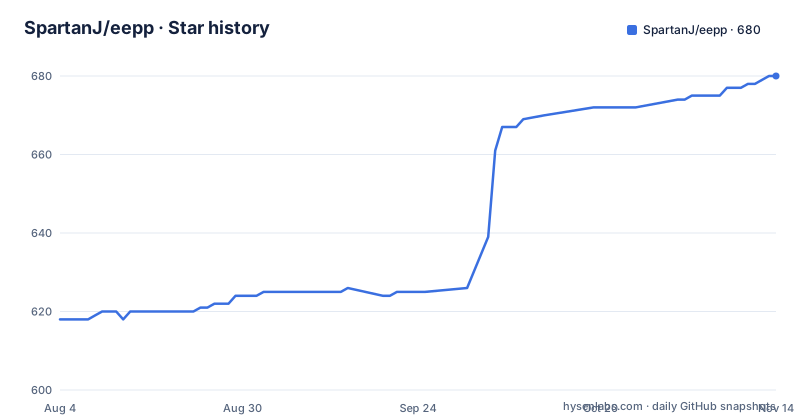
- SpartanJ/eepp680 ★ · +62
| Repository | 2026-08-04 | 2026-11-14 |
|---|---|---|
| SpartanJ/eepp | 618 | 680 |
62 Stars in the last 102 days, measured from the daily GitHub snapshot. Compare with other projects
Editorial analysis
The interface is the framework, not the decoration
eepp describes itself as a cross-platform game and application development framework heavily focused on the development of rich graphical user interfaces. That ordering is the product statement. Most engines treat the UI as a layer on top; here the UI module is the one the author says is the most important and complex part of the codebase.
What is in it is substantial. Base widgets manage application and game objects as nodes and carry the basic input interaction events, meaning clicks, keypress, mouse-over and focus. On top of that sit a full UI system with animation, scaling, rotating, clipping, events and messages, themes and skins, and pixel density support so elements scale with the screen they are on.
The widget set is the conventional one: button, textbox, combobox, inputbox, menu, listbox, scrollbars. Advanced behaviour includes text selection, copy and paste, and key bindings.
Platform coverage is broad and stated as official: Linux, Windows, macOS, FreeBSD, Haiku, Android and iOS, plus HTML5 export through emscripten with what the README calls minor limitations. Continuous integration workflows exist for Linux, Windows, macOS, iOS, Android and emscripten separately, so the cross-platform claim is tested rather than asserted.
The HTML and CSS layer is the ongoing bet
The most ambitious item in the feature list is an HTML and CSS compatibility layer, described as an ongoing effort for native HTML content rendering. It renders HTML documents natively through a `UIWebView` component, and the same component is used by `UIMarkdownView` for Markdown rendering, which is a neat consolidation given how much of technical documentation is one or the other.
The CSS coverage is specific. Layout supports block, inline, inline-block, flex at Flexbox Level 1, inline-flex, grid, inline-grid, table, list-item and none. Positioning covers absolute, fixed, float, relative and sticky. Text work includes inline text spans, line wrapping, custom blocks, floats and baseline alignment.
The property list is long enough to be a compatibility target rather than a demo: backgrounds including colour, image and layers, borders, the box model with margin and padding, sizing constraints with minimum and maximum width and height, `box-sizing`, overflow, visibility, `z-index`, and text styling for colour, font, decoration and alignment. On top of that sit document-scoped stylesheets, viewport and media queries, and scoped `@font-face` resources.
The stated principle is that it follows the CSS and HTML Living Standard specifications rather than inventing behaviour, and is spec-compliant where implemented. That is the right choice for anyone porting an existing stylesheet, because it means the failures are the standard's gaps rather than the library's preferences.
Draw invalidation is what makes it a real application
One line in the UI list carries more weight than the rest: draw invalidation support, used to make real apps with low resource usage because only what is needed gets redrawn.
That is the difference between a UI layer that redraws the screen on every event and one that can sit behind an application for hours. In a framework whose graphics module automatically batches everything it renders, the redraw discipline is what keeps CPU and GPU use proportionate to what changed.
Layout is where the rest of the application-facing design lives. The layout system is described as similar to Android's, with LinearLayout, RelativeLayout and GridLayout as named models, and layouts are loaded and styled from XML. Styling is with Cascading Style Sheets, the same mechanism as the HTML layer, so a style applied to a native widget and a style applied to a web view come from one place.
Themes and skins sit on top of that, which means the visual language of an application is separated from its structure in the same way a stylesheet separates from a document.
Five graphics backends, and a converter for the old pipeline
The graphics module ships renderers for OpenGL 2 on the fixed pipeline, OpenGL 3 on the programmable pipeline, OpenGL ES 2, OpenGL ES 1, and the OpenGL Core Profile. Keeping a fixed-pipeline renderer alongside the programmable ones is a deliberate compatibility choice, and the shaders feature explains why it is affordable: there is an automatic fixed pipeline to programmable converter.
Rendering is batched by the engine rather than by the application, so draw call management is not the caller's problem. Texture atlases are created and updated automatically, and an editor ships for them, which removes the usual failure mode where a growing game silently exceeds a texture page and renders nothing.
Font support covers TrueType, BMFont and XNA Fonts. Frame buffers, vertex buffer objects, particle systems, animated sprites, primitives drawables and clipping masks in stencil, scissors and plane forms are all present. Nine patch resizable bitmaps are supported, which is the mechanism for scalable UI frames rather than stretched pixels.
Image loading is broad, including rasterised SVG, and compressed textures upload directly to the GPU when the hardware allows it. The window module is backend based, currently with SDL 2, so writing your own backend is a supported path rather than a fork. Clipboard, hardware cursors, a display manager and joystick support come with it.
Optional modules are chipmunk physics and Tiled maps
Two modules are marked optional and they are the conventional pair for a 2D engine.
The physics module is a full object-oriented wrapper around chipmunk, which means collision and dynamics are available without writing them and without picking a different language for them.
The maps module gives Tiled maps with software dynamic lights, plus a full featured map editor. The editor is where the README is unusually candid: it describes the map editor as advanced but simple, then admits it lacks several features for lack of time and says it may eventually be replaced by Tiled map format support, while noting the author is not a fan of that format and has made no decision.
That admission is worth more than a feature claim. It tells you the map format in use is not settled, so anything you build against the current map support may need revisiting, while the physics wrapper is a stable dependency on a third-party library.
The tools list also includes a simple UI editor that loads layouts from XML and shows changes in real time, and a texture atlas editor, both of which are supporting tools rather than a general purpose asset pipeline.
Audio, networking and one virtual file system
Audio runs on OpenAL with extendable file format support. Out of the box it reads and writes OGG and Wav, and reads MP3 and FLAC.
The network module is the more substantial one. Web requests use an HTTP client with TLS support provided by either mbedtls or openssl, so you choose the crypto backend rather than inheriting one. Asynchronous requests are supported, along with HTTP proxy support, compressed responses, content-encoding and transfer-encoding handling, automatic redirect following, and resume or continue downloads.
There is an FTP client and an FTPS client, with the explicit TLS variant called out separately, plus raw TCP and UDP sockets. In other words, the module is a client library for a game or tool that ships a patcher, not merely something that fetches a model.
The system module supplies the unglamorous half: multi-threading support, file format packing, clocks, a resource manager and a translator. Its most interesting piece is the virtual file system class, which abstracts asset providers into one tree, mapping zip archives and the local file system onto a single namespace for transparent loading. The README compares it to PhysFS, which is the reference point to read if you have used that.
Half the documentation exists, and the map editor is on notice
The documentation is hosted at cdn.ensoft.dev and the README states that about 50 percent of the project is currently documented and still needs a lot of work. The recommended fallback is the source itself: code examples in `src/examples`, tests in `src/test` and the tools in `src/tools`.
The author says the current effort is going into the UI module documentation, precisely because it is the most important and most complex module and the one that lacks proper documentation. That is a candid admission that the module with the longest feature list is the hardest to learn from the docs and the easiest to learn from the examples.
The build system shows its own history. The tree carries both `premake4.lua` and `premake5.lua`, alongside a `premake/` directory, and a `Doxyfile` for generated API reference, a `.clang-format` for consistent formatting, and a `.gitmodules` entry for submodules.
The default branch is `develop` rather than main, and there is a single release, a nightly build tagged from 2024-09-29, while the last push to the repository is dated 2026-10-01. There is no version history to read in the tag list, so the branch you build from is the release you get.
Editorial conclusion
Use eepp if you are writing a C++ application or game whose interface is the hard part, and you want layout, styling and a browser-grade HTML and CSS renderer from the same toolkit that draws your sprites. Pass if you need only a window and a graphics context, since this is a large framework with a large surface. Before you commit, read the source rather than the feature list, because the README puts documentation at about half complete with the UI module the acknowledged gap, and check which branch you need since the default is develop rather than main.
Frequently asked questions
What is eepp?
The Entropia Engine++, an MIT licensed C++ framework for building games and applications, heavily focused on rich graphical user interfaces. Official platform support covers Linux, Windows, macOS, FreeBSD, Haiku, Android and iOS, plus HTML5 export through emscripten.
Does eepp render HTML and CSS natively?
Yes, through a UIWebView component, and the same component renders Markdown in UIMarkdownView. The CSS layer covers block, inline, inline-block, Flexbox Level 1, grid, table and list-item layout, absolute, fixed, float, relative and sticky positioning, media queries and scoped @font-face, following the CSS and HTML Living Standard where implemented.
Which graphics backends does eepp support?
Renderers for OpenGL 2 fixed pipeline, OpenGL 3 programmable pipeline, OpenGL ES 2, OpenGL ES 1 and the OpenGL Core Profile. The engine batches rendering automatically, converts fixed pipeline shaders to programmable ones, and builds and updates texture atlases on its own, with an editor included.
What optional modules does eepp have?
A physics module wrapping chipmunk and a maps module with Tiled map support, software dynamic lights and a map editor. The README notes the map editor lacks several features and that Tiled format support may eventually replace it.
How complete is the eepp documentation?
About 50 percent of the project is documented, hosted at cdn.ensoft.dev. The author is prioritising the UI module, and points readers to the code examples in src/examples, the tests in src/test and the tools in src/tools in the meantime.
Official sources
Add this badge to your README
If you maintain this project, the badge below links readers to this analysis and shows its maintenance status from the daily GitHub snapshot. Paste the markdown into your README; add ?metric=license or ?metric=stars to the image URL for a different field.

[](https://hysenlabs.com/projects/spartanj-eepp)Star history chart for your README
[](https://hysenlabs.com/projects/spartanj-eepp)Was this useful?