Spring Cloud Config: HTTP configuration, refresh endpoints and a git-backed sample
External configuration (server and client) for Spring Cloud
At a glance
- What is it?
- Spring Cloud Config serves configuration to Spring Boot applications over HTTP and lets running beans rebuild after a change. The sample, the client endpoints and the build page are documented in detail, while backend credentials, access control on those endpoints and the git addressing stay undocumented.
- Who is it for?
- Spring Cloud Config suits Spring Boot fleets that want configuration delivered over HTTP and live refresh without a redeploy, and it does not suit services that must start when the config server is unreachable. The page documents one client property key, a demo that keeps the server inside the same JVM, and no authentication story for the endpoints that rewrite beans at runtime.
- Can I use it commercially?
- Yes. Apache-2.0 is a permissive licence: you can use, modify and sell software built on it, as long as you keep its copyright and licence notices.
- Is it still maintained?
- Yes. The repository last received commits 1 day ago.
- What is it written in?
- Mainly Java, according to GitHub's language statistics.
Answers come from the project's GitHub data, last synced on November 7, 2026, and from our analysis. They are not legal advice.
Star history
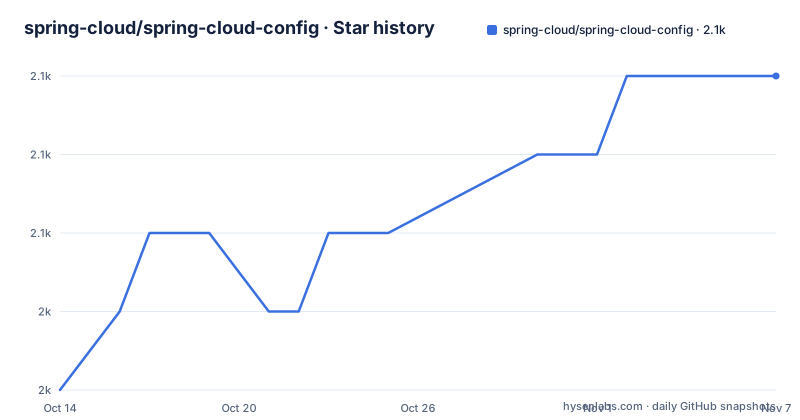
- spring-cloud/spring-cloud-config2,052 ★ · +4
| Repository | 2026-10-14 | 2026-11-07 |
|---|---|---|
| spring-cloud/spring-cloud-config | 2k | 2.1k |
4 Stars in the last 24 days, measured from the daily GitHub snapshot. Compare with other projects
Editorial analysis
The HTTP property source API and its default on port 8888
Spring Cloud Config exists to move configuration out of the application jar. The server exposes an HTTP resource-based API that returns name-value pairs or equivalent YAML content, and any Spring Boot application can host it by adding `@EnableConfigServer`. That one annotation is the whole deployment story on the server side: a long-running service that other services call while they start.
A client looks for `http://localhost:8888` by default, which the README calls a configurable default, and the sample moves that address with `spring.cloud.config.uri` set in `bootstrap.yml`, in system properties, or anywhere else Spring reads configuration. The Maven build splits the project into `spring-cloud-config-server`, `spring-cloud-config-client`, `spring-cloud-starter-config`, `spring-cloud-config-dependencies`, `spring-cloud-config-sample` and `spring-cloud-config-monitor`, with `spring-cloud-config-client-oauth2-tests` and `spring-cloud-config-client-tls-tests` held apart from the core client module. That split says something about where the conditional code lives, because authentication and transport security are exercised in dedicated test suites rather than inside the plain client.
Client side binding into the Spring Environment
Both halves encrypt and decrypt property values, symmetrically or asymmetrically, and the client does more than read values once. It binds to the Config Server and initialises the Spring `Environment` with remote property sources, which is how a property reaches an application that never shipped it. A bootstrap application context sits above the main one as a parent, and by default it is the piece that binds to the server and decrypts values.
Pointing a client at a server is a one key change to an existing Spring application. Nothing here documents the other side of that exchange. The page names no git URI format, no credential keys, no backend selection keys, and no way to say which repository, branch or label a client should read, even though `vault` sits in the repository topics alongside the git and spring-cloud entries. A team setting up a real deployment ends up in the reference documentation for those keys, because this page covers the shape of the API and then stops.
RefreshScope beans and the /env, /refresh, /pause, /resume endpoints
`@RefreshScope` is what makes the server more than a startup dependency. It marks Spring `@Bean`s that want to be re-initialized when configuration changes rather than when the context starts. Four management endpoints sit on top of it: `/env` updates the `Environment` and rebinds `@ConfigurationProperties` and log levels, `/refresh` refreshes the `@RefreshScope` beans, and `/pause` and `/resume` call the `Lifecycle` methods `stop()` and `start()` on the `ApplicationContext`.
`/restart` completes the set by restarting the Spring context, and it is the one endpoint the page marks disabled by default. That default is the detail worth knowing. A service that hands an application a fresh set of beans can also restart the application outright, so switching `/restart` on gives a network caller a power far beyond reading configuration, and no authentication layer is described for any endpoint on the page. `/env` is no calmer, since it can rewrite bound properties and log levels at runtime.
Editing target/config without a commit still reaches the client
The sample's `main()` method points the git repository working directory at `target/config`, so configuration can be edited on disk and picked up by a client that is already running. The README walks through that session with curl:
$ curl localhost:8080/env/sample
mytest
$ vi target/config/mytest.properties
.. change value of "sample", optionally commit
$ curl -X POST localhost:8080/refresh
["sample"]
$ curl localhost:8080/env/sample
sampleValue
Read the third line carefully. The commit is optional and the changed value still comes back after the refresh, so the server is serving from the working tree of a local clone rather than from a pushed commit. That is the right default for a demo, and it is also the detail a reader will carry into production by mistake, because this walkthrough never exercises a pushed commit, a fetch, or a clone that has fallen behind its origin. The README does not document what the server does in any of those cases.
Encryption on both sides, with OAuth2 and TLS split out
Encryption is symmetric or asymmetric on the server and on the client, and decryption happens on the client side by default, inside the bootstrap context. Key handling is where the documentation thinnest out: `vault` appears in the repository topics list, yet the page names no Vault property, no key location and no key store format, so the key management surface stays unspecified at the top level of the project.
The module layout carries more information than that prose does. `spring-cloud-config-client-oauth2-tests` and `spring-cloud-config-client-tls-tests` are separate Maven modules, so the client's authentication to the server and the TLS settings for that connection are covered by dedicated suites instead of by the core client tests. Before wiring this into an existing estate, check that both paths are still covered in the version you pin, and confirm that the property keys your applications already rely on still match what the client reads at startup.
A generated banner that names a different source directory
The README opens with a banner saying the file was generated, that manual changes will be lost, and that contributors should edit the files in the `src/main/asciidoc/` directory instead. Further down, the Documentation section describes a different path. The spring-cloud-build module has a docs profile, and switching it on looks for `docs/src/main/asciidoc/README.adoc`, loads its includes, and copies the result into `${main.basedir}`, which defaults to the project root. Any change then shows up as a modified file after a Maven build, ready to commit and push.
Both directories exist at the repository root, `docs/` and `src/`, so neither instruction can be dismissed as a leftover. An author who edits `src/main/asciidoc/` and then builds with the docs profile still ends up with the root README overwritten from the copy under `docs/`. Confirm which path the profile actually reads before spending an afternoon on a documentation change that the next build erases.
JDK 17 and Maven 3.3.3 with a memory flag from an older JVM
Building from source needs JDK 17, and the repository carries its own Maven wrapper, so a bare checkout runs:
$ ./mvnw installInstall Maven yourself and the page asks for 3.3.3 or newer, then warns that a `-P spring` profile may be needed when local settings lack repository declarations for the spring milestone and snapshot artifacts. Two prerequisites surround that command: projects whose tests need middleware such as Redis expect a local Docker to be running, and the `spring` Maven profile has to be active or the IDE reports build errors against the POMs.
The memory advice is what has aged. You are told to set `MAVEN_OPTS` to a value like `-Xmx512m -XX:MaxPermSize=128m`, but `MaxPermSize` configures the permanent generation, an option the JVM dropped long before the JDK 17 this build asks for. The heap figure still does something; the rest is carried over from an older era. Documentation builds take a separate route through Antora from `modules/ROOT/`:
./mvnw -pl docs -P docs antora:antoraThe last push was on 2026-10-06, and the three most recent tags are 5.1.0-M1 from 2026-09-24, 5.0.5 from 2026-08-20 and 5.0.4 from 2026-06-11.
The sample keeps the central server inside one JVM
The central server in the demo runs inside the same JVM as the client test, on a different port, so the walkthrough never crosses a real network boundary and never shows what a client does when the server is unreachable or slow to answer. That is the widest gap in this documentation set. One client property key is named anywhere on the page, `spring.cloud.config.uri`, and nothing describes how a git backend is addressed, how credentials reach it, or how a client selects what to read. The sample test asserts that an environment property from the git configuration repo is present, so the assertion exists while the settings that make it pass are undocumented.
Everything here is published under Apache-2.0, so redistributing either half carries that licence along with its notice and text, and the page describes no separate commercial or enterprise edition.
Editorial conclusion
Spring Cloud Config suits Spring Boot fleets that want configuration delivered over HTTP and live refresh without a redeploy, and it does not suit services that must start when the config server is unreachable. The page documents one client property key, a demo that keeps the server inside the same JVM, and no authentication story for the endpoints that rewrite beans at runtime. Before exposing one, verify the backend credentials you will need and confirm that `/restart` stays disabled in the build you ship.
Frequently asked questions
How do I run the Spring Cloud Config sample application?
It is a Spring Boot application, so you can start it with `mvn spring-boot:run` and start a config server as well. The sample client looks for the server at `http://localhost:8888`, a default you can change.
Where does the Spring Cloud Config sample keep its git repository?
The `main()` method uses `target/config` as the working directory of the git repository, so a file edited there and a POST to `/refresh` changes what the running client reads. The README shows that the commit is optional.
Which Spring Cloud Config management endpoint is disabled by default?
`/restart`, which restarts the Spring context, is the one the README marks disabled by default. `/env`, `/refresh`, `/pause` and `/resume` are documented without that note.
What JDK and Maven are needed to build Spring Cloud Config?
The build needs JDK 17, and Maven 3.3.3 or newer if you do not use the `./mvnw` wrapper in the repository. The `spring` Maven profile has to be active so the spring milestone and snapshot repositories resolve.
How do I point a Spring Cloud Config client at a different server?
Set `spring.cloud.config.uri` in `bootstrap.yml`, in system properties, or in the other places Spring reads configuration. The address the sample falls back to is `http://localhost:8888`.
Does the Spring Cloud Config README describe authentication for the HTTP API?
No. It names no access control for `/env`, `/refresh`, `/restart`, `/pause` or `/resume`, and it names no credential keys for a git backend. Separate test modules exist for OAuth2 and TLS on the client side, but the page does not connect them to a configuration step.
Official sources
Add this badge to your README
If you maintain this project, the badge below links readers to this analysis and shows its maintenance status from the daily GitHub snapshot. Paste the markdown into your README; add ?metric=license or ?metric=stars to the image URL for a different field.

[](https://hysenlabs.com/projects/spring-cloud-spring-cloud-config)Star history chart for your README
[](https://hysenlabs.com/projects/spring-cloud-spring-cloud-config)Was this useful?