Trino from source: Java 25, plugin.bundles, and a CLI that is just a jar
Official repository of Trino, the distributed SQL query engine for big data, formerly known as PrestoSQL (https://trino.io)
At a glance
- What is it?
- The Trino repository is mostly a contributor's map: a Maven build, an IDE run configuration with a long VM options string, and a plugin loader that accepts three different kinds of entry. What it does not contain is deployment, which the file hands off to the User Manual, and what it quietly requires is Java 25, a 64 bit JDK, and Rosetta 2 on Apple Silicon.
- Who is it for?
- Trino suits a developer who needs to read the engine, work on a connector, or run a server locally with a handful of plugins, and the file is genuinely useful for that. It does not suit anyone looking for deployment answers, because the README hands that to the User Manual without repeating a step.
- Can I use it commercially?
- Yes. Apache-2.0 is a permissive licence: you can use, modify and sell software built on it, as long as you keep its copyright and licence notices.
- Is it still maintained?
- Yes. The repository received new commits within the last day.
- What is it written in?
- Mainly Java, according to GitHub's language statistics.
Answers come from the project's GitHub data, last synced on November 14, 2026, and from our analysis. They are not legal advice.
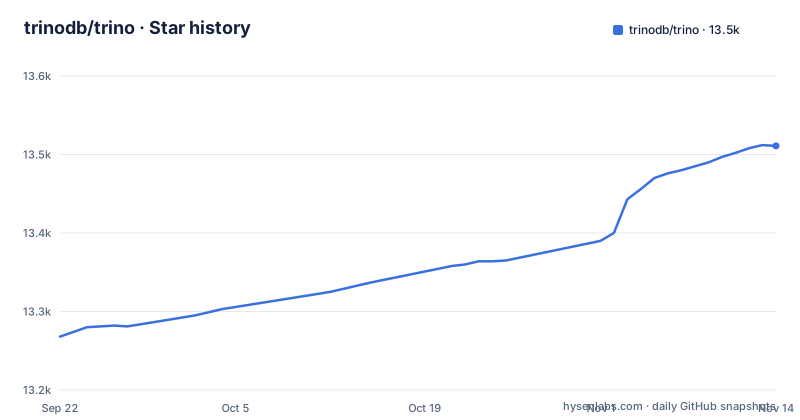
Star history
- trinodb/trino13,511 ★ · +243
| Repository | 2026-09-22 | 2026-11-14 |
|---|---|---|
| trinodb/trino | 13.3k | 13.5k |
243 Stars in the last 53 days, measured from the daily GitHub snapshot. Compare with other projects
Editorial analysis
Java 25, a 64 bit JDK, and Rosetta on Apple Silicon
The build requirements are four lines and each one excludes somebody. The supported operating systems are Mac OS X or Linux, so there is no Windows build path named here. The JDK requirement is Java 25.0.1+, 64-bit, and the IDE instructions repeat it twice: select JDK 25 in the SDKs section and set the project language level to 25. Then there is the line that surprises Mac users, the note that some npm packages used to build the web UI are only available for x86 architectures, so building on Apple Silicon requires Rosetta 2 installed. That means part of your build runs under translation. The last requirement is the quiet one: Docker, with SELinux or anything else that blocks write access to the local checkout turned off so containers can mount parts of the source tree. On a hardened Linux build host that is a change to your host configuration, not to the project.
One command builds the engine and deliberately skips the tests
Trino is a standard Maven project, and the entire build instruction is one line run from the project root:
./mvnw clean install -DskipTestsThe wrapper is checked in as mvnw, so no Maven install is implied. On the first build, Maven pulls everything from the internet and caches it in the local repository under ~/.m2/repository, which the file warns can take a while and depend on your connection speed, with later builds faster. The tests are excluded on purpose: the suite is described as comprehensive and as taking a considerable amount of time, which is why that flag is there. They run in CI when you submit a pull request, and the advice is to run tests locally only for the areas you changed. The practical consequence is that a successful local build tells you the code compiles and nothing else. Correctness arrives later, on someone else's machine.
The vector module flag is required in three different places
One VM option shows up in every run path, and each spelling is slightly different. For a testing server the file says the option generally required is:
--add-modules jdk.incubator.vectorFor tests launched from the IDE you configure the JUnit run configuration template instead, at Run/Debug Configurations, then Edit Configuration Templates, then JUnit, then VM options, and set:
-ea --add-modules=jdk.incubator.vectorFor the full server the flag appears inside a longer options string. The file also warns that some tests rely on JVM options provided by airbase, giving -XX:-OmitStackTraceInFastThrow as the example, which is the kind of option that changes what you see when something fails rather than what passes. Miss any of these and the symptom appears far from the setting.
The full server needs a specific module directory and a relative config path
For a real server rather than a test harness, the file gives a complete run configuration. The main class is:
io.trino.server.DevelopmentServerThe VM options string is:
-ea -Dconfig=etc/config.properties -Dlog.levels-file=etc/log.properties -Djdk.attach.allowAttachSelf=true --sun-misc-unsafe-memory-access=allow --add-modules jdk.incubator.vectorThe working directory is $MODULE_DIR$ and the classpath comes from the module trino-server-dev, and the file is explicit that the working directory should be the trino-server-dev subdirectory. That detail carries the weight: the config path in the options is relative, so it only resolves when you launch from that module. IntelliJ's $MODULE_DIR$ variable handles it, which is why the variable is recommended. If the dialog has no VM options field at all, the file explains that you need to select Modify options and enable Add VM options, which is a common reason a first run appears to ignore your configuration.
plugin.bundles takes a pom, Maven coordinates, or a directory of jars
Which plugins the development server loads comes from one property, plugin.bundles in config.properties, and each entry has to be one of three shapes. It can be a path to a pom.xml or *.pom file describing a Maven project that produces a plugin. It can be Maven coordinates in the form:
<groupId>:<artifactId>[:<extension>[:<classifier>]]:<version>or it can be a path to a plugin directory containing JAR files. The three forms fail differently, and that is the point worth remembering. Coordinates are loaded via Maven, so the artifact must already exist in your local repository or in a remote repository, otherwise the server cannot start. Loading a plugin is also not the same as using it: to have that plugin in a catalog you must add a corresponding <catalog_name>.properties file to testing/trino-server-dev/etc/catalog.
Version numbers are integers, and reproducible builds start at 449
Trino does not use semantic versions. The recent releases are 484 from 16 October 2026, 483 from 18 July 2026 and 482 from 25 June 2026, and the last push to the default branch master is dated 2 November 2026, so the branch moves faster than the tags. Because the version is a plain integer, a number tells you nothing about compatibility, and there is no way to read a breaking change off it. You have to read the release notes or the development documentation. One capability milestone is stated explicitly: Trino supports reproducible builds as of version 449, which is the floor for anyone who needs the same artifact from the same source. The wider release process, including how versions are cut, lives in .github/DEVELOPMENT.md rather than in the README, alongside code style guidance written for people implementing Trino plugins.
Each connector has its own query runner and its own hidden VM options
The recommended way to run Trino for development is not the server at all. It is to run the TpchQueryRunner class, which starts a development server configured with the TPCH connector, and then use the CLI to execute queries against it. Many other connectors have their own *QueryRunner class for when you work on that specific connector, which means there is no single runner that covers the codebase and no single set of options that covers the runners. The file acknowledges this directly: various *QueryRunner classes might require additional options, and it tells you to check the air.test.jvm.additional-arguments property in the pom.xml file of the module the runner comes from. That is a per module lookup, so a runner that starts and then fails on a missing option sends you reading module build files rather than the documentation. The plugin directory at the root is where those modules live.
The CLI is a build artifact with a wildcard in its filename
There is no installed Trino command line tool here. The file tells you to start the CLI by pointing at the jar inside the client module:
client/trino-cli/target/trino-cli-*-executable.jarTwo things follow. The jar exists only after you build, so the CLI is not available before the Maven step, and the filename contains a wildcard because the version is part of the name, so any script that hardcodes one specific jar breaks on the next version bump. Two example queries come with it, one against the server itself and one against the TPCH connector:
SELECT * FROM system.runtime.nodes;
SELECT * FROM tpch.tiny.region;
The first is how you confirm the cluster you are talking to. Deployment instructions, and anything about installing a client on another platform, are not in this file at all: it points at the User Manual for deployment and end user documentation, and at a separate download page for the released artifacts.
Editorial conclusion
Trino suits a developer who needs to read the engine, work on a connector, or run a server locally with a handful of plugins, and the file is genuinely useful for that. It does not suit anyone looking for deployment answers, because the README hands that to the User Manual without repeating a step. Before you build, confirm a 64 bit JDK 25.0.1 or newer, expect Rosetta on Apple Silicon, disable SELinux on the build host, and remember that skipping tests locally means CI on your pull request is the only thing checking correctness.
Frequently asked questions
what is trino
Trino is a distributed SQL query engine for big data analytics, written in Java and licensed under Apache-2.0, formerly known as PrestoSQL. The repository contains the server, the CLI, the plugin connectors and the tests, and the project homepage is trino.io.
What is Trino used for?
The repository calls it a distributed SQL query engine for big data analytics and does not enumerate workloads or industries. The connector modules live under plugin/, each with its own query runner class for development.
how to install trino
The file gives no installation commands and points at the User Manual at trino.io/docs/current for deployment instructions, plus a download page for released builds. To build from source, run ./mvnw clean install -DskipTests on Mac OS X or Linux with Java 25.0.1 or newer, 64-bit.
how to use trino cli
The CLI is the jar at client/trino-cli/target/trino-cli-*-executable.jar, produced by the Maven build. Against a running server the file shows SELECT * FROM system.runtime.nodes; for cluster nodes and SELECT * FROM tpch.tiny.region; against the TPCH connector.
how to use trino
For development, run the TpchQueryRunner class to start a server configured with the TPCH connector and query it with the CLI. For a fuller server, use main class io.trino.server.DevelopmentServer with the working directory set to the trino-server-dev module.
Is Trino like Snowflake?
Nothing in this repository compares Trino with Snowflake or with any other system. The file describes it as a fast distributed SQL query engine for big data analytics and points to the User Manual for deployment instructions and end user documentation.
Official sources
Add this badge to your README
If you maintain this project, the badge below links readers to this analysis and shows its maintenance status from the daily GitHub snapshot. Paste the markdown into your README; add ?metric=license or ?metric=stars to the image URL for a different field.

[](https://hysenlabs.com/projects/trinodb-trino)Star history chart for your README
[](https://hysenlabs.com/projects/trinodb-trino)Was this useful?