spring-cloud-release: a release train of named dependency sets
Spring Cloud Release Train - dependency management across a wide range of Spring Cloud projects.
At a glance
- What is it?
- spring-cloud-release is the release train for Spring Cloud: a curated set of dependency versions across many projects, consumed through the spring-cloud-dependencies POM in Maven or Gradle. The trains carry names rather than version numbers, and the repository also owns the documentation build, the checkstyle setup and the contribution rules for the whole project family.
- Who is it for?
- Adopt spring-cloud-release when you build against several Spring Cloud projects and want a single curated set of compatible versions instead of pinning each one yourself, since the train is the mechanism that keeps them aligned. Do not treat it as a library to depend on directly; you consume the spring-cloud-dependencies POM.
- Can I use it commercially?
- Yes. Apache-2.0 is a permissive licence: you can use, modify and sell software built on it, as long as you keep its copyright and licence notices.
- Is it still maintained?
- Yes. The repository last received commits 2 days ago.
- What is it written in?
- GitHub does not report a main language for this repository.
Answers come from the project's GitHub data, last synced on November 7, 2026, and from our analysis. They are not legal advice.
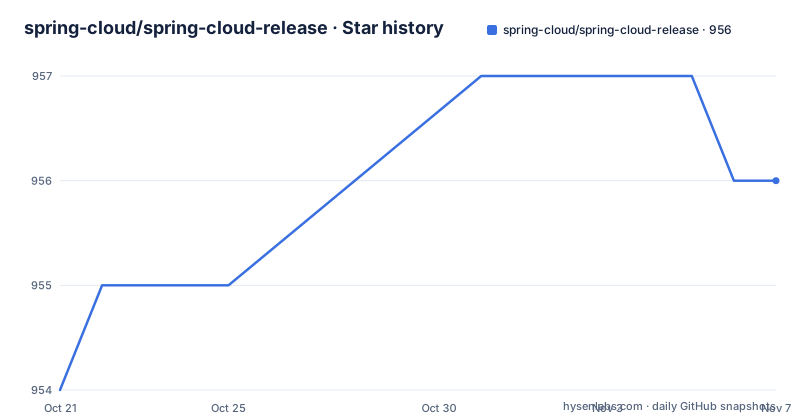
Star history
- spring-cloud/spring-cloud-release956 ★ · +2
| Repository | 2026-10-21 | 2026-11-07 |
|---|---|---|
| spring-cloud/spring-cloud-release | 954 | 956 |
2 Stars in the last 17 days, measured from the daily GitHub snapshot. Compare with other projects
Editorial analysis
Release trains with names, so sorting them works
Spring Cloud Release Train is a curated set of dependencies across a range of Spring Cloud projects. The idea is that dozens of related Spring Cloud projects, each with its own release cycle, are published together as one train so that a team can upgrade without resolving compatibility by hand.
The design decision worth understanding is that the release trains have names, not versions, to avoid confusion with the sub-projects. The names are an alphabetic sequence, so you can sort them chronologically, and they are named after London Tube stations. Angel is the first release and Brixton is the second.
That convention is not decoration. It solves a real ambiguity: with numbered versions, a BOM version like 2025.1.3 looks like a version of Spring Cloud itself and gets confused with the version of the individual project you actually wanted. With station names, the train is unambiguous, and the alphabetical ordering means the name alone tells you which is newer without looking up a date.
For the projects inside the train, the same ordering logic applies. A train name determines the set of versions, and the versions of the sub-projects are pinned inside it, so you do not choose a Spring Cloud Config version or a Spring Cloud Gateway version yourself.
The audience is any team running more than one Spring Cloud project, and especially anyone who has been dragged into the situation where upgrading one library quietly requires upgrading three others. That coordination problem is what the train exists to absorb.
You consume the train through a POM, not as a dependency
The consumption model is short. You consume the release train by using the spring-cloud-dependencies POM to manage dependencies in Maven or Gradle.
That is the whole integration. The POM carries the dependency management section that pins the versions of the Spring Cloud artifacts, and your build imports it. Maven users add it as an imported BOM in dependencyManagement, Gradle users apply it as a platform, and in both cases the version numbers of the individual Spring Cloud libraries stop being your problem.
The repository layout makes the split visible. At the top level there is the spring-cloud-dependencies directory, which is where the POM that applications import lives, alongside pom.xml for the build of the train itself, a train-docs module for the documentation, release-train-settings.xml holding the configuration of the train, and the usual build tooling including the Maven wrapper, an .editorconfig, a .springformat file and a .sdkmanrc.
The train is therefore a build artefact of its own rather than a library in your dependency graph. You import the BOM, and the BOM refers to versions published by the individual projects.
One consequence is that a train upgrade is a build file change with a wide blast radius, not a single library bump. When the train moves, the versions of everything it manages move together, which is the point, and also the reason to read the release notes for the train as a whole.
Generating the train documentation with a Maven profile
The repository owns the documentation for the train, and the generation is a Maven invocation rather than a separate tool.
To generate the release train documentation, you update the project with versions for a given release train and then run:
$ ./mvnw clean install -Pdocs,train-docs -pl train-docsTo upload that documentation to the documentation server, the deploy goal is used:
$ ./mvnw clean deploy -Pdocs,train-docs -pl train-docsThe structure of both commands is instructive. The wrapper script is used rather than a system Maven, so the build uses the Maven version the project pins. The -Pdocs,train-docs switch activates two profiles, one for documentation in general and one specific to the train docs module. The -pl train-docs flag restricts the build to the single module, so the documentation build does not rebuild the world.
For a maintainer, the sequence is: set the versions for the train, generate the docs locally with install, then deploy to publish them.
For everyone else, this is mostly background, with one exception. The documentation a user reads for a given train is produced by this build, so if you are looking for what changed between two trains, the generated release train documentation is the place the difference is written down.
Milestone and GA are different Maven profiles
One instruction in the documentation governs the difference between a milestone build and a generally available one. It is marked IMPORTANT: if you are releasing milestones do not forget to add -Pmilestone, and if GA, -Pcentral.
That single flag changes how the train is published, and it is easy to miss, because the two commands otherwise look identical. A milestone release is a preview of an upcoming train, published to a different place with different expectations, while a GA release goes out through the central channel. Getting this wrong means either publishing a GA artifact to the milestone location or releasing a milestone into the central channel.
The naming of the profile tells you the intent. -Pmilestone selects the milestone publication path, and -Pcentral selects the central publication path used for GA.
It is worth setting this against the release history in the project, which shows v2026.0.0-M1 published on 2026-09-24, v2025.1.3 on 2026-08-20 and v2025.1.2 on 2026-06-12. The M1 suffix marks the first milestone of the 2026.0.0 line, and it was published before the 2025.1.x patch releases that came after it, which is the expected pattern for a train that develops in parallel with the previous train still receiving patches.
So a consumer sees the current train in maintenance while the next train is in milestone, and can upgrade deliberately at a line boundary rather than whenever a patch happens to land.
The README is generated, so edits to it are lost
The first thing at the top of the README.adoc in this repository is a warning about editing it. It says DO NOT EDIT THIS FILE. IT WAS GENERATED. Manual changes to this file will be lost when it is generated again, and directs you to edit the files in the src/main/asciidoc/ directory instead.
This is a small thing that tells you something about the project. The README is assembled from the documentation sources as part of the release train documentation build described earlier, so the same command that produces the site also refreshes the README that appears on the repository page.
The practical consequence for a contributor is that a pull request touching README.adoc directly will lose its changes on the next generation. The change has to go into the AsciiDoc sources under src/main/asciidoc/, and the generated README follows.
For a reader, the same fact explains why the README reads like a set of maintained sections rather than a hand-written introduction. The project documentation, the release train docs and the repository README are all produced from the same source tree, so they do not drift apart.
The repository also keeps a docs directory at the top level, which is where the documentation sources and the generated site content live alongside the train documentation module.
Checkstyle is off by default, and turning it on is a pom exercise
Spring Cloud Build comes with a set of checkstyle rules, and the rules live in the spring-cloud-build-tools module. The most notable files under that module are a checkstyle-suppressions.xml in the checkstyle directory, a checkstyle-header.txt and a checkstyle.xml under main resources.
The important detail for a user of these rules is that checkstyle rules are disabled by default. To add checkstyle to your project you define the properties and plugins yourself, and the documentation gives the exact pom fragment, with the properties block failing the build on checkstyle errors and on checkstyle violations, and including test sources in the analysis, followed by the build and reporting plugin blocks adding the spring-javaformat-maven-plugin and the maven-checkstyle-plugin.
The formatter plugin is included for a reason, stated in the notes: the Spring Java Format plugin will reformat your code to pass most of the Checkstyle formatting rules. In other words, the formatting rules and the formatter are two halves of the same setup, and installing checkstyle without the formatter tends to produce a wall of failures that the formatter would have fixed automatically.
Suppressions are per project. If you need to suppress a rule, for example because a line length needs to be longer, it is enough to define a file under ${project.root}/src/checkstyle/checkstyle-suppressions.xml with your suppressions, and the documentation gives a worked example suppressing a utility class constructor check for one class and a line length check for another.
The advice at the end is to copy the .editorconfig and .springformat files from Spring Cloud Build into your project so that default formatting rules apply, with a script that fetches the .editorconfig with curl.
Contribution mechanics and the shape of a train release
Spring Cloud is released under the non-restrictive Apache 2.0 license and follows a very standard GitHub development process, using the GitHub tracker for issues and merging pull requests into main. If you want to contribute even something trivial, the guidance says not to hesitate, but to follow the guidelines.
The commit requirement is specific. All commits must include a Signed-off-by trailer at the end of each commit message to indicate that the contributor agrees to the Developer Certificate of Origin. The project links the post Hello DCO, Goodbye CLA: Simplifying Contributions to Spring for background, so the DCO replaces a contributor licence agreement for this project family.
Code conventions are listed as helpful rather than essential for a pull request, and they can be added after the original pull request but before a merge. Use the Spring Framework code format conventions, importing formatter settings from the eclipse-code-formatter.xml file in the Spring Cloud Build project, or using the Eclipse Code Formatter Plugin for IntelliJ to import the same file. New .java files need a simple Javadoc class comment with at least an @author tag, and the ASF license header comment copied from existing files. If you modify files substantially, add yourself as an @author. Commit messages follow a referenced convention, and when you fix an existing issue you add Fixes gh-XXXX at the end of the commit message.
The code of conduct is the Contributor Covenant, with unacceptable behaviour to be reported to [email protected].
On the release side, the repository is not archived and the last push was on 2026-10-13, with the release list showing a milestone from 2026-09-24 and two patch releases of the previous line during 2026. The cadence is the point of a train: many projects move together, on a schedule, and a consumer upgrades once rather than many times.
Editorial conclusion
Adopt spring-cloud-release when you build against several Spring Cloud projects and want a single curated set of compatible versions instead of pinning each one yourself, since the train is the mechanism that keeps them aligned. Do not treat it as a library to depend on directly; you consume the spring-cloud-dependencies POM. Before bumping to a new train, check which Spring Boot version that train targets, read the release notes for the train rather than the individual projects, and expect to update the train name in your build whenever you move to a new Boot line.
Frequently asked questions
What is the Spring Cloud Release Train and how do I use it?
It is a curated set of dependencies across a range of Spring Cloud projects. You consume it by using the spring-cloud-dependencies POM to manage dependencies in Maven or Gradle, which pins compatible versions of the Spring Cloud artifacts for you.
Why are Spring Cloud release trains named rather than versioned?
The names are meant to avoid confusion with the sub-projects. They are an alphabetic sequence of London Tube station names, so they can be sorted chronologically, with Angel as the first release and Brixton as the second.
How are the release train documents generated and published?
After updating the project with the versions for a given release train, run ./mvnw clean install -Pdocs,train-docs -pl train-docs to generate the documentation, and ./mvnw clean deploy -Pdocs,train-docs -pl train-docs to upload it to the documentation server.
What is the difference between the milestone and central Maven profiles?
Milestone releases need the -Pmilestone profile added and GA releases need -Pcentral, because the profile decides where the artefacts are published. Forgetting it means publishing a GA build to the milestone location or the other way round.
Does Spring Cloud require a signed-off-by line in commits?
Yes. All commits must include a Signed-off-by trailer at the end of the commit message to indicate that the contributor agrees to the Developer Certificate of Origin. The project follows the standard GitHub process with issues tracked on GitHub and pull requests merged into main.
Official sources
Add this badge to your README
If you maintain this project, the badge below links readers to this analysis and shows its maintenance status from the daily GitHub snapshot. Paste the markdown into your README; add ?metric=license or ?metric=stars to the image URL for a different field.

[](https://hysenlabs.com/projects/spring-cloud-spring-cloud-release)Star history chart for your README
[](https://hysenlabs.com/projects/spring-cloud-spring-cloud-release)Was this useful?