docker-compose-lamp picks its Dockerfile from the PHP version, and ships phpMyAdmin with root and tiger
A basic LAMP stack environment built using Docker Compose.
At a glance
- What is it?
- A local development stack of PHP, Apache, MySQL, phpMyAdmin and Redis built from per-version directories under bin. The compose file publishes the database on loopback only, the documentation says the stack is not for production, and two configuration variable names in the documentation do not match the file.
- Who is it for?
- docker-compose-lamp suits someone setting up a throwaway PHP environment on a laptop, where the value is having eleven PHP versions available in one repository and a database that is not reachable from the network. It does not suit anything that will face a shared network, and the project says so itself: the stack is built for local development and not for production.
- Can I use it commercially?
- Yes. MIT is a permissive licence: you can use, modify and sell software built on it, as long as you keep its copyright and licence notices.
- Is it still maintained?
- Activity is slowing. The repository last received commits 7 months ago.
- What is it written in?
- Mainly Dockerfile, according to GitHub's language statistics.
Answers come from the project's GitHub data, last synced on November 24, 2026, and from our analysis. They are not legal advice.
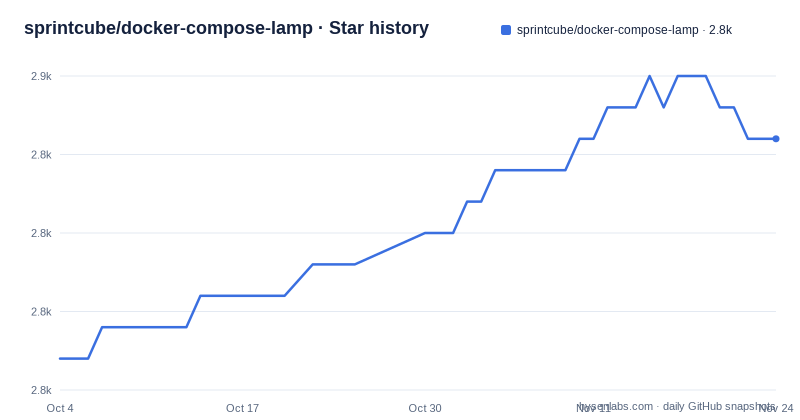
Star history
- sprintcube/docker-compose-lamp2,848 ★ · +7
| Repository | 2026-10-04 | 2026-11-24 |
|---|---|---|
| sprintcube/docker-compose-lamp | 2.8k | 2.8k |
7 Stars in the last 51 days, measured from the daily GitHub snapshot. Compare with other projects
Editorial analysis
The PHP version chooses which directory gets built
The mechanism that makes eleven PHP versions available from one repository is a single variable used as a path.
The compose file builds its webserver service with a context of the bin directory followed by the value of the PHP version setting. So the version does not select a tag on an image, it selects a directory, and each directory holds its own build file. The same pattern applies to the database service, whose context is the bin directory followed by the value of the database setting.
Container names follow the same convention, built from a project name variable and the version variable, so two stacks running side by side with different PHP versions do not collide.
The documentation lists the versions available: 5.4.x, 5.6.x, 7.1.x, 7.2.x, 7.3.x, 7.4.x, 8.0.x, 8.1.x, 8.2.x, 8.3.x, and 8.4.x. The version setting defaults to the latest one.
One mismatch is worth knowing about before you go looking for a file. The documentation tells you to edit a build file under a directory named webserver when adding PHP extensions, and one named for the PHP version when adding Apache modules, while the compose file builds from the version-named directory. Those two paths do not obviously refer to the same place.
The database binds to loopback and the web server does not
The compose file treats the two published ports differently, and the difference is the right way round for a development stack.
The webserver publishes two ports, one for plain HTTP and one for HTTPS, bound to host variables for an unsecured and a secured host port respectively. Neither is restricted to a local address, so on a laptop joined to a network the stack is reachable from the network.
The database publishes its port on 127.0.0.1 explicitly, with the loopback address written into the port mapping. That is the deliberate hardening in the file: the database is not exposed to the network even though the webserver is.
Both services are set to restart always, which is convenient locally and is one more reason the documentation's statement that this is not for production is worth reading twice.
The webserver also declares a link to the database service, and the documentation explains the consequence for application configuration: when you supply a host value to an application such as WordPress, use the value database rather than the usual localhost, because that is the name the two containers resolve each other by.
phpMyAdmin is published on 8080 with root and tiger
The database administration tool is part of the stack rather than something you add, and it is configured with published default credentials.
The tool runs on port 8080 and the documentation gives the login as the root user with the password tiger. Those two values are also the defaults the database service is initialised with, taken from the environment file you copy from the sample.
This is the same pattern as the rest of the stack: correct for a single-user laptop, wrong for anything else. There is no prompt to change it, no first-run wizard, and no note telling you it is a default, so a developer who skips the sample environment file is running a database whose administrative interface is reachable on port 8080 with a two-syllable password.
That is the single fact to carry out of this section. Everything else in the stack is reversible, since the data lives in a directory you can delete, but the credential travels with the port and the port travels with the network you happen to be on.
The documentation does at least state that the stack is built for local development and not for production usage, which covers the whole set rather than this one service.
Two configuration names in the documentation do not match the compose file
The configuration reference and the compose file disagree about two variable names, and the second one is a copy and paste slip.
The whole start-up path is four commands, and the third of them is where the environment file matters:
git clone https://github.com/sprintcube/docker-compose-lamp.git
cd docker-compose-lamp/
cp sample.env .env
docker compose up -d
Every setting in the reference is overridden by copying values into that file.
The documentation names the Apache log directory setting with a default of the logs directory under apache. The compose file mounts the Apache log volume from a variable named for the log directory generally, with the same default path. So a value you set by following the documentation has no effect, and the volume silently uses its default instead. Nothing warns you, because an unset variable with a default is exactly what compose is designed to do quietly.
The MySQL log directory entry has the same default in both places and is wired correctly, so the inconsistency is specific to the Apache one.
The copy and paste slip is in the prose. The entry for the MySQL log directory is described as the place used to store Apache logs. The path, the variable, and the compose wiring are all correct; only the sentence describing it is wrong.
Both are documentation defects rather than functional ones, and both are the kind that cost an afternoon when you are trying to find where a log went.
Eleven PHP versions, and an extension list that shifts with them
The extension list is long and the documentation qualifies it: these are installed by default, and the list may differ for versions below 7.
The list covers database access through both the MySQL-specific and PDO drivers plus a PDO SQLite driver, then string handling, compression, internationalisation, the mcrypt extension, HTTP with curl, JSON, iconv, XML, the XML-RPC extension, and image handling with gd.
Two entries in that list are the ones older codebases still look for, and neither is present in current PHP releases. That is not an argument against the list, since the stack's whole point is testing old applications, but it does mean the list is not uniform across the eleven versions and a project on 8.x will find a shorter one.
Two Apache modules are enabled by default, the rewrite module and the headers module. Adding either more PHP extensions or more Apache modules follows the same procedure: edit the relevant build file in the bin directory, then rebuild the images with the compose build command and restart the containers.
The documentation invites pull requests for build file changes that would be useful generally, which tells you the per-version directories are meant to be edited in place rather than kept pristine.
Xdebug 2 or 3 follows the PHP version, and the launch example is not strict JSON
The debugger ships installed, and which major version you get is decided by your PHP choice: version 2 for PHP 7.3 and below, version 3 for 7.4 and above. The two have completely different setting names, and the documentation provides commented blocks for each, in the PHP ini file under the config directory.
The version 2 block uses the remote enable, autostart, and connect back settings with a client port of 9000. The version 3 block uses a mode setting, a start with request setting, a client host and client port of 9003, and an IDE key set to a specific editor name.
The editor configuration that goes with it is where the documentation has a small problem. The launch file example contains comment lines, including one commenting out the version 2 port and two comments explaining which path mapping to use. That file is JSON with comments, which is the format editors accept, but it is not valid JSON, so copying it into a strict parser will fail.
The path mapping itself is worth understanding rather than copying. It depends on which folder you opened in the editor: mapping the container's document root to the workspace folder if you opened the project root, or to a nested directory if you opened the document root itself. Getting this wrong is why breakpoints appear unbound, and the documentation marks the point as very important.
HTTPS is built in but off, and a missing hosts entry sends you to the internet
Encrypted serving is present in the stack and disabled by default, with three ways to turn it on described, the easiest being HTTPS on localhost. Serving any other domain name takes more configuration.
The warning attached to that is the practical part. For every non-localhost domain you want to use HTTPS with, you have to add an entry to your computer's hosts file pointing that name at 127.0.0.1. If you skip it, the documentation says HTTPS will not work and you will be routed to the internet every time you try to visit the name locally, which for a development domain is how people end up testing against someone else's site.
The SSL material itself is a directory the compose file mounts into the container's Apache configuration, defaulting to a directory under config.
Two other root entries explain themselves. A development build script sits at the top level for working on the images, and a todo file is committed alongside the configuration, which is an unusual thing to ship and a quick way to see what the author considers unfinished. The repository was last pushed on 2026-04-03.
Editorial conclusion
docker-compose-lamp suits someone setting up a throwaway PHP environment on a laptop, where the value is having eleven PHP versions available in one repository and a database that is not reachable from the network. It does not suit anything that will face a shared network, and the project says so itself: the stack is built for local development and not for production. Before you start it, check three things: whether your application connects to the host named database rather than localhost, since that is the name compose links; whether you are on Apple Silicon, where the documentation tells you to choose MariaDB because the MySQL container images are not built for that architecture; and whether the default phpMyAdmin password is acceptable on a shared machine, because nothing prompts you to change it.
Frequently asked questions
How do I start the sprintcube docker-compose-lamp stack?
Clone the repository, copy the sample environment file to .env and edit the values you need, then run docker compose up -d and visit localhost. Apache listens on port 80 and phpMyAdmin on port 8080 with the default credentials root and tiger. The project states that the stack is built for local development and not for production usage.
Which PHP versions does docker-compose-lamp support?
Eleven: 5.4.x, 5.6.x, 7.1.x, 7.2.x, 7.3.x, 7.4.x, 8.0.x, 8.1.x, 8.2.x, 8.3.x, and 8.4.x. The version is set with the PHP version variable, which defaults to the latest, and that same value is used as the build context directory under bin, so the version decides which build file the compose file compiles.
Can I run docker-compose-lamp on Apple Silicon?
Choose MariaDB rather than MySQL. The documentation has a note for Apple Silicon users saying to select MariaDB as the database, because Oracle does not build their SQL container images for the arm architecture. The database container is published on the loopback address only, so it is not reachable from the network even though the web server is.
How do I enable Xdebug in docker-compose-lamp?
Xdebug is installed already and its major version follows your PHP choice: version 2 for PHP 7.3 and below, version 3 for 7.4 and above. Enable the matching settings in the PHP ini file under the config directory, install the PHP Debug extension in your editor, and create a launch configuration. The example launch file in the documentation contains comments, so it is not valid strict JSON, and the path mapping depends on which folder you opened in the editor.
Official sources
Add this badge to your README
If you maintain this project, the badge below links readers to this analysis and shows its maintenance status from the daily GitHub snapshot. Paste the markdown into your README; add ?metric=license or ?metric=stars to the image URL for a different field.

[](https://hysenlabs.com/projects/sprintcube-docker-compose-lamp)Star history chart for your README
[](https://hysenlabs.com/projects/sprintcube-docker-compose-lamp)Was this useful?