sqls: SQL language server setup and capabilities
SQL language server written in Go.
At a glance
- What is it?
- sqls is a Go implementation of the Language Server Protocol for SQL editing across several relational databases. It offers completion, navigation, formatting, and execution features, but its own documentation warns that interfaces and configuration can change without a stable release.
- Who is it for?
- Adopt sqls when an editor-based SQL workflow and support for its documented databases are more important than a stable server interface. Do not choose it for complete DDL completion or `Explain SQL`, which the README marks as unfinished.
- Can I use it commercially?
- Yes. MIT is a permissive licence: you can use, modify and sell software built on it, as long as you keep its copyright and licence notices.
- Is it still maintained?
- Yes. The repository last received commits 79 days ago.
- What is it written in?
- Mainly Go, according to GitHub's language statistics.
Answers come from the project's GitHub data, last synced on November 6, 2026, and from our analysis. They are not legal advice.
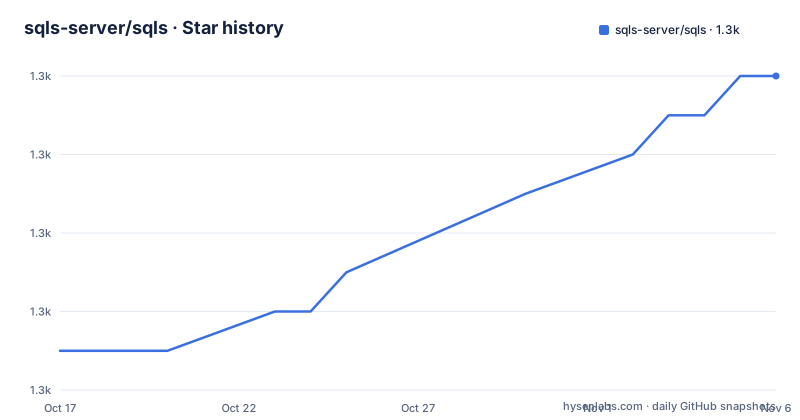
Star history
- sqls-server/sqls1,346 ★ · +7
| Repository | 2026-10-17 | 2026-11-06 |
|---|---|---|
| sqls-server/sqls | 1.3k | 1.3k |
7 Stars in the last 20 days, measured from the daily GitHub snapshot. Compare with other projects
Editorial analysis
Why sqls exists for database editing
sqls addresses a specific gap between ordinary text editing and a database-aware development environment. SQL editors often have little knowledge of connected tables, while full database tools tend to be separate applications. sqls runs as a Language Server Protocol server, allowing a compatible editor to request information about SQL documents while sqls communicates with a configured relational database. The intended users are developers and database-oriented operators who edit `.sql` files and want assistance without moving every query into a separate query runner.
The available features include autocomplete for DML such as `SELECT`, subqueries, `INSERT`, `UPDATE`, and `DELETE`. Join completion is tied to foreign keys, so this is schema-aware assistance rather than only keyword expansion. The project also documents hover information, signature help, document formatting, and code actions. Supported code actions include executing SQL, switching the selected database connection, and switching databases.
This is not a general-purpose database administration console. Its value comes from fitting database context into an LSP-compatible editor. The README lists clients for Vim, Visual Studio Code, Neovim, and Emacs, plus a Sublime Text 4 setup. That breadth is useful, but the clients are separate projects, and this repository does not document identical setup steps for every editor.
sqls architecture and SQL information flow
The repository layout separates the SQL-facing parts into `ast/`, `dialect/`, `parser/`, and `token/` directories. Internal implementation and server behavior are under `internal/`, while `main.go` is the Go entry point. The `go.mod` module is `github.com/sqls-server/sqls`, and the module requires Go 1.25.7. This structure is consistent with a pipeline that tokenizes SQL, parses it into an abstract syntax tree, interprets dialect-specific constructs, and exposes editor operations through LSP.
A database connection supplies the schema context needed for richer completion and join assistance. The README explicitly says that an RDBMS connection is essential to take advantage of the functionality. Based on the documented feature boundaries, the server receives SQL from an editor, analyzes the document, uses the active connection and database when schema-aware results are needed, and returns LSP responses such as completion items, hover content, signature information, formatting edits, or code actions. The README does not describe the internal request handlers or caching behavior, so those implementation details should not be inferred.
Database support is implemented through Go drivers. The README names MySQL, PostgreSQL, SQLite3, MSSQL, H2, and Vertica. The dependencies also include ClickHouse and Oracle-related packages, but the feature list and configuration table do not present them as fully documented supported databases. For an adoption decision, the named support list is the safer guide than treating every module in `go.mod` as a supported configuration target.
Install sqls and prepare the editor connection
The documented installation uses Go's module-aware installer. The module declares Go 1.25.7, so the local Go toolchain should meet that requirement before installation. After the command completes, `sqls` should be available from the directory in the Go toolchain's binary path. The editor client must be able to execute that binary.
Install the server with:
go install github.com/sqls-server/sqls@latestA first useful setup also needs a database connection. The simplest documented YAML example is a MySQL data source name. Save it as a configuration file and pass that file to sqls with the `-config` flag. The following is the project's documented sample, including its sample credentials and port:
lowercaseKeywords: false
connections:
  - alias: dsn_mysql
    driver: mysql
    dataSourceName: root:root@tcp(127.0.0.1:13306)/world
The README identifies three configuration sources in priority order: a file specified by `-config`, settings supplied through the LSP client's `workspace/configuration`, and a file at `$XDG_CONFIG_HOME/sqls/config.yml`. If `$XDG_CONFIG_HOME` is not set, `$HOME/.config` is used. These settings are described as persistent regardless of which method is selected.
For Neovim and coc.nvim, the documented client examples pass `-config` and `$HOME/.config/sqls/config.yml` when starting the server. Installing the binary alone will not exercise sqls's schema-aware features. A database must be reachable with the selected credentials, and the editor must register `sqls` for SQL files.
Choose and override sqls connection settings
A connection can use either `dataSourceName` or individual fields such as `proto`, `user`, `passwd`, `host`, `port`, and `dbName`. The precedence rule is important: `dataSourceName` takes priority over those individual values. An editor user therefore cannot expect a field-level override to replace a data source name already present in the same connection.
The first entry in `connections` is the default connection. Each connection can have an optional `alias`, which gives the server a name for actions that switch connections or databases. Keeping aliases distinct is particularly useful when an editor session contains several environments. The sample configuration also shows an SSH-based MySQL connection with `sshConfig`, including `host`, `port`, `user`, `passPhrase`, and `privateKey`.
The driver names documented in the connection parameter table are `mysql`, `postgresql`, `sqlite3`, `mssql`, and `h2`. The feature list additionally names Vertica and shows a `dsn_vertica` example, although Vertica is absent from that table. That inconsistency makes the configuration documentation thin for adoption decisions. Check the exact driver spelling against the configuration being used rather than assuming the sample guarantees uniform support across every listed system.
Connection files can contain passwords, private key paths, and full data source names. The README does not describe secret redaction, editor-specific secure storage, or permission recommendations. Those are unresolved operational concerns, particularly if a configuration file is shared or committed.
sqls feature coverage and editor actions
The strongest documented workflows are SQL completion, foreign-key-based join completion, hover information, signature help, and document formatting. The code action list confirms that sqls can execute SQL, switch the selected database connection, and switch database. These operations are more useful when the editor plugin exposes sqls commands clearly, but this repository links to separate plugins rather than documenting their command names or user interface.
SQL support is incomplete by design at this stage. Under DML, `SELECT`, subqueries, `INSERT`, `UPDATE`, and `DELETE` are marked complete. Under DDL, `CREATE TABLE` and `ALTER TABLE` are unchecked. `Explain SQL` is also unchecked, even though executing SQL is supported. This makes sqls a better fit for query editing and exploration than for a workflow that expects every schema migration or query plan operation to be available.
The README also states that there is no stable release and that destructive interface and configuration changes are expected. That warning applies beyond APIs consumed by editor plugins. A saved client configuration may need review after an upgrade, and an editor integration may need to accommodate changed server behavior. The project should therefore be evaluated as developing software rather than treated as a fixed protocol contract.
When sqls is the wrong tool
sqls is the wrong choice for a team that requires complete `CREATE TABLE` and `ALTER TABLE` completion from the language server. Those capabilities are explicitly unchecked. It is also unsuitable as the sole interface for explaining SQL execution plans, because `Explain SQL` is listed as unfinished. A general database administration client may be a better fit when query execution, operational management, and result inspection matter more than editor-native assistance.
The dependency on a configured RDBMS is another boundary. Without a connection, the README says the functionality provided by sqls cannot be fully exploited. That is different from a formatter or syntax grammar that can operate without a live database. Remote development machines, private networks, VPN-only database hosts, and rotating credentials can therefore affect whether the editor receives useful results.
The project is also not a stable platform contract. An organization that cannot tolerate interface or configuration changes should treat the absence of a stable release as a deployment risk. The documented `latest` installation command follows the newest obtainable module version, while recent release history includes `v0.2.48`, `v0.2.45`, and `v0.2.32`. Pinning a reviewed version may reduce surprise, although this repository does not provide a documented upgrade procedure or compatibility matrix.
For teams seeking only SQL parsing without database access, sqls may also be excessive. Its documented advantage is database-aware editor intelligence, not a standalone parser API. The repository contains parser and dialect packages, but the README does not present them as a stable public library interface.
Maintenance, releases, and the MIT license
The repository is not archived, and its last push was on 2026-08-20. The listed releases include `v0.2.48` on 2026-07-15, `v0.2.45` on 2026-01-07, and `v0.2.32` on 2026-01-06. This activity does not remove the README's explicit warning that no stable release exists, nor does it guarantee compatibility for editor clients.
The project uses the MIT license. That means the repository carries a permissive license, but this review does not interpret the legal terms or provide legal advice. Organizations should review the actual `LICENSE` file for obligations that apply to their distribution and use.
Maintenance work is not limited to the server binary. Editor integrations are separate repositories, and database behavior depends on external services and Go driver packages. Upgrading sqls may require checking a client plugin, reviewing configuration changes, and validating the selected database driver. The repository also contains a `Dockerfile` and `docker-compose.yml` for build and database service environments, but the README does not provide a production deployment or rollback procedure.
sqls deployment and upgrade trade-offs
The Makefile provides a source-build path with `go build -ldflags=$(BUILD_LDFLAGS) -o $(BIN) .`, and a `make install` target that installs the project with build flags. The Dockerfile uses a multi-stage Go build and copies the resulting binary into a scratch image. These files show packaging options, but they do not turn sqls into a hosted service or define a ready-to-use production image with a documented configuration workflow.
For editor developers, the practical upgrade cost is likely to appear at the integration boundary. The server communicates through LSP, while connections can come from a file or `workspace/configuration`. A client that supplies different settings may observe different behavior from one that launches sqls with `-config`. The priority order is documented, but the README does not explain conflict diagnostics, migration of old keys, or behavior when an invalid database connection is unavailable.
The lack of documented rollback is worth noting. The repository includes release, build, and version targets, but no README section describes reverting a deployment or downgrading after an editor client fails to initialize. An adopter should preserve the editor configuration and binary version as part of its own release process, rather than assume sqls can be safely reverted with an unspecified command.
Editorial conclusion
Adopt sqls when an editor-based SQL workflow and support for its documented databases are more important than a stable server interface. Do not choose it for complete DDL completion or `Explain SQL`, which the README marks as unfinished. Verify first that your database driver, connection settings, editor plugin, and required schema metadata work with the version you intend to install.
Frequently asked questions
How do I install sqls for SQL editing?
The README documents `go install github.com/sqls-server/sqls@latest`. The module requires Go 1.25.7, and the editor must be able to execute the resulting `sqls` binary.
Which databases does sqls support?
The feature list names MySQL, PostgreSQL, SQLite3, MSSQL, H2, and Vertica. The configuration table documents `mysql`, `postgresql`, `sqlite3`, `mssql`, and `h2`, so its driver documentation is not fully consistent with the feature list.
Does sqls require a database connection?
Yes. The README says that an RDBMS connection is essential to take advantage of the functionality provided by sqls, and it provides configuration files and editor workspace settings for defining connections.
Which SQL completion features are available?
The README marks completion for `SELECT`, subqueries, `INSERT`, `UPDATE`, and `DELETE` as supported. `CREATE TABLE` and `ALTER TABLE` remain unchecked, so sqls does not claim complete DDL completion.
Official sources
Add this badge to your README
If you maintain this project, the badge below links readers to this analysis and shows its maintenance status from the daily GitHub snapshot. Paste the markdown into your README; add ?metric=license or ?metric=stars to the image URL for a different field.

[](https://hysenlabs.com/projects/sqls-server-sqls)Star history chart for your README
[](https://hysenlabs.com/projects/sqls-server-sqls)Was this useful?