Tile38: an in-memory geofencing server that speaks RESP but keeps its own command set
Real-time Geospatial and Geofencing
At a glance
- What is it?
- Tile38 is an MIT-licensed Go server that indexes moving objects in memory and fires geofence events. This piece walks through its collection model, field filters, persistence, metrics, and build targets, and where each one bites.
- Who is it for?
- Tile38 fits teams that need radius and polygon queries plus geofence events over objects whose working set fits in RAM, and who are willing to treat its command set as its own API rather than a Redis drop-in. It is a poor fit if you need typed text attributes in fields or a dataset larger than one machine's memory.
- Can I use it commercially?
- Yes. MIT is a permissive licence: you can use, modify and sell software built on it, as long as you keep its copyright and licence notices.
- Is it still maintained?
- Yes. The repository last received commits 1 day ago.
- What is it written in?
- Mainly Go, according to GitHub's language statistics.
Answers come from the project's GitHub data, last synced on November 14, 2026, and from our analysis. They are not legal advice.
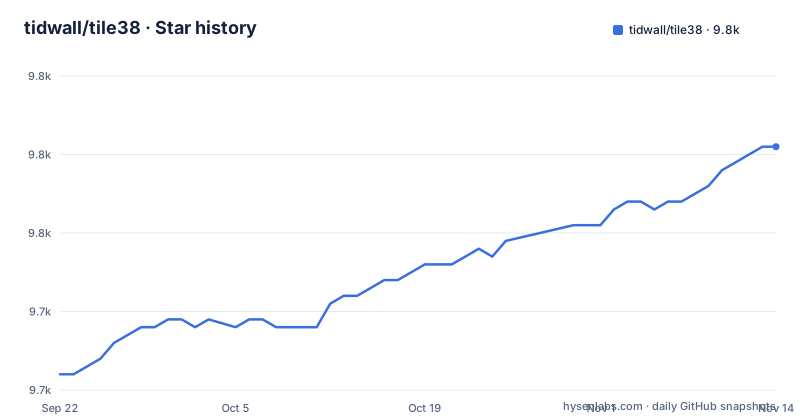
Star history
- tidwall/tile389,761 ★ · +29
| Repository | 2026-09-22 | 2026-11-14 |
|---|---|---|
| tidwall/tile38 | 9.7k | 9.8k |
29 Stars in the last 53 days, measured from the daily GitHub snapshot. Compare with other projects
Editorial analysis
tile38-server listens on 9851 and everything else is a client
Tile38 ships as three programs: tile38-server, the tile38-cli shell, and tile38-benchmark. The server is the only one that holds data. It is an in-memory geolocation data store, spatial index, and realtime geofencing server under the MIT license, and the CLI is just one of several ways to talk to it. The shell connects to localhost:9851 by default and the Docker image exposes the same port, so 9851 is the number to open in a firewall rule or a compose file.
There are four ways to get the binaries. Pre-built release binaries for OSX, Linux, FreeBSD, and Windows sit on the GitHub releases page. Docker users pull the image published as tile38/tile38. macOS users can go through Homebrew. Everyone else builds from source with make. The Homebrew route is two lines:
brew install tile38
tile38-server
From a source checkout, the server and shell start like this, and ./tile38-server -h prints the full list of command line options:
$ ./tile38-server

# The tile38 shell connects to localhost:9851
$ ./tile38-cli
> help
The project is not dormant. The latest tagged release is 1.38.0 from June 9, 2026, preceded by 1.37.0 in January 2026 and 1.36.5 in October 2025, and the most recent push to the master branch landed on October 21, 2026.
Objects live at a collection plus an id, not a single key
Every object in Tile38 has a two-part address: a collection name and an object id. The quick start session puts two trucks into a collection called fleet, then queries that collection by full scan and by radius:
$ ./tile38-cli

# add a couple of points named 'truck1' and 'truck2' to a collection named 'fleet'.
> set fleet truck1 point 33.5123 -112.2693   # on the Loop 101 in Phoenix
> set fleet truck2 point 33.4626 -112.1695   # on the I-10 in Phoenix

# search the 'fleet' collection.
> scan fleet                                 # returns both trucks in 'fleet'
> nearby fleet point 33.462 -112.268 6000    # search 6 kilometers around a point. returns one truck.

# key value operations
> get fleet truck1                           # returns 'truck1'
> del fleet truck2                           # del
Read the arguments carefully. The point takes latitude first and longitude second, and the radius on nearby is in meters, so 6000 is six kilometers. A point is only one of the shapes that set can store. The object types are lat/lon points, bounding boxes, Geohashes, GeoJSON, QuadKeys, and XYZ tiles, and searches run against all of them, including Polygons, MultiPolygons, and GeometryCollections.
scan walks an entire collection, while get and del address one id. That split shapes how you design ids. If your application needs to fetch or delete one vehicle directly, its id has to be something the application already knows, such as a fleet number, because get and del take the id and nothing else.
Fields hold doubles, and an unset field reads as zero
Tile38 lets an object carry extra data called fields, and there is no limit to how many fields an object can have. The constraint is the type: a field is always a double precision floating point number. Speeds, ages, battery levels, and numeric timestamps fit naturally. The WHERE regex operator is described as matching string values in fields or GeoJSON properties, so before storing text in a field, check the commands reference at tile38.com; GeoJSON properties are the documented home for named string attributes such as properties.name.
Fields can be written together with the geometry, or updated later without resending the location, and read back individually:
> set fleet truck1 field speed 90 point 33.5123 -112.2693
> set fleet truck1 field speed 90 field age 21 point 33.5123 -112.2693> fset fleet truck1 speed 90> fget fleet truck1 speedThe second trap is the default value. A field that was never set is treated as 0. When a WHERE clause names a field that an object lacks, the server pretends the object has that field with a value of zero. A filter for speed between minus infinity and 10 will therefore return every truck that has never reported a speed, mixed in with the slow ones. If zero is a legitimate reading in your data, the filter cannot tell stopped from unknown. The practical fix is to write the field on every object when you create it, or to keep a second field that records whether a reading exists at all.
WITHIN, INTERSECTS and NEARBY differ in how the boundary counts
The three search commands share one shape and differ in the spatial test they apply. WITHIN returns objects that are fully contained inside a specified bounding area. INTERSECTS returns objects that intersect that area. NEARBY returns objects that intersect a radius around a point. For single points the distinction between WITHIN and INTERSECTS matters little, but for polygons such as delivery zones or land parcels it decides whether a shape that straddles the edge comes back in the result set.
Two options narrow results further. WHERE filters on field values with a minimum and maximum, and several WHERE clauses combine as AND, so WHERE speed 70 +inf WHERE age -inf 24 means speed over 70 and age under 24. WHERE also accepts the =~ operator, which runs Go's re2 regular expression engine against string values in fields or GeoJSON properties, for example properties.name =~ 'truck.*'. MATCH applies a pattern to the object id instead of to fields:
nearby fleet where speed 70 +inf point 33.462 -112.268 6000nearby fleet match truck* point 33.462 -112.268 6000The first returns only fleet objects inside the 6 km radius whose speed field is above 70. The second returns only objects inside the same radius whose id starts with truck. Because MATCH works on ids, an id scheme with prefixes per vehicle class gives you category filtering in queries without spending a field on it, and without running into the zero default described above.
Everything sits in RAM, and the Docker quick start does not choose where it persists
Tile38 calls itself an in-memory database that persists on disk. That combination sets the sizing rule: the dataset has to fit in the memory of the machine running tile38-server, with disk serving as the place it is saved. Measure with your own objects before committing to a host size; the repository ships tile38-benchmark for putting load on a server.
The Docker image shows where the data goes. Its Dockerfile starts from alpine:3.20, installs ca-certificates, copies in the server, CLI, and benchmark binaries, creates a tile38 user and group, makes /data owned by that user, declares /data as a VOLUME, exposes 9851, and starts the server pointed at that directory:
CMD ["tile38-server", "-d", "/data"]The quick start for Docker is:
docker pull tile38/tile38
docker run -p 9851:9851 tile38/tile38
That run line publishes the port but mounts nothing onto /data, so the saved data ends up in whatever volume Docker creates for that path rather than a host directory you picked. Recreate the container carelessly and you start from an empty store. For anything you would mind losing, add your own volume mount for /data and back up that directory.
Replication is the other durability lever. Tile38 supports leader and follower replication, which puts a second copy of the data on another server instead of relying on one machine's disk alone.
Prometheus metrics stay off until --metrics-addr is set
Monitoring is opt-in. Tile38 can export Prometheus metrics natively, but the --metrics-addr flag is disabled by default, so a fresh server exposes no /metrics endpoint at all. Setting the flag starts a separate HTTP listener on the address you give it:
# start server and enable Prometheus metrics, listen on local interface only
./tile38-server --metrics-addr=127.0.0.1:4321

# access metrics
curl http://127.0.0.1:4321/metrics
The address decides who can scrape. Binding to 127.0.0.1 keeps the endpoint on the local interface, which works when Prometheus or an agent runs on the same host and leaves a scraper on any other machine with nothing to reach. To reach the endpoint from another host you set the flag to 0.0.0.0 with a port, which listens on all interfaces; from then on your firewall, not Tile38, decides who reads the metrics. In a container, the metrics port needs its own -p mapping, since the Dockerfile only exposes 9851.
The built-in exporter does not cover every case. For extracting key values or running a Lua script as part of monitoring, the project points to redis_exporter by oliver006 as the tool for those more advanced setups. That means a second process to deploy and configure if your dashboards need more than what the native endpoint reports.
Redis wire protocol, Tile38 commands, and geofence delivery
Tile38 accepts connections over HTTP, so curl works, as well as websockets, telnet, and the Redis RESP protocol, and it answers in RESP or JSON. That is why people search for tile38 vs redis. The transport is shared, but the commands are Tile38's own: every set, get, and del takes a collection and an id, followed by geometry or field arguments. Code written against a key value store does not carry over unchanged, and you should plan to write Tile38 commands explicitly. The project lists client libraries in many languages, which spare you from assembling those commands by hand through a generic client.
Geofencing runs inside the same server. Realtime geofence events go out either through webhooks, configured with the SETHOOK command, or through pub/sub channels that clients subscribe to. Roaming geofences have their own topic page on tile38.com.
The go.mod file pulls in client libraries for Google Cloud Pub/Sub, Azure Event Hubs, IBM/sarama, the AWS SDK, Eclipse Paho MQTT, NATS, and AMQP, alongside gopher-lua and gRPC. Treat that list as a reason to check rather than a promise. Before designing a pipeline around one particular broker, open the sethook command page at tile38.com and confirm the endpoint format it accepts, so you are not committing to a delivery path on the strength of a dependency name.
Building from source needs Go 1.25 and produces a fourth binary
The codebase is 100% Go and builds on Linux, OSX, Windows, and FreeBSD, on both 32 bit and 64 bit systems. Go must be installed on the build machine, and go.mod declares go 1.25.0, so an older toolchain is the first thing to rule out when a build fails. The build and test targets are short:
$ make$ make testmake builds four binaries, not three: tile38-server, tile38-cli, tile38-benchmark, and tile38-luamemtest, each through scripts/build.sh. make test builds all of them and then runs scripts/test.sh. make install copies only the server, CLI, and benchmark into /usr/local/bin, and make uninstall removes those same three, so both need write access to that directory, and tile38-luamemtest stays in your checkout.
The package target matters if you produce your own release artifacts. It builds for windows amd64, darwin amd64, linux amd64, freebsd amd64, linux arm, and linux arm64. darwin arm64 is not in that list. On an Apple Silicon Mac, check the GitHub releases page for a matching binary, or use Homebrew or a local make, before assuming a native download exists. The Dockerfile expects those packages under packages/tile38-$VERSION-$TARGETOS-$TARGETARCH, so a custom image build needs the package step to have run first.
Editorial conclusion
Tile38 fits teams that need radius and polygon queries plus geofence events over objects whose working set fits in RAM, and who are willing to treat its command set as its own API rather than a Redis drop-in. It is a poor fit if you need typed text attributes in fields or a dataset larger than one machine's memory. Before adopting it, confirm your webhook target on the sethook page at tile38.com, decide where /data lives in Docker, and write every field you filter on so the zero default does not leak into results.
Frequently asked questions
Is geofencing free with Tile38?
Tile38 is open source under the MIT license, and realtime geofencing through webhooks or pub/sub channels is part of the server itself. The cost is whatever it takes to host it.
What is Tile38?
Tile38 is an in-memory geolocation data store, spatial index, and realtime geofencing server written in Go. It stores lat/lon points, bounding boxes, Geohashes, GeoJSON, QuadKeys, and XYZ tiles.
How do I run Tile38 in Docker?
Pull tile38/tile38 and run it with port 9851 published, for example docker run -p 9851:9851 tile38/tile38. The image starts the server with /data as its data directory, so mount a volume there if you need to keep data.
Does Tile38 export Prometheus metrics?
Yes, when tile38-server is started with --metrics-addr, for example --metrics-addr=127.0.0.1:4321, which serves /metrics on that address. The flag is disabled by default.
Official sources
Add this badge to your README
If you maintain this project, the badge below links readers to this analysis and shows its maintenance status from the daily GitHub snapshot. Paste the markdown into your README; add ?metric=license or ?metric=stars to the image URL for a different field.

[](https://hysenlabs.com/projects/tidwall-tile38)Star history chart for your README
[](https://hysenlabs.com/projects/tidwall-tile38)Was this useful?