usql gives you a psql shell for other databases, but the driver list is decided at build time
Universal command-line interface for SQL databases
At a glance
- What is it?
- usql is a Go terminal client modelled on PostgreSQL's psql that talks to SQL and non-relational databases through one interface. The catch is that a default build contains six drivers and everything else, including any ODBC access, has to be compiled in with build tags.
- Who is it for?
- Use usql when you want one psql shaped prompt across several engines and you control how the binary is built, and pick the install route for that reason rather than for convenience. Decide up front whether you need ODBC, Avatica, or a CGO driver, because a binary built without a tag will not have it and no install step can add it afterwards.
- Can I use it commercially?
- Yes. MIT is a permissive licence: you can use, modify and sell software built on it, as long as you keep its copyright and licence notices.
- Is it still maintained?
- Yes. The repository last received commits 3 days ago.
- What is it written in?
- Mainly Go, according to GitHub's language statistics.
Answers come from the project's GitHub data, last synced on November 14, 2026, and from our analysis. They are not legal advice.
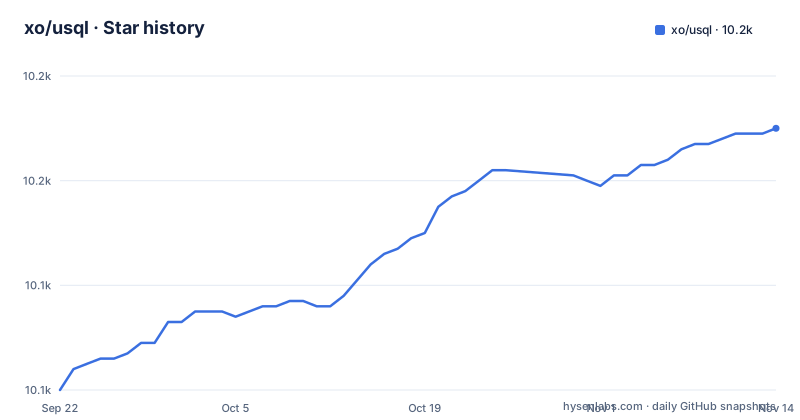
Star history
- xo/usql10,170 ★ · +50
| Repository | 2026-09-22 | 2026-11-14 |
|---|---|---|
| xo/usql | 10.1k | 10.2k |
50 Stars in the last 53 days, measured from the daily GitHub snapshot. Compare with other projects
Editorial analysis
A default build carries six drivers and everything else arrives as a build tag
Building usql with plain `go build` or `go install` produces a binary with only the base drivers, named as PostgreSQL, MySQL, SQLite3, Microsoft SQL Server, Oracle, and CSVQ.
# build/install with base drivers (PostgreSQL, MySQL, SQLite3, Microsoft SQL Server,
# Oracle, CSVQ)
$ go install github.com/xo/usql@main
Anything beyond that set is opt in at compile time. Each database driver has a build tag of its own, and the tags are combined by naming them:
# build/install with base, Avatica, and ODBC drivers
$ go install -tags 'avatica odbc' github.com/xo/usql@main
There is a matching off switch for every on switch. For each tag `<driver>` a `no_<driver>` tag disables that driver, which is how you get a small binary rather than a complete one:
# build/install most drivers, excluding Avatica, Couchbase, and PostgreSQL
$ go install -tags 'most no_avatica no_couchbase no_postgres' github.com/xo/usql@main
The consequence for a user is that driver availability is a property of the executable, not of the configuration. There is no runtime switch to load a driver that was left out, so a binary built with base tags alone has only the six base drivers.
The most tag drops every CGO driver, so a build can silently lack your database
Two aggregate tags exist. Building with `most` includes most SQL drivers, and the project states in a comment that this excludes CGO drivers and problematic drivers. Building with `all` includes all SQL drivers, and the matching comment says it includes CGO drivers and problematic drivers.
# build/install with most drivers (excludes CGO drivers and problematic drivers)
$ go install -tags most github.com/xo/usql@main

# build/install all drivers (includes CGO drivers and problematic drivers)
$ go install -tags all github.com/xo/usql@main
The word problematic in that comment is doing real work. A `most` build is the common recommendation, and it is also a build that, per the project's comment, excludes CGO drivers and problematic drivers. If the engine you need happens to sit on that list, the driver will not be in the binary.
The verification step is the drivers command, since the list of drivers usql was built with can be displayed with it. Run that before you conclude anything about a connection failure, because it separates the two very different causes of an error: a driver that was never compiled in, and a driver that is present and refusing your credentials.
Homebrew installs without ODBC unless you ask twice
The Homebrew route comes from the `xo/xo` tap, and the first command installs most drivers:
# install usql with most drivers
$ brew install xo/xo/usql
ODBC is not part of that default. Support for ODBC databases is available through an install flag, which means a tap and a second install:
# add xo tap
$ brew tap xo/xo

# install usql with odbc support
$ brew install --with-odbc usql
The Go route reaches the same driver differently, by naming it in the build tags rather than by passing a flag to the package manager, so `odbc` joins `avatica` or any other tag name in the same `-tags` list.
For anyone scripting environment setup, the difference matters. A Homebrew step written as the single line above produces a binary with no ODBC support, and the fix is not a reinstall of a different version, it is a reinstall with the flag and the tap in place. Anyone relying on ODBC to reach a database through a generic interface should decide that before writing the setup script rather than discovering it when a connection string is rejected.
The AUR split exists because compiling every driver takes considerably longer
Arch Linux gets two packages with different cost profiles. `usql-bin` installs the released binary, which is the fast path:
# install usql with most drivers
$ yay -S usql-bin
The `usql` package builds from source instead, and the project warns that it takes considerably longer because it compiles every driver.
# build usql with most drivers from source
$ yay -S usql
There is also a manual route that clones the packaging repository and runs the standard Arch build install step:
$ git clone https://aur.archlinux.org/usql.git && cd usql
$ makepkg -si
The practical consequence is that the AUR choice is a build time decision, and the price of building from source is paid in compilation of every driver rather than of a single one. A CI job that installs from the `usql` package on every run will spend its time in the driver compile, while `usql-bin` trades that for a binary you did not compile yourself.
The container banner names the driver and version it actually connected with
An official image, `docker.io/usql/usql`, is maintained by the usql team and works with Docker, Podman, or another container runtime. The documented first run mounts a directory and points the client at a SQLite file:
# run interactive shell and mount the $PWD/data directory as a volume for use
# within the container
$ docker run --rm -it --volume $(pwd)/data:/data docker.io/usql/usql:latest sqlite3://data/test.db
Trying to pull docker.io/usql/usql:latest...
Getting image source signatures
Copying blob af48168d69d8 done   |
Copying blob efc2b5ad9eec skipped: already exists
Copying config 917ceb411d done   |
Writing manifest to image destination
Connected with driver sqlite3 (SQLite3 3.45.1)
Type "help" for help.

sq:data/test.db=> \q
Two details in that output carry the weight. The banner reports the driver and the underlying SQLite3 version, which is the image's version and not your host's, so a file written by the container is a file written by whatever SQLite3 that image bundles. And the prompt shows the path as the container sees it, `data/test.db`, because that is the mount point, not the host path that produced it.
The same section also shows the pattern for the server side, with `docker run --detach --rm --name=postgres -` to run PostgreSQL locally. With a container on both ends, the driver set is whatever the image was built with, which is the constraint to check before assuming a connection problem is a credential problem.
The release archive leaves the binary on your PATH with nothing tracking it
The release install is three manual steps. Download a release for your platform, extract the `usql` or `usql.exe` file from the `.tar.bz2` or `.zip` file, and move the extracted executable to somewhere on `$PATH` on Linux and macOS or `%PATH%` on Windows.
No package manager is involved, which is the trade. No package manager tracks it, so keeping the binary current means repeating the download and overwrite by hand. On Windows the executable name changes to `usql.exe`, which matters for scripts and for anything that shells out to the client by name.
If you need a build with a specific driver set, the Go build tags are the mechanism; if you just need the released binary, this route and `usql-bin` on Arch are the two that avoid compiling anything.
psql habits transfer, but the prompt string and four conveniences do not exist elsewhere
The interface is modelled on PostgreSQL's psql and supports most of the core psql features, named as variables, backticks, and backslash commands. On top of that it adds features psql does not have: multiple database support, copying between databases, context based completion, and terminal graphics.
Those extras are where a psql user's assumptions break. A prompt expectation is the small one: the container example shows `sq:data/test.db=>` rather than the prompt psql prints, so a script or a screencast that assumes a familiar prompt string has to be adjusted. Completion is context based, and terminal graphics may render differently depending on your terminal.
The connection layer is equally worth knowing. usql works with all Go standard library compatible SQL drivers supported by `github.com/xo/dburl`, which is what gives one URL format across engines, as in the `sqlite3://data/test.db` argument above. Backslash commands remain the navigation surface: `\q` to leave and the drivers command to inspect what the binary was built with.
go.mod lists thirty driver modules and a base build uses six of them
The module file declares `go 1.27.1`, so building from source needs a toolchain at or above that line rather than whatever Go version happens to be on the machine. The dependency list below it is long: lib/pq and pgx for PostgreSQL, go-sql-driver/mysql, mattn/go-sqlite3, microsoft/go-mssqldb, xo/oracle for Oracle, mithrandie/csvq, duckdb-go, and more, alongside kenshaw/colors and rasterm for terminal output.
That list is the set of drivers that can be compiled, not the set your binary can connect to. A dependency in go.mod tells you the source of a driver is vendored into the build graph, which is a different statement from the driver being present in the executable. With base tags you get six drivers; with most or all you trade CGO and problematic drivers for coverage; with explicit tags you name exactly one arrangement.
The repository layout follows the same split. `drivers/` holds the per database wiring, `metacmd/` the backslash commands, `handler/`, `highlight/`, `pager/` and `text/` sit alongside them, `docs/` is documentation, `testdata/` and the various `*_test.go` files the test surface, and `build.sh` with `update-deps.sh` sit at the root next to `CONTRIBUTING.md`, `AGENTS.md`, `CLAUDE.md`, and `skills-lock.json`.
Editorial conclusion
Use usql when you want one psql shaped prompt across several engines and you control how the binary is built, and pick the install route for that reason rather than for convenience. Decide up front whether you need ODBC, Avatica, or a CGO driver, because a binary built without a tag will not have it and no install step can add it afterwards. Before you rely on a connection, run the drivers command and confirm the driver you expect is listed, and treat the module dependency list as evidence of what can be compiled rather than as evidence of what your binary contains.
Frequently asked questions
What does "*sql" mean?
In the Go ecosystem it refers to packages implementing the standard library database/sql interface, and those are the drivers usql can use. usql works with all Go standard library compatible SQL drivers supported by `github.com/xo/dburl`, with a base build covering PostgreSQL, MySQL, SQLite3, Microsoft SQL Server, Oracle, and CSVQ.
What are the 5 SQL languages?
usql does not reduce databases to a fixed number of languages; it drives whatever Go database/sql drivers a build contains. Which engines you can reach is decided by build tags, since a plain go install gives you PostgreSQL, MySQL, SQLite3, Microsoft SQL Server, Oracle, and CSVQ, while `most` and `all` widen or narrow the set.
Is SQL very hard to learn?
usql is built on the assumption that you already know one client. Its interface is modelled on PostgreSQL's psql and supports core psql features such as variables, backticks, and backslash commands, then adds multiple database support, copying between databases, context based completion, and terminal graphics.
Is SQL still used in 2026?
The client is still being shipped. The listed releases include v0.21.6 on 2026-09-22 and v0.21.5 on 2026-09-13, and the project describes support for PostgreSQL, MySQL, Oracle Database, SQLite3, Microsoft SQL Server, and many other databases including NoSQL and non-relational ones.
Official sources
Add this badge to your README
If you maintain this project, the badge below links readers to this analysis and shows its maintenance status from the daily GitHub snapshot. Paste the markdown into your README; add ?metric=license or ?metric=stars to the image URL for a different field.

[](https://hysenlabs.com/projects/xo-usql)Star history chart for your README
[](https://hysenlabs.com/projects/xo-usql)Was this useful?