standardebooks/tools: command-line EPUB production toolset
The Standard Ebooks toolset for producing our ebook files.
At a glance
- What is it?
- standardebooks/tools packages Standard Ebooks production commands as the Python-based `se` executable. It supports ebook setup, text processing, EPUB builds, linting, optional Ace checks, and source development, but requires Python >= 3.14.4 and several platform dependencies.
- Who is it for?
- Standard Ebooks contributors and developers who already work within its source, file, and checking conventions should consider adopting this toolset. Users seeking a general-purpose EPUB reader, editor, or converter should first confirm that the documented `se` commands match their production requirements.
- Can I use it commercially?
- Check first. The repository uses a licence we do not classify automatically, so read its LICENSE file before any commercial use.
- Is it still maintained?
- Yes. The repository last received commits 4 days ago.
- What is it written in?
- Mainly HTML, according to GitHub's language statistics.
Answers come from the project's GitHub data, last synced on November 7, 2026, and from our analysis. They are not legal advice.
Star history
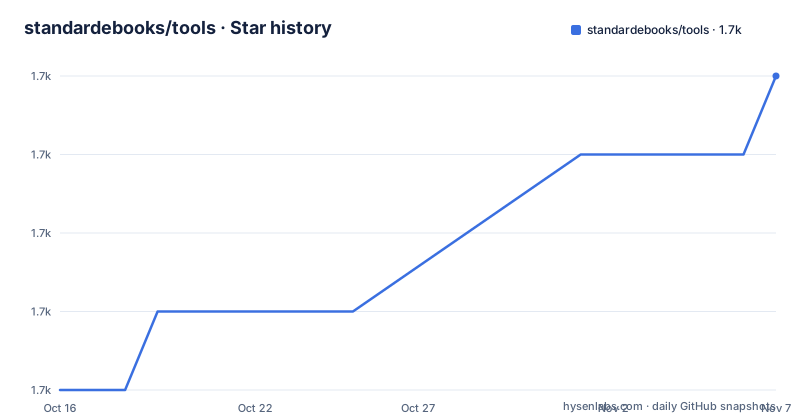
- standardebooks/tools1,686 ★ · +4
| Repository | 2026-10-16 | 2026-11-07 |
|---|---|---|
| standardebooks/tools | 1.7k | 1.7k |
4 Stars in the last 22 days, measured from the daily GitHub snapshot. Compare with other projects
Editorial analysis
What standardebooks/tools handles in an EPUB production workflow
standardebooks/tools is the command-line toolset that Standard Ebooks uses to produce its ebook files. Its stated scope includes basic ebook setup, text processing, and build operations. That makes its direct audience narrower than users looking for a desktop ebook editor. The intended users are people participating in the Standard Ebooks production model, including contributors who prepare source material, developers changing the toolset, and maintainers checking repositories.
The repository maps directly to that role. The Python package is under `se/`, automated tests are under `tests/`, packaging metadata is in `setup.py`, and project behavior is documented through `README.md` and `CHANGELOG.md`. Installation creates a console command named `se`, so the individual tools are exposed through one entry point rather than a collection of unrelated executables. Examples visible in the documentation include `se build`, `se build --check`, `se lint`, and `se help`.
This is not a general EPUB conversion library presented as a simple Python API. The package description calls it the toolset used to produce Standard Ebooks EPUB ebooks, and its commands reflect a repository-based production process. The README excerpt does not document an API for importing individual functions, and it does not describe arbitrary input documents being converted into arbitrary output formats. Adopters should therefore treat it as the production interface for this specific ecosystem, not as a drop-in EPUB toolkit for every application.
The `se` executable, Python package, and build pipeline
The repository is packaged as the PyPI distribution named `standardebooks`. In `setup.py`, setuptools discovers Python packages with `find_packages()`, and the entry-point mapping connects `se` to `se.main:main`. The version is read from `se/__init__.py` rather than being maintained as a separate packaging constant. Based on that layout, command dispatch enters through `se.main`, while command-specific behavior resides in the `se` package.
The documented build path can include several external systems. `se build` performs the project build operation. When `--check` is supplied and Ace is installed, the documentation says Ace will run automatically as part of checking. For projects containing SVG images, the macOS instructions say a browser is used to render those images as PNGs. Chrome or Firefox can provide a headless path, while Safari lacks headless mode and may visibly open and close windows during `se build`.
The README excerpt does not provide the internal source-file transformation order, the exact set of validation rules, or a complete diagram of data moving through a build. It does establish that the workflow combines Python command orchestration, optional Java-based checking through Ace, and browser-based image rendering. It also mentions repository-level commands such as `se lint` and notes that normal invocations process command-line arguments sequentially. For developers testing a change across a corpus, that sequential behavior is a documented performance constraint, although the truncated excerpt does not show the alternative invocation used to parallelize it.
Installing the `se` command with pipx on Ubuntu
Ubuntu installation requires Python >= 3.14.4, and the documented system packages include Java, Git, Python development components, virtual environments, and `pipx`. The command below installs the pre-flight dependencies and then installs the `standardebooks` distribution into a `pipx` environment. It does not install the optional Ace application or shell completions.
sudo apt install --yes default-jre git python3-dev python3-pip python3-venv pipx
pipx install --python=3.14 standardebooks
After the shell can resolve the installed executable, use the documented help entry point to confirm that `se` is on the executable path:
se helpThe README says this lists the available commands. That is the first verifiable CLI use, although it does not process an ebook. A first production run requires an existing Standard Ebooks project that `se` expects.
Optional Ace changes the checking path rather than the installation command. If Ace is installed separately, `se build --check` will invoke it automatically. Shell completions are supplied for ZSH, Bash, and Fish, but each requires filesystem and shell initialization steps, so they should be added only by users who need completion support.
Homebrew, editable source installs, and external rendering choices
macOS offers a Homebrew installation and a more granular `pipx` route. Homebrew is the shorter documented option:
brew install standardebooksThe alternative installation manages dependencies individually and links an OpenJDK installation. This is more involved, but it exposes the platform packages and Python interpreter involved in the build environment. The README specifically installs `cairo`, `git`, `openjdk`, `pipx`, and `[email protected]` before installing `standardebooks` with `pipx`.
Developers working on the repository itself can install the local checkout in editable mode. The documentation says edits under `tools/` are reflected immediately when executing the binary:
git clone https://github.com/standardebooks/tools.git
pipx install --editable ./tools
There is also a browser selection trade-off during SVG builds. Safari can be authorized with `safaridriver --enable`, but it is not headless, so build activity may be visible. Installing Firefox or Chrome changes which browser the toolset can use and avoids that Safari behavior according to the README. Separately, Ace is an optional checker that runs with `se build --check`. It is not part of the Python distribution described by the installation command, so a build without it remains documented, while validation behavior changes when Ace is present.
Constraints in HTML and SVG builds across operating systems
Although Python is the package language, the repository's primary language is HTML. This fits an ebook-production toolchain in which structured HTML files are central source material. Its value depends on compatibility with the conventions expected by Standard Ebooks projects.
Platform setup is another practical constraint. The README provides specific installation paths for Ubuntu 26.04 through 22.04, Fedora 43, macOS, Windows 11, and OpenBSD 6.6, with a note that the OpenBSD instructions may also work on 6.5. Windows requires packages such as Python 3.14, Git, OpenJDK 21, and GTK for Windows. These dependencies indicate that installation is broader than downloading one script, particularly where HTML rendering, Java checking, Git operations, and image conversion are involved.
SVG builds add a further operational boundary on macOS. Safari's lack of headless mode does not necessarily fail the build, but it changes the experience by displaying windows. Chrome or Firefox is the documented preference for users who do not want those interruptions. The README also says Ace is optional even though `se build --check` is presented as the command that invokes it. Projects requiring that checker must install Ace separately.
The Python floor is unusually strict at >= 3.14.4. A system with an older Python cannot satisfy the documented requirement merely by adding a compatible virtual environment. This may affect CI images, managed workstations, and older distribution packages.
standardebooks/tools license, upgrades, and maintenance boundary
`setup.py` identifies the package metadata as GNU General Public License v3 or later through the classifier `OSI Approved:: GNU General Public License v3 or later (GPLv3+)`. However, the repository uses a custom licence that GitHub cannot classify, with `LICENSE.md` identified as the relevant file. Those two signals are not identical, so users who need exact redistribution, modification, or dependency obligations must inspect `LICENSE.md` rather than relying on the package classifier alone. This is a source-review point, not legal advice.
Upgrade tracking is supported by `CHANGELOG.md`, and the repository has tests plus static-analysis configuration in `pytest.ini`, `pylintrc`, and `pyrightconfig.json`. The last push was on 2026-10-16, so recent repository activity is confirmed. That fact does not by itself establish compatibility with every existing Standard Ebooks project. The README excerpt does not document a formal migration guide or a dependency lock file for generated ebooks.
There are no GitHub releases, so installation guidance points to package installation rather than release artifacts or a release-specific changelog link. The package version is defined in `se/__init__.py`, while PyPI installation is documented through `pipx`. Operators adopting the tool should record the installed package version during environment provisioning. The README does not state a rollback procedure for production repositories, so it does not support a claim that `pipx` upgrades or downgrades can be reversed safely for ebook output.
Editorial conclusion
Standard Ebooks contributors and developers who already work within its source, file, and checking conventions should consider adopting this toolset. Users seeking a general-purpose EPUB reader, editor, or converter should first confirm that the documented `se` commands match their production requirements. The first adoption checks are the custom licensing terms in `LICENSE.md`, availability of Python >= 3.14.4, required native and Java dependencies, and whether Ace validation is needed.
Frequently asked questions
How do I install standardebooks/tools?
On Ubuntu, install the documented system dependencies and then run `pipx install --python=3.14 standardebooks`. The toolset requires Python >= 3.14.4 and makes the `se` command available.
What does the `se` command in standardebooks/tools do?
The `se` executable exposes the toolset's ebook setup, text processing, build, and lint commands. The README also documents `se help` for listing commands.
Does standardebooks/tools require Ace?
Ace is optional. If it is installed separately, the documentation says `se build --check` will run it automatically as part of the checking process.
Can I develop standardebooks/tools from a local checkout?
Yes. The README documents cloning the repository and running `pipx install --editable ./tools`. It says source edits under `tools/` are then reflected when the `se` binary runs.
Official sources
Add this badge to your README
If you maintain this project, the badge below links readers to this analysis and shows its maintenance status from the daily GitHub snapshot. Paste the markdown into your README; add ?metric=license or ?metric=stars to the image URL for a different field.

[](https://hysenlabs.com/projects/standardebooks-tools)Star history chart for your README
[](https://hysenlabs.com/projects/standardebooks-tools)Was this useful?