StenographAI: local meeting transcription running on two Parakeet backends
StenographAI is the secure privacy-first AI notepad & notetaker for confidential conversations in government & defence sectors. On Windows & MacOS.
At a glance
- What is it?
- StenographAI records meetings and writes the transcript and summary on your own machine, with Parakeet running through MLX on Apple Silicon and an ONNX runtime on Windows and Linux. The local promise holds, but live speaker labels are a macOS feature, the language list splits 25 live European languages from 99 post-stop ones, and the pinned mlx build is one CI cannot test.
- Who is it for?
- StenographAI suits a team that cannot route meeting audio through a vendor cloud and can standardise on macOS. It is the wrong choice for a mixed fleet that needs live labels on Windows, and for anyone who needs Chinese or Hindi transcribed while the meeting is still running.
- Can I use it commercially?
- Yes. MIT is a permissive licence: you can use, modify and sell software built on it, as long as you keep its copyright and licence notices.
- Is it still maintained?
- Yes. The repository last received commits 1 day ago.
- What is it written in?
- Mainly Python, according to GitHub's language statistics.
Answers come from the project's GitHub data, last synced on October 22, 2026, and from our analysis. They are not legal advice.
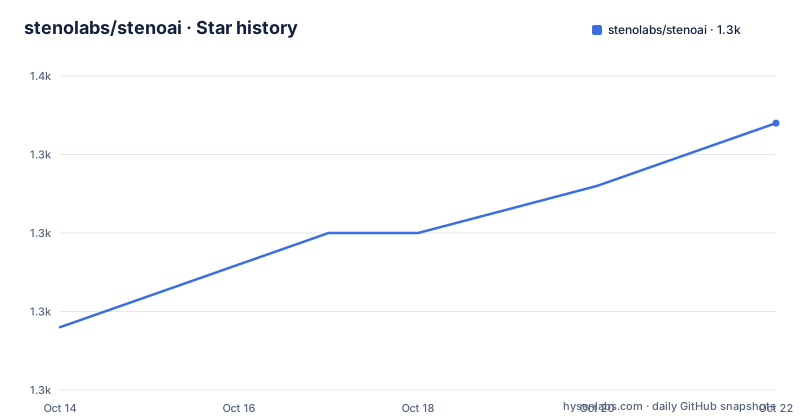
Star history
- stenolabs/stenoai1,347 ★ · +13
| Repository | 2026-10-14 | 2026-10-22 |
|---|---|---|
| stenolabs/stenoai | 1.3k | 1.3k |
13 Stars in the last 8 days, measured from the daily GitHub snapshot. Compare with other projects
Editorial analysis
Recording confidential meetings without sending audio off the machine
StenographAI is a desktop notepad that records a meeting and writes the transcript and the summary on the machine that captured the audio. The stated audience is government and defence staff, plus executives whose conversations cannot travel to someone else's server, and the promise is narrow: no cloud, no usage limits, private data that never leaves your premises. External AI providers are listed as optional rather than required.
That choice shapes everything else. The app notices a meeting starting and offers to take notes, then offers to summarise when it ends, so nobody has to remember to press record. Questions afterwards are answered from the stored summary, the key topics and the full transcript, for one note or for the whole library, and the output is Markdown you own rather than rows in someone else's database. One line in the project's own write-up deserves scepticism from an adopter: six organisations are named as users, including AWS and the European Union, and no evaluation, contract or deployment account is linked for any of them.
Core Audio Tap, Windows loopback, and PipeWire on Linux
Capturing both sides of a call is a platform problem, and the project answers it three different ways. Capture on macOS 14.4 and later uses native Core Audio Tap. Windows uses loopback capture instead. Linux uses PipeWire, and the alpha dated 2026-09-05 brings Debian and Ubuntu packages plus an AppImage. A selectable microphone input sits next to the system capture in each case, so a room microphone and a headset can be combined with the call audio.
While you are speaking, the app shows a chat-bubble view that labels your own voice as `[You]` and everyone else as `[Others]`. That label is honest about what the engine knows mid-meeting, because the split into `Speaker 2` and `Speaker 3` happens only after you stop. The same 2026-09-05 entry records a failure worth knowing before you test on Windows or Linux: the available live transcript now replaces an ONNX batch transcript that read less than half of the recording. A transcript that quietly drops more than half of the audio is not something you would notice without going back to the recording yourself.
Parakeet on Apple Silicon and an ONNX runtime elsewhere
The transcription engine is Parakeet TDT v3, delivered through two quite different routes. On Apple Silicon the live labels come from `parakeet-mlx`, which runs the model through MLX. On Windows and Linux, where `parakeet-mlx` cannot install, `onnx-asr` provides the same model as ONNX Runtime CPU weights, int8 quantised at roughly 670 MB, with no PyTorch and no full NeMo toolkit, pulled from the `istupakov/parakeet-tdt-0.6b-v3-onnx` snapshot through `huggingface_hub` on first use.
Language coverage follows the same seam, and here the feature summary quietly overstates what happens live. Parakeet covers 25 European languages with live transcription. Whisper handles 99 languages, including Chinese, Japanese, Arabic and Hindi, but only after the recording stops. A meeting conducted in Chinese therefore ends with an accurate transcript and no live labels at all, while a meeting in French gets both. Download progress for the Parakeet model became explicit in the 2026-09-05 entry, so the first run fetches several hundred megabytes before you record anything.
The mlx pin exists because no CI runner has a Metal device
This is the detail a skim misses. On Darwin the pin is exact, `mlx==0.31.2`, even though `parakeet-mlx` only asks for `mlx>=0.22.1`. The dependency file explains the reason: an unpinned build resolves to whatever the package index serves that day, and the version decides whether the shipped application works at all. Builds in the 0.32 line fail inside the packaged app with "Failed to load the default metallib", because the shader library is present at `_internal/mlx/lib/mlx.metallib` and is simply not found when the bundle loads it. That kills Parakeet, which is the default engine on macOS.
The project is equally blunt about the second half of the problem. GitHub's macOS runners have no Metal device, so the macOS `@pipeline` job runs whisper while the parakeet jobs are Windows and ONNX. Nothing in CI can catch this regression, and the guard is provenance rather than behaviour: `scripts/verify_mlx_bundle.py` asserts that the bundled version matches the pin, and moving the pin means rebuilding the bundle and running a spike on real Apple Silicon hardware.
scripts/verify_mlx_bundle.py
stenoai spike-parakeet
Those two commands are the entire safety net around the engine most Mac users will end up relying on, which is a thin one for a claim about privacy-critical deployments.
No installation command, only builds and pinned dependencies
There is no installation command anywhere in the project documentation, which is unusual for a repository carrying both a `requirements.txt` and a `stenoai.spec` packaging file. Builds are the entry point instead: a macOS build, a Windows build marked alpha, and the download page where both sit.
https://stenoai.co/
https://github.com/stenolabs/stenoai/releases
Platform coverage is wider than the summary at the top of the repository admits, because that description still advertises Windows and macOS only while the 2026-09-05 entry adds Linux packages for Debian and Ubuntu plus an AppImage.
Working from source, the dependency file is where the real constraints sit. `sounddevice` handles capture, `numpy` is held between 2.0 and 3.0, and the two Apple-only entries carry the `sys_platform == 'darwin'` marker so they never resolve elsewhere:
sounddevice>=0.4.6
numpy>=2.0,<3.0
parakeet-mlx>=0.5.0; sys_platform == 'darwin'
mlx==0.31.2; sys_platform == 'darwin'
That gating is load-bearing, because mlx publishes no x86_64 wheels and an ungated install on Windows or Linux ends in a `ResolutionImpossible` error. The former `numpy<2.0` ceiling was there because `parakeet-mlx` pulls `librosa` and `scipy`, which need NumPy 2.x, and it was tied to `pywhispercpp`; the tests now pass under NumPy 2.3, so only the floor is left.
Speaker separation, the recording pill, and a global shortcut
Once you stop a recording on macOS, the app separates the voices that shared one channel, so the saved transcript reads `Speaker 2` and `Speaker 3` instead of one merged `[Others]`. Name a speaker once and it can put that name on the same person in later meetings, with the behaviour switched off by default and the voice profiles kept on the Mac. The repository isolates that work in a `diarize-sidecar/` entry, with `mic-monitor/` and `native-audio-helper/` handling capture, which is a sensible split if you ever need to swap the diarization model without touching the recorder.
The capture controls are built to stay out of the way. A compact transcription pill docks beside the application rather than taking it over, Stop drops you onto the note, and you can resume recording into an existing note, which appends and regenerates the summary on demand. A global shortcut built from Command, Shift and R on macOS, or `Ctrl+Shift+R` on Windows, starts or stops from anywhere and can be switched off in Settings when it collides with another application. On macOS you can bind any key through the `stenoai://record/start` and `record/stop` deep links in the Shortcuts app.
Markdown on disk, a Granola skill, and transcript export
Storage is plain Markdown. Summaries and transcripts are files you can edit, search and sync into whatever knowledge base you already use, a note can hold several reports at once including template-driven ones you define yourself, and the full transcript exports with its metadata, notes and speaker labels attached. A separate My notes tab stays editable beside the generated summary, and whatever you type there is folded into it.
Migration from Granola is handled by an agent skill rather than an in-app importer. The file at `skills/granola-to-steno/README.md` covers syncing titles, dates, participants, summaries and transcripts into the file-based store, and it is documented as idempotent and re-runnable, so history can be backfilled once and then kept in sync on a schedule. It is a skill you drop into a skills folder and invoke conversationally, which the documentation takes care to point out is not an in-app feature. If you were expecting a menu item, you will not find one.
The no-cloud pitch and the switch that turns it off
Nothing in the local setup stops you from sending text to a hosted model, and that switch is part of the design rather than an accident. The optional hosted list covers OpenAI, Anthropic, AWS Bedrock including application inference profile ARNs for governed AWS environments, and a custom API endpoint. Managed deployments add an Organisation AI adapter, where signing in to your organisation's adapter routes requests automatically with no local API key and no per-user setup. For a team writing a security case, the boundary is a configuration choice rather than a technical guarantee, so the review has to name which path is enabled and what leaves the machine when it is.
Two housekeeping facts, then the rest is your own risk assessment. StenographAI is MIT licensed, so an internal modification carries no copyleft obligation on redistribution. The last push was on 2026-09-15, and the newest build is Steno 0.7.1 from 2026-09-06.
Editorial conclusion
StenographAI suits a team that cannot route meeting audio through a vendor cloud and can standardise on macOS. It is the wrong choice for a mixed fleet that needs live labels on Windows, and for anyone who needs Chinese or Hindi transcribed while the meeting is still running. Before adopting, run `stenoai spike-parakeet` on your own Apple Silicon machine and read the `mlx==0.31.2` pin in `requirements.txt`, because no CI job can verify that bundled build. Keep hosted models disabled unless your data classification allows the transcript to leave the device.
Frequently asked questions
How do I install StenographAI on Windows or Linux?
The project documentation carries no installation command, so builds are the entry point: a macOS build and a Windows build marked alpha, with Debian and Ubuntu packages plus an AppImage added in the 2026-09-05 Linux alpha. From source, `requirements.txt` carries the `sys_platform == 'darwin'` markers that keep the Apple-only packages out of a Windows or Linux resolve.
Which languages does StenographAI transcribe live?
Parakeet covers 25 European languages with live transcription, through MLX on Apple Silicon. Whisper handles 99 languages including Chinese, Japanese, Arabic and Hindi, but only after the recording stops, so a non-European language gets an accurate transcript with no live labels during the meeting.
Does StenographAI separate speakers in a recording?
On macOS, yes. Once the recording stops the app separates the voices sharing each channel, so the saved transcript reads `Speaker 2` or `Speaker 3` instead of one merged `[Others]`, and naming a speaker once lets it recognise that person in later meetings with the behaviour off by default. That code sits in a separate `diarize-sidecar/` entry in the repository.
Why is mlx pinned to an exact version in requirements.txt?
Because `parakeet-mlx` only asks for `mlx>=0.22.1`, while versions in the 0.32 line fail inside the packaged application with "Failed to load the default metallib", which kills the default macOS engine. The pinned build is 0.31.2, and CI cannot test it because GitHub's macOS runners have no Metal device, so `scripts/verify_mlx_bundle.py` only checks that the bundled version matches the pin.
Does StenographAI send meeting audio or transcripts to OpenAI or Anthropic?
Not unless you configure it to. The optional hosted list covers OpenAI, Anthropic, AWS Bedrock including application inference profile ARNs, and a custom API endpoint, and managed deployments can route requests through an Organisation AI adapter with no local API key stored on the machine.
Official sources
Add this badge to your README
If you maintain this project, the badge below links readers to this analysis and shows its maintenance status from the daily GitHub snapshot. Paste the markdown into your README; add ?metric=license or ?metric=stars to the image URL for a different field.

[](https://hysenlabs.com/projects/stenolabs-stenoai)Star history chart for your README
[](https://hysenlabs.com/projects/stenolabs-stenoai)Was this useful?