Nothing Ever Happens: a Polymarket bot that always answers No
Polymarket bot that buys "No" on all non-sports markets. For entertainment only, mostly a meme.
At a glance
- What is it?
- Nothing Ever Happens is an async Python bot that scans standalone Polymarket yes/no markets and buys No below a price cap, with a paper exchange client, a dashboard and live recovery state. The project calls itself a meme for entertainment, and it can move real money once three environment variables are set.
- Who is it for?
- Nothing Ever Happens fits an engineer who wants to read a complete Polymarket execution stack, from scanning to order transmission to recovery state, in about a thousand lines of Python, and it does not fit anyone looking for a profitable trading strategy or for financial advice.
- Can I use it commercially?
- Yes. CC0-1.0 is a permissive licence: you can use, modify and sell software built on it, as long as you keep its copyright and licence notices.
- Is it still maintained?
- Activity is slowing. The repository last received commits 6 months ago.
- What is it written in?
- Mainly Python, according to GitHub's language statistics.
Answers come from the project's GitHub data, last synced on November 6, 2026, and from our analysis. They are not legal advice.
Star history
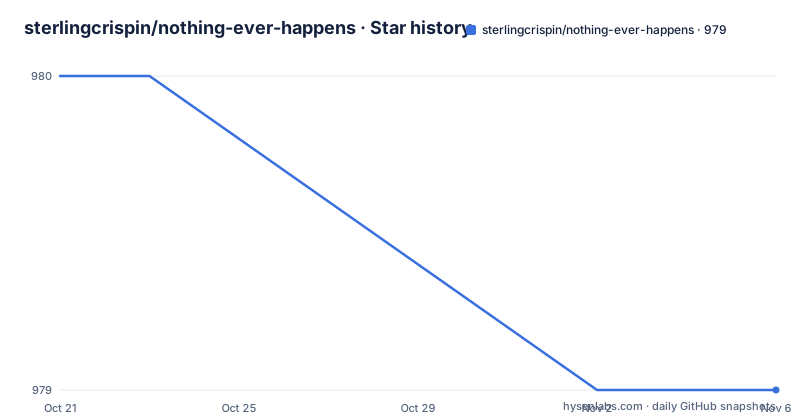
- sterlingcrispin/nothing-ever-happens979 ★ · -1
| Repository | 2026-10-21 | 2026-11-06 |
|---|---|---|
| sterlingcrispin/nothing-ever-happens | 980 | 979 |
-1 Stars in the last 16 days, measured from the daily GitHub snapshot. Compare with other projects
Editorial analysis
What the runtime does with a standalone market
Nothing Ever Happens is a focused async Python bot for Polymarket that buys No on standalone non-sports yes/no markets. The README describes the runtime loop in one sentence: the bot scans standalone markets, looks for NO entries below a configured price cap, tracks open positions, exposes a dashboard, and persists live recovery state when order transmission is enabled.
Four ideas are packed into that line, and each one is a separate design decision. The scan is restricted to standalone markets, meaning markets that are not part of a sports event, which matches the project description that it buys No on all non-sports markets. The entry condition is a price cap, so the bot does not pay an unlimited amount for certainty, and the cap is a configuration value rather than a constant in the code.
Positions are tracked, which implies the bot is not firing and forgetting, and a dashboard exists so a human can watch that state. Recovery state is persisted only when order transmission is enabled, so the database work happens on the live path and the paper path stays simple.
The code is organised into three directories. bot/ holds the runtime, the exchange clients, the dashboard, recovery and the nothing_happens strategy, and the runtime itself is called nothing_happens. scripts/ holds operational helpers for deployed instances and local inspection, and tests/ holds focused unit and regression coverage.
The project states plainly that it is for entertainment only, mostly a meme, and its topic tags include not-financial-advice. That framing is consistent with a strategy that expresses a joke about prediction markets rather than an edge.
Three switches stand between paper mode and real orders
The safety model is the most interesting part of the design, and it is built as a three key gate. Real order transmission requires all three of these environment variables at once:
- BOT_MODE=live - LIVE_TRADING_ENABLED=true - DRY_RUN=false
If any of them is missing, the bot uses PaperExchangeClient instead of the live client. That is a deliberate design choice: it is impossible to set one variable carelessly and start trading, because turning off any single one drops you back to paper. It also means the default state of a fresh checkout is the safe one, since the example environment file ships with BOT_MODE=paper, DRY_RUN=true and LIVE_TRADING_ENABLED=false:
BOT_MODE=paper
DRY_RUN=true
LIVE_TRADING_ENABLED=false
Live mode adds its own requirements. PRIVATE_KEY holds the signing key, FUNDER_ADDRESS is needed for signature types 1 and 2, DATABASE_URL is required for BOT_MODE=live, and POLYGON_RPC_URL is required for proxy wallet approvals and redemption. In the example environment file each of these is listed with the condition attached, including a note that POLYGON_RPC_URL is required for proxy wallet approval bootstrap in live signature_type=2 mode.
The cost of this model is friction. Four values to manage, a database to provision, an RPC endpoint to keep alive, and a key whose exposure has consequences. The benefit is that a stray environment variable cannot turn a demonstration into a live account.
Setup separates non-secret settings from secrets
Getting a copy running locally takes three commands. Install the pinned dependencies, copy the example configuration, and copy the example environment file:
pip install -r requirements.txt
cp config.example.json config.json
cp .env.example .env
The split is deliberate and worth internalising before you start editing. config.json holds non-secret runtime settings and is intentionally local, ignored by git. The .env file holds secrets and runtime flags. The runtime config itself lives under the strategies.nothing_happens key, which is where the price cap and the rest of the strategy parameters are configured.
If you want the runtime to read a different configuration file, CONFIG_PATH points it at one, and the example environment file shows that variable commented out with config.json as the default.
The dependency set is pinned tightly, which is the right call for something that talks to an exchange API:
py-clob-client==0.34.6
python-dotenv>=1.0.0,<2.0.0
sqlalchemy>=2.0.0,<3.0.0
psycopg2-binary>=2.9.0,<3.0.0
python-json-logger>=2.0.0,<3.0.0
web3>=7.10.0,<8.0.0
aiohttp>=3.9.0,<4.0.0
py-clob-client is the only exact pin, at 0.34.6, which is the client library for the Polymarket CLOB. SQLAlchemy with the binary psycopg2 driver backs the database that holds positions and recovery state, web3 covers the on-chain side such as approvals and redemption, aiohttp provides the async HTTP the rest of the bot is built on, and python-json-logger structures the logs that the log parsing script later reads.
Running locally and finding the dashboard
The bot starts as a module, and the dashboard comes with it:
python -m bot.mainThe dashboard binds $PORT or DASHBOARD_PORT when one of them is set. That fallback chain exists because Heroku assigns a port through the PORT environment variable, while a local run usually has no such variable, so a local developer can set DASHBOARD_PORT and get a predictable address. On Heroku the platform routes traffic to the web dyno, and the same PORT variable is what the binding picks up.
The tests run the same way, through pytest:
python -m pytest -qThere is no separate configuration for a local run beyond the .env file you copied. In the default paper mode the bot scans and reports without placing real orders, which is the intended first run: watch the dashboard, confirm that the scan is finding standalone markets and that the price cap filter behaves as you expect, and only then think about live mode.
One thing the README does not spell out is what the dashboard shows in detail, so anyone planning to rely on it operationally should read the bot/dashboard source rather than assume which fields are exposed.
Heroku deployment runs one dyno on purpose
The deployment helpers expect either an explicit app name argument or the HEROKU_APP_NAME environment variable. The shell scripts are:
./alive.sh
./logs.sh
./live_enabled.sh
./live_disabled.sh
./kill.sh
The names describe the operations. alive checks the deployed instance, logs pulls the log output, live_enabled and live_disabled flip the live trading switch without a redeploy, and kill stops the app. A separate logshtml.sh at the repository root sits alongside logs.sh, and the parse_logs.py script converts Heroku JSON logs into readable terminal or HTML output, which is what the JSON logging dependency is for.
The generic deployment flow is config:set for the mode flags, config:set for the secrets and endpoints, a git push to the Heroku remote, and a scale command:
heroku ps:scale web=1 worker=0 -a "$HEROKU_APP_NAME"The instruction that follows is important: only run the web dyno. The worker entry exists only to fail fast if it is started accidentally. That is a small piece of defence in depth. A second process running the same scanning and order logic would duplicate orders, and rather than let a scaling mistake turn into that, the worker is configured to die immediately if it is ever started. The Procfile at the repository root is where those two process types are declared.
Operational scripts, database state and the licence
The scripts directory is aimed at an instance that is already running, not at development. scripts/db_stats.py inspects live database table counts and recent activity. scripts/export_db.py exports live tables from DATABASE_URL or from a Heroku app. scripts/wallet_history.py pulls positions, trades and balances for the configured wallet. These are the tools you reach for when you want to see what the bot believes happened versus what the wallet says happened, and that difference is exactly where bugs in a live trading loop show up.
Repository hygiene is part of the design. Local config, ledgers, exports, reports and deployment artifacts are ignored by default, and config.json is ignored on purpose since it is meant to stay on the machine.
The licence is CC0-1.0, which is a public domain dedication rather than a copyleft licence, so there is no share-alike obligation on anything you take from here. That is worth knowing before you reuse code, and it is worth knowing that it is a deliberate choice for a project the author describes as entertainment.
On maintenance, the repository has no GitHub releases, so there is no tagged version to install, and the last push was on 2026-04-13. With no releases and no recent commits, treat this code as a snapshot to read rather than a dependency to pin, and check that the pinned py-clob-client 0.34.6 still matches the exchange API you intend to trade against before you wire in real funds.
Editorial conclusion
Nothing Ever Happens fits an engineer who wants to read a complete Polymarket execution stack, from scanning to order transmission to recovery state, in about a thousand lines of Python, and it does not fit anyone looking for a profitable trading strategy or for financial advice. Verify first that you understand the three way live mode gate, BOT_MODE=live, LIVE_TRADING_ENABLED=true and DRY_RUN=false, that you have read the LICENSE file, and that the last push on 2026-04-13 still builds against the current py-clob-client release before you rely on it.
Frequently asked questions
How do I run Nothing Ever Happens without placing real orders?
Leave the environment defaults in place, where BOT_MODE=paper, DRY_RUN=true and LIVE_TRADING_ENABLED=false, and the bot uses PaperExchangeClient. Real order transmission needs BOT_MODE=live, LIVE_TRADING_ENABLED=true and DRY_RUN=false all set at the same time.
What does Nothing Ever Happens need in the .env file for live trading?
PRIVATE_KEY for signing, FUNDER_ADDRESS for signature types 1 and 2, DATABASE_URL for live mode, and POLYGON_RPC_URL for proxy wallet approvals and redemption. The example file lists each one with the condition that requires it.
Where is the Nothing Ever Happens configuration stored?
Non-secret settings go in config.json under the strategies.nothing_happens key, and that file is intentionally local and ignored by git. Secrets and runtime flags go in .env, and CONFIG_PATH can point the runtime at a different config file.
Why should only the web dyno run on Heroku?
The README says to run only the web dyno, because the worker entry exists only to fail fast if it is started accidentally. A second process would duplicate the scan and order logic, so the worker is set to exit instead of running.
Official sources
Add this badge to your README
If you maintain this project, the badge below links readers to this analysis and shows its maintenance status from the daily GitHub snapshot. Paste the markdown into your README; add ?metric=license or ?metric=stars to the image URL for a different field.

[](https://hysenlabs.com/projects/sterlingcrispin-nothing-ever-happens)Star history chart for your README
[](https://hysenlabs.com/projects/sterlingcrispin-nothing-ever-happens)Was this useful?