CTX Fit picks the cheapest coding setup by a fixed rule, and its 1.0.21 notes say a simulated result cannot authorize spend
Repo-aware recommendations for skills, agents, MCP servers, and model harnesses. Use your own inventory or the shipped 79,958-node graph with 68,494 skills, 467 agents, 10,790 MCPs, and 207 harnesses.
At a glance
- What is it?
- A Python tool that profiles a repository, tries candidate agent configurations against real tasks in it, and writes the winner as one reviewable sidecar file. What makes it worth reading is the boundary it draws for itself: one harness at a time, no network during verification, and no paid trial in its release qualification.
- Who is it for?
- CTX Fit fits a team that already runs an agent harness on one repository and wants evidence for which capabilities to enable, because it derives tasks from real history, verifies with the repository's own test command, and refuses to write anything without a live evaluation behind it.
- Can I use it commercially?
- Yes. MIT is a permissive licence: you can use, modify and sell software built on it, as long as you keep its copyright and licence notices.
- Is it still maintained?
- Yes. The repository last received commits 32 days ago.
- What is it written in?
- Mainly Python, according to GitHub's language statistics.
Answers come from the project's GitHub data, last synced on November 15, 2026, and from our analysis. They are not legal advice.
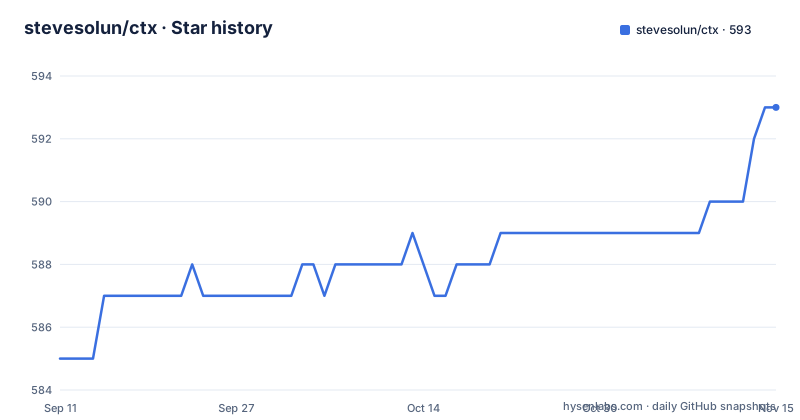
Star history
- stevesolun/ctx593 ★ · +8
| Repository | 2026-09-11 | 2026-11-15 |
|---|---|---|
| stevesolun/ctx | 585 | 593 |
8 Stars in the last 65 days, measured from the daily GitHub snapshot. Compare with other projects
Editorial analysis
The winner is chosen by a fixed rule and never by a model
Most tool comparisons rank candidates on a score. This one refuses to. The winner is chosen by a fixed rule: discard every candidate below the reliability floor, then minimize attributable cost, then break ties toward the simpler configuration. Reliability is a requirement, not a tie-break, which means a cheap configuration that fails the floor loses to an expensive one that passes. The second half of that sentence is the part worth pausing on, because an LLM may explain a result and never decides one. So the model in the loop explains, and a deterministic comparison decides. The scope of that comparison is narrow and stated in the same breath: release 1.0.21 compares capability configurations within one coding-agent harness and does not compare Codex, Claude Code or other harnesses against one another. The tool answers which skills, instructions and MCP servers to enable inside the harness you already run, not which harness to buy.
The release note says a simulation cannot authorize spend
The most useful paragraph in the readme is the scope note for 1.0.21, and it is mostly a list of things the result does not establish. Verification runs in an isolated home and without network access, so a user's package caches are not a supported dependency source. For an installable Python project the tool builds a campaign environment and installs it offline, which means the build backend and dependencies must already be available without downloading them; in the other ecosystems verification is supported only when the runtime is usable from the host PATH under that isolated home and the verification dependencies are already present in the repository. Two sentences set the tone. The evidence is for normal development, and it does not prove that deliberately hostile code cannot deceive its own test runner. And release qualification did not include a paid live-provider trial, so the instruction is to inspect ctx doctor and the dry run before authorizing spend.
Bare fit touches nothing while the dry run reads your git history
The cheapest entry point is genuinely inert. Bare ctx fit is described as free, local and read-only: it runs no model, spends nothing, and issues no git commands at all. Getting there takes two commands after upgrading the package:
pip install --upgrade claude-ctx
cd /path/to/my-project
ctx fit
What it prints is a report card for the repository rather than a recommendation, and the readme shows an abridged run against this repository:
Repository: /path/to/ctx
Languages:  python, javascript

Current AI coding setup
  Instructions:  AGENTS.md, CLAUDE.md
  Tool config:   .claude/settings.local.json
  Installed skills: 26

How this repository verifies itself
  test       python -m pytest -q
             from pyproject.toml [tool.pytest] (high confidence)
  typecheck  python -m mypy src
             from pyproject.toml [tool.mypy] (high confidence)
  lint       python -m ruff check .
             from pyproject.toml [tool.ruff] (high confidence)
  build      python -m build
             from pyproject.toml [build-system]
Read the provenance column, because that is the interesting part. Test runs python -m pytest -q from the pytest table of pyproject.toml, typecheck runs python -m mypy src from the mypy table, lint runs python -m ruff check . from the ruff table, and build runs python -m build from the build-system table, all four marked high confidence. Nothing there is guessed from file extensions, and the commands are read out of project metadata, which is also why the header names python and javascript as the repository languages. The dry run differs from bare fit in one way that matters: it does read your history, running read-only git queries, log, show --name-only, ls-tree and rev-parse, to derive representative tasks, while writing nothing at all, not to the repository, not to the index, not to any ref. Python 3.11 or newer is required, and --json gives the same report for machines.
Spending needs two flags and a list of live prerequisites
The paid path is gated twice on purpose. Evaluating candidate configurations against real tasks takes ctx fit --test --budget N, and spending needs both flags, because --test without --budget only plans. ctx doctor is the command that tells you whether a real evaluation can even run here. The prerequisites it checks are specific: the harness extra, installed as claude-ctx[harness], Node.js with npx for the workspace-filesystem MCP, a matching provider credential, and Bubblewrap on Linux. The base install can profile, plan and simulate, which is enough for the read-only report and nothing more. The failure modes are described without hedging. With no matching provider credential, --test runs in simulation, which the readme says proves the pipeline but not your repository. With a credential but a missing live prerequisite, the tool refuses the run before trial setup rather than starting one. And a simulated result is refused as evidence for --apply and --pr, which closes the loophole where a free run turns into a paid one by accident.
Ubuntu setup installs a system-wide AppArmor profile with sudo
The Linux instructions are the longest block of commands in the readme, and they change host policy rather than project files. Ubuntu 24.04 restricts unprivileged user namespaces, and merely installing bwrap does not prove it can start the network-disabled namespace the tool uses, so Ubuntu's packaged and scoped bwrap-userns-restrict profile is installed and loaded for /usr/bin/bwrap:
sudo apt update
sudo apt install bubblewrap apparmor-profiles apparmor-utils
if [ ! -e /etc/apparmor.d/bwrap-userns-restrict ]; then
  sudo install -m 0644 \
    /usr/share/apparmor/extra-profiles/bwrap-userns-restrict \
    /etc/apparmor.d/bwrap-userns-restrict
fi
sudo apparmor_parser -r /etc/apparmor.d/bwrap-userns-restrict
ctx doctor
The reasoning after those commands is the part to read. Keep Ubuntu's global unprivileged-user-namespace restriction enabled, and use the targeted Bubblewrap profile rather than weakening that system-wide security boundary. The profile is administrator-visible host policy for every /usr/bin/bwrap caller, not something this tool owns privately, and the commands are written to preserve an existing local profile rather than overwrite one that is already installed. Verification of that path is left to ctx doctor, which proves it with a bounded /bin/true probe in the same no-network namespace, executing no repository code and calling no model. For a tool whose whole job is running other people's test suites, that separation is the point: the sandbox is enforced by administrator policy and the tool checks that policy rather than negotiating it. The readme links Ubuntu's own guidance on unprivileged user namespace restrictions and the upstream profile file, which is where an operator should look before copying the block.
--apply writes one sidecar file and needs live evidence first
Two flags write, and they write different things. ctx fit --apply puts the winning configuration into the working tree on whatever branch you happen to be standing on, prints every proposed change first, and stops there unless you pass --yes. The write itself runs no git command: nothing is staged, committed or pushed. Reaching that point does run git, because --apply is refused without evidence from ctx fit --test --budget N, and deriving the tasks for that evaluation uses the same read-only queries the dry run uses. Every plan contains exactly one tool-owned artifact, .ctx/fit-configuration.json, which records the pinned model plus the exact instruction and capability bytes that were evaluated, along with their hashes, so ordinary ctx run invocations can validate and activate that configuration later. Replacing an existing sidecar is guarded by a compare-and-swap check, and a newly created one stays untracked until you add it, which is why the undo column of the readme's table says to restore the tracked file from version control or your own saved copy. Review is the matching half: git diff on that one path when it is tracked, or reading the file directly when it is not.
The manifest calls the public surface one command and registers several
The packaging metadata carries its own commentary, and the commentary sits oddly next to the list below it. A comment above the scripts table states that the public surface is one command, then explains that modules behind removed entry points still run via python -m, that only the installed console scripts were retired so no capability was lost, that entry points for modules already moved point at their canonical package path, and that legacy flat shims such as ctx_init and scan_repo keep working for anyone invoking a file path directly. The table that follows still registers ctx-init, ctx-scan-repo and ctx-source-registry, and the comment itself admits some entries are waiting for a later move. Two other details matter. The runtime dependencies are markdown, networkx, numpy, pymdown-extensions and pyyaml, with no model provider client among them, which fits a base install that profiles and simulates and needs the harness extra to evaluate. And the classifiers name MacOS, POSIX and Linux with Python 3.11 through 3.13, with no Windows entry, while Bubblewrap is named as a Linux prerequisite.
The description promises a 79,958 node graph the readme never explains
The project description sells two products. One is repository-aware recommendations across a shipped graph of 79,958 nodes, made up of 68,494 skills, 467 agents, 10,790 MCP servers and 207 harnesses, which can be used with your own inventory instead. The readme that follows documents none of that, it documents one command. The gap is visible in the tree rather than hidden: there is a graph/ directory, a skills/ directory, an imported-skills/ directory, a .codegraph/ directory and a skills-lock.json, so the graph is plainly there and plainly not what the visible prose is about. The releases show the same split, with a v1.0.21 for the tool and a separate graph-artifacts-v1.0.21-7cf8fb62 published the same day, the graph getting its own artifact channel named after a commit. The rest of the tree supports the tool side: benchmarks/, qa/, docs/ with a mkdocs configuration and its own requirements-docs.txt, SECURITY.md, STATE.md, install.sh, hooks/ and a .githooks/ directory. If you came for the graph, this readme is not where it is described.
Editorial conclusion
CTX Fit fits a team that already runs an agent harness on one repository and wants evidence for which capabilities to enable, because it derives tasks from real history, verifies with the repository's own test command, and refuses to write anything without a live evaluation behind it. It does not fit a harness comparison project, since 1.0.21 explicitly excludes comparing Codex against Claude Code, and it does not fit an environment that cannot already build its project offline, since verification runs without network access and treats user package caches as unsupported. Before running an evaluation, read the release scope note, run ctx doctor to see which prerequisites are missing, use the dry run first because it reads your git history even though it writes nothing, and remember that qualification for 1.0.21 did not include a paid live-provider trial.
Frequently asked questions
How does CTX Fit decide which AI coding setup wins?
By a fixed rule rather than a score: candidates below the reliability floor are discarded, then attributable cost is minimized, then ties break toward the simpler configuration. An LLM may explain the result but never decides it.
What does the free ctx fit command do to my repository?
Bare ctx fit runs no model, spends nothing and issues no git commands at all. It reports the current setup and the verification commands it found in project metadata. The dry run is different: it runs read-only git queries to derive representative tasks and writes nothing.
What does CTX Fit need before it can spend money?
Both --test and --budget. A real evaluation also needs the harness extra, Node.js with npx for the workspace-filesystem MCP, a matching provider credential and Bubblewrap on Linux. ctx doctor reports which of these are present.
Can CTX Fit compare Claude Code against Codex?
Not in release 1.0.21. It compares capability configurations within one coding-agent harness and explicitly does not compare harnesses against one another.
What does ctx fit --apply write to my repository?
One tool-owned artifact, .ctx/fit-configuration.json, recording the pinned model and the instruction and capability bytes evaluated with their hashes. It prints every proposed change and stops unless you pass --yes, and the write runs no git command.
Official sources
Add this badge to your README
If you maintain this project, the badge below links readers to this analysis and shows its maintenance status from the daily GitHub snapshot. Paste the markdown into your README; add ?metric=license or ?metric=stars to the image URL for a different field.

[](https://hysenlabs.com/projects/stevesolun-ctx)Star history chart for your README
[](https://hysenlabs.com/projects/stevesolun-ctx)Was this useful?