Stoat backend: the repository is Stoat, the configuration files are still Revolt
The software powering Stoat
At a glance
- What is it?
- A Rust workspace of crates forming the backend of the Stoat chat service, split into core libraries, a REST server, a WebSocket events server, three services and two daemons, developed against a compose file with MongoDB, KeyDB, an S3-compatible store and RabbitMQ. The rename to Stoat did not reach the config files, the bucket names or the Redis fork, and the Redis client is patched from a personal fork at a pinned revision.
- Who is it for?
- Stoat's backend is worth reading if you want to see how a chat service is split into separately deployable pieces, because the crate boundaries here are unusually explicit and each service gets its own port. Four things to settle first.
- Can I use it commercially?
- Check first. The repository uses a licence we do not classify automatically, so read its LICENSE file before any commercial use.
- Is it still maintained?
- Yes. The repository received new commits within the last day.
- What is it written in?
- Mainly Rust, according to GitHub's language statistics.
Answers come from the project's GitHub data, last synced on November 24, 2026, and from our analysis. They are not legal advice.
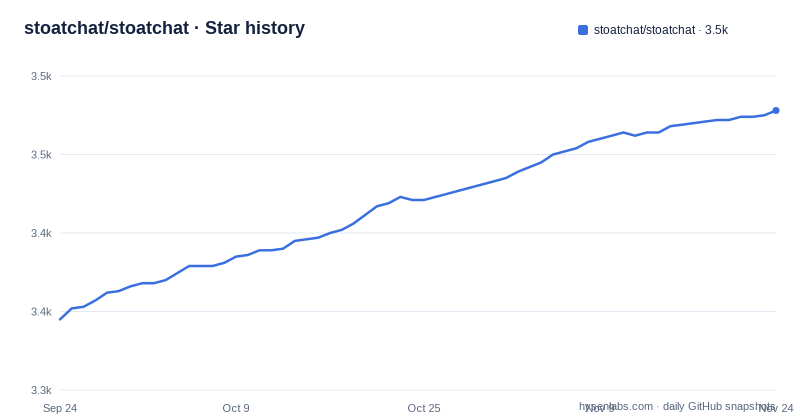
Star history
- stoatchat/stoatchat3,478 ★ · +133
| Repository | 2026-09-24 | 2026-11-24 |
|---|---|---|
| stoatchat/stoatchat | 3.3k | 3.5k |
133 Stars in the last 61 days, measured from the daily GitHub snapshot. Compare with other projects
Editorial analysis
The repository is Stoat and the configuration files are Revolt
The rename is incomplete, and the residue is useful for orientation.
The default configuration file is named Revolt.toml, and its override file is Revolt.overrides.toml. The ports table lists the web front end as Revolt Web App. The compose file creates an object storage bucket called revolt-uploads. The workspace patches the Redis crate to a fork hosted at github.com/revoltchat/redis-rs, and one of the notification dependencies is revolt_a2.
Even the project's recorded homepage is a revolt.chat address, pointing at an API page under developers.revolt.chat, while the technical documentation and contribution guidelines live at developers.stoat.chat.
None of this breaks anything, since a config file name is just a name. But anyone searching the codebase for Stoat will miss the configuration, and anyone auditing dependencies for third-party code will find a fork under a name the project no longer uses.
The Redis client is a fork pinned to one revision
The workspace manifest contains a patch section, which is Cargo's mechanism for replacing a dependency that would otherwise come from crates.io. One entry is active.
It maps a version requirement of 0.23.3 onto the redis package and redirects it to a git repository, pinned to a specific revision hash. So the Redis client this backend compiles against is not the one published on crates.io. It is a fork, at a fixed commit, from an organisation whose name predates the rename.
Pinning a revision is the conservative choice, since a fork can change under you otherwise. But it also means the dependency cannot receive upstream fixes without a deliberate update here, and a licence or advisory scan has to look at the fork's contents rather than at the crates.io entry it replaces.
Two further patch lines sit commented out, both redirecting an authifier package to a path outside the repository, in a sibling directory. Whether that split-out crate has since moved elsewhere is not recorded anywhere in the tree.
The Redis service is KeyDB, and MinIO is now Silo
The compose file does not run the software its service names suggest.
The service named redis pulls the image mirror.gcr.io/eqalpha/keydb, which is KeyDB rather than Redis. It is a drop-in-compatible fork, so the configuration works, but anyone reading the compose file expecting to test against Redis is testing against something else.
The service named minio pulls mirror.gcr.io/pgsty/silo, and the comment above it names the situation directly: Silo, the artist formerly known as MinIO, an S3-compatible storage server. So the upstream project was renamed and the compose file moved with it while keeping the old service name, the old environment variable names for the root user and password, and the old port mapping.
Every image in the file is pulled through mirror.gcr.io rather than from a public registry namespace, which means the development environment depends on that mirror being reachable and current.
Two services ship working default credentials
The object storage service sets its root user and root password to the same literal string, minioautumn, and the message broker sets its default user to rabbituser with the password rabbitpass. Both pairs are committed in the repository.
That is normal for a development compose file, and it is not a production exposure on its own. It becomes one if the published ports are reachable, which is exactly what the file does: the object store publishes two ports to the host, one for the API and one for its console, and the broker publishes both its AMQP port and its management interface.
The file's own guidance is to change them by way of an override file when ports clash, and the port table in the documentation lists these services on their standard ports. So the shape of a development setup is well documented, including the credentials, which is precisely why they should be treated as public.
Three crates the image builds are missing from the crate table
The documentation opens with a table of fifteen crates, grouped as core libraries, services and daemons, each with a path and a one-line description. It reads as the map of the workspace.
It is not complete. The container build copies manifests for three crates that do not appear in the table: a core parser crate, a core rate limits crate, and a voice ingress daemon. The workspace member list in the manifest uses globs for the core, services and daemons directories, so those three are built and linked without ever being named in the documentation.
The names of the two undocumented core crates suggest their roles, and both would matter to anyone reasoning about the request path. A separate example configuration for LiveKit at the top level points at the same area, since a voice ingress daemon and a LiveKit configuration file belong to the same feature.
So the crate table is a useful orientation that should not be trusted as an inventory.
Two Rust versions, one stated and one pinned
The documentation states a minimum supported Rust version of 1.86.0 or higher. The container build pins something else: a base image tagged with Rust 1.92.0 on a slim Debian trixie variant.
Those two numbers are not in conflict, since a minimum and a build image are different things. But they are the only two places a version appears in the visible material, and they are six minor releases apart, which is a wide gap for a floor that contributors are expected to build against.
Two more toolchain files sit at the top of the tree, a rust-toolchain.toml for Cargo and a .mise/ directory for the version manager the setup instructions tell you to install. So there are three mechanisms influencing which compiler runs: the stated floor, the pinned toolchain file, and the base image.
The optional faster linker is configured the same way, with an environment variable in the .env file that rewrites the cargo invocation.
One shell script drives three phases of the image build
The Dockerfile does not run Cargo directly. It copies a single script into the build stage and invokes it three times, with the arguments tools, deps and apps, so dependency compilation is separated from application compilation and both are separated from installing system packages.
The build stage is configured for cross-architecture work. It pins the platform to the build platform rather than the target, takes the target architecture as an argument, adds that architecture to the package database, and installs the architecture-suffixed development packages for the AV1 decoder and OpenSSL. A second file, Dockerfile.useCurrentArch, exists for the non-cross case.
The image runs its build stage as user 0:0, which is the only way to add architectures and install packages, and it sets a default of ten cargo build jobs.
So reproducing a build outside Docker means reproducing a script that is not in the manifest, which is the practical reason the Nix flake and the mise tasks both exist. The documented route outside the container is three commands:
git clone https://github.com/stoatchat/stoatchat stoat-backend
cd stoat-backend
mise install
mise build
and the optional faster linker is selected by rewriting the cargo invocation in the .env file.
Editorial conclusion
Stoat's backend is worth reading if you want to see how a chat service is split into separately deployable pieces, because the crate boundaries here are unusually explicit and each service gets its own port. Four things to settle first. The Redis client is not upstream Redis: the workspace patches it to a fork at a single pinned revision, so read that before trusting a dependency audit. The development compose file commits working credentials for the object store and the broker, so do not expose those ports. Three crates the build compiles are missing from the crate table in the documentation. And the licence is unresolved: the recorded field is unspecified even though a licence file is in the tree. If you are evaluating it for production, the technical documentation on the separate developer site, not this repository, is where the operational detail lives.
Frequently asked questions
what is stoat chat
The repository holds the software powering Stoat: the Rust services and libraries behind it, split into core libraries for configuration, database, files, models, permissions, presence and results, a REST API server, a WebSocket events server, three services including a file server and a proxy, and two daemons. The API page it points at is still on the revolt.chat domain.
Can I self host Stoat chat?
The repository ships a compose file for a local development environment and a default configuration file described as suited for development, but it does not document a production self-hosting path. Operational documentation lives on a separate developer site linked from the readme.
Is Stoat chat free and open source?
The file does not state terms. The recorded licence is unspecified even though a LICENSE file sits at the top of the tree, and there is a cargo-deny configuration in the repository suggesting licences are checked somewhere in the build, but no licence is named.
Is Stoat chat safe?
Nothing in the repository makes a safety or security claim. What it does show are development defaults, including committed credentials for the object store and the message broker, and container ports published to the host.
stoat chat vs discord
The file makes no comparison and names no alternative. It describes its own components instead: a REST API server, a WebSocket events server, a proxy, a Tenor proxy, a file server, and daemons for timed cleanup and push notifications.
What is Stoat slang for?
That question is about the word rather than about the software. The repository describes itself as the services and libraries that power the Stoat service, and says nothing about the term itself.
Official sources
Add this badge to your README
If you maintain this project, the badge below links readers to this analysis and shows its maintenance status from the daily GitHub snapshot. Paste the markdown into your README; add ?metric=license or ?metric=stars to the image URL for a different field.

[](https://hysenlabs.com/projects/stoatchat-stoatchat)Star history chart for your README
[](https://hysenlabs.com/projects/stoatchat-stoatchat)Was this useful?