stacks.js: the JavaScript building blocks for Stacks
JavaScript libraries for identity, auth, storage and transactions on the Stacks blockchain.
At a glance
- What is it?
- stacks.js is a TypeScript monorepo of MIT licensed packages for building on the Stacks blockchain, covering transaction construction, wallet key handling, Gaia storage, auth requests and network access. It is the right foundation for a JavaScript application, and the wrong choice if you need wallet connection, which lives in a separate repository.
- Who is it for?
- Adopt stacks.js when you are building a JavaScript or TypeScript application that signs transactions, stores files on Gaia, or issues auth requests on Stacks, and skip it when your work is read-only, where calling a node's HTTP API directly is simpler.
- Can I use it commercially?
- Yes. MIT is a permissive licence: you can use, modify and sell software built on it, as long as you keep its copyright and licence notices.
- Is it still maintained?
- Yes. The repository last received commits 4 days ago.
- What is it written in?
- Mainly TypeScript, according to GitHub's language statistics.
Answers come from the project's GitHub data, last synced on November 7, 2026, and from our analysis. They are not legal advice.
Star history
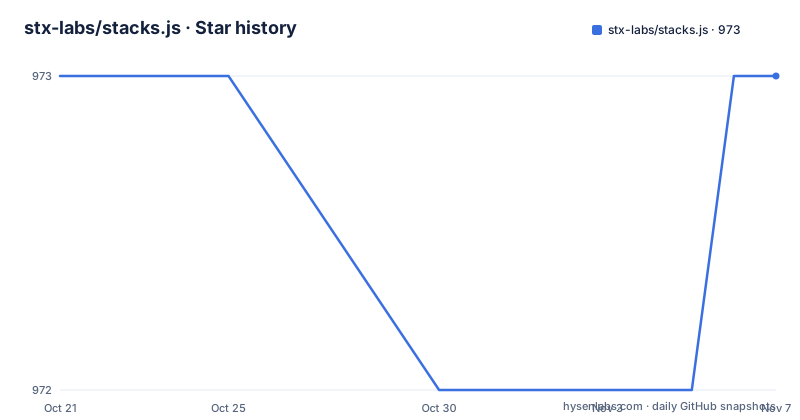
- stx-labs/stacks.js973 ★ · +0
| Repository | 2026-10-21 | 2026-11-07 |
|---|---|---|
| stx-labs/stacks.js | 973 | 973 |
0 Stars in the last 17 days, measured from the daily GitHub snapshot. Compare with other projects
Editorial analysis
One repository, many scoped packages
stacks.js is a monorepo whose root package.json declares a workspace over the packages directory, and it publishes each package separately under the @stacks scope. The README calls it a one-stop solution for working with the Stacks blockchain from JavaScript or TypeScript, and the packages are grouped into three families.
The primitives are the core of the work. @stacks/transactions constructs and decodes transactions and works with Clarity smart contracts. @stacks/wallet-sdk builds wallets, manages accounts and handles keys. @stacks/storage stores and fetches files through Gaia, the decentralised storage system. @stacks/encryption provides the encryption functions used by the other stacks.js packages, and @stacks/common holds the utilities those packages share. @stacks/auth constructs and decodes authentication requests for Stacks applications, and @stacks/profile manipulates user profiles.
The smart contract packages are narrower. @stacks/bns interacts with the BNS contract, and @stacks/stacking covers proof of transfer stacking. @stacks/network is the layer for talking to Stacks blockchain nodes over their API.
The tool for the terminal is @stacks/cli, a command line interface to interact with auth, storage and Stacks transactions, which is the fastest way to sanity check a key or a contract call without writing any application code.
Because each package has its own README with installation instructions and usage guidelines, the practical entry point is the package you need rather than the monorepo as a whole.
The dependency layering explains the package boundaries
The package list is not arbitrary. The README describes @stacks/encryption as the encryption functions used by stacks.js packages, and @stacks/common as the common utilities used by stacks.js packages. Those two sit underneath the higher level packages, and the higher level packages are what an application actually imports.
That structure has an immediate consequence for dependency management. A project that only needs to build and sign a transaction ends up pulling @stacks/transactions, and through it the shared utility and encryption layers. A project that also stores files pulls @stacks/storage on top of the same base. The cost of the ecosystem is shared, so the number of packages you install matters less than whether you need the transaction layer at all.
It also explains why the packages carry separate version numbers. @stacks/encryption and @stacks/common are both at 7.6.0, published on 2026-07-29, while @stacks/wallet-sdk sits at 7.5.0 from 2026-06-23. These are independent releases from a shared repository, so a wallet application can find itself with a wallet-sdk version a step behind the common layer it depends on.
That is the main upgrade cost of this project, and it is a normal one for a monorepo of separately published libraries: check the changelog of every package you actually depend on, rather than assuming a single version bump covers you.
Installing one package rather than the monorepo
Installation is npm and package scoped, and the README gives a concrete example for testing the latest Nakamoto changes:
npm install @stacks/[email protected]That example is worth reading twice, because it carries a protocol requirement rather than a routine install. Version 6.16.0 or later is what you need to test the latest Nakamoto changes, so a version floor appears in an otherwise ordinary install command.
For day to day work you install the packages you need, one scoped package at a time. Nothing in the README suggests installing the repository itself, and the workspace layout confirms that the monorepo is a development container rather than a distributable.
The auto-generated library references for the packages live at stacks.js.org, and the README states that installation instructions and usage guidelines are in the README of each package directory. So the documentation path is per package, which is how the packages stay independently usable.
There is a migration note for anyone coming from an older world. Applications built on blockstack.js are pointed at the migration guide in .github/MIGRATION.md, and @stacks/keychain is marked deprecated in favour of @stacks/wallet-sdk. Both details matter if you are maintaining an older codebase, since the deprecated package will not receive the work.
Wallet connection is not in this repository
The one gap in the package list is the one most web developers look for first. @stacks/connect, the library that connects a web application to Stacks wallet browser extensions, is listed under Connecting Wallets but is explicitly marked as living in a separate repository.
The difference in approach matters for anyone assembling a stack. @stacks/connect is a browser extension bridge, concerned with the injected provider API and the permission prompt, and it is versioned and released independently of the transaction and wallet packages here. This repository provides everything after that point: building the transaction, signing it with a key, broadcasting it, reading the result.
So a typical application ends up depending on two projects rather than one, and the version compatibility between them is your problem to manage. The README does not describe a compatibility matrix between @stacks/connect and the packages in this monorepo, so the practical approach is to check the release notes of both when you upgrade either.
The same split shows up in the CLI package description, which covers auth, storage and Stacks transactions rather than wallet extension interaction. The scope of this monorepo is the protocol side of Stacks, and the browser wallet is somebody else's package.
Three module formats and a changesets based release flow
The root build script runs the workspace clean and then three separate build passes, one for CommonJS, one for ESM and one for UMD:
npm run build --workspaces --if-presentPublishing three formats per package is a compatibility decision rather than an accident. A browser bundler wants ESM, a Node project may still require CommonJS, and a script tag wants UMD. Consumers do not choose a format at install time, the package exports map does it, but the build cost is paid at release time.
Releases run through changesets. The release script builds and then publishes with changeset publish, and versioning runs changeset version followed by a script that updates the root CHANGELOG.md. The .changeset/ directory at the top of the repository holds the pending changesets, which means every version bump is driven by a changeset describing what changed rather than by a hand edited version field.
That mechanism is what makes the independent package versions workable. A changeset touches one package, that package gets a patch or minor, and the rest of the monorepo stays where it is.
Documentation is generated as well, with build:docs running typedoc after clearing the docs directory, and the auto-generated references are published at stacks.js.org.
Lint, format and dependency hygiene tools in the repository
The tooling in the root package.json is worth a look, because it tells you how the project is policed day to day.
Linting runs oxlint over the source directories of the packages, and formatting runs oxfmt over the same path, with separate check and fix variants, and the lint script runs the check form of both. The project has moved away from the ESLint and Prettier pairing that its own devDependencies still list for other purposes, and both oxlint and oxfmt are present at recent versions.
Two tools stand out as deliberate quality checks. The madge script runs madge with the circular option over the packages directory for TypeScript extensions, excluding declaration files, which is a check for dependency cycles inside the published packages. The knip.jsonc file at the top level points at knip, a tool for finding unused files, dependencies and exports in a repository.
Type checking runs per workspace, and the test script does the same, with jest and ts-jest at the root along with fetch mocking and module name mapping helpers. The TypeScript configuration is split into tsconfig.json and tsconfig.build.json, the usual arrangement for separating the editor configuration from the published build.
The continuous integration badge in the README points at a tests workflow. Husky is wired up through the prepare script to install the git hooks, and the repository has a commitlint configuration for conventional commit messages.
Where stacks.js is the wrong tool
There is a clear case for not using this library: an application that only reads chain data. If you want to fetch an account, a transaction or a contract call result, calling the Stacks node API over HTTP with the fetch API is a handful of lines and adds no dependency at all. The value of @stacks/transactions and @stacks/wallet-sdk is in constructing and signing what you send, and a read-only tool does not send anything.
There is a second case, which is more of a maintenance judgement than a technical one. This is a large surface, eleven active packages plus a deprecated one, each released on its own schedule, and the version alignment between them is left to the consumer. A team with a narrow need, say Gaia storage and nothing else, takes on that dependency graph to get one capability. The alternative approach is to depend on the single package you need and accept that you are responsible for pinning it.
A third boundary is protocol churn. The README asks you to use version 6.16.0 or later to test the latest Nakamoto changes, which is a reminder that a blockchain client library has a compatibility surface with the network itself, and that surface moves.
The alternative to the whole library set is the raw node API plus hand written transaction construction, which is where you would end up if you wanted zero dependencies. That is a real difference in approach, and the cost of it is implementing transaction encoding, post conditions and fee handling yourself.
Editorial conclusion
Adopt stacks.js when you are building a JavaScript or TypeScript application that signs transactions, stores files on Gaia, or issues auth requests on Stacks, and skip it when your work is read-only, where calling a node's HTTP API directly is simpler. Verify three things before you pin versions: that the package you need has a release new enough for the protocol changes you are targeting, since the Nakamoto changes require version 6.16.0 or later, that your dependency graph agrees on one major, because packages such as @stacks/common and @stacks/encryption are released independently of @stacks/wallet-sdk, and that you have removed @stacks/keychain, which is deprecated in favour of @stacks/wallet-sdk. The last push to main was on 2026-10-07 and the licence is MIT.
Frequently asked questions
Which packages make up stacks.js?
The primitives are @stacks/transactions, @stacks/wallet-sdk, @stacks/storage, @stacks/encryption, @stacks/auth, @stacks/profile, @stacks/network and @stacks/common, with @stacks/bns and @stacks/stacking for smart contract work and @stacks/cli for command line use. @stacks/keychain is deprecated in favour of @stacks/wallet-sdk.
How do I install stacks.js for the latest Nakamoto changes?
The README asks you to use version 6.16.0 or later, giving npm install @stacks/[email protected] as the example. Installation instructions for each package are in the README inside that package's directory.
Where does wallet connection for Stacks live?
The @stacks/connect package, which connects a web application to Stacks wallet browser extensions, is maintained in a separate repository. This monorepo covers transaction construction, wallet and key handling, storage, auth requests and node access.
How are stacks.js packages versioned and released?
Each package is released separately under the @stacks scope using changesets, so versions do not move in lockstep. For example @stacks/common and @stacks/encryption were at 7.6.0 while @stacks/wallet-sdk was at 7.5.0.
What licence is stacks.js released under?
Stacks.js is open source and released under the MIT Licence, with the LICENSE file at the root of the repository and the licence declared in the package metadata.
Official sources
Add this badge to your README
If you maintain this project, the badge below links readers to this analysis and shows its maintenance status from the daily GitHub snapshot. Paste the markdown into your README; add ?metric=license or ?metric=stars to the image URL for a different field.

[](https://hysenlabs.com/projects/stx-labs-stacks-js)Star history chart for your README
[](https://hysenlabs.com/projects/stx-labs-stacks-js)Was this useful?