Maple Mono V7 on the v7 branch: a frozen snapshot, three package managers and a CN build with no variable format
Maple Mono: an open-source monospace font with round corners, ligatures and Nerd Font icons for IDEs and terminals, with fine-grained customization options and a perfect 2:1 width ratio between Chinese and English characters.
At a glance
- What is it?
- Maple Mono is a round-cornered monospace font with ligatures and Nerd Font icons. The v7 branch is now a frozen snapshot, so the real decision is which build to install and whether V8 is ready for you.
- Who is it for?
- Pick Maple Mono if you want a rounded coding font with ligatures, Nerd Font icons and a 2:1 Chinese to English width, and choose the NF or NF CN build that matches your terminal. Skip the v7 branch if you want new fixes, because it is frozen and V8 is still in beta.
- Can I use it commercially?
- Check first. The repository uses a licence we do not classify automatically, so read its LICENSE file before any commercial use.
- Is it still maintained?
- Yes. The repository last received commits 1 day ago.
- What is it written in?
- Mainly Python, according to GitHub's language statistics.
Answers come from the project's GitHub data, last synced on November 15, 2026, and from our analysis. They are not legal advice.
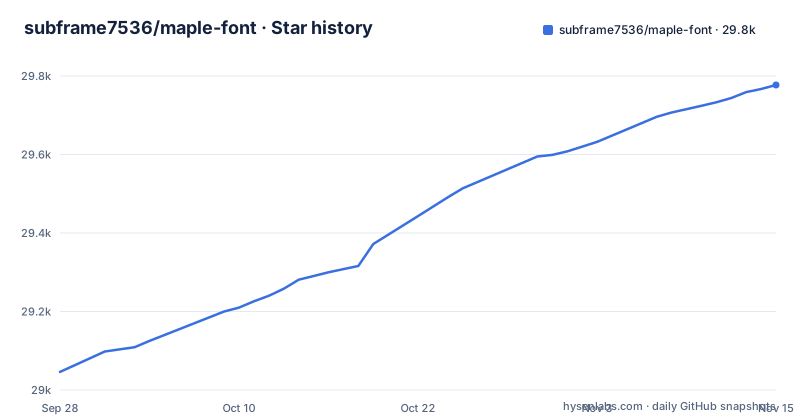
Star history
- subframe7536/maple-font29,777 ★ · +731
| Repository | 2026-09-28 | 2026-11-15 |
|---|---|---|
| subframe7536/maple-font | 29k | 29.8k |
731 Stars in the last 48 days, measured from the daily GitHub snapshot. Compare with other projects
Editorial analysis
The v7 branch is a frozen snapshot, and V8 is in the variable branch
The default branch of subframe7536/maple-font is v7, and its README opens with a notice that the branch has been frozen as a snapshot of V7. The latest features and bug fixes go into V8, which you find in the variable branch. The last push to the repository was on 2026-10-30, so the project is moving, but that activity is not on the branch you land on by default.
The release list shows three V8 betas: v8.0-beta.1 on 2026-08-09, v8.0-beta.2 on 2026-08-23 and v8.0-beta.3 on 2026-09-20. The pyproject.toml on the v7 branch still says version 7.9, and the download section links to the v7.9 release page. If you read this repository to decide what to install, you are reading the stable V7 line while the newer work carries a beta label.
What V7 changed compared with V6
V7 is described as a completely remade version. It provides the variable font format and the source files of the font project, redesigns more than half of the glyphs and offers smarter ligatures. V6 stays available on the main branch for anyone who wants the older design.
The glyph work is specific. The `@ $ % & Q ->` shapes are new, corners are rounded, and the italic style uses cursive forms for `f i j k l x y`. The variable build gives you a continuous range of weights with finer-grained italic glyphs. Ligature rules live in the source/features directory, so the list of supported sequences is something you read in the repository rather than guess from screenshots.
Nerd Font icons come as separate NF packages
Maple Mono advertises first-class Nerd Font support, and the package names show how that is split. The plain Maple Mono package carries the font without icons, while Maple Mono NF adds the Nerd Font glyphs and Maple Mono NF CN adds both the icons and the Chinese character set. Scoop, Homebrew, ArchLinuxCN, AUR and Nixpkgs each expose these as distinct names.
The consequence is that a terminal prompt using Nerd Font glyphs will show missing-glyph boxes if you installed the plain package. Install an NF variant and select that family name in your terminal or editor. The same naming applies to the Normal line, which Homebrew lists with its own NF and CN variants.
The CN build gives a 2:1 grid but has no variable format and wider Chinese spacing
The CN version is based on Resource Han Rounded and covers Simplified Chinese, Traditional Chinese and Japanese. Its main trait is exact 2:1 alignment between Chinese and English characters, which keeps multilingual text and Markdown tables on a regular grid.
There are two stated costs. The CN version has no variable format support, so you get static weights only. Also, the spacing of Chinese characters is larger than in other popular Chinese fonts. If your editor mixes Chinese and English heavily, the alignment gain is the reason to choose it. If you want to fine-tune weight continuously, or want denser Chinese text, this build works against you. The README points to the cn-base release notes and issue 211 for details.
Install commands differ per platform, and Arch has a recommended and a not recommended route
Releases hold every font archive for manual download. On Windows, Scoop needs the nerd-fonts bucket first:
scoop bucket add nerd-fonts
scoop install Maple-Mono-NF-CN
On macOS and Linux, Homebrew installs casks:
brew install --cask font-maple-mono-nfFor Arch Linux, ArchLinuxCN is marked as recommended because it lets you download a single package zip without fetching every package zip in the pkgbase. AUR does not allow that, so it is marked not recommended:
paru -S ttf-maplemono-nf-unhintedNixOS users add entries such as `maple-mono.NF-unhinted` to `fonts.packages`. Pay attention to hinted versus unhinted: Scoop offers a Maple-Mono-autohint package and the Arch repositories offer autohint and unhinted names, so the suffix decides which one you get.
Building your own font needs Python 3.10 or newer and FontForge
The font is customizable: you enable or disable features and produce your own build. The tooling is Python. pyproject.toml requires Python >=3.10 and pins foundrytools-cli==2.1.1, glyphslib==6.12.7, python-minifier==3.1.0, skia-pathops==0.9.2 and typing-extensions==4.15.0. The requirements.txt file is generated by uv and also pins fonttools==4.62.1 and afdko==5.0.0 among its transitive packages.
The Dockerfile starts from python:3.11-slim and installs fontforge with apt-get. It declares a volume at /app/fonts and sets an empty BUILD_ARGS variable. Its entry point is:
sh -c "python build.py $BUILD_ARGS"So build options travel through BUILD_ARGS into build.py, and finished fonts are meant to appear in the mounted fonts folder. Without Docker you must supply FontForge and the pinned Python packages yourself.
Screenshots and the editor setup behind them
The README screenshots were produced with the CodeImg extension and the Maple theme for VS Code. The stated configuration is font size 16px, line height 1.8 and default letter spacing. That is a useful starting point if you want your editor to look like the project images, but it is one author's setup rather than a requirement.
The repository layout shows where each concern lives: build.py and task.py for building, config.json for build configuration, source for the font sources, woff2 for web output, and maple-font-page for the website at font.subf.dev. The license is OFL-1.1, with OFL.txt and AUTHORS.txt in the root.
Editorial conclusion
Pick Maple Mono if you want a rounded coding font with ligatures, Nerd Font icons and a 2:1 Chinese to English width, and choose the NF or NF CN build that matches your terminal. Skip the v7 branch if you want new fixes, because it is frozen and V8 is still in beta. Before installing, check which release tag your package manager serves and whether you need the variable format, which the CN version lacks.
Frequently asked questions
Is Maple Mono a nerd font?
Maple Mono has first-class Nerd Font support through its NF packages, such as Maple Mono NF and Maple Mono NF CN. The plain Maple Mono package is the version without those icons.
What are the features of the Maple Mono font?
It has a variable format with fine-grained italics, rounded corners, new glyphs for @ $ % & Q ->, cursive f i j k l x y in italic, many smart ligatures, Nerd Font icons and feature switches for customizing your own build.
Does Maple Mono work in VS Code?
The project screenshots were made with the CodeImg VS Code extension and the Maple theme, using font size 16px and line height 1.8. Install a Maple Mono family and select it as your editor font.
Official sources
Add this badge to your README
If you maintain this project, the badge below links readers to this analysis and shows its maintenance status from the daily GitHub snapshot. Paste the markdown into your README; add ?metric=license or ?metric=stars to the image URL for a different field.

[](https://hysenlabs.com/projects/subframe7536-maple-font)Star history chart for your README
[](https://hysenlabs.com/projects/subframe7536-maple-font)Was this useful?