Mac Duo's only download link points at a tag named dev
Wish you could bring the iPhone Duo effect to your MacBook?
At a glance
- What is it?
- A small Swift app that reproduces the iPhone Duo lid-closing effect on a MacBook, using a lid angle sensor and live screen capture. The prebuilt app is signed and notarized, the local build is ad-hoc signed and costs you your screen recording permission, and both download links resolve through a single tag called dev.
- Who is it for?
- This is a small, honestly bounded project: the hardware requirements are stated as three separate restrictions, the failure modes are listed rather than discovered, and the licence is a standard permissive one with a notice file for attribution. Two things to check before you rely on it.
- Can I use it commercially?
- Yes. Apache-2.0 is a permissive licence: you can use, modify and sell software built on it, as long as you keep its copyright and licence notices.
- Is it still maintained?
- Yes. The repository last received commits 58 days ago.
- What is it written in?
- Mainly Swift, according to GitHub's language statistics.
Answers come from the project's GitHub data, last synced on November 14, 2026, and from our analysis. They are not legal advice.
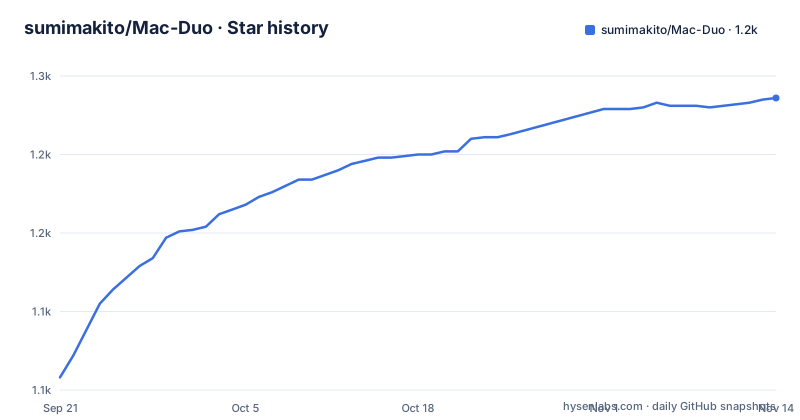
Star history
- sumimakito/Mac-Duo1,236 ★ · +178
| Repository | 2026-09-21 | 2026-11-14 |
|---|---|---|
| sumimakito/Mac-Duo | 1.1k | 1.2k |
178 Stars in the last 54 days, measured from the daily GitHub snapshot. Compare with other projects
Editorial analysis
Both downloads resolve through one tag called dev
There is exactly one release, and its tag is named for a development label rather than a version. The download links are a disk image and a zip, both fetched through that same tag path, and the version string embedded in the app is a 0.1.0 with a dev counter on the end. So the stable-looking download URL on the page is not a versioned artefact: it is a path through a tag whose contents can be replaced whenever the developer pushes a new build. Two people who follow the same instructions on different days may get different binaries under the same URL, and there is no version number on the download page for either of them to check against. For a tool whose entire job is a visual effect, that is a minor risk. It becomes a larger one the moment anyone runs the code it captures.
A local build is ad-hoc signed and costs you the permission
Building is one script, and it produces an app with an ad-hoc signature rather than a Developer ID one:
./build.sh --runThe page then names the consequence: macOS may require screen recording permission again after rebuilding with ad-hoc signing. That is the permission the app needs, because it captures your screen through a framework that requires explicit user consent. So every local rebuild invalidates the grant and costs a re-approval. The prebuilt app does not have this problem, because it is signed and notarized, and the reason it can be is named in a sponsorship note. One practical consequence worth stating plainly: if you are capturing your own screen, the permission is granted to a specific signed binary, so swapping between the prebuilt app and your own build means re-granting between them.
Free app, permissive code, and a sponsor who paid the signing fee
A note near the top says the app is completely free to use, and extends that to reusing the code in your own projects, asking only for sponsorship if it proved useful. The licence is Apache 2.0 with a notice file for attribution, which is one of the cleaner licensing statements in this class of project: no source-available hedge, no separate commercial clause. The funding paragraph is the interesting part, because it names what sponsorship actually bought. A team sponsored the Apple Developer Program membership used to sign and notarize the prebuilt build. So the annual cost of distributing a signed binary is covered by a named third party and the developer's ask is directed at users rather than at companies. The project also says it is built with AI assistance, one line in the acknowledgements, which is worth knowing when you read the source.
Three separate sensor restrictions, and one ignores a working display
The hardware gate is described in three parts and each part can fail on its own. Only MacBooks with a compatible lid angle sensor can use the effect, and the app reports when no sensor is available rather than failing silently. The sensor has to be one the operating system marks as built-in, which means an external display carrying a similar sensor is ignored even though the hardware is present and working. And the effect applies only to the built-in display, so a second screen shows nothing. Read together, that is a narrow target: a Mac laptop, with a recognised lid sensor, on its own panel. The requirement line says macOS 14 or later, and the app is available in English and Simplified Chinese.
Clicks pass through the effect to the apps underneath
One entry in the limitations list is a security-adjacent behaviour rather than a missing feature: clicks pass through the effect to the applications underneath it. The overlay is not a window that takes input. That is the right choice for a decorative effect, since a transparent layer that swallowed clicks would be maddening, and it also means you cannot click the effect itself to dismiss it or adjust it. Controls live in the menu bar instead, which the opening paragraph mentions and the rest of the page assumes. The rest of the list is equally plain: the effect stops when the machine sleeps as the lid closes, and it does nothing on hardware without the sensor.
Closing the lid starts the effect and also ends it
The whole feature is triggered by closing the lid, and the second limitation says the effect stops when the system sleeps as the lid closes. Those are the same physical action. A closed MacBook sleeps, so what you are watching is a transition that the operating system will terminate at the moment the animation is meant to matter, and whether you see the tilt and blur depends on how quickly the machine suspends and on the perspective you have dialled in. The page says that with the default settings it is recommended to view the effect in front of the machine, which is a fair instruction, and it offers adjustable perspective so the geometry can be tuned to where you stand. It does not say anything about keeping the machine awake while you watch, and the app cannot do that for you.
Building needs a recent toolchain and the repo ships two editor configs
The build requirement is Xcode with Swift 6.0 or later, and the whole build is one shell script, with a flag that also launches the result so you do not have to open it from Finder yourself. The repository root is tidy for a project this size: a package manifest, sources, resources, tests, assets, a licence, a notice file, the build script, and two editor directories for two different editors plus a tool version file for a version manager. Having tests in the tree is worth noting, because an app whose only input is a hardware sensor and whose only output is a visual effect is not obviously the kind of thing that accumulates test coverage. What the tests cover is not stated on the page.
Editorial conclusion
This is a small, honestly bounded project: the hardware requirements are stated as three separate restrictions, the failure modes are listed rather than discovered, and the licence is a standard permissive one with a notice file for attribution. Two things to check before you rely on it. Where the binary came from, because both download links resolve through one tag whose name is a development label rather than a version, so the artifact behind a given URL can change. And what it costs you locally, because building from source produces an ad-hoc signature that invalidates your screen recording grant, which you then re-approve. If your machine has a built-in lid angle sensor that macOS recognises, the app does one thing and lists precisely where it will not work. If it does not, the app tells you so rather than failing quietly.
Frequently asked questions
Is there a Duo for Mac?
Mac Duo is a Mac app that reproduces the effect of closing an iPhone with a second screen, applying perspective, blur and dimming to a MacBook's built-in display as the lid closes. It uses Metal for rendering and a screen capture framework for live content, with controls in the menu bar.
What hardware does Mac Duo need?
A MacBook with a compatible lid angle sensor that macOS marks as built-in, running macOS 14 or later, and the effect applies only to the built-in display. The app reports when no sensor is available, and an external display with a similar sensor is ignored.
How do I download Mac Duo?
A disk image and a zip, both linked from the page, and both resolve through a single release tag named dev rather than a version. The app is available for Apple Silicon and Intel Macs, and the page says these are development builds.
How do I build Mac Duo from source?
With Xcode and Swift 6.0 or later, run one shell script from the project directory, optionally with a flag that launches the result. The script produces an app with an ad-hoc signature, and the page warns that macOS may require screen recording permission again after rebuilding that way.
Can I reuse Mac Duo's code in my own project?
The page says the app is free to use and invites reusing the code, asking only for sponsorship. The licence is Apache 2.0 with a separate notice file for attribution. A sponsorship note also credits a third party with paying for the developer programme membership used to sign and notarize the prebuilt build.
Official sources
Add this badge to your README
If you maintain this project, the badge below links readers to this analysis and shows its maintenance status from the daily GitHub snapshot. Paste the markdown into your README; add ?metric=license or ?metric=stars to the image URL for a different field.

[](https://hysenlabs.com/projects/sumimakito-mac-duo)Star history chart for your README
[](https://hysenlabs.com/projects/sumimakito-mac-duo)Was this useful?