There are two install.py files and only one registers the skill
Precision PPT design skill for OpenCode/Claude Code/Codex, with 40,000+ styles, pixel-perfect Build Mode control, AI image generation, and fully editable PPTX.
At a glance
- What is it?
- PPT-Design-Skill orchestrates a separately published Python package that actually writes the PPTX, and its contribution is the layer above: choosing a generation mode, locking a visual direction, rendering the result to images and then judging those images against a contract written before any slide existed. Its sharpest operational detail is that the installer at the repository root and the installer in its own directory have different jobs.
- Who is it for?
- PPT-Design-Skill fits someone who has to hand a deck to a client or a leadership team and has been burned by a technically successful file that looks unfinished, since the mandatory image review is the feature. It does not fit someone who wants a one-shot draft, because the slowest mode is still the recommended default and the review loop is not optional for formal delivery.
- Can I use it commercially?
- Yes. MIT is a permissive licence: you can use, modify and sell software built on it, as long as you keep its copyright and licence notices.
- Is it still maintained?
- Yes. The repository last received commits 37 days ago.
- What is it written in?
- Mainly Python, according to GitHub's language statistics.
Answers come from the project's GitHub data, last synced on October 22, 2026, and from our analysis. They are not legal advice.
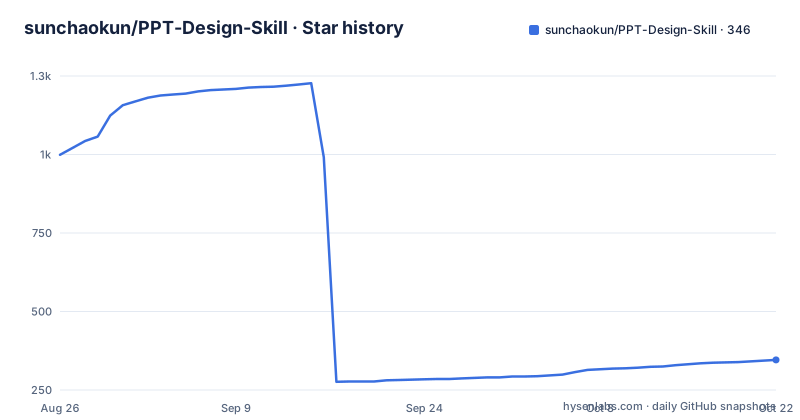
Star history
- sunchaokun/PPT-Design-Skill346 ★ · -653
| Repository | 2026-08-26 | 2026-10-22 |
|---|---|---|
| sunchaokun/PPT-Design-Skill | 999 | 346 |
-653 Stars in the last 57 days, measured from the daily GitHub snapshot. Compare with other projects
Editorial analysis
The root installer installs a package, the other one registers the skill
There are two files with the same name at two levels of this repository, and the documentation has to warn you about the difference explicitly. The script inside the installer directory is the one that completes a skill installation: it installs the published generation package and copies the skill bundle to the coding assistant you name. The script at the repository root does something else entirely, installing only the Python runtime package and, in the documentation's words, not registering the skill with any coding tool. So a user who finds the shorter path first, runs it, sees a clean success, and then wonders why their assistant has no new capability, has followed the documentation exactly. The correct invocation names the platform explicitly, and the supported values are the opencode assistant, two others, and an option that covers all of them:
git clone https://github.com/sunchaokun/PPT-Design-Skill.git
cd PPT-Design-Skill

python installer/install.py --platform opencode --force
python skill/scripts/check_runtime.py
The install also has a force flag and a separate flag for render dependencies, and the assistant needs restarting afterwards, which is the kind of step that gets skipped and then blamed on the installer.
Formal delivery cannot skip the image review, and the review has three verdicts
The central claim of this project is that running successfully is not the same as being finished, and the mechanism for closing that gap is a render-and-look loop. After a deck is generated it is converted to PDF and then to images, and the model is required to look at those images directly rather than infer quality from the code it wrote. The images are checked for a visual centre of gravity, sane density, clear hierarchy, complete composition, and whether the deck actually meets what was asked for. Two gates follow in order: the first judges overall visual effect and whether the finish is at the level you would hand a client, the second looks for serious defects, requirement coverage, and whether the result is still editable. Anything that fails goes back to the source or the content and is re-rendered. The documentation is blunt that this is not optional for formal delivery, in any of the three modes, which is the difference between this and a generator with a style parameter.
Build Mode is the default because layout control, not speed, is the scarce thing
Three generation modes are offered, and the recommendation table ranks them rather than presenting them as equals. Build Mode is the first choice, for client delivery, proposals, strategy work, roadshows, editorial pieces and formal reporting. Its layout control is the highest of the three, described as per-page and per-element, and its speed is only medium. FreeStyle Mode is for quick exploration, direction drafts, and light decks where the content is already settled; its layout is auto-arranged by the generation call, and it is the fastest. VI Build Mode is for decks that must follow an existing corporate template, master or brand specification, and its control is bounded by that template because it extracts and preserves the brand rather than inventing one. The guidance for choosing is a set of three questions about whether you care about professional finish, whether you are validating a direction, and whether you are bound to an existing identity. When the answer is uncertain, the recommendation is Build Mode, and the other two are for when you are deliberately trading control away.
FreeStyle's two entry points are one engine, and the documentation says so
A small clarification in the mode section is worth more than it looks. The generation call appears in two forms, one taking a natural-language query and one taking content directly, and the documentation states that these are two input styles of the same mode rather than two independent generation engines. That is a real piece of engineering honesty, because the alternative presentation, showing two similarly named functions next to a three-mode table, invites the reader to believe there are four paths and to pick on the basis of a function signature. The same paragraph carries the rule that the query form and the content form are not quality tiers, so choosing between them does not buy you a better deck. It also reinforces the earlier point: whatever route you take, a formal deliverable goes through the image check. The three modes control how much the layout is dictated, and the check applies to all of them equally.
LibreOffice is a rendering fallback, and the installer looks in three places for it
The optional dependency question gets a properly argued answer, which is more than most projects manage. Generating the PPTX itself needs only the Python package. The quality loop needs more, because it has to turn the file into images, and there the documentation gives an ordered fallback: on Windows with Microsoft PowerPoint available, drive the conversion through PowerPoint's own automation interface; without PowerPoint, use the LibreOffice command-line converter; then convert the PDF to images with a separate PDF rendering tool from Poppler. So LibreOffice is the fallback for environments with no PowerPoint, not the thing that writes your slides, and not something every user has to install. The installer looks for the converter on the path, in the default Windows install directories, and in the registry, specifically so it does not report a correct installation as missing just because the executable was never added to the path. Desktop software is also never installed silently; there is a separate opt-in flag if you want it to use the Windows package manager to fetch both tools.
Requirements become a contract with three verdicts before a slide exists
The step that makes the review auditable rather than a matter of taste is that the requirements are formalized before generation. The model turns what the user asked for into a trackable visual acceptance contract, and after the images are produced it checks each item against the requirements and the page evidence, recording one of three outcomes per item: passed, needs revision, or blocked. That structure is what makes the loop more than a vibe check. It also explains why the workflow insists on user confirmation at two points, once for the visual direction before generation and once for the finished result after the rework, because a contract the user never agreed to is not a contract. The evaluation material in the repository follows the same discipline, with separate briefs for a Chinese enterprise strategy case, a couture editorial case, and a scientific research case, plus a directory of regression baselines and an archive of earlier examples, which is what you would expect from a design tool that intends to notice when it regresses.
The skill orchestrates a separate published package and never writes the file itself
The division of labour is stated in the first paragraph and it is the most important structural fact here. The actual PPTX generation is handled by an already published Python library on the package index, described as a standard-library-based generator. This skill is responsible for requirements confirmation, structural design, the visual direction, orchestration of the generation call, the image-based acceptance check, and the rework and delivery cycle. That framing tells you what you are adopting. You are not getting a PowerPoint engine, and you are not getting a style library. You are getting a procedure that a coding assistant follows, plus a bundle of references on design principles, a public API surface, and quality and delivery guidance, wired to a generation library someone else maintains. The consequence for anyone extending this is that improving the output means either changing the procedure, which lives in the skill, or changing the library, which lives elsewhere.
Editorial conclusion
PPT-Design-Skill fits someone who has to hand a deck to a client or a leadership team and has been burned by a technically successful file that looks unfinished, since the mandatory image review is the feature. It does not fit someone who wants a one-shot draft, because the slowest mode is still the recommended default and the review loop is not optional for formal delivery. Before your first install, run the runtime check rather than the installer, and read the mode decision table rather than the case gallery, because the gallery shows finished results and the table is where the actual cost of each path is stated.
Frequently asked questions
How do I install the PPT Design Skill?
Clone the repository and run the installer from the installer directory, naming your coding assistant: `python installer/install.py --platform opencode --force`, then `python skill/scripts/check_runtime.py`. Replace the platform with the claude, codex or deepseek-harness option, or with the option covering all of them, and restart the assistant afterwards. The script at the repository root is a different tool.
What is Build Mode in PPT-Design-Skill and when should I use it?
It is the recommended default for client delivery, proposals, strategy work, roadshows, editorial pieces and formal reporting, because it has the highest layout control of the three modes, described as per-page and per-element, at medium speed. FreeStyle is the fast option for exploration, and the template-constrained mode is for decks that must follow an existing corporate identity.
Do I need LibreOffice installed to use PPT-Design-Skill?
Not to generate the file, which needs only the Python package. You need a rendering path for the quality loop, and the order is: PowerPoint's own automation interface on Windows if you have it, otherwise the LibreOffice command-line converter, then a Poppler tool to turn the PDF into images. The installer searches the path, the default Windows install directories and the registry, and never installs desktop software silently.
What does the skill check after it generates slides?
It renders the deck to images and looks at them directly, checking visual centre of gravity, density, hierarchy, composition and whether the result meets the request. Two gates follow, one for overall visual finish and one for serious defects, requirement coverage and editability, and each requirement carries a recorded verdict of passed, needs revision, or blocked.
Which AI image providers does PPT-Design-Skill support?
Five, named in the environment template: gpt-image, seedream, gemini, wanx and kimi, each with its own key, model and base URL block, plus a generic block for any OpenAI-compatible endpoint. Stock image search is separate, with optional keys for two providers. The environment file goes in the presentation project, never in the installed skill directory, and process variables take priority.
Official sources
Add this badge to your README
If you maintain this project, the badge below links readers to this analysis and shows its maintenance status from the daily GitHub snapshot. Paste the markdown into your README; add ?metric=license or ?metric=stars to the image URL for a different field.

[](https://hysenlabs.com/projects/sunchaokun-ppt-design-skill)Star history chart for your README
[](https://hysenlabs.com/projects/sunchaokun-ppt-design-skill)