GF_X: Unity hot update tooling built on GameFramework and HybridCLR
Unity GameFramework + HybridCLR热更,Obfuz代码加固,兼容WebGL(小游戏)热更。融入AI功能、高效率、高性能、简单易用、规范化、自动化的开发工作流。
At a glance
- What is it?
- GF_X is a Unity layer that wraps UnityGameFramework and HybridCLR with one-click build and hot update tooling, spreadsheet driven data tables, automatic localisation and Obfuz code obfuscation. It is a Chinese documented, opinionated workflow for studios shipping updates to live games, including WebGL and mini game builds.
- Who is it for?
- GF_X suits a Unity studio that already uses GameFramework, wants to ship code hot updates to a live game, and is willing to work inside Unity 2022 through Unity 6000 LTS with a Chinese language toolchain. It is the wrong choice for a team without HybridCLR in its plan, for a project outside the supported Unity range, or for a studio that needs English documentation, since the tutorials are Chinese video and article material.
- Can I use it commercially?
- Yes. MIT is a permissive licence: you can use, modify and sell software built on it, as long as you keep its copyright and licence notices.
- Is it still maintained?
- Yes. The repository last received commits 94 days ago.
- What is it written in?
- Mainly C#, according to GitHub's language statistics.
Answers come from the project's GitHub data, last synced on November 7, 2026, and from our analysis. They are not legal advice.
Star history
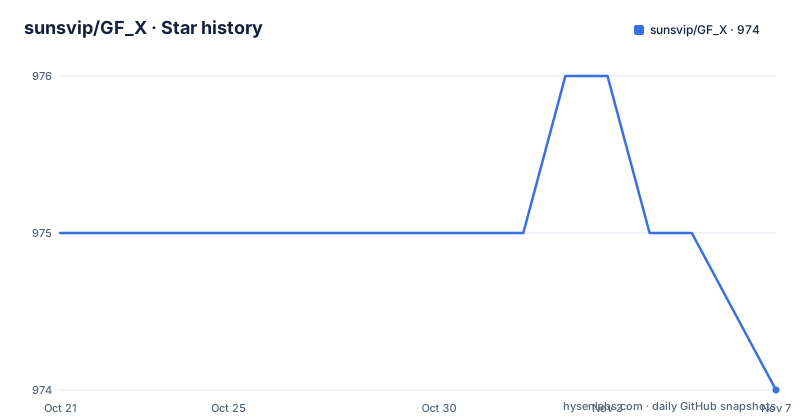
- sunsvip/GF_X974 ★ · -1
| Repository | 2026-10-21 | 2026-11-07 |
|---|---|---|
| sunsvip/GF_X | 975 | 974 |
-1 Stars in the last 17 days, measured from the daily GitHub snapshot. Compare with other projects
Editorial analysis
A framework layer aimed at removing repetitive Unity work
GF_X is a Unity project that combines UnityGameFramework with HybridCLR through a static extension of the framework interfaces, and it adds a large set of automation tools. The stated goal is an industrialised production workflow aimed at performance and development efficiency, with the pitch that the framework layer costs nothing and the developer only writes business logic.
The audience is specific. This is for studios shipping live Unity games where the platform store release cycle is too slow for content and logic changes, and where WebGL mini game builds add a second target to support. The homepage points at a plugin for large scale rendering, movement, targeting, collision detection and pathfinding in 2D and 3D Unity projects.
The repository is a real Unity project rather than a package. At the top level there is `GF_X.sln`, a set of `.csproj` files including `GameFramework.csproj`, `Hotfix.csproj`, `Builtin.Runtime.csproj`, several `UniTask` projects and a `ZString.csproj`, plus `Assets/`, `Packages/`, `ProjectSettings/`, `Tools/`, `AB/`, `AAAGameData/` and `CompressImageTool/`. The recommended editor versions are Unity 2022 through Unity 6000 on the LTS line.
The credited dependencies are UnityGameFramework, HybridCLR, UGFExtensions, UniTask for zero allocation Tasks and GC optimisation, and ZString for string building and formatting. The project is MIT licensed with the licence text in the LICENSE file at the repository root, and it publishes no GitHub releases, so the last push on 2026-08-06 is the marker for what state the code is in.
The procedure chain decides when hot code takes over
GF_X keeps the GameFramework model of procedures as a finite state machine and uses it as the spine of the game. The readme lays out the full chain, which is the most useful thing in the documentation because it shows exactly where the update boundary sits.
`LaunchProcedure` handles initial settings such as language, audio and vibration, then switches to `CheckAndUpdateProcedure`, which handles the single player or hot update resource initialisation, app upgrade and resource update paths. From there it moves to `LoadHotfixDllProcedure`, which prepares for HybridCLR by loading the hot update DLL and supplementing AOT generics, then uses reflection to call `HotfixEntry.StartHotfixLogic` and create a new procedure state machine. Only after that does the flow reach `PreloadProcedure`, which adds the framework extension features, sets the AB test group and loads the data tables, configuration tables and localisation data.
The rest of the chain is `ChangeSceneProcedure` for scene switching, `MenuProcedure` for the main menu, `GameProcedure` for gameplay such as loading a level map and creating the player and enemies, and `GameOverProcedure` for the result screen and rewards.
The key sentence is the one that says everything before the switch to hot updated code is Builtin code and cannot be hot updated. The boundary is not a convention, it is architectural, and any feature that must be patchable has to live after `LoadHotfixDllProcedure`.
Script and ScriptBuiltin split the code into patchable and fixed halves
The directory convention makes the split concrete. The development directory is `Assets/AAAGame`, `Script` is the hot update script directory and `ScriptBuiltin` holds the built in assembly. The launch scene is `Assets/AAAGame/Scene/Launch`.
On top of the GameFramework primitives, GF_X adds thin static wrappers so that the pooling behaviour stays inside the framework. `GF.UI.OpenUIForm()` opens a UI and `GF.UI.CloseUIForm()` closes it, with the framework handling object pool reuse or destruction on its own. `GF.Entity.ShowEntity()` and `GF.Entity.HideEntity()` do the same for entities, where an entity can be understood as any GameObject. The readme also notes that all of GameFramework's asynchronous loading methods can be awaited through UniTask.
The procedure itself has a lifecycle similar to a MonoBehaviour, with `OnEnter` when the procedure starts, `OnUpdate` every frame and `OnLeave` when it ends, and `ChangeState()` switches to another procedure.
There is also an A/B test mechanism. `GF.Setting.SetABTestGroup("GroupName")` assigns a user to a test group, and different groups read their own configuration tables and data tables. That is a server side or config driven mechanism rather than a store level experiment, which matters when the game is distributed as a mini game.
One build window handles the app and the hot update bundle
Installation is a sequence inside the Unity editor rather than a command line, and the readme gives three steps. First you install the HybridCLR environment through the Unity top menu entry `HybridCLR->Installer`. Then the toolbar button `Build App/Hotfix` opens the one-click packaging window, and for the first hot update build you use the dropdown next to the `Build App` button and choose `Full Build`. After that, `Build App` produces the package and `Build Resource` produces the hot update bundle.
The packaging tool also handles a set of things that are otherwise manual work. It switches between single player and hot update mode with one click, supports Obfuz code hardening, supports remote packaging and hot update through Jenkins, and automatically handles duplicate dependencies between AssetBundles.
The rest of the tooling follows the same pattern of removing repetitive work. The package size tools batch compress image files and change compression format, create atlases and atlas variants in bulk, and compress animation files. Data tables, constant tables and localisation tables are edited in Excel and imported automatically, with table structure code generated from the sheet, and the spreadsheet gets a drop down of data types. The localisation tools scan and generate the localisation table, add languages with automatic translation and control which rows are kept.
UI work is covered too: adding UI variables with no code, isolated variable code generation that does not touch existing code, one-click button event binding, batch Rasycast settings and visual UI animations. There are also batch tools for trimming `link.xml` configuration, generating artistic text and sprites, generating TMP SpriteAssets, converting SpriteAtlas to sprite atlases and replacing fonts in prefabs in bulk.
Where the framework stops and plain Unity begins
Three limits are visible in the readme, and they are worth stating before anyone adopts the project.
The first is the Unity version range. The readme recommends Unity 2022 through Unity 6000 on LTS releases, so a studio pinned to an older editor, or unwilling to move to the 6000 line, cannot use it as is.
The second is the dependency on HybridCLR being installed properly. The HybridCLR environment setup is step one of the install procedure, and the hot update path additionally relies on AOT generic supplementation and reflection to reach the hot updated assembly. If the studio does not want HybridCLR in its pipeline, GF_X loses its main reason to exist and the remaining value is the GameFramework convenience layer plus the editor tools.
The third is the language of the material. The documentation is Chinese, and the tutorials are a series of Chinese video and article walkthroughs covering the toolset, data tables, entity usage, the UI system, packaging, Jenkins remote builds, Obfuz hardening, WebGL packaging and the conversion to WeChat mini games. There is also a DeepWiki entry for the project. A team that cannot read Chinese will be working from the source and the tooltips.
One more honest note: the readme mentions extension modules aimed at extreme performance requirements, such as rendering many thousands of players on screen, but gives no measurements or configuration details for that work, so treat it as a direction rather than a documented feature you can switch on.
How GF_X compares with assembling GameFramework and HybridCLR yourself
The alternative is the one the acknowledgements section points at: take UnityGameFramework and HybridCLR directly, and build the pipeline yourself. The difference in approach is where the automation lives.
Using the two upstream projects, you own the assembly definition boundary, the AOT generic supplementation step, the reflection entry into the hot update assembly, the AssetBundle dependency handling, the Excel to data table pipeline and the localisation extraction. Each of those is well understood individually, and the upstream projects give you the mechanisms. What you do not get is the wiring, which is exactly what GF_X supplies.
GF_X's own contribution is the static extension of the framework interfaces plus the editor tooling around them. That is a real saving on the repetitive parts, particularly the packaging flow, since one window produces both the app build and the hot update bundle and the Jenkins path is built in.
The trade is dependency and opinionation. You inherit a specific procedure chain, with a fixed boundary between Builtin and hot updated code, a specific `Assets/AAAGame` directory layout, a build tool that assumes certain naming conventions, and a Unity version range. A team with an existing, working GameFramework pipeline probably has little reason to move, while a team starting from nothing and shipping frequent updates has a lot to gain from not writing the wiring twice.
Editorial conclusion
GF_X suits a Unity studio that already uses GameFramework, wants to ship code hot updates to a live game, and is willing to work inside Unity 2022 through Unity 6000 LTS with a Chinese language toolchain. It is the wrong choice for a team without HybridCLR in its plan, for a project outside the supported Unity range, or for a studio that needs English documentation, since the tutorials are Chinese video and article material. Before adopting it, confirm your Unity version falls in the recommended range, install the HybridCLR environment through the HybridCLR menu entry before the first build, and read the procedure chain in the readme, because the Builtin half of it cannot be patched by a hot update.
Frequently asked questions
What does GF_X add to UnityGameFramework and HybridCLR?
It extends the framework interfaces statically and adds a large editor toolset, including one-click build and hot update packaging, Obfuz code hardening, Jenkins remote builds, Excel driven data tables, localisation automation and UI code generation. The recommended editors are Unity 2022 through Unity 6000 on LTS.
How do I install GF_X in a Unity project?
First install the HybridCLR environment from the Unity top menu entry `HybridCLR->Installer`. Then open the one-click packaging window with the `Build App/Hotfix` toolbar button, and for the first hot update build choose `Full Build` from the dropdown beside `Build App`.
Which part of the code can be hot updated in GF_X?
The `Script` directory under `Assets/AAAGame` is the hot update script directory and `ScriptBuiltin` holds the built in assembly. The readme is explicit that the Builtin code, including the `LaunchProcedure` and `CheckAndUpdateProcedure` stages, cannot be hot updated.
How does GF_X support A/B testing?
Calling `GF.Setting.SetABTestGroup("GroupName")` assigns a user to a test group, and each group reads its own configuration tables and data tables. The mechanism is table based rather than store level experiment tooling.
Can GF_X build for WebGL and mini games?
Yes. The readme lists adapting the framework for WebGL with hot update support, and the tutorial list includes separate sessions on WebGL packaging with hot update and on converting WebGL to WeChat mini games with hot update.
Official sources
Add this badge to your README
If you maintain this project, the badge below links readers to this analysis and shows its maintenance status from the daily GitHub snapshot. Paste the markdown into your README; add ?metric=license or ?metric=stars to the image URL for a different field.

[](https://hysenlabs.com/projects/sunsvip-gf-x)Star history chart for your README
[](https://hysenlabs.com/projects/sunsvip-gf-x)Was this useful?