Superalgos: daily 1.7.0 betas, a manifest on 1.6.1, and four install routes
Free, open-source crypto trading bot, automated bitcoin / cryptocurrency trading software, algorithmic trading bots. Visually design your crypto trading bot, leveraging an integrated charting system, data-mining, backtesting, paper trading, and multi-server crypto bot deployments.
At a glance
- What is it?
- Superalgos is an Apache-2.0, JavaScript-first crypto trading platform that you design visually. Its repository ships daily 1.7.0 beta snapshots while package.json still reads 1.6.1, and two of the four install routes refuse to be your first.
- Who is it for?
- Superalgos fits a trader who wants strategies designed, backtested and paper traded inside one graphical application, and who is willing to install a JavaScript stack with git, npm, webpack, vite, knex and electron in the loop. Before committing, check the version gap between the 1.6.1 manifest and the 1.7.0 snapshots, confirm your exchange is reachable from your region, and note that package.json has no rollback script.
- Can I use it commercially?
- Yes. Apache-2.0 is a permissive licence: you can use, modify and sell software built on it, as long as you keep its copyright and licence notices.
- Is it still maintained?
- Yes. The repository last received commits 4 days ago.
- What is it written in?
- Mainly JavaScript, according to GitHub's language statistics.
Answers come from the project's GitHub data, last synced on November 14, 2026, and from our analysis. They are not legal advice.
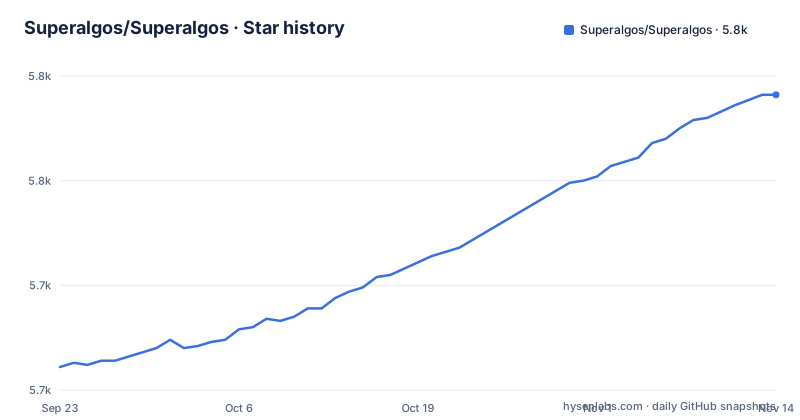
Star history
- Superalgos/Superalgos5,791 ★ · +130
| Repository | 2026-09-23 | 2026-11-14 |
|---|---|---|
| Superalgos/Superalgos | 5.7k | 5.8k |
130 Stars in the last 52 days, measured from the daily GitHub snapshot. Compare with other projects
Editorial analysis
package.json reads 1.6.1 while the release tags read 1.7.0
The manifest at the repository root declares version 1.6.1 and describes the package as a free, open-source crypto trading bot, and the README title carries the same 1.6.1 number. The three most recent releases are tagged 1.7.0-20260928, 1.7.0-20260929 and 1.7.0-20260930, each named Superalgos-Beta-v1.7.0 Snapshot with the date appended, and each published a day after the one before it between 03:37 and 03:42 UTC. So the version you see depends on the file you open. Clone the repository and npm reports 1.6.1. Read the release list and the newest thing there is a 1.7.0 beta. The default branch adds a third wrinkle: it is master, while the contributor scripts operate on develop instead, so the branch you clone is not the branch contributors work on.
npm run setup hands off to postsetup, which starts the platform
The install steps are concrete in the manifest rather than in prose. The setup script runs node setup with the noShortcuts flag, and the postsetup script that npm chains after it runs npm start, which runs node platform with the flags minMemo and noBrowser. Two more entry points matter on a first run: build bundles the dashboards with webpack against Dashboards/webpack.config.js, and dist packages the desktop app with electron-builder, pointing at build/electron-builder.json. Alongside the npm path sit install.sh, install.ps1, an installer directory and a Brewfile, so Linux, Windows and macOS each have a native route.
npm run setup
npm run start
One detail rewards anyone reading the manifest top to bottom: main is manageApps.js while start invokes node platform. The table of contents also points to a Prerequisites section and a Superalgos Platform Client Installation section, so the dependency list for your platform lives there rather than in the script names.
presetup pulls from a remote named upstream, not origin
Contributor setup opens with a script that runs git checkout develop and then git pull upstream develop. The remote it names is upstream, and a fresh clone does not create that remote: git clone writes origin. Anyone working from a fork therefore has to add the second remote before this script does anything useful, and the manifest does not say so. The prepare script installs husky, so every install in this repository also installs git hooks. Linting runs through eslint, with lintAll covering .js files and lintFile aimed at one file. Tests run on jest: unitTest passes --silent, unitTest:coverage adds --coverage, and unitTest:debug sets DEBUG=nock.* before jest starts. A .mocks directory sits at the root next to a .tests directory.
The tutorial path assumes Binance or Binance US
Learning happens inside the app. A series of interactive tutorials walks you through the interface, data mining, backtesting strategies and a live trading session, and the project asks you to finish all of them before exploring on your own. Those tutorials pick Binance or Binance US as the exchange. Holding no account there does not block you: the tutorials can be followed end to end, and the live trading section can be walked without actually running a session. If both exchanges are blocked where you are, the guidance is to configure a different exchange from the start instead of retrofitting one later. The assumption also shows up in the layout. Secrets.js sits at the root, README_Binance_RSA_Keys.md exists as a separate file for one exchange's key handling.
Docker, Raspberry Pi and Public Cloud each demand the step before
Four install routes are named, and two of them arrive with a prerequisite. The default route, for developers and contributors, is also the one the README recommends for non-developers who only want to fix documentation, translations or design work. README_Docker.md covers Docker, which gives a clean isolated environment but is not tuned for development or contributions, with workarounds offered. README_RaspberryPi.md covers a Raspberry Pi, framed as the economical option for live sessions, and expects you to be comfortable with the developer install or Docker first. README_PublicCloud.md expects the Raspberry Pi route before it. That chain is the strange part. The two routes you would pick for actually running money are the two you cannot enter from nothing. The advice on remote and minimalist hardware is to learn locally on a full-size PC first, because the tutorials need the GUI, and to save small machines for live trading.
npm start passes minMemo and noBrowser, and neither flag is explained
One line decides how the platform behaves at launch. These values are copied from the manifest:
"start": "node platform minMemo noBrowser",
"setup": "node setup noShortcuts",
"postsetup": "npm start",
"unitTest": "jest --silent",
"migration-make": "knex migrate:make"
Neither minMemo nor noBrowser is defined in the manifest. Taken literally, noBrowser means the platform does not open a browser window on start, which is the flag a headless server wants, and minMemo names some memory related mode. Treat both as undocumented switches rather than as features. The same gap sits on the database side. migration-init runs knex init and migration-make creates a migration file, but no script applies migrations to an existing installation, and the migrations directory in the tree has no matching command in package.json.
Nothing in the manifest rolls back a migration or runs one
Two capabilities a trading system needs before real money move are missing from what the manifest exposes. There is no rollback script and no backup step in package.json. Second, the system is shaped around an operator sitting in front of a screen. The tutorials, the searchable documentation of over 1500 pages that the README says is available inside the app and interacts with it, and the dashboards webpack bundle all assume a person clicking through the interface. For unattended work the manifest offers no HTTP API, no authentication token and no headless command surface. An appendix entry named Running Superalgos on a Headless Linux Server as a Daemon says the scenario is meant to be supported.
Install problems go to a Telegram group, not the tracker
Install trouble is routed away from the project's own tracker. The instruction is explicit: if the app will not install or will not run the first time, do not open an issue, join the support Telegram group and follow the pinned message. A repository with an active .github directory still sends a stuck first launch to chat. The writing around it is real, though. The table of contents carries a Troubleshooting Dependencies Installation entry and a Prerequisites Notes entry, so write-ups for common failures exist somewhere. For an evaluator that is the practical cost. The searchable record of what breaks on a first install lives in a Telegram thread instead of an issue queue, which means an answer found there cannot be cited back to the project later.
Editorial conclusion
Superalgos fits a trader who wants strategies designed, backtested and paper traded inside one graphical application, and who is willing to install a JavaScript stack with git, npm, webpack, vite, knex and electron in the loop. Before committing, check the version gap between the 1.6.1 manifest and the 1.7.0 snapshots, confirm your exchange is reachable from your region, and note that package.json has no rollback script.
Frequently asked questions
How do you use Superalgos after installing the platform?
Install it, launch it, then work through the in-app tutorials, which cover the interface, data mining, backtesting strategies and a live trading session. Those tutorials run on Binance or Binance US and can be followed without holding an account.
Is Superalgos a legitimate project to run trading software from?
The repository is Apache-2.0 licensed, is not archived, and its last push was on 2026-11-02, with daily 1.7.0 beta snapshots published on 2026-09-28, 2026-09-29 and 2026-09-30. It is community owned, with a native SA token distributed to contributors.
Is Superalgos a free AI trading bot?
It is free and Apache-2.0 licensed, and package.json describes it as a free, open-source crypto trading bot. The feature list is visual strategy design, charting, data mining, backtesting, paper trading and multi-server deployments.
Do AI trading bots really work?
Superalgos publishes no performance or profitability figures, and no backtest results ship with the repository. It does give you backtesting and paper trading modes plus a tutorial live session, so a strategy can be judged before it risks capital.
Which crypto bot is most profitable?
That comparison is not available here: the repository holds no profitability data and does not compare itself with other bots. Superalgos at least ships backtesting and paper trading modes, so you can produce your own numbers instead of trusting a table.
Official sources
Add this badge to your README
If you maintain this project, the badge below links readers to this analysis and shows its maintenance status from the daily GitHub snapshot. Paste the markdown into your README; add ?metric=license or ?metric=stars to the image URL for a different field.

[](https://hysenlabs.com/projects/superalgos-superalgos)Star history chart for your README
[](https://hysenlabs.com/projects/superalgos-superalgos)Was this useful?