CC0 covers the icon file, not the trademark, and the README says so first
SVG icons for popular brands
At a glance
- What is it?
- More than 3400 brand SVG icons, published under a public domain dedication, with a warning about trademarks as the first thing in the usage section. The interesting engineering is in the package: one module holding every icon, a false side-effects flag that only pays off if you bundle, optional licence and guidelines fields you cannot rely on, and a version-pinning decision on the CDN that trades stability against a runtime 404.
- Who is it for?
- simple-icons fits a project that wants recognisable brand marks in a consistent single-colour style, served from a CDN or bundled, and that accepts that every icon is a third party's trademark. It does not fit a project that needs per-icon licensing metadata to be authoritative, because the licence field on an icon can be absent.
- Can I use it commercially?
- Yes. CC0-1.0 is a permissive licence: you can use, modify and sell software built on it, as long as you keep its copyright and licence notices.
- Is it still maintained?
- Yes. The repository last received commits 4 days ago.
- What is it written in?
- Mainly JavaScript, according to GitHub's language statistics.
Answers come from the project's GitHub data, last synced on November 14, 2026, and from our analysis. They are not legal advice.
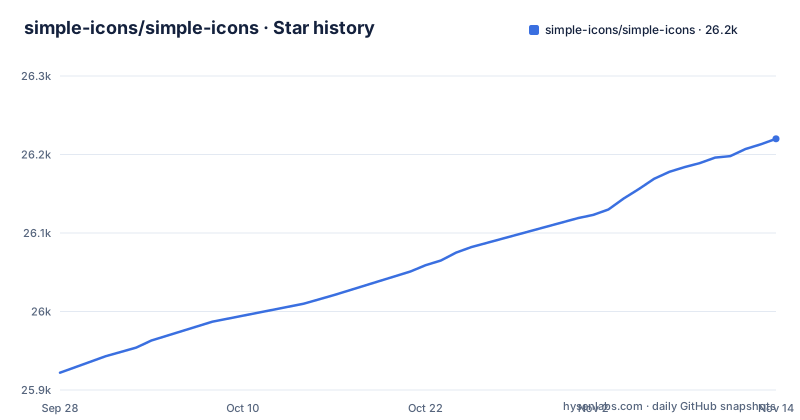
Star history
- simple-icons/simple-icons26,220 ★ · +298
| Repository | 2026-09-28 | 2026-11-14 |
|---|---|---|
| simple-icons/simple-icons | 25.9k | 26.2k |
298 Stars in the last 47 days, measured from the daily GitHub snapshot. Compare with other projects
Editorial analysis
The licence is CC0, and the trademark warning comes before the install instructions
The very first block of the usage section is not a code sample. It is a request that all users read the project's legal disclaimer before using any icon, and the link points to a document in the repository.
That placement is the whole story of this project. The package metadata declares the licence as CC0, a public domain dedication, and the licence file is named accordingly. So the artwork is dedicated to the public domain: no attribution required, no share-alike, nothing to keep track of when you vendor it.
What CC0 does not do is transfer a trademark. Every icon in this repository is a brand mark belonging to the company it depicts, and trademark rights are a different legal category from copyright. The project is careful not to conflate the two, which is why the disclaimer sits in front of the install command rather than in a legal corner of the repository.
So the practical position is this. You can use the files freely. Whether you can use a given brand's mark in a given context, in a favicon, in a client-side app, in a printed piece, is a trademark question that depends on the brand and how prominently you display it, and the disclaimer exists to make sure nobody mistakes the CC0 dedication for an answer to that.
The documentation also treats this as a live problem rather than a disclaimer formality. Each icon can carry a `guidelines` entry pointing at the brand's own usage guidelines.
Pinning a major version or tracking latest is a 404 waiting to happen
The CDN section contains a trade-off stated more plainly than most projects state theirs, and it is worth reading before you paste a URL into production.
Icons are served from a public CDN, using the npm package as the source and a version in the URL. Two strategies are available. You can name the latest major version, in which case the URL is stable but you will not receive any updates following the next major release. Or you can name the moving target, in which case you receive updates indefinitely, and a removed icon becomes a 404.
The removed-icon case is the interesting one. Icons get removed. A brand can rebrand, a company can object, a legal dispute can resolve, and the icon leaves the repository. With a pinned major version your icon is frozen in place and cannot disappear, because the file still exists in the version you reference. With a moving target, a page that has been working for a year can start showing a broken image because someone else's legal decision removed an icon you never chose to remove.
The failure is a network 404 at render time rather than a build failure, which means it can reach production without anything in your pipeline complaining. That is the argument for pinning, and the argument for tracking latest is that you get colour and guideline corrections and newly added brands without a deploy.
There is a third option the documentation offers, which is to download the file and vendor it. Individual icons can be downloaded straight from the website, which moves the whole problem into your repository and out of your runtime dependencies.
Every icon lives in one module, so tree shaking is a requirement not a nicety
The Node usage section contains a recommendation with a consequence attached, and the consequence is why the package manifest looks the way it does.
All icons are imported from a single file, with the icon slug capitalised as the export name. And the documentation says it highly recommends using a bundler that can tree shakes, naming webpack as an example, in order to remove the unused icon code.
npm install simple-icons// use import/esm to allow tree shaking
import {siSimpleicons} from 'simple-icons';
// or with require/cjs
const {siSimpleicons} = require('simple-icons');That is a real constraint. If you import the package without a bundler, or with one that does not tree shake, you ship the SVG data for every icon in the set. For a collection of over 3400 icons that is not a rounding error.
The manifest is built to make tree shaking work when you do have one. The package declares itself as having no side effects, which is the flag a bundler reads to decide that an unused import can be dropped entirely rather than merely having its exports pruned. The export map offers a separate `./icons` subpath (index-icons) as well as the aggregate root, and a raw passthrough path for the SVG files themselves, so a project can be as granular as it needs to be.
The tension is that iterating over every icon is a first-class use case with its own documented import, the star import of the whole module. That is the opposite of tree shakeable, and it is correct for a build-time generator or a design tool, and wrong for a page that renders twenty icons.
The license and guidelines fields on an icon are both optional
The icon object has a shape, and two of its fields are documented as possibly absent, which is the kind of thing that produces a bug in someone else's build.
An icon object carries a title, a slug, a hex colour, a source URL, the SVG markup, the path data, a guidelines entry, and a licence object with a type and a URL.
Then the notes. The guidelines entry will be undefined if the project does not yet have guidelines for that icon. The licence entry will be undefined if the project does not yet have licence data.
So a field called licence, in an object that is otherwise uniformly populated, can simply be absent. If your build wants to check that an icon carries the permissions it needs, or that the brand has published usage guidelines, you cannot assume either is there, and code that reads them without a check will fail, or worse, silently treat undefined as permissive.
The colour field is different and is worth knowing about, because it is what the colour CDN defaults to. An icon's hex is the brand colour shown on the project website, and the colour service defaults to that value when you do not supply one. So an unstyled icon picks up whatever the brand's colour happens to be, rather than your interface's foreground colour, which is the opposite of what a monochrome icon set usually wants.
The colour service also accepts a dark mode colour, applied through the standard media query for the user's colour scheme preference, and a viewbox parameter that produces auto-sized viewboxes so icons render at a consistent size regardless of their original geometry.
An icons.json export lets you read metadata without importing a single icon
The export map in the package manifest is more interesting than the install command, because it shows the project thinking about consumers it does not have code samples for.
There are five entry points. The root gives you the aggregate module. A dedicated icons subpath points at a separate index-icons module. A wildcard path passes through the raw icon files, so a build can read an SVG directly without going through JavaScript at all. A separate SDK path exists, and finally there is a JSON export that points at the icon data as a plain JSON file with its own type declarations.
That last one is the interesting design decision. A JSON export means you can read every icon's title, slug, colour and licence fields at build time, in a script, without importing the module and without any of the SVG payload. A documentation generator that wants a list of brands, a linter that wants to check which icons are used, or a build step that wants to warn about a missing guidelines entry can all do that cheaply. The PHP distribution is installed from Packagist and used by reading the icon file out of the package directory by slug:
composer require simple-icons/simple-iconsThe PHP distribution is the same idea in a different language. The icon data is the interchange format across all three distributions, and the JSON export is the one that exposes it most directly.
TypeScript definitions are bundled rather than shipped separately, and the exported type describes a single icon, so you can type your own helpers against it without a second package.
The Dockerfile in this repository optimises one SVG and exits
The container file at the root of this repository has nothing to do with running the project, and if you assume otherwise you will lose an afternoon.
It starts from a current Node Alpine image, installs git, copies the repository in, runs a clean install, and then sets the entry point to a single invocation of an SVG optimiser against a hardcoded path. There is no server, no port, and no long-running process. It is a drop-in container for shrinking one SVG file.
That is a small, opinionated thing to have in a repository, and it tells you something about the project's priorities. Icon files are the product, and a contributor adding an icon will want to shrink what they just committed. Folding that into the same container means the optimisation settings are the project's settings rather than whatever the contributor's editor happened to produce.
The rest of the tooling at the root tells the same story from a different angle. There is a configuration file for an SVG linter, a separate one for the SVG optimiser, a JSON schema, a Markdown linter configuration, a link checker configuration, a pre-commit hooks file, and a formatter configuration. The icon data has its own formatting script, and the format command runs the data formatter, then the code formatter, then the linter's fix mode, in that order.
There is also a slugs.md file at the root.
The third-party list is pruned against the previous major version
There are two lists of third-party work in this repository, and they are maintained on different rules, which is worth knowing if you are the author of one of the entries.
The first is a list of extensions: integrations into other tools, with the author named in each row. A Figma plugin, a Blender add-on, a Raycast extension, a Drawio library, a Typst package, a Stream Deck icon pack, a web app, a Jekyll plugin, a Miro app, a Kando icon theme, and a couple of others. The rule for joining this list is a pull request, and the invitation is explicit.
The second is a list of libraries other people have built for using these icons, and here the policy is stated: entries are only kept if they are at least up to date with the previous major version. So a library that has not caught up with the last major is removed from the table, and its author has to update it to come back.
That is an unusual and rather good policy. It is easy to accumulate a list of libraries that broke when you cut a major release and leave them there because nobody is maintaining the list. Gating on currency means the list stays trustworthy, at the cost of some churn: a maintainer who is away for a year comes back to find their entry gone.
The third distribution worth noting is the font, which lives in its own repository and is referenced rather than included. An icon set delivered as a font is a different artefact with different constraints, and keeping it separate means the SVG set and the font can version independently.
Editorial conclusion
simple-icons fits a project that wants recognisable brand marks in a consistent single-colour style, served from a CDN or bundled, and that accepts that every icon is a third party's trademark. It does not fit a project that needs per-icon licensing metadata to be authoritative, because the licence field on an icon can be absent. Verify first whether the brands you need have guidelines recorded, and read the legal disclaimer before shipping, since the CC0 dedication covers the artwork file and nothing about who owns the mark it depicts.
Frequently asked questions
what is simple icons
simple-icons is a set of over 3400 SVG icons for popular brands, published under a CC0 public domain dedication, with a website showing them all on one page. The artwork is dedicated to the public domain, but each icon depicts a brand whose trademark remains that brand's, which is why the project asks every user to read its legal disclaimer before using an icon.
how to use simple icons
Install the npm package and import the icon you want by its capitalised slug, using the ES module entry so your bundler can remove the unused icons. All icons live in a single file, so the documentation recommends a tree-shaking bundler. If you would rather not bundle, you can serve icons from a CDN with a version in the URL, or download individual SVGs from the website and vendor them.
how to use simple icons in react
The package exports icon objects rather than components. In a React project you import the icons you use from the ES module entry, let your bundler tree shake the rest, and render the object yourself. There is also a JSON export and a raw passthrough path, so a build step can read the data without importing any icon code at all.
Where do I get icons?
Individual SVGs can be downloaded directly from the project website by clicking the download button. The full set is on npm as the simple-icons package, on Packagist for PHP, and from a public CDN, and there is a separate repository for the font distribution. A single icon can also be vendored into your own repository, which removes any runtime dependency on a version that might change.
simple icons alternative
The README lists other forms of the same set: a font distribution in a separate repository, a list of third-party extensions into design and productivity tools, and a list of third-party libraries for using the icons in code, where entries are kept only if they are at least up to date with the previous major version.
Official sources
Add this badge to your README
If you maintain this project, the badge below links readers to this analysis and shows its maintenance status from the daily GitHub snapshot. Paste the markdown into your README; add ?metric=license or ?metric=stars to the image URL for a different field.

[](https://hysenlabs.com/projects/simple-icons-simple-icons)Star history chart for your README
[](https://hysenlabs.com/projects/simple-icons-simple-icons)Was this useful?