superdesign puts an AI design agent in the VS Code sidebar, and the repo is now history
AI Product Design Agent - Open Source
At a glance
- What is it?
- superdesign is a VS Code extension that turns a natural language prompt into mockups, components and wireframes inside the editor. The repository behind it stopped being the product: the README says it is kept for history, and the tool now lives as a web app, a Chrome extension and a coding agent skill.
- Who is it for?
- Read this repository as an archive of the 2025 IDE extension rather than as the current Superdesign, because its own README says it is kept for history and the product has moved to a web app, a Chrome extension and a design skill for coding agents.
- Can I use it commercially?
- Check first. The repository uses a licence we do not classify automatically, so read its LICENSE file before any commercial use.
- Is it still maintained?
- Yes. The repository last received commits 139 days ago.
- What is it written in?
- Mainly TypeScript, according to GitHub's language statistics.
Answers come from the project's GitHub data, last synced on November 15, 2026, and from our analysis. They are not legal advice.
Star history
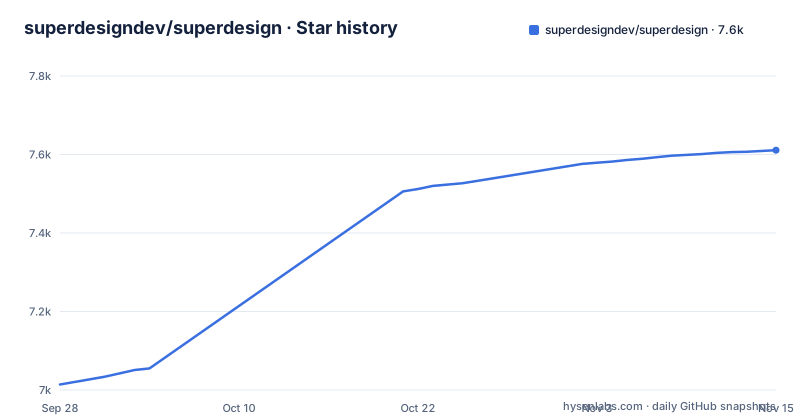
- superdesigndev/superdesign7,611 ★ · +597
| Repository | 2026-09-28 | 2026-11-15 |
|---|---|---|
| superdesigndev/superdesign | 7k | 7.6k |
597 Stars in the last 48 days, measured from the daily GitHub snapshot. Compare with other projects
Editorial analysis
A design agent packaged as a VS Code extension
The repository is a VS Code extension, not a web service. package.json names it superdesign-official, publishes it under the SuperdesignDev publisher, and requires a host of VS Code 1.90.0 or newer through the engines field. The entry point is the bundled ./dist/extension.js, and the extension declares its own sidebar view as one of the two activation events, the other being a command called superdesign.helloWorld.
The design work happens in that sidebar. You type a prompt such as "Design a modern login screen" and the extension returns mockups, reusable components and low fidelity wireframes. The README frames the pitch as exploring options rather than committing to one, and lists five capabilities: whole product screens from one prompt, reusable components, wireframes, forking a design to iterate on it, and copying the prompt into another AI editor.
The five steps in the getting started section are the whole user story: install from the Cursor or VS Code Marketplace, open the SuperDesign sidebar panel, type the prompt, look at what came back, then fork, tweak and paste the result into your project.
The repository is history and the product moved to the web
The first thing the README says, in a callout at the top, is that this repository is the original open source Superdesign IDE extension from 2025, that it is kept here for history, and that it is no longer actively maintained. What it points to instead is www.superdesign.dev, described as a web app that generates mockups, components and full designs from a prompt on an infinite canvas. A Chrome extension is offered as well, with the stated purpose of cloning any website and UI.
The repository facts line up with that notice rather than contradicting it. The last push was on 2026-06-29 and the repository is not archived, so the code is still there to read and build, but there are no GitHub releases, which means no published version history and no release notes. The version that exists is the 0.0.14 in package.json, and a CHANGELOG.md sits at the root as the only in-repository record of what changed.
For coding agents there is a third path. The README points at a separate superdesign-skill repository that drives Superdesign as a design skill from Claude Code and Cursor, which keeps the editor workflow available without installing this extension.
Designs are files on disk under .superdesign/
Generated designs are not held somewhere opaque. The storage answer in the README is one line: designs are saved locally inside a .superdesign/ directory. That matters for two reasons. A directory is diffable, so a generated screen can sit in the same repository as the code it belongs to and travel through review like any other change. And because the output is a file, a person can look at what the agent produced instead of trusting a rendered preview.
The packaging side of the repository matches a conventional extension layout. The tree carries esbuild.js as the bundler that produces dist/extension.js, a .vscodeignore to control what ships, tsconfig.json with a separate tsconfig.test.json, and .vscode-test.mjs for running the extension under test. The system prompt the agent works from is a file at the root called system-prompt.txt, and there is a .cursor/ directory.
Pointing it at a local OpenAI-compatible server takes three fields
The extension can talk to a local model server, and the README gives the procedure as three steps: select OpenAI as the model provider, put anything in the OpenAI API key input, and set the OpenAI URL field to the address of your server.
http://127.0.0.1:1234/v1That URL is the one the README offers as an example, for LM Studio. The middle step is the part that makes people hesitate: the key field is not verified against the local server, so any string satisfies it.
package.json shows the matching set of commands, one per credential: superdesign.configureApiKey is titled Configure Anthropic API Key, and there are separate commands for the OpenAI key, the OpenAI URL and an OpenRouter key.
Initialising the extension writes rules into your editor
The answer to whether you can use your own Claude Code or Cursor subscription is yes, and the mechanism is worth understanding before you initialise anything. After you initialise the Superdesign extension, it adds Cursor and Claude Code rules to your workspace. From then on you can prompt the agent to do design work and preview it in the Superdesign canvas.
superdesign: open canvaThat is the command the README names for reaching the canvas, reached through the editor's command palette. The same paragraph carries the practical advice: in Cursor, copy the prompt into a file called design.mdc and create a custom mode with that system prompt, which the author says gives much better performance.
So the extension is not only a sidebar you type into. It edits the rule files that another agent reads, which is a wider footprint than a typical editor extension and is worth reviewing in a diff before you accept it.
Updating existing UI gets one sentence and no example
The feature list is mostly about generating something new, and the one question about working on code you already have is answered in a single line: select a component, describe the change, and let the agent do the rest. No file is named, no example output is shown, and the getting started section ends at pasting a generated design into your project rather than editing a file in place.
That gap has a practical consequence. If your codebase uses a component library, a naming convention or a styling approach, nothing in the README says the agent reads your existing files to match them. The honest reading is that this extension is a mockup generator with an editing claim attached, so a team should expect to review and adapt what comes back rather than merge it.
The same restraint applies to the rest of the surface. The README does not say what format a generated mockup is stored in beyond the .superdesign/ directory, does not describe an offline mode, and does not mention any way to run the agent against a codebase you have not opened in the editor.
Two lockfiles and two backups in a 0.0.14 tree
The repository layout suggests a project that changed shape more than once. Version 0.0.14 in package.json is pre 1.0, there is no GitHub release attached to any of it, and the tree keeps package.json.backup next to package.json and esbuild.js.backup next to esbuild.js. Both package-lock.json and pnpm-lock.yaml are present, so a fresh clone has two competing dependency resolutions and no single answer about which package manager the maintainer used.
Licensing is the other loose end. The repository metadata carries no licence identifier, while the README answers a question about cost by saying the project is open source and inviting you to fork, extend and remix it, and a LICENSE file sits at the root of the tree. Those two facts sit next to each other without reconciling. Anyone planning to ship code derived from this extension should read the LICENSE file first, since the metadata alone will not tell them what they are allowed to do.
Editorial conclusion
Read this repository as an archive of the 2025 IDE extension rather than as the current Superdesign, because its own README says it is kept for history and the product has moved to a web app, a Chrome extension and a design skill for coding agents. If you want the in-editor experience and you run Cursor or Claude Code, fork it and expect to do the maintenance yourself: the last push was on 2026-06-29, the repository has no GitHub releases, and the licence metadata names no identifier even though the README calls the project open source.
Frequently asked questions
Is superdesign free?
The README says the project is open source and invites you to fork it, extend it and remix it. It also states that this repository is the 2025 IDE extension, kept for history and no longer actively maintained, with the product now at www.superdesign.dev.
What is superdesign?
An AI design agent packaged as a VS Code extension, published as superdesign-official by SuperdesignDev, which generates UI mockups, components and wireframes from a natural language prompt. package.json records version 0.0.14 and requires VS Code 1.90.0 or newer.
Can I use Superdesign with Claude Code?
The README says yes: after you initialise the extension it adds Cursor and Claude Code rules, so you can prompt the agent to do design work and preview it in the Superdesign canvas with the superdesign: open canva command. A separate superdesign-skill repository offers it as a design skill for coding agents.
What are some alternatives to SuperDesign?
The README points at three other shapes of the same product: the web app at www.superdesign.dev, described as generating mockups and full designs on an infinite canvas, a Chrome extension for cloning websites and UI, and the superdesign-skill repository for driving it from Claude Code and Cursor.
Official sources
Add this badge to your README
If you maintain this project, the badge below links readers to this analysis and shows its maintenance status from the daily GitHub snapshot. Paste the markdown into your README; add ?metric=license or ?metric=stars to the image URL for a different field.

[](https://hysenlabs.com/projects/superdesigndev-superdesign)Star history chart for your README
[](https://hysenlabs.com/projects/superdesigndev-superdesign)Was this useful?