SuperPlane hands only high-confidence backlog issues to coding agents, then checks their pull requests
The open source control plane for agentic engineering. It lets you orchestrate engineering workflows across the tools you use, such as Git, LLMs, CI/CD, observability, incident tools, and infrastructure, with durable execution, approvals, and operational UI.
At a glance
- What is it?
- superplanehq/superplane is a Go system that picks backlog issues agents can finish, runs them through verification, and returns review-ready pull requests. It is selective by design, and the self-hosted path and license picture need checking before you commit.
- Who is it for?
- SuperPlane suits teams with a GitHub backlog full of small, well-scoped bugs, test fixes and doc updates who want agents to draft pull requests while humans keep the merge. It is a poor fit if you expect it to take on ambiguous work, or if you need a self-hosted setup without reading a separate guide.
- Can I use it commercially?
- Check first. The repository uses a licence we do not classify automatically, so read its LICENSE file before any commercial use.
- Is it still maintained?
- Yes. The repository received new commits within the last day.
- What is it written in?
- Mainly Go, according to GitHub's language statistics.
Answers come from the project's GitHub data, last synced on November 14, 2026, and from our analysis. They are not legal advice.
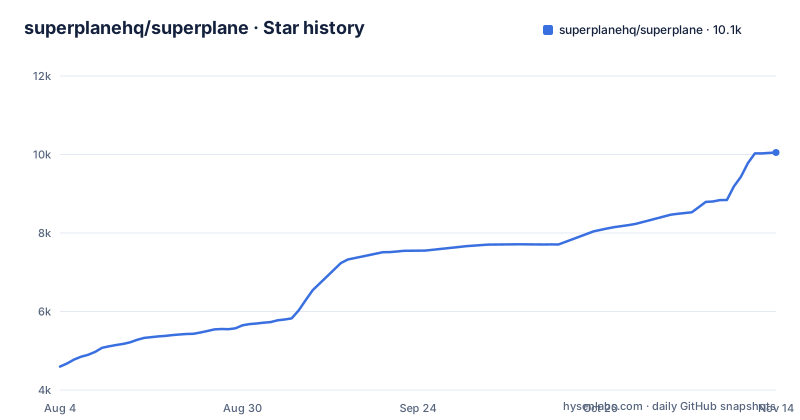
Star history
- superplanehq/superplane10,052 ★ · +5,455
| Repository | 2026-08-04 | 2026-11-14 |
|---|---|---|
| superplanehq/superplane | 4.6k | 10.1k |
5,455 Stars in the last 102 days, measured from the daily GitHub snapshot. Compare with other projects
Editorial analysis
The repository tagline and the README describe different products
The GitHub description calls SuperPlane the open source control plane for agentic engineering: a way to orchestrate workflows across Git, LLMs, CI/CD, observability, incident tools and infrastructure, with durable execution, approvals and an operational UI. The README opens with something narrower: an open source factory for one-shot engineering that turns high-confidence backlog issues into verified, review-ready pull requests.
Both framings survive in the README text. The plan and the pull request review are described as two parts of one workflow, and SuperPlane can also wait for an event from your tools, call an agent, or ask a person for approval. So the general workflow engine is still there underneath, but the product pitch is now the issue-to-PR pipeline.
The practical consequence is that what you read on a directory listing or a search result may not match what you get when you sign up. If you came for a general orchestration layer across incident tools and infrastructure, the getting-started flow will steer you toward connecting a GitHub repository and picking a small issue instead. Read the product overview on docs.superplane.com before you decide which of the two you are evaluating.
Only issues the factory rates as high confidence reach an agent
SuperPlane does not try to automate the whole backlog. It continuously evaluates which issues agents can handle with high confidence, imports the issues from a connected repository, and assesses which tasks are suitable for an agent. Ambiguous work and decisions that need human judgment stay with your team.
Before implementation begins, SuperPlane analyzes the issue, helps refine the plan, and identifies decisions that need your input. That front-loading is the mechanism that makes one-shot runs possible: a clear task goes in, so a usable pull request is more likely to come out.
The flip side matters for planning. The work SuperPlane takes is the routine end of the backlog. The recommended first run is a small bug, a test fix or a documentation update. If your backlog is mostly vague feature requests or design questions, the factory will route most of it back to people, and the share of issues it actually handles will be small. Teams that want agents to take on larger, underspecified work will need to do the refinement themselves first, because that judgment is exactly what SuperPlane leaves with humans.
Failed checks go back to the agent, and the merge decision stays human
After an agent produces a change, SuperPlane checks the work and sends failures back to the agent with actionable context for correction. The same workflow-level guardrails apply to every run, rather than being configured per task. Once the change passes, an agent review assesses merge confidence and highlights remaining concerns, so the team can make the final decision with evidence.
This is the core loop the README sells: coding agents, source control, CI, review, approvals and feedback in one visible system, so engineers do not have to project-manage every step.
What this does not do is remove review. The output is a review-ready pull request, not a merged one. Someone on your team still reads it, weighs the agent review's merge confidence and concerns, and decides. If your bottleneck is reviewer time rather than implementation time, SuperPlane adds pull requests to that queue rather than draining it. The quality of the gate also depends on your own CI: the verification step can only send back failures that your checks are able to catch, so thin test coverage means thin verification.
Self-hosting is Docker Compose on one VM or Kubernetes, with the steps kept in a separate guide
There are two ways to run SuperPlane. SuperPlane Cloud is the hosted path: sign up at app.superplane.com, create a workspace, connect a GitHub repository, and choose a small issue for the first run. The quickstart on docs.superplane.com covers setup.
The self-hosted path offers two shapes: Docker Compose on one Linux VM, or Kubernetes on AWS, Azure or Google Cloud. The README does not carry an install command for either; both are in the self-hosting guide at docs.superplane.com/self-hosting/overview. The go.mod pulls in SDKs for all three clouds, including AWS EC2 and S3, Azure compute, network and blob storage, and Google Cloud storage and metadata, which lines up with those three Kubernetes targets.
The consequence is that a self-hosted evaluation is not a one-command trial. You choose between a single VM, which is simpler but means one machine carries everything, and a Kubernetes deployment on one of three named clouds. The README pitches running in the cloud or on-prem with your own choice of models, but if your infrastructure is outside those listed options, check the guide before assuming it is covered.
Apache 2.0 engine, ee directory and an unresolved license field
The README says SuperPlane is built on an Apache 2.0 open source engine and that SuperPlane is available under the Apache License 2.0. GitHub's license detection for the repository, however, reports NOASSERTION rather than a single recognized license.
The tree helps explain why the picture is not simple. Alongside pkg/, cmd/ and api/, the top level has an ee/ directory and a NOTICE file, the Makefile tests ./pkg/... and ./ee/... together, and it has a dedicated check.ee.imports target. The wording built on an Apache 2.0 engine, rather than the whole product is Apache 2.0, also leaves room for parts that sit outside that engine.
The repository listing alone does not say what ee/ contains or under which terms. For a hobby trial this may not matter. For a company planning to self-host, fork, or ship modifications, it does: read LICENSE, NOTICE and any license file inside ee/ before assuming every directory carries the same Apache 2.0 terms. That check takes minutes and avoids building on code you are not permitted to redistribute.
The local stack is a Docker build with fixed development defaults
Contributor setup is Docker-based, starting from AGENTS.md and the development section of CONTRIBUTING.md. The Dockerfile's dev-base stage builds on Ubuntu 22.04 with Go 1.27.3 and playwright-go v0.6201.1, then installs Go, Node.js, the PostgreSQL client, gomigrate and protoc through scripts in scripts/docker. The go.mod also targets Go 1.27.3.
The Makefile drives the rest through targets such as dev.up, dev.setup, dev.server, dev.runners, doctor-local, db.snapshot and db.restore. It sets DB_NAME to superplane and DB_PASSWORD to the-cake-is-a-lie, and BASE_URL defaults to https://app.superplane.com. Runner services live in docker-compose.dev.yml under a local-runner profile; on CI, docker-compose.ci.yml is overlaid so Go module and build caches persist, and CI does not enable the runner profile.
Two consequences follow. The database password is a fixed development value committed to the repository, so nothing built from this setup should face a network you do not control. And because BASE_URL falls back to the hosted app's address, a local environment that never sets it points somewhere you did not intend. Set it explicitly.
One .env file controls ports, origins, process roles and run retention
Local overrides go in a .env file copied from .env.example. Docker Compose reads it for variable interpolation, but it is not a generic env_file, so a variable only reaches the app container when docker-compose.dev.yml references it. The Makefile also includes .env so host-side targets such as profiling see the same values.
The public entrypoint values have to move together:
# PUBLIC_API_PORT=8000
# BASE_URL=http://localhost:8000
# WEBHOOKS_BASE_URL=http://host.docker.internal:8000
# ALLOWED_WS_ORIGINS=http://localhost:8000
Changing PUBLIC_API_PORT without updating BASE_URL, WEBHOOKS_BASE_URL and ALLOWED_WS_ORIGINS leaves them pointing at different origins; the example file says to keep them aligned unless you intentionally need that. PORT and API_PORT default to PUBLIC_API_PORT. Supporting services sit on their own host ports: PGWEB_PORT 8081, RABBITMQ_PORT 5672, RABBITMQ_MANAGEMENT_PORT 15672, OTEL_GRPC_PORT 4317 and OTEL_HTTP_PORT 4318, with Vite on 5173.
Process roles are flags. START_WEBSOCKET_SERVER follows START_WEB_SERVER when unset, and START_GRPC_GATEWAY should be no on websocket-only pods. Run history is not kept forever once retention is on: with START_EVENT_RETENTION_WORKER=yes, a worker deletes finished canvas runs for organizations whose usage_retention_window_days is above zero, default 180. If you need run history for audits, set that window before enabling the worker.
Editorial conclusion
SuperPlane suits teams with a GitHub backlog full of small, well-scoped bugs, test fixes and doc updates who want agents to draft pull requests while humans keep the merge. It is a poor fit if you expect it to take on ambiguous work, or if you need a self-hosted setup without reading a separate guide. Before adopting, confirm which parts of the repository fall under Apache 2.0 and read the self-hosting guide for your chosen platform.
Frequently asked questions
Is SuperPlane open source?
SuperPlane says it is built on an Apache 2.0 open source engine and is available under the Apache License 2.0. The repository also has an ee/ directory and a NOTICE file, so check those terms before redistributing.
Can I self-host SuperPlane?
Yes. SuperPlane can run with Docker Compose on one Linux VM or on Kubernetes on AWS, Azure or Google Cloud, following the self-hosting guide at docs.superplane.com.
What kind of issues does SuperPlane hand to coding agents?
SuperPlane evaluates which backlog issues agents can handle with high confidence, such as a small bug, a test fix or a documentation update. Ambiguous work and decisions needing human judgment stay with your team.
Official sources
Add this badge to your README
If you maintain this project, the badge below links readers to this analysis and shows its maintenance status from the daily GitHub snapshot. Paste the markdown into your README; add ?metric=license or ?metric=stars to the image URL for a different field.

[](https://hysenlabs.com/projects/superplanehq-superplane)Star history chart for your README
[](https://hysenlabs.com/projects/superplanehq-superplane)Was this useful?