Superset runs 100+ coding agents in Git worktrees, which are not sandboxes
Superset is an agentic IDE to orchestrate 100+ coding agents in parallel. Run any agent with your own subscription.
At a glance
- What is it?
- Superset, now renamed Paradev, is a macOS desktop app for driving Claude Code, Codex or another CLI agent across parallel workspaces. Its parallelism is Git worktrees plus a diff viewer and a per-workspace browser preview, and the README is plain about what worktrees do not isolate.
- Who is it for?
- Adopt Superset if you already pay for Claude Code or Codex, work on a Mac, and want several small edits running while you watch them. Skip it on Windows, on agents that must not share a machine, or on review comments that have to outlive a closed laptop.
- Can I use it commercially?
- Yes. MIT is a permissive licence: you can use, modify and sell software built on it, as long as you keep its copyright and licence notices.
- Is it still maintained?
- Yes. The repository received new commits within the last day.
- What is it written in?
- Mainly TypeScript, according to GitHub's language statistics.
Answers come from the project's GitHub data, last synced on November 15, 2026, and from our analysis. They are not legal advice.
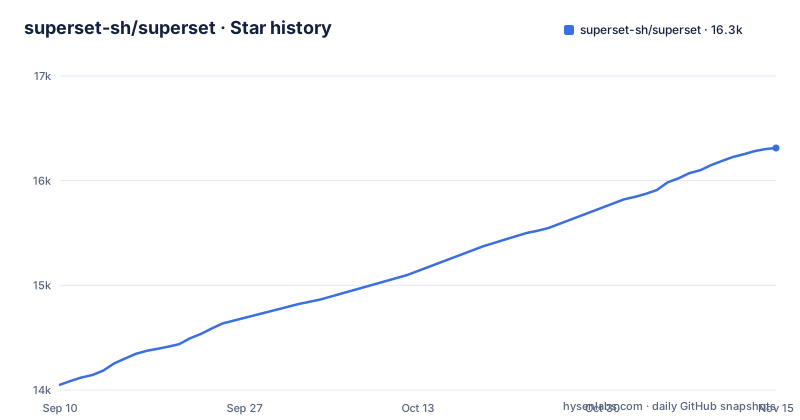
Star history
- superset-sh/superset16,312 ★ · +2,261
| Repository | 2026-09-10 | 2026-11-15 |
|---|---|---|
| superset-sh/superset | 14.1k | 16.3k |
2,261 Stars in the last 66 days, measured from the daily GitHub snapshot. Compare with other projects
Editorial analysis
Each parallel task gets a Git worktree, not a sandbox
Superset's parallelism is Git plumbing. Give each task a Git worktree with its own branch and terminals, and the worktree is what stops two agents from writing over each other's files. What it does not stop is anything outside those files. The README draws the line in one sentence: worktrees separate working files, they do not sandbox processes or prevent merge conflicts.
So a formatter that rewrites a whole tree, an install step that walks node_modules, a dev server that claims a port, and two agents pushing to the same remote all land on the same machine. The README's own framing tells you how to use that. Review each result before merging, or try two approaches to the same problem and keep the one you prefer. That holds while the tasks touch different files. The moment two agents rewrite the same function, Superset hands you two clean diffs and the conflict is still yours at merge time.
Port detection is per workspace, so every worktree previews its own dev server
The browser pane previews dev servers started inside a workspace, and ports are detected per workspace, which is why each worktree gets its own preview instead of all agents fighting over 5173.
The other half of that pane is Design mode: select an element in the running app and the requested change goes to an agent with the element's context attached, so the agent is not guessing which button you meant. What travels with that request is whatever the browser pane hands over. The README does not enumerate the payload, so read it as enough to point at the right element and not enough to promise the agent sees computed styles or the component tree.
Changes, the diff viewer and Pull requests to Code are three doors into one patch
Review starts in Changes, where you inspect the patch an agent produced, run the relevant tests and preview the app in the browser pane before committing. The built-in diff viewer covers the same loop from the editor side: inspect, comment on and edit agent changes without leaving the app, then commit and push when it is ready. Pull requests, then its Code tab, adds a third door. Select diff lines there and the feedback goes to a running or new agent session, and posting to GitHub is optional, so the view works on code that never leaves your machine.
That optionality has a dependency price. gh is the optional piece that enables the PR workflows, and the app offers to install it for you; Git is the only hard requirement. A machine with Git and no gh still gets workspaces, terminals, the diff viewer and the browser pane. What it loses is whatever else the PR workflows wrap, and the README does not itemise that. Fine for a reviewer who does not want GitHub credentials on a desktop, poor for a team that reviews on GitHub by convention, because you then maintain two surfaces for the same comment thread.
A Page stops accepting comments when its host goes away
Pages are the fragile link in the review chain. Ask an agent to publish a Page, teammates pin comments on it, and a watching agent can revise the report at the same link. The README attaches one condition to all of it: keep its host and session running for feedback delivery. The document is therefore live only while a particular machine and a particular agent session stay up.
Compare that with the built-in terminal, whose sessions are described as persistent and surviving restarts: the persistence story covers shells, not published reports. For a reviewer in another timezone this is the gap between a link that updates and a link that quietly stops. Pin comments while the session indicator is still live, or move the review to a pull request, where feedback attaches to the diff rather than to a running process.
The install is a macOS dmg, an experimental AppImage and no Windows build
There is no install command to copy, because Superset ships as a desktop app. The README points at the releases page: an Apple Silicon .dmg and an Intel .dmg for macOS, an x64 AppImage for Linux that is labelled experimental because macOS is the primary target, and Windows marked not yet available. On Windows there is nothing to install.
On the machine you install Git. gh is optional, it enables the PR workflows, and Superset offers to install it for you. The first run is three moves: add a repository from your computer or clone one, create a workspace and choose your CLI agent, then describe a small change. After that you inspect the patch in Changes, run the relevant tests and preview the app in the browser pane before committing. Keep that last step. The isolation warning from the worktree model applies to your test run as much as it does to the agent's edits.
A source checkout brings up postgres:17, a Neon proxy, Redis and an HTTP shim
Building from the repository is a different job from downloading the app. The root package is @superset/repo, marked private, with [email protected] as the package manager, and docker-compose.yml defines four services: postgres:17, a ghcr.io/timowilhelm/local-neon-http-proxy main image in front of it, redis:7-alpine, and hiett/serverless-redis-http. Each port carries an override, so a machine that already runs Postgres on 5432 is not stuck:
ports:
  - "${LOCAL_PG_PORT:-5432}:5432"
The redis service backs the relay's host directory at apps/relay/src/directory.ts and deliberately has no volume, because that directory is TTL-scoped presence data meant to be lost on restart. Expecting the relay's host directory to survive docker compose down means misreading the design, not meeting a bug. The shim in front of Redis exists because @upstash/redis speaks Upstash's HTTP REST protocol rather than the Redis wire protocol, and the comment marks it local dev only.
Environment variables come in two flavours. .env.example is the production template: NEON_ORG_ID, NEON_PROJECT_ID, NEON_API_KEY, DATABASE_URL, DATABASE_URL_UNPOOLED and a block of NEXT_PUBLIC_* URLs, all of which the header says to fill for a deployed environment. Local work is meant to skip them:
cp .env.local.example .envThat file ships placeholder values and points at a local Postgres container, and .env.example names ./.paradev/setup.local.sh as the other route. Do not deploy the compose file as it ships. POSTGRES_PASSWORD is pinned to postgres and SRH_TOKEN to local_dev_token, so anything that reaches that network finds a database and a Redis HTTP endpoint with known credentials.
The CLI, the MCP server and a Pro iPhone app are the doors besides the desktop window
Superset has a scriptable surface too: the README says the CLI, SDK and MCP server let agents and scripts manage workspaces, and the CLI command is still superset.
Remote access is the third door. Connect another machine to reach its workspaces remotely, or schedule an agent to work on a recurring task. Mobile supports iPhone and iPad and requires Paradev Pro and iOS 26 or iPadOS 26 or later.
The plain alternative is the same CLI agent in a terminal you opened yourself. Superset earns its keep with worktree management, a diff pane, per-workspace previews and status indicators in the sidebar. You give up the supervision view and pay for it with a macOS-first binary, a Pro subscription for the phone.
desktop-v1.34.0 and desktop-v1.35.0 both shipped on 2026-10-02, and the licence strings disagree
Upgrade cost is the practical question for an app you keep open all day. The repository is not archived, and the last push was on 2026-11-02. The latest desktop tag is desktop-v2.0.3 from 2026-11-01, with a desktop-canary build on 2026-11-03 and a cli-latest build on 2026-10-30. That is a fast cadence, and pinning a version stops being fussiness.
The root also ships four agent configuration directories, .claude, .codex, .cursor and .agents, next to .claude-plugin, .agent-marketplace.json, AGENTS.md, CLAUDE.md, CODEX.md and WARP.md, which says the project expects to be driven by more than one coding agent. Contributor commands stay thin, with predev and predev:desktop both running a port check first:
bun scripts/check-dev-ports.ts
turbo test --concurrency=2
./scripts/lint.sh
On licensing the two sources differ. The repository metadata reports NOASSERTION while the root package.json declares Elastic-2.0, which is source available rather than an OSI-approved licence, on a package marked private. If you mean to run Superset as a service for your own team, read LICENSE.md yourself rather than trusting either string, and settle the question before you build on it.
Editorial conclusion
Adopt Superset if you already pay for Claude Code or Codex, work on a Mac, and want several small edits running while you watch them. Skip it on Windows, on agents that must not share a machine, or on review comments that have to outlive a closed laptop. Check three things first: whether the platform list covers your hardware, whether the 100+ agents figure includes the specific agent you run, and what the Elastic-2.0 string in the root package.json means for your own deployment, because the repository metadata reports the licence as NOASSERTION instead.
Frequently asked questions
What is Superset in coding terms?
Superset, now named Paradev, is a desktop app for running Claude Code, Codex or another CLI agent with terminals, code review and browser previews in one workspace. The repository describes it as an agentic IDE to orchestrate 100+ coding agents in parallel, and you run any agent with your own subscription.
Can I install Superset on Windows?
Not yet. The README lists Apple Silicon and Intel .dmg builds for macOS, an x64 AppImage for Linux marked experimental because macOS is the primary target, and Windows as not yet available.
How do I install Superset on Ubuntu?
Linux uses the x64 AppImage from the releases page, and the README labels it experimental with macOS as the primary target. Git is the only hard dependency on any platform; gh is optional and only enables the PR workflows.
How do I use the Superset app for a first task?
Add a repository from your computer or clone one, create a workspace, choose your CLI agent and describe a small change. Then inspect the patch in Changes, run the relevant tests and preview the app in the browser pane before committing.
What does superset.sh offer besides the download?
The README links the macOS download, the documentation at docs.paradev.com, the changelog on the releases page and a Discord server. The docs also publish a Markdown index at docs.paradev.com/llms.txt and one full-text file at docs.paradev.com/llms-full.txt, written for agents to read.
Official sources
Add this badge to your README
If you maintain this project, the badge below links readers to this analysis and shows its maintenance status from the daily GitHub snapshot. Paste the markdown into your README; add ?metric=license or ?metric=stars to the image URL for a different field.

[](https://hysenlabs.com/projects/superset-sh-superset)Star history chart for your README
[](https://hysenlabs.com/projects/superset-sh-superset)Was this useful?