vite-plugin-svelte: the Vite integration Svelte projects actually depend on
Svelte plugin for https://vite.dev
At a glance
- What is it?
- vite-plugin-svelte is the MIT-licensed official Svelte plugin for Vite, the piece that turns .svelte files into a hot-reloading dev server and a production build. The judgement is that for most Svelte projects this is not a choice at all, and that the interesting questions are about how it is built and what the version numbers mean.
- Who is it for?
- vite-plugin-svelte fits a Svelte project building with Vite, since it is the supported path and the alternative is maintaining a fork of it. It does not fit a project on SvelteKit, which brings its own Vite integration, and it does not fit a team that needs to pin a plugin version independently of Vite, since the plugin's releases track Vite's.
- Can I use it commercially?
- Yes. MIT is a permissive licence: you can use, modify and sell software built on it, as long as you keep its copyright and licence notices.
- Is it still maintained?
- Yes. The repository last received commits 1 day ago.
- What is it written in?
- Mainly JavaScript, according to GitHub's language statistics.
Answers come from the project's GitHub data, last synced on November 7, 2026, and from our analysis. They are not legal advice.
Star history
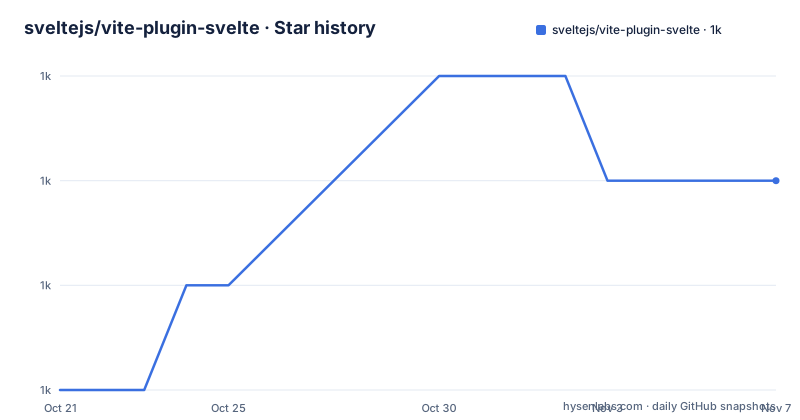
- sveltejs/vite-plugin-svelte1,046 ★ · +2
| Repository | 2026-10-21 | 2026-11-07 |
|---|---|---|
| sveltejs/vite-plugin-svelte | 1k | 1k |
2 Stars in the last 17 days, measured from the daily GitHub snapshot. Compare with other projects
Editorial analysis
Installation and the one config file you need
vite-plugin-svelte is the official Svelte plugin for Vite, and it is installed as a dev dependency:
npm install --save-dev @sveltejs/vite-plugin-svelteThe configuration is a single plugin entry in `vite.config.js`:
// vite.config.js
import { defineConfig } from 'vite';
import { svelte } from '@sveltejs/vite-plugin-svelte';

export default defineConfig({
  plugins: [
    svelte({
      // plugin options
    })
  ]
});
That is the whole integration. The plugin is imported, called with an options object, and placed in the `plugins` array. Everything else in the Vite config, the dev server, the build, the CSS handling, is Vite's own behaviour, and the plugin's job is to teach Vite how to compile Svelte components and to wire up hot module replacement for them.
The documentation is split into three files in the `docs/` directory. `docs/config.md` covers the plugin options, `docs/inspector.md` covers the Svelte Inspector, and `docs/faq.md` is the FAQ. The Svelte Inspector is the piece worth knowing about, because it is what gives you the component tree and the state of a running Svelte app inside the browser's devtools, and because its behaviour has changed over the plugin's life as Vite and the inspector tooling moved.
The package is published under the scoped name `@sveltejs/vite-plugin-svelte`, and the npm badge in the README points at that package rather than an unscoped one. There is also a Discord link for questions, pointing at the Svelte chat.
A monorepo with one published package
The repository layout is worth reading because it says something about how the project is structured for the future.
The root `package.json` is named `vite-plugin-svelte-monorepo` and is marked private, and the `packages/` directory is where the actual package lives. The Packages table in the README lists exactly one entry, `@sveltejs/vite-plugin-svelte`, with its changelog at `packages/vite-plugin-svelte/CHANGELOG.md`.
So the monorepo exists with a single published package today. That is a deliberate structure rather than an accident, and it is the shape a project takes when it expects to add more packages in the same repository, for example the separate hotkeys and inspector packages that the plugin ecosystem has grown into.
The tooling is pnpm-based with a `pnpm-workspace.yaml` and a `pnpm-lock.yaml`, and the release process uses changesets. The `.changeset/` directory at the root holds the pending changeset files, and the release script is `pnpm changeset publish`. The `generate:types` script generates the public types from jsdoc, and the documentation states that this is required when changing types and is validated in CI, which is a meaningful constraint for a package whose main output is type definitions.
The repository also has a `docs/` directory at the root, an `eslint.config.js` that covers JavaScript, TypeScript, Svelte and Markdown files, a `.prettierrc.js`, a `.husky/` directory with `prepare` set to husky, a `nano-staged` dependency, and two Vitest configurations, `vitest.config.ts` and `vitest.config.e2e.ts`.
The `check` script is a fan-out of five tasks running in parallel with `run-p`: an audit of production dependencies with `pnpm audit --prod`, a `publint` check across all packages, a type check, an ESLint run over the source, and a Prettier format check. The `fixup` script runs lint with fix and then format.
Hot module replacement is the part that cannot be swapped out
The credits section in the README names rixo with the note that without svelte-hmr and your support this would not have been possible. That is the clearest statement in the document about where the difficulty lives.
Hot module replacement is what lets a Svelte component update in the browser without losing component state, and it is a genuinely hard problem for a virtual-DOM framework. A component's local state, its props, its slots and the state of its children all have to be transferred from the old instance to the new one, and any mismatch produces either a lost state or a broken page. For Svelte, the component is compiled, so the hot update path is not the same as it is for React or Vue.
The README also credits intrnl for the initial inspiration from `intrnl/vite-plugin-svelte`, which is the fork of the original community plugin that predates the official one.
Two things follow from this for someone evaluating the plugin. First, HMR is the reason the plugin is a first-party package rather than a community integration, because it needs deep knowledge of the Svelte compiler's output. Second, the version of the plugin you pin determines the HMR behaviour you get, and the changelog in `packages/vite-plugin-svelte/CHANGELOG.md` is where the HMR changes are recorded.
The other piece of the plugin's value is the option surface. `docs/config.md` documents the plugin options, which is where compiler options, the HMR settings, the inspector toggle and the various per-extension hooks live. That is the part a project actually configures, and the part that changes between major versions.
The development loop and its one sharp edge
The Development section is written for contributors rather than users, and it contains one warning that will bite anyone who tries to run the tests without reading it.
All scripts work from the monorepo root. The plugins are unbundled esm, so a build step is not required while developing locally, but restarting the local dev servers can be needed to apply changes. That is a real characteristic of the plugin and it is a good one for contributors: no build loop between editing the plugin and seeing the change.
The commands are pnpm throughout. `pnpm i` installs dependencies, `pnpm check` and `pnpm:test` validate changes, `pnpm format` formats the source code, and `pnpm test:unit`, `pnpm test:serve` or `pnpm test:build` run a subset of tests. `pnpm test <e2e-directory-name>` focuses a specific test suite, and `pnpm changeset` generates a changeset for the release.
The sharp edge is the browser install. The documented command is `pnpm playwright install chromium`, to install the required Playwright browser binaries via the local `playwright-core`. The note explains why: this repo uses `playwright-core` with a bin alias to `playwright` via a package.json script, and calling `pnpm dlx playwright install chromium` will not work.
That is the kind of detail that costs an afternoon if you hit it blind. The package.json backs it up with a `"playwright": "playwright-core"` entry, and the reason for the alias is that the repository installs only the core package rather than the full one with its bundled browser downloads.
The test scripts themselves are structured in three tiers. `test:unit` is plain Vitest against the package. `test:serve` runs the end-to-end config against a dev server, and `test:build` sets `TEST_BUILD=1` to run the same suite against a production build, with `test:build:watch` doing that in watch mode. The top-level `test` script chains unit, build, serve and build-watch with `run-s` in that order, which is the sequence a full validation runs in.
Version 7 tracks Vite, not Svelte
The release history is the clearest signal about what this package is coupled to.
The three listed releases are `@sveltejs/[email protected]` on 2026-07-07, `7.3.0` on 2026-08-08 and `7.3.1` on 2026-09-23. The last push was on 2026-10-15 and the repository is not archived.
The minor releases land about a month apart, which is a fast cadence for a build plugin, and it reflects what the package is. This is not a library you add to your application and forget. It is the integration layer between two fast-moving tools, and it has to track the Vite major it supports. A plugin pinned to Vite 7 will not work with Vite 8, which is exactly why the plugin's own major version moves in step.
That coupling is the practical consequence of the project existing. There is no stable, long-lived version of this plugin that you can pin once. You are choosing a Vite major by choosing a plugin major, and you are accepting an upgrade cadence tied to Vite's own release schedule.
The Svelte side is looser. The package is a compiler integration, so it moves with the Svelte compiler's own release cycle, but the plugin version is not what determines which Svelte you can use. What determines that is the Svelte version you have installed and the compiler options you pass through the plugin.
SvelteKit is the case to be aware of. The README's Credits section names the Svelte and Vite creators, maintainers and contributors, and the ecosystem treats SvelteKit as a separate product with its own Vite setup. A project built with SvelteKit does not add this plugin to its Vite config, because SvelteKit brings the integration with it. The plugin is for Vite projects that are not SvelteKit projects, and for the many libraries and standalone apps that are.
Editorial conclusion
vite-plugin-svelte fits a Svelte project building with Vite, since it is the supported path and the alternative is maintaining a fork of it. It does not fit a project on SvelteKit, which brings its own Vite integration, and it does not fit a team that needs to pin a plugin version independently of Vite, since the plugin's releases track Vite's. Verify first that the plugin version you install supports the Vite major you are on, since the 7.x line was released across 2026 with three minor versions, that your `svelte()` call passes the options the documentation describes in `docs/config.md`, and that the Svelte Inspector behaviour in `docs/inspector.md` matches what you expect for your editor setup, because that is the piece most likely to differ from what you had with an older plugin.
Frequently asked questions
How do I install vite-plugin-svelte in a project?
Run `npm install --save-dev @sveltejs/vite-plugin-svelte`. The package is published under the scoped name `@sveltejs/vite-plugin-svelte` and is a dev dependency, since it runs at build time rather than in the browser.
How do I configure the Svelte plugin in vite.config.js?
Import `svelte` from `@sveltejs/vite-plugin-svelte` and place `svelte({...})` in the `plugins` array of the config exported by `defineConfig`. The plugin options are documented in `docs/config.md` in the repository.
What is the Svelte Inspector in vite-plugin-svelte?
It is a component inspection tool for running Svelte applications, and the plugin integrates it into the dev server. Its behaviour and configuration are covered in `docs/inspector.md`, and it is worth reading because the inspector's behaviour has changed across plugin versions.
Which version of vite-plugin-svelte should I use?
The plugin's major version tracks the Vite major it supports, and the 7.x line was released across 2026 with 7.2.0 in July, 7.3.0 in August and 7.3.1 in September. Pick the line that matches your Vite major rather than the newest release available.
How do I run the vite-plugin-svelte test suite locally?
From the monorepo root, run `pnpm i` to install dependencies and `pnpm playwright install chromium` for the browser binaries, then `pnpm check` and `pnpm test`. The `pnpm dlx playwright install chromium` form does not work because the repo uses `playwright-core` with a bin alias.
Official sources
Add this badge to your README
If you maintain this project, the badge below links readers to this analysis and shows its maintenance status from the daily GitHub snapshot. Paste the markdown into your README; add ?metric=license or ?metric=stars to the image URL for a different field.

[](https://hysenlabs.com/projects/sveltejs-vite-plugin-svelte)Star history chart for your README
[](https://hysenlabs.com/projects/sveltejs-vite-plugin-svelte)Was this useful?