swaylock: a screen locker for any Wayland compositor with ext-session-lock-v1
Screen locker for Wayland
At a glance
- What is it?
- swaylock is a C screen locking utility that works with any Wayland compositor implementing the ext-session-lock-v1 protocol, so it is not tied to Sway even though it lives in the swaywm organisation. It suits a Wayland user who wants a lock screen with a password prompt, and its PAM-less mode and background image support are the two decisions that shape how you install it.
- Who is it for?
- swaylock suits a Wayland user on any compositor with ext-session-lock-v1 support who wants a lock screen that behaves like the X11 tools they used before, and who is prepared to read swaylock(1) rather than guess at the options. It does not suit a system without a Wayland compositor, and it does not suit an environment where a suid or sgid binary on the PATH is unacceptable, because the non PAM password path depends on it.
- Can I use it commercially?
- Yes. MIT is a permissive licence: you can use, modify and sell software built on it, as long as you keep its copyright and licence notices.
- Is it still maintained?
- Yes. The repository last received commits 10 days ago.
- What is it written in?
- Mainly C, according to GitHub's language statistics.
Answers come from the project's GitHub data, last synced on November 6, 2026, and from our analysis. They are not legal advice.
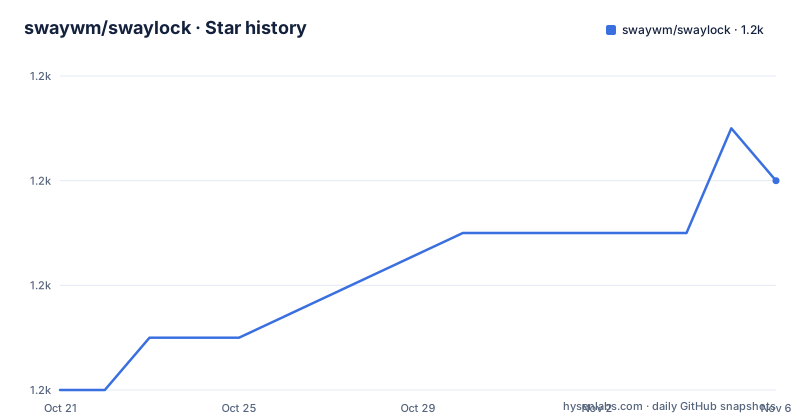
Star history
- swaywm/swaylock1,238 ★ · +4
| Repository | 2026-10-21 | 2026-11-06 |
|---|---|---|
| swaywm/swaylock | 1.2k | 1.2k |
4 Stars in the last 16 days, measured from the daily GitHub snapshot. Compare with other projects
Editorial analysis
Any compositor, not just Sway
swaylock is a screen locking utility for Wayland compositors, and the compatibility statement is the most important line in the README. It is compatible with any Wayland compositor which implements the ext-session-lock-v1 Wayland protocol. That protocol is the standard mechanism by which a compositor is told to blank its output and refuse input until it is released, and building against it rather than against a compositor specific API is what makes swaylock usable outside Sway.
That said, the provenance is visible. The repository is swaywm/swaylock, the topic tags are sway, wayland and wlroots, and the README notes that swaylock releases are managed independently of sway releases. The distinction matters if you are tracking versions, because a Sway update does not imply a swaylock update and vice versa. The project also points at a man page, swaylock(1), written in scdoc, and that is where the instructions for using it live.
The screen lock is a security boundary, so the details of the repository layout are worth reading. There is main.c for the program entry, seat.c for the seat handling that a Wayland lock needs, render.c for drawing the lock screen, cairo.c for the drawing backend, background-image.c for the wallpaper feature, password.c and password-buffer.c for the password handling, pam.c and a pam/ directory for the PAM path, shadow.c for the non PAM path, and unicode.c for the input handling that a password prompt needs. There is also log.c, comm.c for the communication with the compositor, loop.c, pool-buffer.c, a completions/ directory for shell completions, and include/ for the headers. The C file names map closely onto the features, which is a good sign for a utility of this size.
Building with Meson and Ninja
The project is built with Meson, and the README gives the three commands.
meson build
ninja -C build
sudo ninja -C build install
The dependency list is short and the README marks which are compile time requirements and which are optional. Meson itself, wayland, wayland-protocols, libxkbcommon and cairo are the core set. gdk-pixbuf2 is marked as optional but required for background images other than PNG. PAM is optional in the sense that there is an alternative authentication path, which the README covers separately. scdoc is optional and only needed for the man pages, and git is listed as a compile time dependency for the build.
The optional gdk-pixbuf2 line is the kind of detail that saves an afternoon. If you want a JPEG background image and you do not have that library, the build will succeed and the feature will be missing, and the failure will look like a swaylock bug rather than a build configuration one. The same applies to the man page: without scdoc you get a binary with no documentation, on a project whose documentation is a man page.
The scdoc source of swaylock(1).scd is in the repository root, which means the documentation is versioned alongside the code. That matters for a security tool, where the man page is often the only description of what the authentication options actually do.
Password checking with PAM, with a fallback that needs root
The authentication story is the part of swaylock that deserves the most attention, and the README handles it in a section headed Without PAM.
On systems without PAM, swaylock uses shadow.h. That means it reads the password hashes the way the traditional Unix tools do, and it needs privileges to do it. The README splits this into two cases. Systems which rely on a tcb-like setup, either via musl's native support or via glibc combined with tcb, require no further action, because the password is checked without needing to read the shadow file. The README links the tcb page for what that setup means.
For most other systems, where passwords for all users are stored in /etc/shadow, swaylock needs to be installed suid.
sudo chmod a+s /usr/local/bin/swaylockOptionally, on systems where the file /etc/shadow is owned by the shadow group, the binary can be made sgid instead.
sudo chgrp shadow /usr/local/bin/swaylock
sudo chmod g+s /usr/local/bin/swaylock
The last line of that section is the reassuring one: swaylock will drop root permissions shortly after startup. So the privileged window is short, but it exists, and the binary keeps the setuid bit for its whole life on disk. If your environment does not allow a setuid binary in a user-writable path, that is a hard constraint rather than a preference, and the PAM path is the answer rather than the shadow path.
The two source files make the split visible. pam.c and the pam/ directory handle the PAM path, and shadow.c handles the direct shadow.h path, so the two mechanisms are cleanly separated in the code rather than tangled together.
Releases are signed and versioned independently
The README has a short section on release signatures, and it is worth reading because it tells you how to verify what you install. Releases are signed with the key E88F5E48, published on keys.openpgp.org, and the releases themselves are published on GitHub. The note that swaylock releases are managed independently of sway releases appears in the same place, so both facts are in one spot.
For a screen locker, signed releases are not a nicety. A lock screen is a binary that reads a password and runs before anything else in the session, and the usual failure mode of a lock screen being skipped is exactly the thing an attacker wants. A project that publishes signed releases and gives you the key ID to check gives you a way to answer the question of whether the binary on your system is the one the project published.
The release history shows a steady line. v1.8.4 was tagged on 2025-11-06, v1.8.5 on 2026-03-09 and v1.8.6 on 2026-07-09, and the last push to master was on the same day as the newest tag. The project is MIT licensed, with the LICENSE file at the top of the repository.
The repository also has a .build.yml file, which is the build configuration for the CI, and an .editorconfig for formatting. The meson.build and meson_options.txt files at the root are the build definition and the option list, and the meson_options.txt file is where you would find the compile time switches, since the build exposes options rather than hard coding them.
Where swaylock is the wrong tool
Three cases argue against it. The first is a session that is not Wayland. swaylock is a Wayland screen locker, and it depends on the ext-session-lock-v1 protocol, so on X11 it is simply not the right program, and the X11 equivalents are a different set of tools with a different model. The second case is a compositor without ext-session-lock-v1. The README's compatibility claim is precisely scoped, and a compositor that does not implement the protocol will not be locked by this tool, whatever else it supports.
The third case is an environment where a setuid binary is not acceptable. On a system without PAM and without a tcb-like password setup, swaylock has to read the shadow file, which means the setuid or setgid bit. A locked down environment, a distribution that refuses setuid binaries, or a policy that treats a privileged copy of a screen locker as unacceptable will send you back to PAM or to a different tool. That constraint is real and it is the reason the PAM path exists.
A smaller point is the size of the feature surface. The README is short, and the man page is the documentation, so the options, the visual behaviour of the lock screen, the background image behaviour, the surface handling across multiple outputs and the keyboard input handling are all things you learn from swaylock(1) rather than from the README. That is a fine arrangement for a tool with a man page, and it is also a reason to read the man page before configuring anything, because the options are where the interesting behaviour lives.
On the security model, the honest framing is that swaylock is a screen lock and not a full security boundary on its own. It secures the session display, and it depends on the Wayland protocol being implemented correctly by the compositor and on the session not having another path to the display server. A lock screen is one part of a setup, and the project does not claim otherwise.
Editorial conclusion
swaylock suits a Wayland user on any compositor with ext-session-lock-v1 support who wants a lock screen that behaves like the X11 tools they used before, and who is prepared to read swaylock(1) rather than guess at the options. It does not suit a system without a Wayland compositor, and it does not suit an environment where a suid or sgid binary on the PATH is unacceptable, because the non PAM password path depends on it. Before you install it, read the man page for the full option list, decide whether you need PAM, and note that the last push was on 2026-07-09 with the newest release 1.8.6 from the same day.
Frequently asked questions
What is swaylock and which compositors does it work with?
swaylock is a screen locking utility for Wayland compositors, and it is compatible with any Wayland compositor which implements the ext-session-lock-v1 Wayland protocol. It lives in the swaywm organisation but is not tied to Sway.
How do I build swaylock from source?
Install the dependencies, which include meson, wayland, wayland-protocols, libxkbcommon and cairo, then run meson build, ninja -C build and sudo ninja -C build install. scdoc is only needed for the man pages and gdk-pixbuf2 only for background images other than PNG.
How does swaylock check passwords without PAM?
Without PAM it uses shadow.h. Systems with a tcb-like password setup need no further action, but where passwords are stored in /etc/shadow the binary has to be installed suid with chmod a+s, or made sgid in the shadow group on systems where /etc/shadow is owned by that group. swaylock drops root privileges shortly after startup.
Are swaylock releases signed?
Yes. Releases are signed with the key E88F5E48 published on keys.openpgp.org, and the releases themselves are published on GitHub. swaylock releases are managed independently of sway releases.
Official sources
Add this badge to your README
If you maintain this project, the badge below links readers to this analysis and shows its maintenance status from the daily GitHub snapshot. Paste the markdown into your README; add ?metric=license or ?metric=stars to the image URL for a different field.

[](https://hysenlabs.com/projects/swaywm-swaylock)Star history chart for your README
[](https://hysenlabs.com/projects/swaywm-swaylock)Was this useful?