mini-swe-agent: a bash-only coding agent built from one agent class and subprocess.run
The 100 line AI agent that solves GitHub issues or helps you in your command line. Radically simple, no huge configs, no giant monorepo—but scores >74% on SWE-bench verified!
At a glance
- What is it?
- mini-swe-agent is the Princeton and Stanford team's stripped-down successor to SWE-agent: no tools besides bash, a linear message history, and one subprocess per action. This analysis covers how those choices work, what they cost, and where SWE-agent is still the better fit.
- Who is it for?
- Use mini-swe-agent as a baseline, a local command line agent, or a sandboxed benchmark harness where you want to read the whole control flow. Use SWE-agent instead if you want to experiment with custom tools or history processors.
- Can I use it commercially?
- Yes. MIT is a permissive licence: you can use, modify and sell software built on it, as long as you keep its copyright and licence notices.
- Is it still maintained?
- Yes. The repository last received commits 4 days ago.
- What is it written in?
- Mainly Python, according to GitHub's language statistics.
Answers come from the project's GitHub data, last synced on November 13, 2026, and from our analysis. They are not legal advice.
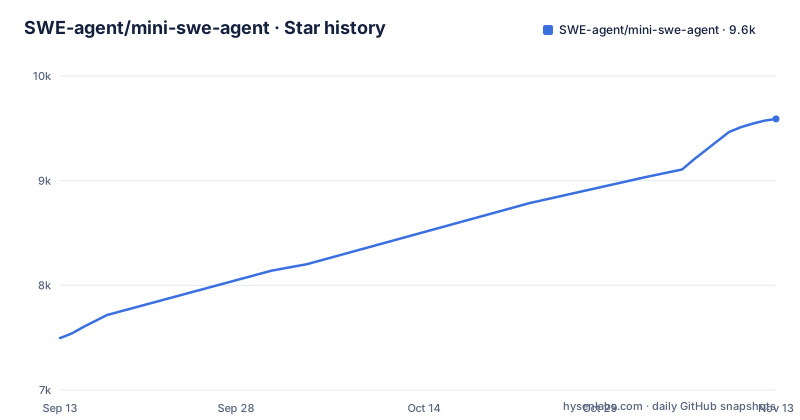
Star history
- SWE-agent/mini-swe-agent9,590 ★ · +2,094
| Repository | 2026-09-13 | 2026-11-13 |
|---|---|---|
| SWE-agent/mini-swe-agent | 7.5k | 9.6k |
2,094 Stars in the last 61 days, measured from the daily GitHub snapshot. Compare with other projects
Editorial analysis
The only tool is bash, and tool calling is optional
The design starts by deleting things. SWE-agent, built by the same group in 2024, put a lot of effort into custom tools and special interfaces for the model. mini-swe-agent drops all of that: the agent has no tools other than bash, and it does not even need the tool-calling interface of the language model.
The project states the consequence directly. Because nothing depends on a vendor's function-calling format, you can run it with literally any model. The same property helps in sandboxes, since nothing has to be installed inside the container for the agent to work. All it needs is bash.
The cost is that every capability lives in the model's shell skills. If you want the agent to open a pull request, the project's answer is to tell the model to figure it out rather than implement a tool for it. That keeps the code small, but it also means behaviour you might want to constrain, such as which commands may run, is not something a tool schema enforces for you.
Each action is a fresh subprocess.run, so no shell session survives a step
Actions are executed with subprocess.run, and every action is completely independent. There is no stateful shell session kept alive between steps. The project calls this a big deal for the stability of the agent and links an FAQ entry titled why no shell session.
The upside is that sandboxing becomes a one-line substitution. To run actions in a container, you literally switch out subprocess.run for docker exec. Scaling out is the same idea repeated: independent commands have nothing to coordinate.
The consequence for anyone driving it is that state does not carry across steps. A directory change or an exported variable in one command is gone in the next, so the model has to put the working directory and environment into each command it issues. Long interactive programs are also a poor match for this execution model, because there is no persistent terminal to attach to.
The trajectory is the message list, with nothing else hidden
The history is completely linear. Every step appends to the messages that are passed to the model on the next step, and that is all. There is no separate memory, no summarisation pass, and no history processor in between.
This gives one practical benefit: there is no difference between the trajectory you saved and the messages the model saw. When a run goes wrong you can read exactly what the model was prompted with. The project also points at this as a good fit for fine-tuning, since the logged conversation is the training-shaped data.
The flip side is that the agent has no built-in way to shrink a long conversation. Anything that SWE-agent could do with a history processor is not on offer here, and the README lists experimenting with history processors as a reason to choose swe-agent instead. The repository does ship a trajectory browser, documented on the project site under usage/inspector, for reading saved runs.
Swapping the environment: local, docker, podman, singularity, apptainer, bubblewrap, contree
The agent class is roughly 100 lines in src/minisweagent/agents/default.py. The surrounding pieces are separate files: the local environment in src/minisweagent/environments/local.py, the litellm model in src/minisweagent/models/litellm_model.py, and a run script at src/minisweagent/run/hello_world.py.
Environments are where deployment varies. The supported list is local environments, docker and podman, singularity and apptainer, bublewrap (spelled that way in the README), and contree, with more mentioned. In pyproject.toml the extras mirror this: full pulls in dev, swe-rex at version 1.4.0 or newer, modal and contree, while modal on its own adds modal and boto3.
Model access goes through litellm, openrouter, portkey and others, with support for the /completion and /response endpoints and interleaved thinking. The practical point is that the environment and the model are two independent objects handed to the agent, so changing where commands run does not touch how the model is called.
The Python binding is four lines and the model name is left blank
For embedding, the README shows the whole shape of the API. You build a DefaultAgent from a model and an environment, then call run with a task string:
agent = DefaultAgent(
    LitellmModel(model_name=...),
    LocalEnvironment(),
)
agent.run("Write a sudoku game")
The model_name argument is left as an ellipsis, so you supply whichever litellm-routable model you use. The snippet shows no imports, so check the cookbook linked from the Python bindings cell of the README for the module paths.
The same README grid lists the other entry points: the mini command line tool, batch inference for SWE-bench, and the trajectory browser. A newer addition is a documented way to run the agent on ProgramBench, a benchmark the README describes as new and extremely challenging.
Version 2 broke version 1, and the dependency pins show the scars
A warning at the top of the README says this is mini-swe-agent v2 and sends v1 users to a migration guide and a v1 branch. Releases v2.4.4 (2026-07-02), v2.4.5 (2026-07-06) and v2.4.6 (2026-07-23) came in quick succession, and the last push to the default branch was on 2026-10-26.
The package metadata is more modest than the marketing. The Development Status classifier is 3 - Alpha, and the package requires Python 3.10 or newer. The README advertises no fancy dependencies, yet pyproject.toml lists fourteen runtime dependencies, including litellm, openai, pydantic, textual, typer, rich and datasets.
Two pins are worth reading before you install. litellm must be at least 1.75.5 and not 1.82.7 or 1.82.8, which a comment calls compromised. openai must not be 1.100.0 or 1.100.1, referencing issue 446 in the project's tracker. If your environment already pins either library, resolve that conflict first.
Where SWE-agent is still the right choice, and what the benchmark claims cover
The README says to treat mini-swe-agent as the default choice if you want a quick local command line tool, a very simple control flow, faster and simpler sandboxing and benchmark evaluation, or you are doing fine-tuning or reinforcement learning and do not want to overfit to one scaffold.
It says to use swe-agent if you want to experiment with different sets of tools, each with its own interface, or with different history processors. Both give you excellent performance on SWE-bench and a trajectory browser.
The performance figures are the project's own statements. It claims over 74% on SWE-bench verified, says it starts much faster than Claude Code, and links announcements that it powers Ramp SWE-Bench and beats Claude Code and Codex on DeepSWE. None of those numbers were reproduced for this article, so check the linked leaderboard and blog posts for the model, date and settings behind each figure before relying on them.
Editorial conclusion
Use mini-swe-agent as a baseline, a local command line agent, or a sandboxed benchmark harness where you want to read the whole control flow. Use SWE-agent instead if you want to experiment with custom tools or history processors. Before adopting v2, read the migration guide and check the litellm and openai version pins against your environment.
Frequently asked questions
What is mini swe agent?
mini-swe-agent is a Python coding agent from the team behind SWE-bench and SWE-agent. It uses only bash, a linear message history, and subprocess.run for each action, with roughly 100 lines in the agent class.
How to use mini swe agent?
You can use the mini command line tool, run batch inference for SWE-bench, or embed it in Python by passing a model and an environment to DefaultAgent and calling agent.run with a task.
How do you install mini swe agent?
The project is published on PyPI as mini-swe-agent and requires Python 3.10 or newer. The README section visible here does not show the install command, so copy it from the project site at mini-swe-agent.com.
What is the difference between mini swe agent and SWE-agent?
mini-swe-agent has only bash and a linear history, while SWE-agent supports different tool sets and history processors. The README calls mini-swe-agent the default choice and recommends swe-agent for tool and history-processor experiments.
Official sources
Where developers are discussing it
Posts on Hacker News, dev.to and Lobsters that link to this repository, found by our scan of those communities. 1 in the last 30 days; newest first.
- Mini-Swe-AgentHacker News · Oct 24, 2026 · 2 points · 1 comments
Add this badge to your README
If you maintain this project, the badge below links readers to this analysis and shows its maintenance status from the daily GitHub snapshot. Paste the markdown into your README; add ?metric=license or ?metric=stars to the image URL for a different field.

[](https://hysenlabs.com/projects/swe-agent-mini-swe-agent)Star history chart for your README
[](https://hysenlabs.com/projects/swe-agent-mini-swe-agent)Was this useful?