SukiSU Ultra vs KernelSU: a kernel root fork that adds KPM modules, susfs and non-GKI support
Kernel-based Android Root Solution & KPM
At a glance
- What is it?
- SukiSU Ultra is a fork of tiann/KernelSU that grants root from inside the Android kernel and adds KernelPatch module loading, a susfs root-hiding tool and support for older non-GKI kernels. It suits people prepared to flash or build a kernel; it is not an app you install and run.
- Who is it for?
- SukiSU Ultra is a reasonable choice for someone on a GKI 2.0 device with kernel 5.10 or newer who wants KernelSU-style root plus KPM modules and a susfs configuration tool in the manager. It is the wrong choice for anyone who cannot flash a boot image or rebuild a kernel, and owners of 4.14 to 4.19 devices should expect manual integration and backports.
- Can I use it commercially?
- Yes, with conditions. GPL-3.0 is a copyleft licence: if you distribute software that includes it, you must release that software's source code under the same licence. Running it internally without distributing it does not trigger that obligation.
- Is it still maintained?
- Yes. The repository received new commits within the last day.
- What is it written in?
- Mainly Kotlin, according to GitHub's language statistics.
Answers come from the project's GitHub data, last synced on November 14, 2026, and from our analysis. They are not legal advice.
Star history
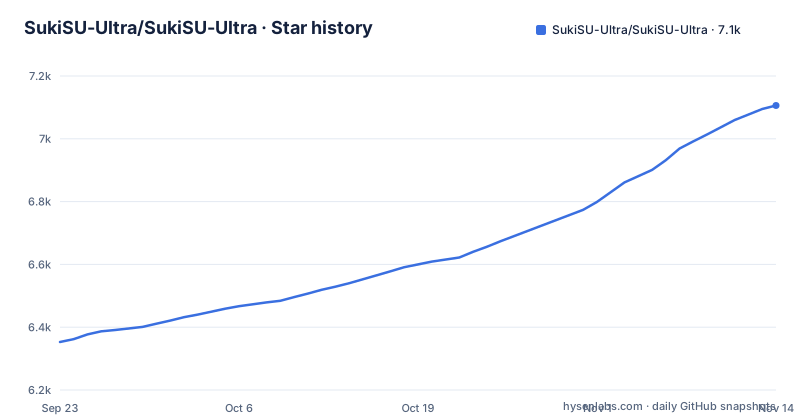
- SukiSU-Ultra/SukiSU-Ultra7,106 ★ · +753
| Repository | 2026-09-23 | 2026-11-14 |
|---|---|---|
| SukiSU-Ultra/SukiSU-Ultra | 6.4k | 7.1k |
753 Stars in the last 52 days, measured from the daily GitHub snapshot. Compare with other projects
Editorial analysis
Root granted from the kernel, managed by a Kotlin app
SukiSU Ultra puts root inside the Android kernel rather than in a patched userspace. The kernel provides su and the access control around it; a manager app decides which apps get it. The project started as a fork of tiann/KernelSU and now describes itself as independently maintained, with code merged from several other forks: Magic Mount from MKSU, non-GKI support from RKSU, root-hiding patches from susfs and module loading from KernelPatch.
The repository layout maps onto those layers. kernel/ holds the kernel-side code. manager/ is the Android app, which is why GitHub reports Kotlin as the main language. userspace/ksud and userspace/ksuinit are Rust crates in a Cargo workspace built with edition 2024, and uapi/ sits alongside them. The release profile in Cargo.toml asks for opt-level "z", LTO, stripping and panic = "abort", which tells you the userspace daemon is tuned for size on the device rather than for debuggability.
The audience is people who already flash custom kernels or build their own. There is no path here for a user who only wants to install an APK and tap a button.
Which kernel you have decides whether this is a flash or a build
The answer to how to install SukiSU Ultra depends entirely on the kernel. On a GKI 2.0 device with kernel 5.10 or newer, you flash a boot image, following guide/installation.md. On kernels from 4.14 up, the project calls them compatible but says the kernel has to be built manually using guide/how-to-integrate.md. Kernels in the 3.x line (3.4 to 3.18) can be supported with more backports and that porting work falls on you.
Architecture is narrower than the Android device range might suggest. Only arm64-v8a, armeabi-v7a (bare) and some X86_64 targets are supported. A 32-bit device outside the bare armeabi-v7a case, or an X86_64 build not covered, has no supported route.
One line in the compatibility notes matters more than the rest: compatibility is based on testing in this repository and no longer equals KernelSU's official support scope. A device that works with upstream KernelSU is not automatically covered by SukiSU Ultra, and the reverse holds too. Check the SukiSU guide for your kernel version, not KernelSU's list.
App Profile cages root per app, and the manager must match the kernel
Root access is granted per app through App Profile, which the project describes as locking root power in a cage. Rather than giving every requesting app the same unrestricted su, the manager holds a profile per app. The detailed rules live in the App Profile guide on sukisu.org.
The tight coupling between manager and kernel is the operational catch. The troubleshooting notes say that when the manager cannot detect root, the first thing to check is that the flashed kernel matches the manager version, and the second is that su is in PATH. Updating the APK alone, after a new release, can leave the manager blind to the root it is supposed to control. Update the kernel and the manager together, from the same release.
Another documented failure is stranger. If a device gets stuck after the manager app is uninstalled, the fix given is to uninstall _com.sony.playmemories.mobile_. Write that down before you remove the manager, because you will want it when the device is in that state.
KPM loading keeps one KernelPatch feature and drops the rest
KPM support is the main thing that separates SukiSU Ultra from upstream KernelSU. It comes from KernelPatch, the kernel component behind APatch, but the project removed the features redundant with KernelSU and kept only KPM loading. The patched source lives in ShirkNeko/SukiSU_KernelPatch_patch, and udochina/KPM-Build-Anywhere is the suggested template for building a module.
The status is partial and stated as such. Basic KPM loading works if the kernel is built with CONFIG_KPM=y. APatch compatibility expansion is in progress with some features not yet merged, so an existing APatch module is not guaranteed to load. Non-GKI kernels additionally need CONFIG_KALLSYMS=y and CONFIG_KALLSYMS_ALL=y, and kernels below 4.19 need set_memory.h backported from 4.19.
The consequence for a prebuilt GKI image: if it was not compiled with CONFIG_KPM=y, KPM will not load, and the manager cannot change that. When KPM fails to load, the troubleshooting steps go straight back to those kernel config options.
Building ksud and the manager with the justfile
Developers who want to build from source get a justfile at the repository root. The ksud recipe cross-compiles the Rust daemon for 64-bit Android using the cross tool:
cross build --target aarch64-linux-android --releaseThe build_manager recipe depends on that step, then copies the daemon into the app as a native library and builds a debug APK with Gradle:
cp target/aarch64-linux-android/release/ksud manager/app/src/main/jniLibs/arm64-v8a/libksud.so
cd manager && ./gradlew aDebug
The recipe only covers aarch64 and only copies into jniLibs/arm64-v8a, so a manager built this way carries the daemon for arm64 devices alone. Builds for armeabi-v7a or X86_64 need more than the justfile offers. The repository also ships repack_apk.py, split_apk_by_arch.py and a repack-config.example.json for repackaging and per-architecture APK splits. The aliases bk and bm shorten the two main recipes, and a clippy recipe runs cargo fmt plus cross clippy against the same Android target.
Where SukiSU Ultra and upstream KernelSU part ways
Choosing between SukiSU Ultra and KernelSU comes down to whether you need what the fork added. Upstream KernelSU is the origin of the kernel su design and is credited as the upstream here. SukiSU Ultra adds KPM loading, a built-in susfs management tool for one-click root hiding configuration, a customizable manager theme and support for non-GKI kernels and GKI 1.0.
Each of those additions is another piece of out-of-tree kernel code from a different project, and each has its own requirements: KPM needs specific config options, non-GKI needs manual builds. A user who wants plain kernel root on a supported GKI device gets less moving machinery from upstream. A user who wants KPM modules, or runs an older non-GKI kernel that upstream does not handle, has a reason to pick the fork. Since the support scopes have diverged, read both projects' device notes rather than assuming one inherits the other's.
Three licences, and the launcher icons are not GPL
Licensing is split three ways, which matters to anyone redistributing builds. Files under kernel/ are GPL-2.0-only. Everything else, including the manager and the Rust userspace, is GPL-3.0 or later. The launcher images matching ic_launcher(?!.*alt.*).* that carry anime character artwork are under a separate arrangement: drawn by 怡子曰曰, copyright held by 明风 OuO, with vectorized icons provided by the project, and the terms are set out in LICENSE_icon_English and LICENSE_icon_SC.
A fork that redistributes a modified manager under the GPL alone cannot assume the default launcher icon comes along under the same terms. Read the icon licence files, or swap in the alt icons, before publishing a build.
Releases arrive close together: v4.2.1-r2 on 2026-10-24, v4.3.0 on 2026-10-29 and v4.3.0-r1 on 2026-11-03, with the last push to main on 2026-11-01. Because the manager must match the kernel, each of those releases is a kernel and APK update to apply together, not an app update to accept from a store.
Editorial conclusion
SukiSU Ultra is a reasonable choice for someone on a GKI 2.0 device with kernel 5.10 or newer who wants KernelSU-style root plus KPM modules and a susfs configuration tool in the manager. It is the wrong choice for anyone who cannot flash a boot image or rebuild a kernel, and owners of 4.14 to 4.19 devices should expect manual integration and backports. Before flashing, confirm your ABI is arm64-v8a, armeabi-v7a or a supported X86_64 target, and that the manager APK version matches the kernel you flash.
Frequently asked questions
What is SukiSU Ultra?
SukiSU Ultra is a kernel-based root solution for Android, forked from tiann/KernelSU and now independently maintained. It adds KPM module loading, a built-in susfs root-hiding configuration tool and support for non-GKI kernels.
How do you install SukiSU Ultra?
On a GKI 2.0 device with kernel 5.10 or newer you flash a boot image following guide/installation.md. Kernels from 4.14 up need a manually built kernel following guide/how-to-integrate.md.
How is SukiSU Ultra different from KernelSU?
SukiSU Ultra adds KPM support from KernelPatch, a susfs management tool, a customizable manager theme and non-GKI and GKI 1.0 support. Its compatibility is based on its own testing and no longer equals KernelSU's official support scope.
How do you root with SukiSU Ultra once the kernel is flashed?
Root is granted through the manager app using App Profile, which controls root access per app. The manager version must match the flashed kernel, and su must be in PATH for the manager to detect root.
Official sources
Add this badge to your README
If you maintain this project, the badge below links readers to this analysis and shows its maintenance status from the daily GitHub snapshot. Paste the markdown into your README; add ?metric=license or ?metric=stars to the image URL for a different field.

[](https://hysenlabs.com/projects/sukisu-ultra-sukisu-ultra)Star history chart for your README
[](https://hysenlabs.com/projects/sukisu-ultra-sukisu-ultra)Was this useful?