SymForce ships compiled C++ in its wheels but no headers, so linking against the optimizer needs a source build
Fast symbolic computation, code generation, and nonlinear optimization for robotics
At a glance
- What is it?
- A read of symforce-org/symforce: three systems in one library, a packaging story where the version and the dependency list both come from outside the manifest, a setup script that subclasses setuptools to drive CMake, and an epsilon convention for singularities.
- Who is it for?
- SymForce is worth adopting if your team is already comfortable with symbolic differentiation and wants the same expressions to exist as Python for exploration and as generated C++ for deployment, because that continuity is the thing it actually sells. Two boundaries decide how much work adoption is.
- Can I use it commercially?
- Yes. Apache-2.0 is a permissive licence: you can use, modify and sell software built on it, as long as you keep its copyright and licence notices.
- Is it still maintained?
- Yes. The repository last received commits 16 days ago.
- What is it written in?
- Mainly C++, according to GitHub's language statistics.
Answers come from the project's GitHub data, last synced on November 15, 2026, and from our analysis. They are not legal advice.
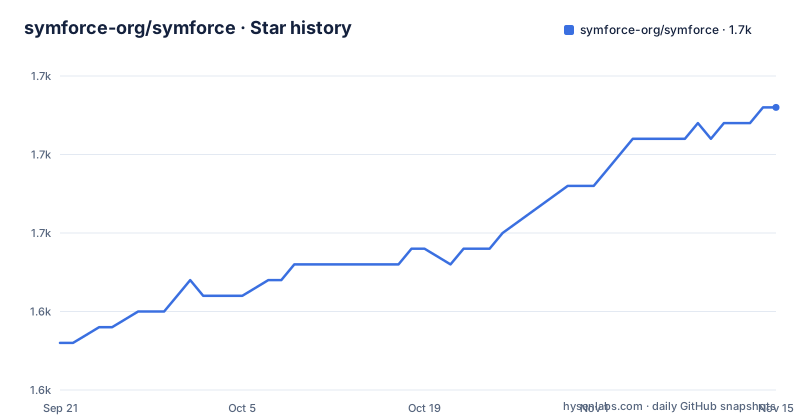
Star history
- symforce-org/symforce1,658 ★ · +15
| Repository | 2026-09-21 | 2026-11-15 |
|---|---|---|
| symforce-org/symforce | 1.6k | 1.7k |
15 Stars in the last 55 days, measured from the daily GitHub snapshot. Compare with other projects
Editorial analysis
The wheels carry compiled components and no headers
Installation is one command:
pip install symforceand the verification is two lines in a Python prompt:
>>> import symforce.symbolic as sf
>>> sf.Rot3()
The qualification that follows is the part to read. This installs pre-compiled C++ components on Linux and Mac through pip wheels, but it does not include C++ headers. If you want to compile against the C++ SymForce types, and `sym::Optimizer` is the example given, you currently need to build from source.
So the library divides into two experiences. The symbolic toolkit is importable anywhere the wheel lands. The code generator and the C++ optimization library are usable as generated output or as a Python layer, but a C++ consumer is routed back to the source build, with CMake, and the wording carries an admission that the gap is known rather than settled.
The platform scope deserves a note against the packaging metadata. The install note names Linux and Mac for the pre-compiled components, while the manifest classifier says `Operating System :: OS Independent`. Those two statements are not the same claim, and a Windows user reading the classifier rather than the install section will find out later than they would like. The manifest also declares `Programming Language :: C++` next to the Python classifiers, which is accurate about what the project is and unusual for something you install with pip.
Four packaging values are computed outside the manifest
The project table declares almost nothing about itself directly:
dynamic = ["version", "readme", "dependencies", "optional-dependencies"]Four fields, none of them written down in the file. The version is derived from git, and the table that enables that is empty on purpose, carrying only the comment that an empty presence is what turns setuptools_scm on:
[tool.setuptools_scm]
# Empty, presence enables setuptools_scm
The readme, the dependency list and the optional dependency list are computed the same way, and the repository layout shows where the dependencies live: there is a `requirements/` directory at the top level, beside `setup.py`. So there are two sources of truth outside the manifest, one for the version in the tag history and one for the dependencies in a directory.
The practical consequence is that a source checkout has no version of its own. There is no `version =` line to grep, and nothing in the manifest tells you which release a working copy corresponds to. The tags carry it: v0.10.1 on 2025-04-23, v0.11.0 on 2026-06-01, v0.12.0 on 2026-08-19, with the last push on 2026-09-30. That middle gap is thirteen months between releases, so the version you land on is worth pinning deliberately rather than inheriting. The source headers still say Copyright 2022, Skydio, Inc., and the paper is from RSS 2022, while the current release is two years past both.
setup.py subclasses setuptools to hand the build to CMake
The Python build script is not a configuration file. It overrides setuptools commands.
`CMakeExtension` extends `Extension` and calls the parent constructor with an empty source list:
class CMakeExtension(Extension):
    """
    CMake extension type.
    """

    def __init__(self, name: str):
        Extension.__init__(self, name, sources=[])
That empty `sources=[]` is the whole trick: there is no compilation for distutils or setuptools to perform, because the real work happens in CMake.
`PatchDevelop` does something subtler, overriding the legacy `develop` command and carrying a comment that explains exactly which setuptools versions will use it. `develop` predates setuptools 64.0.0, which implemented the PEP 660 editable install hook, so it is used with older setuptools and not with newer ones during a normal editable install, though it can still be invoked directly. A second comment, attributed to a developer by name, records what changed at that version: `build_ext` gained an `editable_mode` field which is set to true during a PEP 660 editable install, and the override wants to recognize an editable install regardless of which setuptools version is in play. That is compatibility code written against a moving target, and the comments are there so the next person does not delete it.
Two smaller signals in the same file. Both `find_packages` and `find_namespace_packages` are imported, so the package discovery strategy is not a single choice. And `ESCAPED_SOURCE_DIR` is a second copy of the source path with spaces replaced by `%20`, computed next to the real one, which is the form CMake needs when a path contains spaces.
The root Makefile states that it plays no part in the build
The first comment block in the Makefile is unambiguous about its own status: these are development utilities, this plays no part in the SymForce build process, and the build itself is done with CMake per the README.
What remains is a formatting, typing and coverage toolchain. `all` chains `clean docs coverage coverage_open docs_open`, so running it opens a browser and a coverage report. `format` runs `ruff check . --fixable=I,D --fix-only`, then `ruff format .`, then finds C++ files by extension and pipes them to `clang-format -i`. `check_format` does the same three things without writing, using `--diff`, `--check --diff` and `clang-format --dry-run -Werror`, so a formatting failure is a hard error rather than a warning. Type checking runs mypy against the manifest with `--show-error-codes`.
Two configuration details come out of that. Python formatting is configured in two places at once, a `ruff.toml` at the top level and a set of flags passed on the command line, with a comment admitting the author could not work out how to filter the docstring rules and left that out of the check. And a `prettier.config.mjs` sits in the root of a C++ and Python repository, which is what formats the notebooks.
The C++ file finder is where the generated code is quarantined. It skips `lcmtypes/`, `third_party/`, `build/`, `.venv/` and `.eggs/`, and one more specific path:
-not -path "./symforce/benchmarks/matrix_multiplication/gen/*" \Generated benchmark output is excluded from formatting, which is the ordinary convention and also the one that tells you where code generation writes its results.
The type check defaults to a build path for python2.7
The mypy invocation sets one environment variable to a default:
MYPY_COMMAND=$(PYTHON) -m mypy --show-error-codes --config-file=pyproject.toml
SYMFORCE_LCMTYPES_DIR ?= build/lcmtypes/python2.7
check_types:
	SYMFORCE_LCMTYPES_DIR=$(SYMFORCE_LCMTYPES_DIR) $(MYPY_COMMAND) . \
		--exclude build \
		--exclude .eggs \
The default value names `python2.7`, in a project whose manifest requires Python 3.10 or newer and whose classifiers run from 3.10 through 3.14. The variable points at generated Python bindings under `build/lcmtypes/`, and the naming convention of that directory is what the default inherits. Whether the stale segment is harmless depends on whether anything actually resolves that path, and the visible recipe does not say.
The rest of the recipe excludes `build` and `.eggs` from the check and then runs mypy over the whole tree, which is the standard shape. What is unusual is that the same directory name appears twice in this repository's tooling with different meanings: `build/` is excluded from type checking, excluded from the C++ formatting search, and named as the default location of the generated LCM types. It is a scratch space that three separate parts of the build assume they own.
The `lcmtypes/` directory at the top level is excluded from formatting for the same reason `third_party/` is, which suggests it holds generated or imported message definitions rather than hand-maintained code. Between that, the excluded paths and the python2.7 default, this repository makes its generated-code boundaries fairly visible if you read the tooling rather than the documentation.
Singularities are handled by an epsilon symbol, not by a branch
The tutorial builds a symbolic 2D pose and landmark and transforms the landmark into the robot frame, using a `world_T_body` convention so that `pose.inverse() * landmark` gives the body frame position. The orientation type `sf.Rot2` is stored internally as a complex number with real and imaginary parts, which is what the expanded expression shows. The tangent space of that same pose is a scalar angle, a translation and a translation, and the library understands the difference without being told:
landmark_body.jacobian(pose)That call returns the two by three matrix of the body frame landmark with respect to the pose tangent parameters. The point being made is that the storage representation and the differentiation representation are different, and the Jacobian comes out in the tangent space rather than in the coordinates the object happens to keep.
The singularity handling is the mechanism worth carrying to your own code. `atan2` is singular at the origin, and the library does not special-case it at runtime. Instead it places a symbol, epsilon, that preserves the value of an expression in the limit as epsilon goes to zero while still allowing evaluation at run time with a very small nonzero value. Functions with singularities accept an `epsilon` argument:
sf.V3.symbolic("x").norm(epsilon=sf.epsilon())which produces the square root of the sum of squares plus epsilon. The cost is that the expression you generated symbolically is not the expression you would have written by hand, and the benefit is that the generated code has no branch and no special case at the singularity.
The one performance number has no benchmark attached
The feature list contains a single quantitative claim: strategies for flattening computation and exploiting sparsity that can yield tenfold speedups over standard autodiff. There is no benchmark, no model, no graph and no hardware description anywhere near it in the documentation.
That is worth holding in mind precisely because of what else is claimed. The library computes tangent space Jacobians automatically, so no derivatives are handwritten, and generated functions can be used directly as factors in the nonlinear optimizer, which is the join between two of the three systems. The code generator emits branchless code with clean interfaces and minimal dependencies, through a template system that can target any language, and the C++ output is templated Eigen code with zero dynamic memory allocation, aimed at embedded targets. Each of those is a design statement you can check by reading generated output. The tenfold figure is the only one you cannot check without measuring.
The three systems are described as independently useful. The symbolic toolkit builds on the SymPy API and adds geometric and camera types, Lie group operations and singularity handling. The code generator turns symbolic expressions into target code. The optimization library is a tangent space optimizer built on factor graphs, in C++ and Python. The project is developed and maintained by Skydio, and the documentation says it is used in production for SLAM, bundle adjustment, calibration and sparse nonlinear model predictive control on autonomous robots at scale.
One authorship detail. The paper is an RSS 2022 paper with seventeen authors and a DOI, while the package metadata lists a single author, Skydio, Inc., with one individual's address. If you are citing, use the paper form; if you are filing a bug, the package form is where it will be read.
Editorial conclusion
SymForce is worth adopting if your team is already comfortable with symbolic differentiation and wants the same expressions to exist as Python for exploration and as generated C++ for deployment, because that continuity is the thing it actually sells. Two boundaries decide how much work adoption is. The Python side is self contained after a pip install, but anything that links against the C++ types, the optimizer in particular, needs a CMake source build, since the wheels omit headers. And the version you depend on lives in a git tag rather than in the manifest, so pinning has to happen at the packaging layer or through the release you checked out. Before you commit, read the one performance claim in the documentation, a possible tenfold speedup from flattening and sparsity strategies, and notice that no benchmark accompanies it, then measure your own graph. Teams that want a solver without a build step, or that cannot run the CMake path on their target platform, should look at a packaged optimizer instead.
Frequently asked questions
What is SymForce used for in robotics?
It is a symbolic computation and code generation library for applications such as computer vision, state estimation, motion planning and controls. It bundles three independently useful systems: a symbolic toolkit built on the SymPy API with geometry, camera and Lie group types, a code generator that targets any language through templates, and a tangent space optimization library built on factor graphs in C++ and Python.
How do I install symforce and check that it works?
Run `pip install symforce`, then verify in Python with `import symforce.symbolic as sf` followed by `sf.Rot3()`. That path installs pre-compiled C++ components through wheels on Linux and Mac.
Do I need to build symforce from source to use the C++ optimizer?
Yes, if you want to compile against the C++ types such as `sym::Optimizer`. The pip wheels ship pre-compiled components on Linux and Mac but do not include C++ headers, so anything that links against the generated types goes through the CMake source build instead.
How does symforce deal with singular functions like atan2?
It places an epsilon symbol that preserves the value of an expression as epsilon approaches zero while still allowing evaluation at run time with a very small nonzero value. Functions with singularities take an `epsilon` argument, for example `sf.V3.symbolic("x").norm(epsilon=sf.epsilon())`, which generates the sum of squares plus epsilon under the square root.
Who maintains symforce and where is the paper?
It is developed and maintained by Skydio, and the documentation says it runs in production for SLAM, bundle adjustment, calibration and sparse nonlinear model predictive control. The paper is published at Robotics: Science and Systems 2022 with arXiv 2204.07889 and a DOI of 10.15607/RSS.2022.XVIII.041.
Does symforce compute derivatives for me?
Yes. It computes tangent space Jacobians for expressions automatically, so no derivatives are handwritten, and generated functions can be used directly as factors in its nonlinear optimizer. It also generates branchless native code from symbolic expressions, including templated Eigen C++ with zero dynamic memory allocation for embedded targets.
Official sources
Add this badge to your README
If you maintain this project, the badge below links readers to this analysis and shows its maintenance status from the daily GitHub snapshot. Paste the markdown into your README; add ?metric=license or ?metric=stars to the image URL for a different field.

[](https://hysenlabs.com/projects/symforce-org-symforce)Star history chart for your README
[](https://hysenlabs.com/projects/symforce-org-symforce)Was this useful?