GoNavi: the memory figures are for v0.9.8, the tag is v1.0.1, and the module is named GoNavi-Wails
High-performance multi-data-source database client - about 30MB, AI & MCP ready, zero Electron bloat.
At a glance
- What is it?
- GoNavi is a desktop database client for SQL, cache, vector, message queue, search and time-series stores, built with Wails and React rather than Electron, and it publishes its own resident memory measurements. Reading its own numbers and manifest closely shows the measurements belong to a version two minors behind the current release, the one unmeasured claim in its comparison table is its own, and the Go module is declared under a bare name with two major versions of the same database driver required directly.
- Who is it for?
- GoNavi suits a developer who wants one desktop client across relational, cache, vector and message queue stores, and who will treat a local install as the starting point rather than a server component, since four container targets exist but the product is described as desktop first.
- Can I use it commercially?
- Yes. Apache-2.0 is a permissive licence: you can use, modify and sell software built on it, as long as you keep its copyright and licence notices.
- Is it still maintained?
- Yes. The repository last received commits 1 day ago.
- What is it written in?
- Mainly TypeScript, according to GitHub's language statistics.
Answers come from the project's GitHub data, last synced on November 15, 2026, and from our analysis. They are not legal advice.
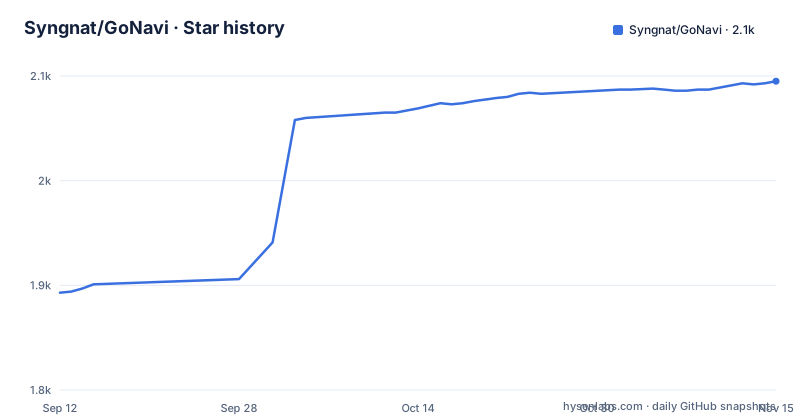
Star history
- Syngnat/GoNavi2,095 ★ · +202
| Repository | 2026-09-12 | 2026-11-15 |
|---|---|---|
| Syngnat/GoNavi | 1.9k | 2.1k |
202 Stars in the last 64 days, measured from the daily GitHub snapshot. Compare with other projects
Editorial analysis
The memory figures are labeled v0.9.8 while the tag is v1.0.1
The headline table separates three numbers, and the column heading for the project is `GoNavi (v0.9.8)`. The note underneath is more specific, describing the resident memory figures as one Linux cloud run of the v0.9.8 WebKit41 build, on an empty workbench, with no database connections, over a remote display, reaching steady state after roughly 30 to 40 seconds. The releases list tells you where the project actually is: v1.0.0 published 2026-09-24, v1.0.1 on 2026-10-01, and a rolling `dev-latest` tag built from a named commit on 2026-10-03. So the performance evidence on the page predates the current release by two minor versions, and the page presents it in the present tense as the project's numbers. The project is unusually candid about the limits of that sample, saying Windows and macOS laptop figures may differ and asking the reader to treat it as a labeled sample rather than a leaderboard score. It is a stronger disclosure than most, and it is still disclosure of an older build.
A 20-26 MB installer and about 429 MB of resident memory
The three numbers being separated are installer size, steady-state resident memory, and whether the UI stack is Chromium. On installer size the project claims a 20-26 MB class across the Windows, macOS and Linux release assets, against hundreds of megabytes common for a typical Electron client. On resident memory the Linux WebKit build is given as roughly 429 MB for the main process on an idle empty workbench, and roughly 765 MB once the WebKit helper processes are counted. That is the same application holding twenty to thirty times the memory of the file you downloaded, which is exactly the comparison the page warns against twice: a callout states that installer megabytes are not RAM, and tells the reader not to compare the figures to installer size or to unverified native 80 MB marketing. A second table repeats the instruction, listing the memory claim for other clients as often mixed with installer size and for this one as measure RSS separately. Whatever the number, the download size and the working set are two different questions, and the project is the one making that argument.
Startup is the one row in the comparison with no number in it
The table setting this client against a typical Electron client has six rows, and five of them are specific. Runtime is Chromium plus Node against Go plus a native WebView. Installer is hundreds of megabytes common against the 20-26 MB class. Data sources are mostly relational stores against SQL, cache, vector, message queue, search, time-series and domestic databases. On memory the other column is faulted for mixing the claim with installer size. On AI and agents the other column is described as bolt-on or absent, against first-class MCP and multi-provider AI. The sixth row is Startup, and there the claim is Heavy against Fast. Two adjectives, no measurement, in a table where the adjacent row supplies a resident memory figure to three significant figures and a build number. The philosophy section says startup time is considered critical, which makes the missing number more noticeable rather than less.
The At a Glance box drawing stops before its bottom border
The diagram that introduces the product is a text-mode layout in a fenced block, and it does not finish. Three panels are drawn inside an outer frame, labelled Connections with SSH, proxy and drivers, a middle panel labelled Monaco SQL plus AI with schema context and slash commands, and a Virtualized DataGrid with batch edit, export, and transaction submit or rollback. The middle panel's lower border is drawn with a tee junction, and a connector drops from it on the next line. That line is the last one before the frame stops, mid-row, without closing the panels, without the connector reaching anything, and without the outer box's bottom edge. So the single piece of ASCII art a reader meets after the performance tables is an unterminated drawing. Nearby, the screenshot captions make a claim of their own: every image is a full application window at 1440 by 900, captured from the latest dev build and scaled down for the page, with connection addresses, keys and provider configuration withheld.
The Go module is named GoNavi-Wails and requires two majors of one driver
The manifest opens with a module line that is a bare name rather than a host and path:
module GoNavi-Wails

go 1.25.0
A module path without a domain cannot be resolved by a remote fetch, so this is a repository that can only be built from a local checkout rather than consumed as a dependency. The direct requirements block is long and tells you what the data source claim is made of: a ClickHouse client, an IoTDB client, Pulsar and RocketMQ clients, a Kafka client, an MQTT client, an Elasticsearch client, a MySQL driver, an OceanBase connector, an Oracle driver, a Trino client, a TDengine driver, a DuckDB driver, Redis, both lib/pq and a pq-sm3 fork, a SQL Server driver, a Kingbase driver, a Dameng driver, a GaussDB driver, an Iris native driver, xlsx export, and the MCP Go SDK at v1.6.1. Two entries in that list are the same driver at two majors, `go.mongodb.org/mongo-driver v1.17.9` and `go.mongodb.org/mongo-driver/v2 v2.5.0`, both required directly rather than one being reached through the other.
Three drivers sit on commits from 2020, two of them off GitHub
Not every pin in the same block names a release. `gitea.com/kingbase/gokb` is required at a pseudo-version whose embedded timestamp is 2020-10-21, so the Kingbase driver is a five-year-old commit with no tag behind it. `github.com/skip2/go-qrcode` is the same shape, pinned to a commit dated 2020-06-17. `github.com/highgo/pq-sm3` is required at `v0.0.0`, which carries no version information at all, and it is a fork of a Postgres driver. A fourth pseudo-version, `github.com/tailscale/hujson`, is dated 2026-07-18, so the file is not uniformly stale. Two hosts in the list are not GitHub at all: the Kingbase driver is on Gitea and the Dameng driver at `gitee.com/chunanyong/dm` is on Gitee. For a client whose whole pitch is reaching stores that smaller projects ignore, that is a reasonable trade, and it is also a build environment that has to be able to reach those forges, plus a dependency surface where an upstream change to an untagged commit is a possibility rather than a hypothetical.
Four container targets for an app described as desktop first
The repository root carries four Dockerfiles: a build environment, a CLI, an MCP server and a web server. Beside them sit three compose files for those last three plus two more suffixed for local use, and three example environment files named for the CLI, the MCP server and the web server. There is also a `.dockerignore` and a separate `.containerignore`, and shell scripts for building release artifacts and for building driver agents. That is four deployment shapes for a project whose own summary says desktop first, and the tree explains why without needing to guess: the file names are split by build constraint rather than by product, with `main_windows_webview_userdata.go` paired against a stub of the same name for other platforms, a macOS preferences menu file, a deeplink handler with its own test, a startup window gate, and separate development and production asset embedders each with a test. The release channel is equally split, with a rolling dev tag sitting alongside numbered versions, and the default branch is `dev`.
The agent boundary is drawn at draft SQL
The product is described as agent ready, and the comparison table gives the mechanism: first-class MCP plus multi-provider AI, with the parenthetical doing the real work. The AI drafts SQL, while the GUI still owns schema, edits and EXPLAIN. So the assistant can propose a query and the human path for changing a schema or reading a query plan stays in the application rather than being delegated. The other stated property is about leaving the machine, described as handing structured context to coding agents without leaking passwords off-host, and the screenshot captions say the same thing about the images, with connection addresses, keys and provider configuration not shown. Against that, the two named sponsors are an OpenAI-compatible model aggregator and a model API relay, and the sponsorship invitation is a WeChat contact rather than a public process. An external registry health badge in the header also carries referral and campaign parameters in its query string, which is a small thing to know before copying the header into a fork.
Editorial conclusion
GoNavi suits a developer who wants one desktop client across relational, cache, vector and message queue stores, and who will treat a local install as the starting point rather than a server component, since four container targets exist but the product is described as desktop first. It suits less well anyone who needs the published memory figure to describe the binary they are about to install, because the measurement is labeled to an older version on one platform and the project says so itself. Before adopting it, take the installer and resident memory as two separate numbers, expect the working set to be several times the download, note that the data source breadth rests on drivers some of which are pinned to commits years old on forges outside GitHub, and read the agent boundary before wiring an assistant to it, since the design deliberately keeps schema changes and query plans in the GUI.
Frequently asked questions
How much memory does the GoNavi desktop client use?
On the measurement the project publishes, the Linux WebKit build holds about 429 MB for the main process on an idle empty workbench, and about 765 MB including WebKit helpers. The note states these are one Linux cloud run of the v0.9.8 WebKit41 build with no database connections, over a remote display, and asks readers to treat them as a labeled sample rather than a score.
How large is the GoNavi installer?
The 20-26 MB class is the installer, quoted across the Windows, macOS and Linux release assets. The project separates that from resident memory in a dedicated table and warns in a callout not to compare the two, describing installer megabytes as not equal to RAM.
Which data sources does GoNavi connect to?
The claim covers SQL, cache, vector, message queue, search, time-series and domestic databases, with MySQL, Postgres, Redis, Kafka, Milvus, OceanBase and ClickHouse named in the summary. The module file corroborates it with clients for ClickHouse, IoTDB, Pulsar, RocketMQ, Kafka, MQTT, Elasticsearch, MongoDB, Oracle, Trino, TDengine, DuckDB, Redis, Kingbase, Dameng, GaussDB, Iris and a SQL Server driver.
What can the GoNavi AI assistant change in my database?
The documented boundary is that the AI drafts SQL while the GUI still owns schema, edits and EXPLAIN. The schema-aware chat surface is described as being able to insert, run and preview generated SQL, so the assistant produces queries and the application retains the other operations.
Is there a GoNavi container image?
The repository carries four Dockerfiles, for a build environment, a CLI, an MCP server and a web server, with three compose files and two more for local use plus three example environment files. The product itself is described as desktop first and built with Wails and React rather than Electron.
Official sources
Add this badge to your README
If you maintain this project, the badge below links readers to this analysis and shows its maintenance status from the daily GitHub snapshot. Paste the markdown into your README; add ?metric=license or ?metric=stars to the image URL for a different field.

[](https://hysenlabs.com/projects/syngnat-gonavi)Star history chart for your README
[](https://hysenlabs.com/projects/syngnat-gonavi)Was this useful?