AIOX core: one CLI, five bin names, and hook parity that stops at Cursor
Synkra AIOS: AI-Orchestrated System for Full Stack Development - Core Framework v4.0
At a glance
- What is it?
- An AI agent orchestration framework distributed as the npm package @aiox-squads/core, which installs agent definitions into your editor's own directories. The interesting parts are the five command names, the per IDE hook support table, and an environment template that asks for nine keys.
- Who is it for?
- Adopt AIOX core if your team already works from the command line and wants agents, story files and planning documents installed as files in the repository rather than as a separate web tool. Set your limits before you start: the framework assumes Claude Code style lifecycle hooks, and Cursor, Copilot and AntiGravity get something weaker, so features that depend on pre and post tool events will not behave the same everywhere.
- Can I use it commercially?
- Check first. The repository uses a licence we do not classify automatically, so read its LICENSE file before any commercial use.
- Is it still maintained?
- Yes. The repository received new commits within the last day.
- What is it written in?
- Mainly JavaScript, according to GitHub's language statistics.
Answers come from the project's GitHub data, last synced on November 15, 2026, and from our analysis. They are not legal advice.
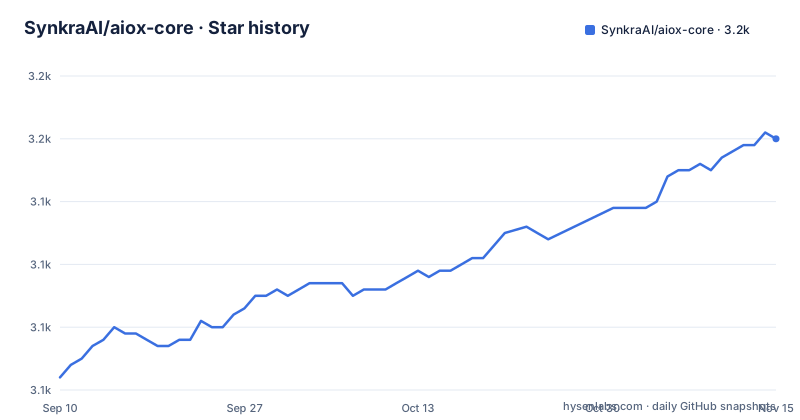
Star history
- SynkraAI/aiox-core3,150 ★ · +38
| Repository | 2026-09-10 | 2026-11-15 |
|---|---|---|
| SynkraAI/aiox-core | 3.1k | 3.2k |
38 Stars in the last 66 days, measured from the daily GitHub snapshot. Compare with other projects
Editorial analysis
Five command names, two of them the same file
The npm package is `@aiox-squads/core`, and the name change is documented as a consolidation: it is the successor to the unscoped `aiox-core`, the content is the same framework, and the CLI command `aiox-core` is preserved on purpose so existing scripts keep working.
The `bin` block registers five commands, and the duplication is deliberate rather than a mistake:
  "bin": {
    "aiox": "bin/aiox.js",
    "aiox-core": "bin/aiox.js",
    "aiox-minimal": "bin/aiox-minimal.js",
    "aiox-graph": "bin/aiox-graph.js",
    "aiox-delegate": "bin/aiox-delegate.js"
  },
`aiox` and `aiox-core` are the same file under two names, so the short name works for daily use and the long name keeps working after the migration. The other three are separate entry points: a minimal variant, a graph command, and a delegation command. `preferGlobal` is set to false and workspaces cover `packages/*`, so this is a monorepo published as one installable.
init for a new directory, install for an existing one
The onboarding path is two commands, and which one you need depends on whether you have a project yet:
# novo projeto
npx aiox-core init meu-projeto

# projeto existente
cd seu-projeto
npx aiox-core install
After that, each editor activates agents differently: Claude Code uses `/agent-name`, Gemini CLI goes through `/aiox-menu` and then `/aiox-<agent>`, and Codex CLI uses `/skills` followed by `aiox-<agent-id>`. Cursor, Copilot and AntiGravity are pointed at `docs/ide-integration.md` instead of being given a slash command, which is the first hint that they are second class here.
The success criterion is stated as a binary definition of first value: agent activation, a valid greeting, and one initial command producing useful output, all within ten minutes. The docs recommend activating exactly one agent first and running `*help` or its equivalent to confirm the loop closes before you add anything else.
Hook parity runs from complete to workflow based
Many of the framework's capabilities ride on lifecycle events, and the README publishes an honest parity table. Claude Code is the reference implementation with complete coverage. Gemini CLI is rated high because it fires native events, giving strong pre and post tool coverage. Codex CLI is partial: part of the automation depends on `AGENTS.md`, `/skills`, MCP and the operational flow rather than on hooks alone.
The bottom three are the ones to plan around. Cursor and GitHub Copilot are both listed as having no equivalent lifecycle hooks, with the practical effect described as less pre and post tool automation and more reliance on rules, MCP and the agent's own flow. AntiGravity is classified as workflow based rather than hook based, so integration happens through workflows that are not the same mechanism at all.
If your team spans more than one of those editors, treat Claude Code or Gemini CLI as the reference environment and verify the others against `docs/ide-integration.md` before promising parity.
CLI first, observability second, UI third
The architectural premise is a priority order, and it is printed as a diagram before anything else:
CLI First → Observability Second → UI ThirdThe CLI is where the work happens: agents such as `@dev` and `@qa`, workflows and commands. Observability is secondary and exists to watch the CLI in real time through an SSE dashboard, logs, metrics and a timeline. The UI is third, for occasional management and visualisation, with kanban, settings and story management named as its jobs.
Four rules are derived from that order, and they are the ones that matter when a feature request arrives: the CLI is the source of truth and dashboards only observe; anything new has to work completely from the CLI before it gets a UI; the UI must never be a requirement for operating the system; and observability exists to explain what the CLI is doing, not to drive it. In practice that means a feature that only works in the web interface is a bug against this framework's own rules.
Planning agents write documents, sm writes the story files
The workflow has two phases, and the README names what each produces.
The first is agentic planning. Dedicated agents, named as analyst, pm and architect, collaborate with you to produce PRD and Architecture documents, using prompt engineering plus human in the loop refinement on the argument that generic task generation is not good enough.
The second is development carried by those documents. The `sm` agent, a Scrum Master role, converts the plans into hyper detailed development stories, and the stated point is that each story file carries everything the dev agent needs: full context, implementation detail and architectural guidance embedded in the file itself. The dev agent then opens a story file already understanding what to build, how to build it and why.
The two problems this claims to remove are planning inconsistency and context loss. The diagrams that explain the loop live in `docs/guides/user-guide.md`: one for the planning flow through the web interface, one for the core development cycle in the IDE, where sm, dev and qa hand notes to each other through the story files.
The package ships your editor's configuration, not only code
Look at the `files` array and the shape of the package becomes clear. Alongside `bin/`, `scripts/`, `packages/` and `.aiox-core/`, it ships `.claude/CLAUDE.md`, `.claude/settings.json`, and whole subtrees for agents, commands, skills, rules and hooks. The published artefact is an editor configuration as much as a library.
The repository tree says the same thing from the other side. Alongside `.aiox-core/` and `.aiox/` there are `.antigravity/`, `.claude/`, `.codex/`, `.cursor/`, `.gemini/`, `.grok/`, `.kimi/` and `.synapse/`, one directory per assistant tool, plus `.docker/`. That is why `install` is the interesting command: it writes into whichever of those directories your tool reads.
The `exports` map goes further than a default entry. It publishes `./resilience` and `./resilience/agent-immortality` from inside `.aiox-core/core/resilience/`, and it exposes installer internals as named subpaths, including `installer/enterprise-detector`, `installer/enterprise-errors`, `installer/enterprise-manifest-loader`, `installer/enterprise-rollback` and `installer/enterprise-upgrader`.
Nine keys in the env template, and three versions in the metadata
The environment template asks for a lot before you have done anything. Under LLM providers it wants `DEEPSEEK_API_KEY` (annotated as about $0.14 per million tokens with tool calling support), `OPENROUTER_API_KEY`, `ANTHROPIC_API_KEY` and `OPENAI_API_KEY`. Under search and research it wants `EXA_API_KEY` for web search and `CONTEXT7_API_KEY` for library documentation, noted as usually free and not required for basic use. Then `SUPABASE_URL`, `SUPABASE_ANON_KEY` and `SUPABASE_SERVICE_ROLE_KEY`, and `GITHUB_TOKEN`. The file carries the instruction not to commit a filled copy.
Nothing requires you to fill all of them, and the DeepSeek key is called out as the one for the claude-free command, which suggests the framework can run without a Claude subscription key at all.
The version numbers do not agree with each other, which is worth knowing before you file anything: the package description says Core Framework v4.0, the hook parity table is labelled AIOX 4.2, and the published version is 5.4.1. The release history agrees with the package: v5.3.0 on 2026-07-11, then v5.4.0 and v5.4.1 both on 2026-08-15, with the last commit dated 2026-10-04. Prerequisites are Node.js 18 or newer with 20 plus recommended, npm 9 or newer, and GitHub CLI only if you want team collaboration. The repository metadata reports no recognised licence identifier, so read the LICENSE file rather than trusting the badge.
Editorial conclusion
Adopt AIOX core if your team already works from the command line and wants agents, story files and planning documents installed as files in the repository rather than as a separate web tool. Set your limits before you start: the framework assumes Claude Code style lifecycle hooks, and Cursor, Copilot and AntiGravity get something weaker, so features that depend on pre and post tool events will not behave the same everywhere. Fill in only the keys your chosen model needs, because the environment template requests nine and leaving them empty is fine, while filling all of them is a standing credential liability. Finally, check the version yourself, since the package description says v4.0, the hook table is labelled 4.2, and the published package is 5.4.1.
Frequently asked questions
What is the difference between aiox-core init and aiox-core install?
init is for a new project, taking the directory name as an argument, for example npx aiox-core init meu-projeto. install is for a project that already exists, so you change into it first and then run npx aiox-core install.
Which IDEs get full hook support in AIOX core?
Claude Code is the reference implementation with complete coverage, and Gemini CLI is rated high because it uses native events. Codex CLI is partial, Cursor and GitHub Copilot have no equivalent lifecycle hooks, and AntiGravity integrates through workflows rather than hook events.
Which API keys does aiox-core read from the environment?
The template lists DeepSeek, OpenRouter, Anthropic and OpenAI for models, Exa and Context7 for search and documentation lookup, three Supabase values for URL, anon key and service role key, and a GitHub token. The file warns not to commit a filled copy.
Why does the aiox-core package register both aiox and aiox-core?
Both names point at the same file, bin/aiox.js. The package moved from the unscoped aiox-core to @aiox-squads/core while preserving the CLI command names during the transition, so existing scripts keep working.
What do the AIOX core agents actually produce?
Planning agents named analyst, pm and architect produce PRD and Architecture documents with human in the loop refinement, and the sm agent turns those plans into hyper detailed story files that embed context, implementation detail and architectural guidance for the dev agent.
Official sources
Add this badge to your README
If you maintain this project, the badge below links readers to this analysis and shows its maintenance status from the daily GitHub snapshot. Paste the markdown into your README; add ?metric=license or ?metric=stars to the image URL for a different field.

[](https://hysenlabs.com/projects/synkraai-aiox-core)Star history chart for your README
[](https://hysenlabs.com/projects/synkraai-aiox-core)Was this useful?