lowfi is a terminal music player with one job and no extras
An extremely simple lofi player.
At a glance
- What is it?
- lowfi is a small Rust program that plays random lofi in a terminal, with no albums, no ads and no video. It is built for people who want background music that survives a flaky connection, and it ships as a cargo crate, as distro packages and as prebuilt binaries.
- Who is it for?
- Adopt lowfi if you want background audio in a terminal without opening a browser or a streaming client, since the binary is small, the keys are few and the buffering design keeps playback going through a poor connection. Do not adopt it if you want an album library, offline downloads or anything other than lofi, because the player is deliberately built around a random track list.
- Can I use it commercially?
- Yes. MIT is a permissive licence: you can use, modify and sell software built on it, as long as you keep its copyright and licence notices.
- Is it still maintained?
- Yes. The repository last received commits 9 days ago.
- What is it written in?
- Mainly Rust, according to GitHub's language statistics.
Answers come from the project's GitHub data, last synced on November 7, 2026, and from our analysis. They are not legal advice.
Star history
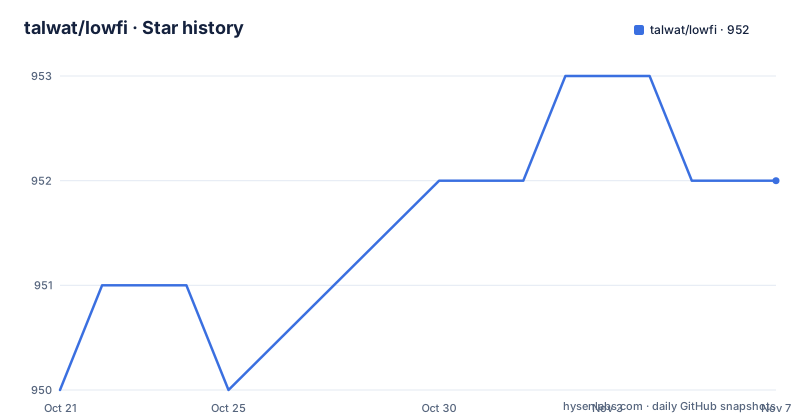
- talwat/lowfi952 ★ · +2
| Repository | 2026-10-21 | 2026-11-07 |
|---|---|---|
| talwat/lowfi | 950 | 952 |
2 Stars in the last 17 days, measured from the daily GitHub snapshot. Compare with other projects
Editorial analysis
One purpose, stated in the first line of the README
lowfi is a tiny Rust app that serves a single purpose: play lofi. The README puts the constraint plainly, it'll do this as simply as it can, no albums, no ads, just lofi.
The reason given is personal and specific. The author says he really hates modern music platforms and wanted a small, simple app that would just play random ambient music without video and other fluff. That is the whole product definition, and the rest of the project follows from it.
The program is a terminal application, not a web player and not a desktop one. The interface is drawn in the terminal with crossterm, and audio is played through rodio with the symphonia-mp3 feature. The Cargo.toml describes the package as An extremely simple lofi player, and the categories are command-line-interface, command-line-utilities and multimedia, with multimedia::audio nested under it.
It is MIT licensed, the last push to the repository was on 2026-09-13, and the releases are frequent: 2.0.7 on 2026-06-20, 2.0.6 on 2026-04-14 and 2.0.5 on 2026-03-18. The crate requires Rust 1.83.0 and uses the 2021 edition.
It buffers five whole songs instead of parts of one
The one piece of engineering judgement in the project is about buffering, and it explains the rest of the design.
The README says lowfi was designed to be fairly resilient to inconsistent networks, and that it buffers 5 whole songs at a time instead of parts of the same song. That is an unusual choice. The usual approach for a network player is to buffer ahead within the current track, which uses less memory and starts playing sooner, but which stalls the moment the connection cannot keep up with the bitrate.
Buffering by whole tracks moves the failure point. If a song is fully downloaded, the player can move to the next one without touching the network, and five of them give a decent cushion. The cost is memory and a slower first play, since nothing is audible until a full track has arrived.
The buffer size is configurable rather than fixed. The flag table lists -s, --buffer-size with a default of 5, described as the internal song buffer size, so a user on a fast connection can trade the cushion for a quicker start, and a user on a slow one can widen it.
The network side is handled by reqwest with the stream and http2 features and default-tls, and downloads have their own timeout, --timeout, defaulting to 3 seconds. That default is small, which suggests the intent is to fail fast and move on rather than wait out a stalled connection.
Six ways to install, and cargo is the universal one
The README lists installation methods in order of universality rather than convenience, and the packaging story is unusually thorough for a small project.
Cargo is the universal route. It needs Rust 1.83.0 or newer, and on MacOS and Windows no extra dependencies are needed.
cargo install lowfiOn Linux you also need openssl and alsa with their headers, named per distribution as alsa-lib on Arch, libasound2-dev on Ubuntu and alsa-lib-devel on Fedora, and openssl on Arch, libssl-dev on Ubuntu and openssl-devel on Fedora. If you use PulseAudio, pulseaudio-alsa has to be installed too. After installing, $HOME/.cargo/bin needs to be on $PATH.
Two optional cargo features change what gets built, and they are installed as flags on the same command.
cargo install lowfi --features mpriscargo install lowfi --features media-controlsBeyond cargo there are release binaries in the latest release, an AUR package installed with yay -S lowfi, an openSUSE package installed with zypper install lowfi, a Debian and Ubuntu route backed by an unofficial repository, and a Fedora COPR route. The README also notes that distro repositories may be slightly behind cargo, but that lowfi is not security critical so they are still perfectly fine to use.
For debugging there is a manual path, which clones the repository and builds it directly.
git clone https://github.com/talwat/lowfi
cd lowfi
cargo build --release --all-features
./target/release/lowfi
A French version of the README is available in the docs folder.
The key map is small and the flags change the frame
Running the program is a single word. lowfi, and that is it.
The controls are listed in a table, and the set is deliberately tiny. s, n and l skip the song, p and Space play or pause, + = k and the up arrow raise the volume by 10 percent while the right arrow raises it by 1 percent, - _ j and the down arrow lower it by 10 percent and the left arrow lowers it by 1 percent, q and CTRL+C quit, and b bookmarks the track.
The fine grained volume steps are a small detail that tells you the author cared about fine control, and the key choices are all memorable because they echo the media player conventions people already have in their fingers.
The flags adjust the presentation rather than the function. -a uses an alternate terminal screen, -m hides the bottom control bar, -b excludes borders, -c includes a clock, -p starts paused, -f sets the UI frame rate with a default of 12, -d adds ALSA and other debugging logs, -w sets the player width from 0 to 32 with a default of 3, -t selects a custom track list and -s sets the buffer size. The flag list is viewable with lowfi --help, and the README points at docs/ENVIRONMENT_VARS.md for anything even more specific.
The width range is worth noting. A maximum width of 32 means the player is a narrow column, which is a deliberate design decision about how much of the terminal to take.
Cargo features keep the platform specific parts optional
The features section in Cargo.toml shows how the author handles code that only a minority of users need, and the reasoning is stated in the README: lowfi uses the cargo feature system to make certain parts of the program optional, like those which are only expected to be used by a handful of users.
The default feature set is just default-tracklist, so a plain build carries the track list and nothing else. The optional ones are mpris, which pulls in mpris-server and arc-swap, media-controls, which pulls in souvlaki and windows for the Windows System Media Transport Controls, extra-audio-formats, which turns on the rodio default feature set, and scrape, which adds serde, serde_json, html-escape, scraper and indicatif.
The reasoning for mpris is spelled out. It is optional because it is Linux only, and because the main point of lowfi is its unique and minimal interface. The same note explains the Windows situation: terminal media keys via crossterm only work while the terminal is focused, and building with --features media-controls registers SMTC so play, pause, next and volume work globally when the OS exposes them, with track metadata in the Windows media overlay.
The scrape feature is the odd one out, and the README is upfront about it: it provides the scrape command, it is usually not very useful, and it is included for transparency's sake.
Bookmarks are a track list and nothing more
lowfi has no library concept, so saving a track had to be built on top of the one thing it already had, a list of tracks.
The README calls bookmarks lowfi's extremely simple answer to what about if I'd like to save a track. You bookmark and unbookmark with b, and you play them back with lowfi -t bookmarks. The technical explanation follows: the bookmarks are no different to any other track list, and as such are also stored in the same directory.
That is a nice piece of economy. There is one concept, a track list, and a bookmark is a list built by hand. The -t and --track-list flag points at the same mechanism for supplying a custom list, so a user who wants a fixed rotation rather than a random one does not need a different feature, just a different file.
It also means there is no database and no metadata store. The directory layout is the state of the program, and the user can read, edit or delete the files with any tool. For a program whose whole pitch is minimalism, that is consistent, and it is the opposite of the usual media library design where a metadata database is the centre of the application.
Where lowfi is the wrong tool
The obvious limit is the scope of the music. There are no albums and no ads, and the audio content is fixed by the project rather than chosen by you, so if you want to listen to something other than lofi, this is not the player.
The second limit is the content itself, and it is documented rather than hidden. As of the 1.7.0 version of lowfi, all of the audio files embedded by default are from chillhop, and the docs/MUSIC.md file holds the details. That is worth reading before you rely on the player for a long session, because the default experience is one specific catalogue of tracks rather than a generic lofi radio.
The third limit is the platform floor. The Linux build needs system audio and TLS libraries with their headers, which is a normal cost for a Rust project that uses rodio and reqwest, but it does mean a container image without those packages will not play sound. The Windows media key integration is behind a feature flag for a similar reason, since crossterm media keys only work while the terminal has focus.
Finally, note that this is a hobby project maintained by one person, with a MIT licence and no security expectations. The README says outright that lowfi is not security critical, which is the right framing for a music player, but it also means you should not build a dependency on it for anything else.
Editorial conclusion
Adopt lowfi if you want background audio in a terminal without opening a browser or a streaming client, since the binary is small, the keys are few and the buffering design keeps playback going through a poor connection. Do not adopt it if you want an album library, offline downloads or anything other than lofi, because the player is deliberately built around a random track list. Verify first that the source of the audio suits you, since as of the 1.7.0 version all of the embedded audio files are from chillhop and the details are in docs/MUSIC.md, and note that the cargo route needs Rust 1.83.0 or newer plus openssl and alsa with their headers on Linux.
Frequently asked questions
How do I install lowfi on Linux?
The cargo route needs Rust 1.83.0 or newer plus openssl and alsa with their headers, and pulseaudio-alsa if you use PulseAudio. Distro packages are also listed for Arch via the AUR, openSUSE, Debian and Ubuntu through an unofficial repository, and Fedora through a COPR.
What are the keyboard controls in lowfi?
s, n and l skip the song, p and Space toggle play and pause, q and CTRL+C quit, and b bookmarks a track. Volume changes in 10 percent steps with the plus and minus keys and in 1 percent steps with the arrow keys.
How do I enable MPRIS support in lowfi?
MPRIS is an optional cargo feature, installed with cargo install lowfi --features mpris. It is optional because it is Linux only and because the project prioritises its minimal interface.
Where does lowfi get its music from?
As of the 1.7.0 version, all of the audio files embedded by default are from chillhop, and the project documents that in docs/MUSIC.md. The player also has a scrape command for transparency, included behind the optional scrape cargo feature.
How do I save a track in lowfi?
Press b to bookmark the current track and lowfi -t bookmarks to play the bookmarked list. The README explains that bookmarks are no different to any other track list, so they are stored in the same directory and the same -t flag selects them.
Official sources
Add this badge to your README
If you maintain this project, the badge below links readers to this analysis and shows its maintenance status from the daily GitHub snapshot. Paste the markdown into your README; add ?metric=license or ?metric=stars to the image URL for a different field.

[](https://hysenlabs.com/projects/talwat-lowfi)Star history chart for your README
[](https://hysenlabs.com/projects/talwat-lowfi)Was this useful?