TanStack Markdown is small on purpose and says what it drops
Tiny, fast Markdown parsing and rendering for blogs and documentation
At a glance
- What is it?
- TanStack/markdown is a deterministic Markdown parser and renderer for blogs and documentation, quoting 5.2 KB gzipped for the parser and 7.0 KB for each of the HTML, React and Octane adapters. It is explicitly not a complete CommonMark or GFM implementation, and it ships a corpus gate that runs against real TanStack content.
- Who is it for?
- Fit for a blog or documentation site that renders Markdown you control, where a small bundle and identical output across the HTML, React and Octane renderers matter more than full spec coverage. A poor fit for arbitrary user-submitted Markdown, since the project states it is not a complete CommonMark, GFM or MDX implementation and publishes a conformance report rather than a pass.
- Can I use it commercially?
- Not without permission. GitHub finds no licence file in the repository, and without a licence all rights are reserved by default: you may read the code but not reuse it. Check the README, or ask the authors, before using it.
- Is it still maintained?
- Yes. The repository last received commits 12 days ago.
- What is it written in?
- Mainly TypeScript, according to GitHub's language statistics.
Answers come from the project's GitHub data, last synced on November 15, 2026, and from our analysis. They are not legal advice.
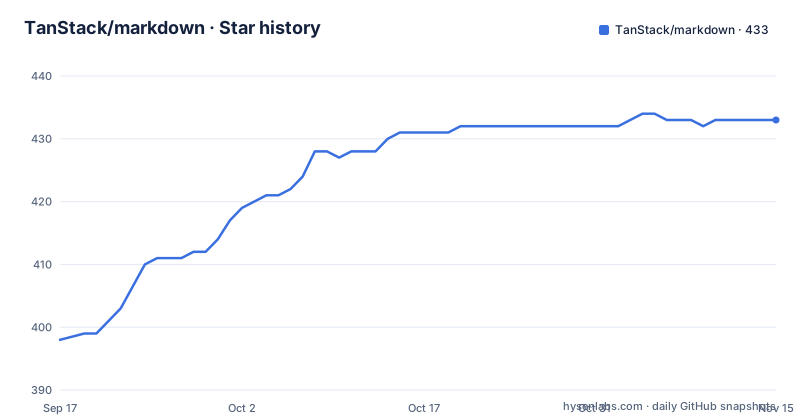
Star history
- TanStack/markdown433 ★ · +35
| Repository | 2026-09-17 | 2026-11-15 |
|---|---|---|
| TanStack/markdown | 398 | 433 |
35 Stars in the last 59 days, measured from the daily GitHub snapshot. Compare with other projects
Editorial analysis
Four sizes, and what they leave out
The size list is the pitch, and it is given as four separate numbers because there are four things to ship:
- 5.2 KB gzip parser - 7.0 KB gzip HTML renderer - 7.0 KB gzip React adapter - 7.0 KB gzip Octane adapter
Two further claims sit under them: zero runtime dependencies, and a serializable AST. The AST being serializable is the one with architectural consequences, since it means the parse result can be persisted, sent over a wire or inspected in a test rather than being locked inside a renderer.
The caveat is stated in the same breath as the numbers. Bundle sizes include the parser and exclude framework runtimes and syntax highlighters. So 7.0 KB for the React adapter is the adapter, not React, and highlighting is not counted either, which is fair but means the figure is not what a React page will add to its bundle.
Installation is one command, `pnpm add @tanstack/markdown`, and there is a separate instruction for agents: if you use an AI agent, run `npx @tanstack/intent@latest install` so it can discover the package's task specific skills.
It declines spec coverage and publishes the accounting
The positioning paragraph is unusually direct about what this is not. TanStack Markdown targets controlled technical content. It supports the Markdown used by blogs and docs, then spends its remaining complexity budget on four things: deterministic output, renderer parity, malformed-input resilience, and small entry points.
Then the sentence that decides whether it fits your project: it is intentionally not a complete CommonMark, GFM, MDX, or general content-processing implementation.
Renderer parity is the claim that needs explaining. The same source should produce the same result whether it goes out as an HTML string, as React elements or through the Octane adapter. If that holds, a site can move a page between renderers without the document silently changing shape, which is the failure mode that is hard to debug and easy to ship.
Malformed input resilience is the other half. Content that is not quite right should produce something rather than throwing, and the conformance report accounts for CommonMark compatibility rather than claiming a pass rate. That report is one of five generated files in the reports directory, alongside bundle sizes and benchmarks.
Small entry points means one path per feature
The package exports are the clearest evidence for the small entry points claim, and each one is a separate subpath rather than one barrel.
The root export carries the types and the ES module build. Then there is `./html`, `./parser`, `./react` and `./octane`, each with its own declaration file and its own JavaScript file. After the renderers come the extensions, and each extension is also its own entry point: `./extensions/callouts`, `./extensions/comment-components`, `./extensions/docs`, `./extensions/framework` and `./extensions/headings`, with more beyond what the visible package file shows.
The consequence for a bundle is straightforward. A page that renders HTML strings never pulls in React, and a site that does not use callouts does not pay for callouts. That is the difference between a single entry point that re-exports everything and a package where the import path is the feature flag.
Two package fields support the same intent. `sideEffects` is false, so importing a module for its types has no cost, and the published files list covers `dist`, the README and the `skills` directory while explicitly excluding `skills/_artifacts`, which is how build output inside the skills tree is kept out of the tarball.
One component name, two frameworks and a string renderer
Three surfaces, three imports, and the smallest one is a function call:
import { renderHtml } from '@tanstack/markdown/html'

const html = renderHtml('# Fast by default')
The React adapter exposes a `Markdown` component that takes children as the source string:
import { Markdown } from '@tanstack/markdown/react'

export function Article({ source }: { source: string }) {
  return <Markdown>{source}</Markdown>
}
The Octane adapter exposes the same component name from a different path, and its example uses an `@{ ... }` block in the component body rather than a returned expression, which is the syntax that example teaches:
import { Markdown } from '@tanstack/markdown/octane'

export function Article({ source }: { source: string }) @{
  <Markdown>{source}</Markdown>
}
Keeping the name identical across the two frameworks is what makes renderer parity checkable: the same source prop, the same child shape, a different import path. Separate guides exist for React and for Octane in the documentation directory.
Highlighting is external and opt-in per language
Syntax highlighting is deliberately not part of the package. The README points at the TanStack Highlight adapter as the tested route and describes what it does: it registers only the languages you choose and returns escaped token markup inside Markdown owned code containers.
Both halves of that sentence matter. Registering only the chosen languages is what keeps a highlighter from weighing down a site that only ever shows one language, and returning escaped token markup inside containers the Markdown renderer owns keeps the highlighter from having to decide how a code block is structured.
It also explains the size caveat again. Highlighters are excluded from the reported bundle sizes, so the numbers stay small precisely because highlighting is somebody else's package. A syntax highlighting guide sits in the docs directory alongside the extensions guide, the AI streaming guide and the API reference.
Raw HTML and executable URLs get safe defaults
Two safety items appear in the feature list without a paragraph of explanation: safe defaults for raw HTML and safe defaults for executable URLs.
For a Markdown renderer the raw HTML question is the classic one, since the format permits embedding HTML and a blog that accepts Markdown from a non-technical author will eventually get a script tag. A default that does not execute it is the safe answer, and a package that advertises the default rather than leaving it implicit is being explicit about it.
The same applies to links. An executable URL in a link target is the second classic vector, and treating the default as safe means the unsafe form has to be opted into.
What the visible documentation does not do is spell out the exact behaviour, the escape hatch, or which of the extensions can widen it. That level of detail lives in the security relevant part of the API reference or the extensions guide, and it is the first place to look if you accept Markdown from anyone you do not control.
The corpus gate runs against real TanStack content
Verification is a script and the interesting part is what it verifies against. `pnpm run verify` is the entry point, and the corpus gate can be pointed at content outside the repository:
MARKDOWN_CORPUS_DIRS=../tanstack.com/src/blog:../tanstack.com/docs \
  pnpm run test:corpus
That is a real corpus rather than a fixture set, taken from the TanStack site blog and documentation directories. Two audit targets exist for the wider question: `pnpm run corpus:audit:tanstack` audits practical compatibility across local TanStack repositories, and `pnpm run corpus:audit:external` audits a pinned external docs and blog sample.
The results land in the reports directory as generated files: bundle sizes, benchmarks, CommonMark compatibility accounting, the TanStack repository corpus and the external docs and blogs corpus. So the package's own claims are published as artifacts in the tree rather than asserted in prose, which means a reader can check the numbers instead of trusting them.
The rest of the layout supports that: `corpus/` for the content, `fixtures/` for the small cases, `tests/` with a vitest config, `scripts/` for the runners, and a `skills/` directory whose artifacts are excluded from the published files.
v1.0.0 landed a day after two 0.0.x releases
The release history explains what kind of library this is. v0.0.15 on 13 September 2026, v0.0.16 on 30 September, and v1.0.0 on 1 October at half past two in the morning. Three releases in under three weeks, with the 1.0.0 tag following the last 0.0.x by about a day.
The package file describes it as a tiny, fast, deterministic Markdown renderer for blogs and documentation, and the version field reads 1.0.0, matching the newest tag. The main branch last moved on 1 October 2026.
Two details to note if you are consuming rather than reading. The package declares MIT in its license field, but there is no LICENSE file at the top level of the repository, so the terms are asserted by metadata rather than shipped as a text. And the toolchain is pinned in the file itself, with pnpm 11.4.0 as the package manager, a workspace file and a lockfile, plus two tsconfig files separating the build from the base configuration and a `.changeset/` directory, which is how version bumps are recorded.
Editorial conclusion
Fit for a blog or documentation site that renders Markdown you control, where a small bundle and identical output across the HTML, React and Octane renderers matter more than full spec coverage. A poor fit for arbitrary user-submitted Markdown, since the project states it is not a complete CommonMark, GFM or MDX implementation and publishes a conformance report rather than a pass. Before adopting it, read the conformance accounting to see which constructs it declines, and run the corpus gate against your own content, because the package is at version 1.0.0 after a long stretch of 0.0.x releases and the size claims exclude framework runtimes and highlighters.
Frequently asked questions
What is TanStack Markdown and how small is it?
It is a tiny, fast, deterministic Markdown parser and renderer for blogs and documentation, with zero runtime dependencies and a serializable AST. The README quotes 5.2 KB gzipped for the parser and 7.0 KB gzipped each for the HTML renderer, the React adapter and the Octane adapter, with framework runtimes and syntax highlighters excluded from those numbers.
Is TanStack Markdown a complete CommonMark implementation?
No, and the README states it plainly. It targets controlled technical content, supports the Markdown used by blogs and docs, and spends its remaining complexity budget on deterministic output, renderer parity, malformed-input resilience and small entry points. It is intentionally not a complete CommonMark, GFM, MDX or general content-processing implementation, and a generated report accounts for CommonMark compatibility.
How do I check TanStack Markdown against real content?
Run pnpm run verify, or point the corpus gate at real content with MARKDOWN_CORPUS_DIRS, for example the tanstack.com blog and docs directories, then run pnpm run test:corpus. Two audit targets exist, corpus:audit:tanstack for local TanStack repositories and corpus:audit:external for a pinned external sample, and both write generated reports into the reports directory.
Official sources
Add this badge to your README
If you maintain this project, the badge below links readers to this analysis and shows its maintenance status from the daily GitHub snapshot. Paste the markdown into your README; add ?metric=license or ?metric=stars to the image URL for a different field.

[](https://hysenlabs.com/projects/tanstack-markdown)Star history chart for your README
[](https://hysenlabs.com/projects/tanstack-markdown)Was this useful?