tau: a Go workspace where the local run is a link and the tests are a sweep
Fullstack Workspace for Humans & Machines
At a glance
- What is it?
- Taubyte tau is a Go fullstack workspace for humans and machines, licensed BSD-3-Clause, with libp2p, DNS, git and webhook libraries in one module. Its README is short on purpose: the local run, the deploy paths and the walkthroughs all live off the repository, while the Makefile carries the real engineering decisions.
- Who is it for?
- tau suits a team that wants a peer to peer fullstack substrate with its own CLI, DSL and client libraries, and that is comfortable reading an external docs site before the first line of Go. Before committing, check three things: whether the 1.26 toolchain in go.mod matches your build machines, whether the ee/ submodule carries changes you need to license, and whether your deployment story survives without the Spore Drive automation.
- Can I use it commercially?
- Yes. BSD-3-Clause is a permissive licence: you can use, modify and sell software built on it, as long as you keep its copyright and licence notices.
- Is it still maintained?
- Yes. The repository last received commits 2 days ago.
- What is it written in?
- Mainly Go, according to GitHub's language statistics.
Answers come from the project's GitHub data, last synced on November 13, 2026, and from our analysis. They are not legal advice.
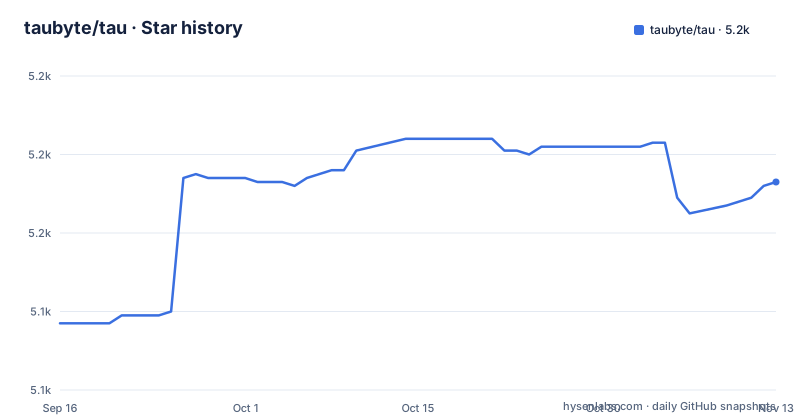
Star history
- taubyte/tau5,173 ★ · +36
| Repository | 2026-09-16 | 2026-11-13 |
|---|---|---|
| taubyte/tau | 5.1k | 5.2k |
36 Stars in the last 58 days, measured from the daily GitHub snapshot. Compare with other projects
Editorial analysis
Run Locally is a sentence and an outbound link
The whole local setup instruction fits in one line: the quickest way to try Taubyte is to spin up a local environment with dream, and the line points at https://tau.how/getting-started/local-cloud. There is no clone command, no flag list and no configuration snippet anywhere in the file. Everything you need in order to start is behind that link, which is a deliberate choice by the maintainers and also the first friction a new user hits.
The word doing the work is dream, and the repository has a matching dream/ directory at the root. The rest of the top level gives you the shape of the system: cli/, clients/, core/, services/, tools/, utils/, p2p/, cdk/ and main.go sitting next to go.mod and go.sum. Read that as a map before you read the docs, because it tells you the workspace is split by role rather than by feature.
One entry deserves a note. ee appears in the tree without a trailing slash, and the Makefile refers to it as a submodule, which is why .gitmodules sits in the repository. If the capability you are after lives there, a plain clone of the parent is not enough, and the README does not say what license applies to it.
Two deploy routes, and one of them has its own product name
Deployment is offered as a pair. The first is a manual route to your own servers and VMs, documented at https://tau.how/platform/deployment. The second is automated deployment with Spore Drive, documented separately at https://tau.how/platform/spore-drive.
The split is the important detail. A manual path means you keep control of the machines and the sequence of steps, at the cost of doing them. The automated path hands that sequence to Spore Drive, which is a separate thing with its own documentation and its own failure modes, and nothing in the repository describes how it reaches your infrastructure. If you take that route, you are adopting a dependency whose behavior lives entirely outside the code you cloned.
What the repository does carry for release mechanics is .goreleaser.yml, so the binaries are built by GoReleaser, plus a .pre-commit-config.yaml for local hooks. Neither file appears in the README, which is a good illustration of the pattern here: the operating instructions and the build machinery sit in different places, and you need both.
The Makefile sweeps tagged tests instead of running go test ./...
The test story is the most documented part of the repository, and it is documented in the Makefile rather than in prose. A plain target runs go test across the tree with an overridable flag variable:
test:
	go test $(FLAGS) ./...
The interesting part is why the heavier targets do not do the same thing. Tagged sweeps discover their packages instead of sweeping ./..., so they only build and run the packages that actually carry tagged tests. Discovery is a grep for the //go:build dreaming tag across test files, with packages whose dreaming tests are all also tagged for ee filtered back out, because listing such a package fails it outright rather than skipping it. The resulting list is scoped to the community tree, and the ee submodule's dreaming tests run under their own target instead, named make test-ee-dreaming.
Two exclusions exist for concrete reasons. Dot-directories are skipped because tooling keeps git worktrees there, meaning checkouts of this repository nested inside it. go test ./... skips those directories on its own since each has its own go.mod, but the grep based glob does not, and including them both fails their packages and runs every dreaming test twice under the parallelism setting, which collides on the fixed ports the fixtures bind.
tau-cli coverage needs -coverpkg or it hides the end to end reach
The coverage target carries a long comment that explains a trap specific to this codebase. The tau-cli command tree is driven in process through cli.Run, so a normal per package run reports each package against its own test files and hides the end to end reach of the tests. Crediting coverage across the whole module with -coverpkg is what makes the real number appear.
That target also reports the module total and hard enforces the DSL surface the refactor owns, and the comment is candid about why the total cannot be pushed higher. The module total is gated by the I/O packages, and those are the ones dealing with git, OAuth, containers and accounts, which need live service mocks before they can be unit tested. The gate is on tools/tau/tcc, the DSL reader the CLI is now built on, described as the substantive logic worth protecting.
For a contributor this is a useful map. cli/ holds the command tree you will change, tools/tau/tcc holds the parser underneath it, and the packages that block the coverage target are not your code. GOMEMLIMIT defaults to 4GiB in the Makefile and the dreaming parallelism defaults to 4.
One module carries libp2p, DNS, git and webhooks together
The dependency list explains what kind of system this is before any documentation does. go.mod declares module github.com/taubyte/tau at go 1.26, which is a recent toolchain floor and the first thing to check against your build machines. Alongside it sit github.com/libp2p/go-libp2p v0.48.0 and go-libp2p-pubsub v0.17.0 for the peer to peer layer, github.com/miekg/dns v1.1.72 for name resolution, github.com/gorilla/websocket v1.5.3 for live connections, and github.com/go-git/go-git/v5 v5.19.1 for git operations without shelling out.
Storage and content addressing come from the IPFS libraries, ipfs/go-cid and ipfs/go-datastore. The service side adds connectrpc.com/connect v1.18.1, gopkg.in/go-playground/webhooks.v5, and an OAuth stack through golang.org/x/oauth2, with github.com/golang-jwt/jwt/v5 for tokens. First party pieces include github.com/taubyte/domain-validation v1.0.1, github.com/taubyte/go-sdk v0.3.9 and github.com/taubyte/go-sdk-smartops v0.1.3. The command line comes from github.com/urfave/cli/v2 and the terminal output from pterm, with zap for logging.
The consequence for a reader is scale. There is no small subset to install and read first. Pulling the module in brings the peer to peer stack, the DNS resolver and the git implementation with it, so budget for reading a distributed systems codebase rather than a web service. buf.yaml at the root indicates protobuf definitions are part of the contract surface.
The README is a directory of links plus a four step PR loop
What tau's README does give you is a map of where help lives. There is a Discord invite, a documentation link, social buttons for X, LinkedIn, GitHub and YouTube, two embedded video thumbnails, and a Prefer Video section with five walkthrough links under the name Hitchhiker's Guide to Taubyte, described as guided walkthroughs and demos. Staying ahead is handled by starring on GitHub to be notified of new releases, which is also the release history: v1.2.0 in November 2026, v1.1.10 in April 2026, v1.1.9 in November 2025.
The contribution path is five steps written out in full: fork, branch from main, make changes, test, then submit a PR, with commits kept focused and a clear description of what and why. New contributors are pointed at good first issue. The repository reinforces that with CONTRIBUTING.md, AGENTS.md and CODE_OF_CONDUCT.md at the root, plus buf.yaml and .goreleaser.yml for the build and release side.
The license is BSD-3-Clause, with details in the LICENSE file, which is the permissive end of the range and the friendliest thing in the README for commercial use. One caveat worth keeping in view: ee is a separate submodule, and the README does not say what terms apply to it.
Editorial conclusion
tau suits a team that wants a peer to peer fullstack substrate with its own CLI, DSL and client libraries, and that is comfortable reading an external docs site before the first line of Go. Before committing, check three things: whether the 1.26 toolchain in go.mod matches your build machines, whether the ee/ submodule carries changes you need to license, and whether your deployment story survives without the Spore Drive automation. If you need the quick start to live inside the repository, this README will not give it to you.
Frequently asked questions
What is Taubyte tau, in one sentence?
A Go fullstack workspace described by its repository as a workspace for humans and machines, released under BSD-3-Clause and split into cli/, clients/, core/, services/, tools/, utils/, p2p/, cdk/ and dream/ directories at the top level.
How do I run Taubyte tau locally?
The README says the quickest way is to spin up a local environment with dream, and points at https://tau.how/getting-started/local-cloud for the steps. The repository itself carries no clone command or configuration snippet for that run.
What are the options for deploying tau to my own servers?
Two. A manual deployment to your own servers and VMs, documented at https://tau.how/platform/deployment, and automated deployment with Spore Drive, documented at https://tau.how/platform/spore-drive. The Spore Drive behavior is described outside the repository.
Official sources
Add this badge to your README
If you maintain this project, the badge below links readers to this analysis and shows its maintenance status from the daily GitHub snapshot. Paste the markdown into your README; add ?metric=license or ?metric=stars to the image URL for a different field.

[](https://hysenlabs.com/projects/taubyte-tau)Star history chart for your README
[](https://hysenlabs.com/projects/taubyte-tau)Was this useful?