WeKnora: the upgrade needs a pull, and only one service reads your .env
Open-source LLM knowledge platform: turn raw documents into a queryable RAG, an autonomous reasoning agent, and a self-maintaining Wiki.
At a glance
- What is it?
- WeKnora is a Tencent project that turns a team's documents into three things on one knowledge base, a RAG lookup, a reasoning agent and a self-maintaining wiki. Self-hosting it with Docker Compose is straightforward, but two details in the deployment files cost real time: docker compose up alone will reuse cached images and leave the interface on a different version than the release you downloaded, and only the app service reads your whole .env file.
- Who is it for?
- WeKnora fits a team that already keeps its documents in Feishu, Confluence, GitLab, Notion or Yuque and wants one search and reasoning surface across them, with the data staying in an environment it controls, and it fits a team willing to read a .env file organised into ten groups. It does not fit anyone who wants a single container, because the default deployment is several services behind profiles, and it does not fit a team without someone who will own the version pinning.
- Can I use it commercially?
- Check first. The repository uses a licence we do not classify automatically, so read its LICENSE file before any commercial use.
- Is it still maintained?
- Yes. The repository last received commits 4 days ago.
- What is it written in?
- Mainly Go, according to GitHub's language statistics.
Answers come from the project's GitHub data, last synced on November 13, 2026, and from our analysis. They are not legal advice.
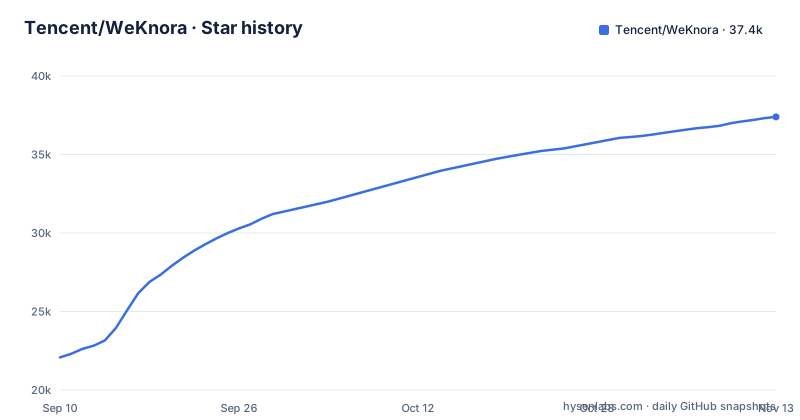
Star history
- Tencent/WeKnora37,395 ★ · +15,320
| Repository | 2026-09-10 | 2026-11-13 |
|---|---|---|
| Tencent/WeKnora | 22.1k | 37.4k |
15,320 Stars in the last 64 days, measured from the daily GitHub snapshot. Compare with other projects
Editorial analysis
Three modes over one knowledge base, and three ways to install it
The product shape is stated in one sentence and it is the thing to understand before anything else. Use RAG to look things up, the agent for multi-step tasks, and the wiki to organize knowledge, and all three work on the same knowledge bases. The framing is an open source, LLM powered knowledge framework for enterprise document understanding, semantic retrieval and reasoning, which brings a team's documents together so they can be searched, reasoned over and kept up to date. Installation then forks three ways rather than one. There is an online route through the WeChat Dialog Open Platform, which manages knowledge bases in the browser and connects Q and A to Official Accounts and Mini Programs. There is a cloud route as a Tencent Cloud Lighthouse application template. And there is the self-hosted route, deploying with Docker or Kubernetes and configuring models, storage and networking yourself, which is the one this repository is built for.
docker compose up alone can leave the interface on a different version
Installation is three prerequisites and five commands. Docker, Docker Compose and Git, then a clone, a copy of the environment file, a pull and an up.
git clone https://github.com/Tencent/WeKnora.git
cd WeKnora
cp .env.example .env    # Edit .env as needed, see comments in the file
docker compose pull     # Pull the latest images
docker compose up -d    # Start core services
After that you open the web interface and follow the onboarding guide. Three ports matter: the web interface on the default port, the backend API on 8080, and Langfuse tracing on 3000. The upgrade path is where the trap is, and the project's own note is blunt about it. The command up with the detach flag on its own reuses locally cached images and may leave the interface version out of sync with the release you downloaded. So an upgrade is three steps, not one: set WEKNORA_VERSION in .env to the target release, pull, then bring the containers up. That variable is interpolated straight into the image tags..
The README writes 0.8.2, the environment file writes v0.7.0, and the prefix is the point
Here is a discrepancy worth two minutes of your attention, because it produces a confusing failure rather than an error message. The upgrade snippet in the README tells you to set WEKNORA_VERSION in .env to the target release, giving 0.9.0 as the example, with no prefix. The comment in .env.example describes the same variable differently: it explains that the value is the target release's git tag, gives v0.7.0 as its example, and explicitly notes the v prefix. Since WEKNORA_VERSION is substituted into the image references for both the interface image and the app image, the two sources disagree on the format, and neither shows which tag form the images actually use. The same comment also explains the two values you can use without pinning at all, where latest is the stable version and main is the newest development build. Pin a release tag with the prefix, or stay on latest deliberately.
Only the app service reads your whole .env, and four others read nothing from it
This is the single most useful thing in the environment file, and it is documented in Chinese comments at the top of it. The injection mechanism works like this: the app service reads the entire .env through an env_file directive, while the docreader, mcp, frontend and odl-hybrid services have no env_file at all and consume only the variables explicitly listed in their own environment sections in the compose file. So the practical rule is that adding a variable to .env is necessary but not sufficient. If you are configuring the document reader or the front end, you have to find the right service block as well, or your setting is silently ignored. The file itself is organised into ten labelled groups, covering deployment basics, data and storage, retrieval and graph, models, document parsing, auth and workspace isolation, agent and sandbox, optional integrations, observability, and security and tuning, so the knob is findable. The front end block also shows the defaults you are overriding, with a 50 megabyte upload limit and a 256 megabyte skill bundle limit.
The Office parser is a Rust static library you can switch off
The document pipeline has one part that surprises people, because the project is written in Go and the parser is not. Office files are parsed in-process by a component called anydoc, and the app image build takes an argument for whether to link it, defaulting to on. Setting it to zero skips the Rust toolchain and shortens the build time, and the engine then shows up as unavailable in the settings page rather than failing anything else. That is the trade: you lose Office parsing, and in exchange you can build the app image on a machine with no Rust installed. The Makefile makes the split explicit with a target that builds the anydoc static library and notes that it needs the Rust toolchain, and a second target for building the application with the parsing engine linked in. The broader format support is separate from this and stays in place, with more than ten formats including PDF, Word, images, Excel and XMind.
Sixteen storage and search clients are compiled in, and the tests run against fakes
The claim that LLMs, vector databases and storage backends are all swappable is checkable in go.mod, and the file is long. The module targets a recent Go release and pulls in both relational drivers, MySQL and Postgres, alongside OpenSearch, and two major versions of the Elasticsearch client at once. Vector and graph options include Milvus, Neo4j, SQLite vector bindings and DuckDB. Object storage comes in three flavours, MinIO, the Alibaba Cloud OSS SDK and the AWS S3 client. Ingest has its own adapters, with the Feishu SDK, the DingTalk stream SDK, a feed parser and a readability extractor for turning a web page into text. Task execution is a queue plus a goroutine pool. Two entries are worth noticing for a different reason: a Redis fake and a SQL mock are test dependencies, so the test suite runs without standing up real instances. The cost of that breadth is compile surface, and two Elasticsearch major versions in one module is the kind of thing to look at before you pick one.
v0.8.2 on 2026-09-24, with a changelog and a Homebrew formula at the root
The project is not archived and the last push landed on 2026-11-02, so WeKnora is actively maintained, with recent releases v0.8.2 on 2026-09-24, v0.8.3 on 2026-10-14 and v0.9.0 on 2026-10-29. The repository root is unusually well equipped for a project at version 0.9. There is a CHANGELOG.md, a VERSION file, SECURITY.md, THIRD_PARTY_NOTICES.md and a licenses directory, and the README exists in English, Chinese, Japanese and Korean. A Formula directory holds a Homebrew formula, and helm holds the chart for the Kubernetes route. There is also a lite variant, with its own .env.lite.example and build, run and package targets, which is the answer to a deployment that does not want every service. An .air.toml sits beside a Makefile with around forty targets for building, running, migrating and packaging, and migrations have their own directory with both an up and a down target.
Editorial conclusion
WeKnora fits a team that already keeps its documents in Feishu, Confluence, GitLab, Notion or Yuque and wants one search and reasoning surface across them, with the data staying in an environment it controls, and it fits a team willing to read a .env file organised into ten groups. It does not fit anyone who wants a single container, because the default deployment is several services behind profiles, and it does not fit a team without someone who will own the version pinning. Verify four things before you put documents in it: whether your platform's ingestion source is one of the listed syncs, whether your vector store is on the list the go.mod actually compiles in, whether the version string in WEKNORA_VERSION carries the v prefix the environment file insists on, and whether the Office parser matters to you, since that engine is a Rust library you can switch off.
Frequently asked questions
How do I run WeKnora locally?
You need Docker, Docker Compose and Git. Clone the repository, copy .env.example to .env and edit it, then run docker compose pull followed by docker compose up -d, and open the web interface in a browser to follow the onboarding guide. The web interface is on the default port, the backend API on 8080, and Langfuse tracing on 3000.
How do I upgrade WeKnora to a new release?
Set WEKNORA_VERSION in .env to the target release, run docker compose pull, then run docker compose up -d. Running the up command alone is not enough, because it reuses locally cached images and can leave the interface version out of sync with the release you downloaded. The project asks you to read the upgrade notes before upgrading, and deployments older than v0.8.2 should also read the v0.8.2 notes.
Why does my .env variable not reach the docreader or frontend service?
Only the app service reads your whole .env file, through an env_file directive. The docreader, mcp, frontend and odl-hybrid services have no env_file and consume only the variables listed explicitly in their own environment sections in the compose file, so a setting has to be added in both places to take effect.
Can WeKnora use a local model instead of a cloud LLM?
Yes. LLMs, vector databases and storage backends are all swappable, there are 29 built-in model vendors with a generated catalog, and Ollama is one of them. To use a local Ollama model you start the runtime first with ollama serve in the background, and the base URL and embedding model name are configuration settings documented separately.
What document formats does WeKnora parse, and what is anydoc?
More than ten formats are supported, including PDF, Word, images, Excel and XMind. Office files specifically are parsed in-process by anydoc, which is a static library linked into the app image and requires a Rust toolchain to build. It can be turned off with a build argument, which shortens the build but makes the engine show as unavailable in the settings page.
Official sources
Add this badge to your README
If you maintain this project, the badge below links readers to this analysis and shows its maintenance status from the daily GitHub snapshot. Paste the markdown into your README; add ?metric=license or ?metric=stars to the image URL for a different field.

[](https://hysenlabs.com/projects/tencent-weknora)
[](https://hysenlabs.com/projects/tencent-weknora)Star history chart for your README
[](https://hysenlabs.com/projects/tencent-weknora)Was this useful?