ClaudeBar tracks twenty quota sources, and only three fit in the menu bar
A macOS menu bar application that monitors AI coding assistant usage quotas. Keep track of your Claude, Codex, Antigravity ,and Gemini usage at a glance.
At a glance
- What is it?
- ClaudeBar is a macOS menu bar app that reads AI coding quota from twenty providers and shows how much is left before it resets. The interesting constraints are physical rather than technical: three providers fit in the menu, the Touch Bar and the notch only exist on some hardware, and every provider decides for itself how to expose its numbers.
- Who is it for?
- ClaudeBar is worth installing if you juggle more than one AI coding subscription and want to know which one is nearly spent before a long task starts. Its real strength is the per-provider documentation, since each of the twenty integrations states what credentials it needs, and that is the part you will actually consult.
- Can I use it commercially?
- Yes. Apache-2.0 is a permissive licence: you can use, modify and sell software built on it, as long as you keep its copyright and licence notices.
- Is it still maintained?
- Yes. The repository last received commits 1 day ago.
- What is it written in?
- Mainly Swift, according to GitHub's language statistics.
Answers come from the project's GitHub data, last synced on November 14, 2026, and from our analysis. They are not legal advice.
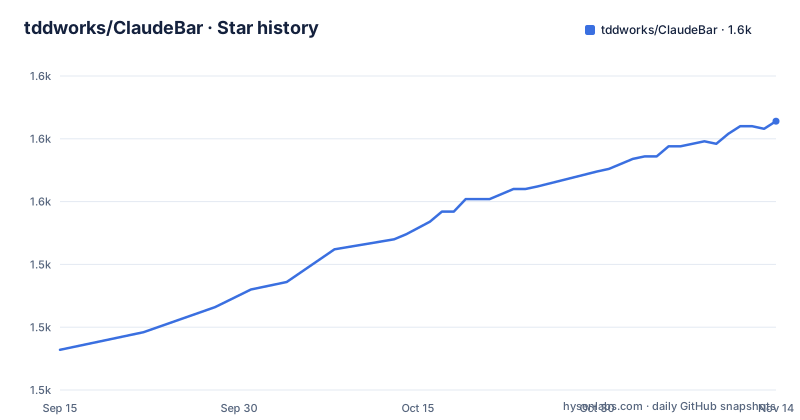
Star history
- tddworks/ClaudeBar1,582 ★ · +91
| Repository | 2026-09-15 | 2026-11-14 |
|---|---|---|
| tddworks/ClaudeBar | 1.5k | 1.6k |
91 Stars in the last 60 days, measured from the daily GitHub snapshot. Compare with other projects
Editorial analysis
Twenty providers, and each row tracks something different
The provider table is the most informative page in the repository, because the second column does not describe twenty variations on the same number.
Claude tracks a five-hour session window, a weekly limit, per-model limits for three named models, and an extra usage pool. Codex tracks five-hour and weekly rate limits plus credits. Gemini tracks per-model Code Assist quota across three tiers. Copilot tracks monthly AI credits. Cursor splits included monthly usage from on-demand and team credits. Antigravity reports two separate pools with their own five-hour and weekly windows. AWS Bedrock is the odd one out, reporting today's spend and tokens per model with an optional daily budget rather than a subscription allowance at all.
The rest follow the same idea of reporting whatever the vendor actually meters: account balances for DeepSeek, today's spend for Mistral, request counts per model for MiniMax, credit balances for Grok per billing period and per product, and a credit balance for a gateway rather than a coding plan for Vercel.
The consequence is that there is no single percentage the app could compute across all of them. It is a display layer over twenty different vendor APIs, which is why the setup column links to a separate page per provider instead of one shared manual.
The menu bar holds three providers
The menu bar row states the limit plainly: up to three providers shown as a percentage with a reset countdown, or a single status icon. That is the constraint that shapes the whole application.
Twenty integrations compete for three slots, so the configuration question is not which providers you have accounts with but which three you want to glance at. A user who enables everything in the settings panel and then finds only three visible has made the tool less useful, not more, and the page does not say what happens to the remainder.
There is also a status icon mode, which collapses the display to one indicator. That reads as the fallback for a crowded menu bar, and it pairs naturally with the alert levels described elsewhere: healthy, warning, critical and depleted, with colours that take pace into account rather than only the remaining percentage.
The pace-aware part deserves attention. A quota that resets in ten minutes and one that resets in two days can both read as fifty percent and mean very different things, so colouring by pace alone rather than by remaining amount is the more useful of the two designs.
Three features only work on particular MacBook hardware
The features table includes two that depend on what the machine has rather than on the software.
The notch row puts quota and live sessions from Claude Code into the MacBook notch, which is a physical cutout in the display on certain models. The Touch Bar row puts quota gauges on a MacBook Pro Touch Bar, a component Apple has been removing from its line. Both are the kind of feature that makes a screenshot look compelling and then does nothing on the desktop you actually use.
The remaining integrations are platform independent within macOS. Notifications reach an iPhone Lock Screen and Home Screen through a companion app. Session hooks emit started and finished notifications tied to Claude Code sessions, which is the one feature that depends on something outside the app entirely, since a hook has to be installed into another tool for it to fire.
Daily usage is the least exotic and possibly the most useful, showing today's cost and tokens beside yesterday's, which turns the menu from a status display into a running meter.
An extension point reads anything a script can print
The last row of the provider table is not a vendor. It is a directory in the user's home folder, and anything a script can print becomes a quota source.
That is the mechanism that explains how twenty providers were reached without twenty rewrites of the interface. New vendors appear as extensions with a manifest and a script rather than as code merged into the application, and the documentation treats it as a first class path rather than a workaround. The architectural consequence is that the provider list in the table is a snapshot of what shipped, not a hard limit.
The trade is that an extension is a script running with your user's privileges on a machine that also holds your coding tool credentials. The page does not discuss permissions or sandboxing for extensions, which means the trust model is whatever the manifest implies, and a reviewer should read one before installing one.
The same openness appears elsewhere: URL schemes expose actions for launchers and scripts, and themes include importing a terminal's own colour file.
Two install routes, and a source build that needs a toolchain
The quick start is a single command installing a Homebrew cask:
brew install --cask claudebarThe alternative is downloading a signed and notarized disk image from the releases page. The page states the system requirement as macOS 15 or newer and points the setup at a settings pane where each provider is enabled individually, with that provider's own documentation saying what it needs.
That last part is the real setup instruction. There is no single credential to paste, because twenty providers means twenty authentication mechanisms, and the page's decision to delegate each one to its own page keeps the main document short at the cost of spreading the work.
Building from source is delegated to a contributing document rather than described here. The repository layout explains what that involves: a Swift package manifest, a Tuist configuration with its own directory, sources and tests as separate top level directories, a modules directory, and a scripts directory. Tuist is a build system for Xcode projects, so the project is generated rather than opened as a checked in workspace, which is the pattern the directory listing implies.
Releases move fast by conventional standards, with three tags in the last week at the time of writing, and the newest is on the release page the install link points to.
Apache 2.0 and third-party terms
The repository includes a LICENSE file that GitHub identifies as Apache-2.0. The project also links to contribution, changelog and architecture documentation, publishes signed and notarized builds, and provides a package-manager cask.
If you distribute or modify the application, review the LICENSE file and any applicable third-party terms. Extension scripts can be third-party code and may carry separate licenses.
Multiple accounts are handled for one provider only
The features table has a row for multiple Codex accounts, and it is the only entry of its kind. Separate logins are identified by email, each with independent quotas.
That asymmetry is a reasonable response to how people actually work. It is common to hold two coding plan accounts, for example one for personal work and one billed elsewhere, and the feature keeps them apart rather than summing them into a single misleading number. The cost is that the same treatment is not offered for the other nineteen providers, where multiple accounts would presumably be aggregated or ignored.
The identity mechanism is worth noting too. Accounts are keyed by email rather than by a token or a workspace identifier, which is simple and readable, and means switching identity depends on which credentials are present rather than on a selector in the interface.
For the providers where a balance rather than a window is reported, the same question applies differently, since two accounts with balances would produce two figures and there is no stated rule for combining them.
Editorial conclusion
ClaudeBar is worth installing if you juggle more than one AI coding subscription and want to know which one is nearly spent before a long task starts. Its real strength is the per-provider documentation, since each of the twenty integrations states what credentials it needs, and that is the part you will actually consult. Two cautions. The menu holds three providers, so turning on everything means the ones you care about will not all be visible at once, and you should pick your three before you enable anything. And the app is macOS 15 or newer with several features that only work on particular MacBook hardware, so check what your machine supports before planning a workflow around the notch or the Touch Bar.
Frequently asked questions
What does ClaudeBar track?
Remaining AI coding quota for twenty sources including Claude, Codex, Gemini, Copilot, Cursor, Antigravity, AWS Bedrock, DeepSeek, Mistral, Grok and others, with reset countdowns and a notification before you run out. What each provider reports differs, from five hour and weekly windows to monthly credits, per-model quotas, today's spend or account balances.
How many providers can I show in the ClaudeBar menu bar?
Up to three, shown as a percentage with a reset countdown, or as a single status icon if you prefer. Turning on more than three in settings does not give you more menu space, so the three you enable are the three you will see.
Does ClaudeBar work on any Mac?
It requires macOS 15 or newer. The notch integration needs a MacBook with that cutout and the Touch Bar integration needs a MacBook Pro with a Touch Bar, so those two features depend on your hardware rather than on the software.
Can I add a quota source ClaudeBar does not ship with?
Yes, through the extensions directory in your home folder, where anything a script can print can become a quota source. An extension is a manifest plus a script, and it runs with your user privileges, so read one before installing it.
Can I use two Codex accounts in ClaudeBar?
Yes, and this is the only provider with explicit multi-account support. Separate logins are identified by email and each keeps its own quota, which is useful when personal and work accounts are billed differently.
Official sources
Add this badge to your README
If you maintain this project, the badge below links readers to this analysis and shows its maintenance status from the daily GitHub snapshot. Paste the markdown into your README; add ?metric=license or ?metric=stars to the image URL for a different field.

[](https://hysenlabs.com/projects/tddworks-claudebar)Star history chart for your README
[](https://hysenlabs.com/projects/tddworks-claudebar)Was this useful?