REST APIs with Flask and Python by tecladocode
Projects and e-book for our course, REST APIs with Flask and Python
At a glance
- What is it?
- A section-based Flask course repository covering Python APIs, Docker, PostgreSQL, SQLAlchemy, JWT authentication, migrations, and Render.com deployment. It suits guided learners, not teams seeking a finished production application.
- Who is it for?
- Developers who already know basic Python and want a guided Flask API curriculum should consider adopting this course repository. Teams seeking a finished application, a current production architecture, or clear reuse rights should first inspect the section code, dependencies, deployment assumptions, and license because the README presents the project as course material and does not document all operational requirements.
- Can I use it commercially?
- Not without permission. GitHub finds no licence file in the repository, and without a licence all rights are reserved by default: you may read the code but not reuse it. Check the README, or ask the authors, before using it.
- Is it still maintained?
- Yes. The repository last received commits 67 days ago.
- What is it written in?
- Mainly Python, according to GitHub's language statistics.
Answers come from the project's GitHub data, last synced on November 7, 2026, and from our analysis. They are not legal advice.
Star history
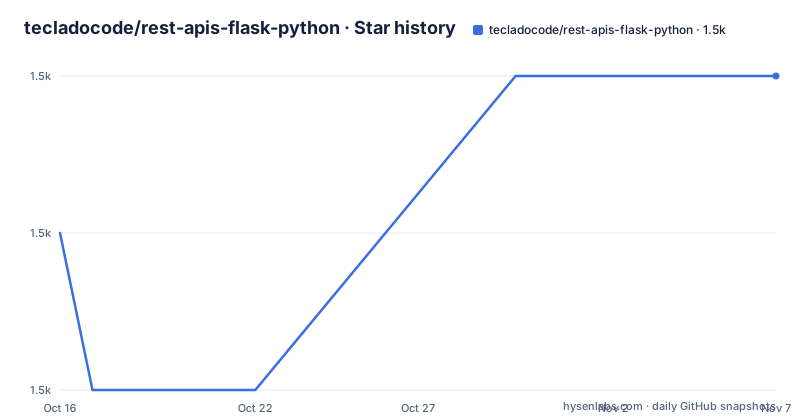
- tecladocode/rest-apis-flask-python1,509 ★ · +1
| Repository | 2026-10-16 | 2026-11-07 |
|---|---|---|
| tecladocode/rest-apis-flask-python | 1.5k | 1.5k |
1 Stars in the last 22 days, measured from the daily GitHub snapshot. Compare with other projects
Editorial analysis
A staged Flask API course rather than a finished service
tecladocode/rest-apis-flask-python is a codebase for the course titled “REST APIs with Flask and Python.” The repository is designed to be studied alongside the associated lessons. Its README directs readers to enrol through the course link, download the repository, and work through the code in section order. The files therefore represent instructional checkpoints rather than one application with a single documented production entry point.
The intended audience includes programmers who need an introduction to Python as part of an API course. However, the README is direct about the limit of that preparation. Section 2 is a Python refresher for people who are new to Python, and the README explicitly says it is not a complete-beginner Python course. Learners should therefore arrive with enough programming experience to follow Python code while the course introduces Flask and related tools.
The repository serves a different purpose from a normal Flask starter. It teaches the progression of an API through several infrastructure and application concerns. That structure makes it useful for guided study because examples can build on earlier sections. It also creates a constraint for adoption: a team cannot assume that every file belongs to the same deployable service without tracing the course directory and checking the dependencies associated with each section.
From JSON routes to database-backed resources
Section 3 contains the first API example. According to the README, it is a simple Flask app that accepts and returns JSON data. That establishes the initial request and response path without introducing a database. The example is intentionally small, which makes it easier for a learner to understand the relationship between a Flask route and a JSON response before more libraries enter the application.
Section 5 introduces Flask-Smorest. The README describes it as a library that simplifies writing REST APIs with Flask and provides automated documentation generation. This changes the emphasis from a bare route to an API structure with supporting behavior. The documentation states that Flask-Smorest handles useful API concerns, but it does not show the route schemas or generated documentation format in the text available here.
Section 6 replaces Python lists with SQLAlchemy and adds Flask-SQLAlchemy to the course stack. The README describes SQLAlchemy as an ORM that simplifies database connections and interaction. The result is a move from process-local storage to persistent database records. Section 7 then introduces many-to-many relationships, moving beyond a single resource model into relationships between multiple resources.
This sequence is the repository's clearest teaching mechanism. Request handling comes first, API scaffolding follows, then persistence and relationships. Each stage adds a concept that would otherwise obscure the basic JSON response path. A developer evaluating the code should still inspect the actual section directory because the README does not identify one current application file or explain which older examples are intentionally incomplete.
Docker and PostgreSQL dependencies in the lesson path
Section 4 introduces Docker before the database sections. The README covers images and containers and describes their use in running applications. That placement gives learners a way to consider application execution before the service depends on SQLAlchemy and PostgreSQL. The README does not document a Dockerfile, image name, container port, startup command, or Compose setup, so it does not support reproducing a deployment from its prose alone.
The persistence stack uses Flask-SQLAlchemy, SQLAlchemy, and PostgreSQL. SQLAlchemy replaces the earlier Python lists, while Section 11 states that the Render.com deployment includes a PostgreSQL database. Together, these sections describe an architecture in which Flask handles HTTP input, SQLAlchemy mediates object-oriented database access, and PostgreSQL retains data outside the Python process.
The README does not publish a connection string or explain whether database credentials are loaded through configuration files, environment variables, or the hosting platform. It also does not document database initialization for a new learner. Anyone trying the PostgreSQL path must inspect the relevant project files and course instructions rather than inventing configuration values. This gap is important because a working ORM mapping alone does not establish that a contributor can create, connect to, or recover a database.
JWT authentication and schema migration coverage
Section 8 covers Flask-JWT-Extended and describes access token JWTs, refresh tokens, JWT claims, blocklists, and password hashing. This indicates that authentication is treated as a collection of token and account-security behaviors rather than a single login endpoint. The README does not specify endpoint paths, token expiration settings, signing-key configuration, claim fields, or authorization rules, so those implementation details must be verified in the section code.
Section 9 addresses database changes through Flask-Migrate and Alembic. The README explains that manually changing database tables with SQL after deployment can be difficult. It then identifies migration scripts as the solution taught by the course. This is a useful separation between application deployment and schema evolution, but the README does not provide migration commands for this repository.
The topics also reveal a practical boundary. The course teaches mechanisms, not an operational guarantee. Authentication examples do not by themselves establish secure deployment settings, and migration examples do not establish backup or rollback policy. The README is silent on token revocation storage, secret rotation, migration recovery, monitoring, and production traffic. Teams with established security or operations standards should review those concerns directly rather than treating the section titles as a production checklist.
Render deployment, repository layout, and maintenance
Section 11 covers deployment to Render.com and states that the course deploys both an application and a PostgreSQL database. The stated objective is to make the API publicly accessible. This gives learners an end-to-end destination after the API, persistence, authentication, and migration sections. However, the README does not document scaling, health checks, observability, backups, secret management, zero-downtime deployment, or rollback.
The default branch is `develop`. Top-level entries include `.python-version`, `.flake8`, `.github/`, `.templates/`, `.vscode/`, `CONTRIBUTING.md`, `README.md`, `assets/`, `dependabot.yml`, `docs/`, `project/`, and a Git submodule declaration in `.gitmodules`. Based on this layout, course implementation is grouped under `project/`, while development and support files occupy separate areas. The README does not explain whether each project directory is independently runnable.
The repository is not archived, and its last push was on 2026-09-01. Recorded releases include `v2.4.0` on 2024-06-21, `v2.3.3` on 2023-05-10, and `v2.3.2` on 2023-02-08. The repository does not explain what changed in those releases or whether their code follows the current default branch. A present `dependabot.yml` indicates a Dependabot configuration exists, but the README does not document how dependency updates are managed.
No license is identified in the repository information. The README does not provide reuse terms for the course code. That does not establish what a learner may do, but it prevents a confident claim about redistribution or commercial reuse. License status should be checked in the repository and associated course terms before copying code into another product. Upgrade work may also require comparing dependencies against current Python and Flask releases, because the README shows a Python 3.10 badge but does not publish a compatibility matrix.
Installing and starting the course code
The README does not provide a standalone installation command for Python dependencies, Docker, PostgreSQL, or the full course application. It says to enrol in the course, download the repository, and return to the code while following the lessons. It also says that Git can be used when familiar with it, otherwise the repository can be downloaded as a zip file.
The exact command to use when Git is already installed is not printed in the README. The documented starting procedure is therefore:
1. Open the course link named in the README. 2. Enrol in the course. 3. Download the repository through Git or as a zip file. 4. Begin at Section 2 if a Python refresher is needed, or Section 3 when ready for the first Flask API. 5. Type the examples while following the lessons, then change and repair them to study the behavior.
The first documented application example is the Section 3 Flask app that accepts and returns JSON data. The README does not name its entry point, dependencies, or startup command. To make the first use reliable, a reader should identify the Section 3 project directory and check the dependency files stored there before attempting to start it. Installing every course dependency at once could mix section-specific packages and obscure which versions belong to the first lesson.
The course's suggested learning method is unusually concrete: watch a lesson, watch it again while typing the code, and then make changes, break the implementation, and repair it. That procedure is more appropriate here than treating the repository as a one-command demo because the examples evolve across multiple sections.
Adoption decision for a course codebase
The main alternative is a conventional Flask application repository organized around a current application, deployment workflow, and supported dependency set. Both approaches use Flask, but the operating model differs. This project teaches API construction through ordered lesson checkpoints, while a conventional application expects a developer to evaluate one declared environment and adapt an existing service. The course repository is the better fit when the learning sequence and extension examples matter more than immediate production ownership.
A developer should adopt this project when the goal is guided practice with JSON APIs, Flask-Smorest, SQLAlchemy relationships, JWT authentication, Alembic migrations, Docker concepts, and Render deployment. The developer should not adopt it as a finished platform or assume that section code has been synchronized as one service. The README does not identify a license, current compatibility matrix, rollback procedure, or operational policy.
Before choosing a starting section, check the Python version, dependency declarations, database credentials, and entry point for that exact course chapter. Before copying code into another project, resolve the license and inspect the current default branch. For this course repository, the decisive limitation is its instructional structure: it can teach the API stack effectively, but it does not present itself as a documented production template.
Editorial conclusion
Developers who already know basic Python and want a guided Flask API curriculum should consider adopting this course repository. Teams seeking a finished application, a current production architecture, or clear reuse rights should first inspect the section code, dependencies, deployment assumptions, and license because the README presents the project as course material and does not document all operational requirements.
Frequently asked questions
What does tecladocode/rest-apis-flask-python teach?
It teaches REST API development with Flask and Python. The listed topics include JSON APIs, Docker, Flask-Smorest, Flask-SQLAlchemy, many-to-many relationships, JWT authentication, Flask-Migrate, Git, and Render.com deployment.
Is REST APIs with Flask and Python suitable for a complete beginner?
It is not presented as a complete-beginner Python course. The README describes its Python refresher as intended for programmers who are new to Python.
How do I start the REST APIs with Flask and Python repository?
The README says to enrol in the associated course, download the repository with Git or as a zip file, and begin following the sections. It does not print a standalone dependency installation command or a single command for running every example.
Official sources
Add this badge to your README
If you maintain this project, the badge below links readers to this analysis and shows its maintenance status from the daily GitHub snapshot. Paste the markdown into your README; add ?metric=license or ?metric=stars to the image URL for a different field.

[](https://hysenlabs.com/projects/tecladocode-rest-apis-flask-python)Star history chart for your README
[](https://hysenlabs.com/projects/tecladocode-rest-apis-flask-python)Was this useful?