deepmerge concatenates arrays and dropped its ESM build over a bundler bug
A library for deep (recursive) merging of Javascript objects
At a glance
- What is it?
- deepmerge is a small JavaScript merge library whose browser bundle is stated as 723 bytes minified and gzipped, and it returns a new object instead of touching its inputs. Its two surprises are a default of array concatenation and the absence of an ESM entry point.
- Who is it for?
- deepmerge fits code that merges configuration-shaped objects where returning a new value matters more than handling class instances or arrays by index. Its default is the part to understand before you install it: arrays are concatenated, not combined position by position, and a key present in both inputs takes the value from the second one.
- Can I use it commercially?
- Yes. MIT is a permissive licence: you can use, modify and sell software built on it, as long as you keep its copyright and licence notices.
- Is it still maintained?
- Yes. The repository last received commits 62 days ago.
- What is it written in?
- Mainly JavaScript, according to GitHub's language statistics.
Answers come from the project's GitHub data, last synced on November 25, 2026, and from our analysis. They are not legal advice.
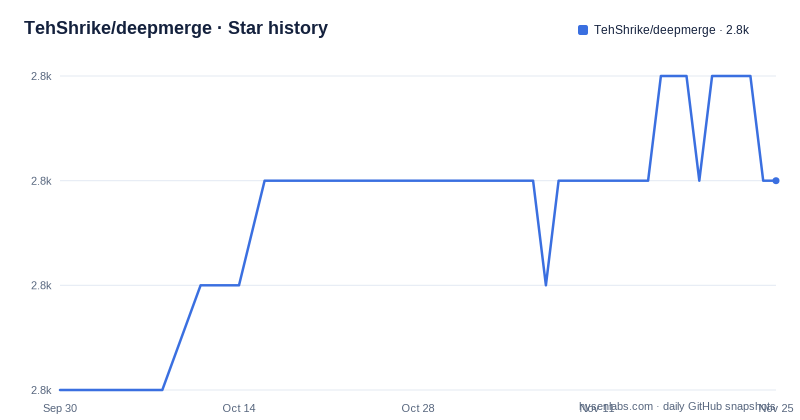
Star history
- TehShrike/deepmerge2,818 ★ · +2
| Repository | 2026-09-30 | 2026-11-25 |
|---|---|---|
| TehShrike/deepmerge | 2.8k | 2.8k |
2 Stars in the last 56 days, measured from the daily GitHub snapshot. Compare with other projects
Editorial analysis
There is no ESM entry point, and the reason given is a bundler bug
The include section offers one way to load the library. It exposes a CommonJS entry point:
const merge = require('deepmerge')And then it says the ESM entry point was dropped due to a Webpack bug, with a link to that project's issue tracker. The manifest agrees with the prose rather than the other way round: the main field points at dist/cjs.js, which is the CommonJS build, and there is no module or exports field beside it.
So a package with no runtime dependencies ships one module format. Anyone reaching for an import statement in a bundler setup is relying on interop rather than on a declared entry.
The browser story is separate and older in style. It can be used directly without package managers or bundlers, through a UMD file served from unpkg at the dist/umd.js path, and the headline number on the page is that this UMD bundle is 723 bytes minified and gzipped. That figure is not decoration: the size script in the manifest rebuilds and then measures it by pushing uglifyjs output through gzip into a byte count.
Arrays concatenate by default, and the old default is still shipped as an example
The API page states one rule and one note. If an element at the same key is present for both x and y, the value from y appears in the result. And by default, arrays are merged by concatenating them.
The worked example at the top of the page shows what concatenation means in practice. The target holds an array of one object with a nested array of three numbers, the source holds an array of two objects, and the merged output's array has three entries: the first object's values from the target, the second object's values from the source, and the third object from the source. Nothing is combined position by position. Two arrays of the same length come out twice as long, and identical-looking entries at different indexes stay separate.
Position-wise combining is available, but it is presented as an option rather than a default, with the note that it was the default array merging algorithm before version 2.0.0. The combineMerge recipe is still in the documentation as a starting point for anyone who wants the older semantics back.
The default clone copies properties and loses the prototype
One option exists purely because the default is aggressive. By default deepmerge clones every property from almost every kind of object, and the page says outright that you may not want this if your objects are of special types and you want to copy the whole object instead of just copying its properties.
The example makes the consequence concrete with a constructor called SuperSpecial holding one property, merged into a target. The default output keeps the source object's property value, but the check on the merged result, an instanceof test against SuperSpecial, evaluates to false. The object came out as a plain copy of its properties, which is what a merge of two plain objects would produce.
The suggested fix is to pass a function for the isMergeableObject option, and the page points at the is-plain-object package as the thing you probably want. Worth knowing where that lives: in the manifest it is a development dependency, not a runtime one, so it is a package you install yourself and pass in. The example that shows the custom function being used stops partway through the options object, so the completed version of it is not on the page.
customMerge dispatches on the property name and can decline
customMerge is a per-key override. The function is passed the key for each property, and it should return the function to use when merging the values for that property. Returning undefined is meaningful: it falls back to the default merge behaviour for that key.
The example exercises both halves at once. Two objects are merged, one belonging to Alex with a name object and a pets array of a cat and a parrot, the other to Tony with a name object and a pets array of one dog. The custom merge function is asked for the name key, returns a merger that combines the two first names into a string, and the merged name comes out as a first name from each person joined by a word. The pets key is never mentioned in the custom function, so it returns undefined for it and the default applies, which concatenates the two arrays into three entries.
That is the clearest statement of the library's design in the whole documentation: a key you care about gets your function, every other key keeps the built-in behaviour, and nothing has to be enumerated to get the defaults.
arrayMerge is handed the clone helpers, and the simplest example ignores them
The arrayMerge option receives three arguments: a target array, a source array, and an options object. That options object is not decoration, because it carries the two internal functions a custom merge needs in order to behave like the built-in one. They are isMergeableObject(value), which you already met as a top level option, and cloneUnlessOtherwiseSpecified(value, options), which decides whether a value is copied or shared.
The two documented examples sit at opposite ends of how much of that they use. overwriteMerge is one line, takes the destination array, the source array and the options object, and returns the source array, producing the second array in place of the first. Nothing about cloning is involved and the options argument goes unused. combineMerge, by contrast, starts from a slice of the target, then walks the source and calls cloneUnlessOtherwiseSpecified for values that land in a new index, calls merge recursively for values that are mergeable objects at an existing index, and pushes anything the target does not already contain.
So the option surface is deliberately small and the documentation's job is to show you how much the helpers let you do, since the default behaviour you are replacing is index-aware and clone-aware.
clone is deprecated, and it exists to restore the pre-2.x behaviour
One option is marked deprecated in the page. clone defaults to true. If it is false, child objects are copied directly instead of being cloned, and the page notes that this was the default behaviour before version 2.x.
That is the whole documentation of the option, three sentences, and it is a historical marker as much as an API. Two of the documented options exist to get back a behaviour that used to be the default: clone for object copying, and arrayMerge with the combineMerge recipe for array handling, which the page also labels as the pre-2.0.0 algorithm.
The pattern tells you something about the library's shape. Version 2 changed two defaults at once, from direct copying to cloning and from index-wise array combining to concatenation, and the current documentation keeps the old behaviour reachable through options rather than through version checks. Anyone upgrading across that boundary has two decisions to make explicitly instead of one silent change to discover in production.
The test run executes the README's own code blocks
The test script is a chain of four stages rather than a single runner:
`npm run build && tape test/*.js && jsmd readme.md && npm run test:typescript`
The first stage builds with rollup, the second runs the tape tests, the third hands the readme to jsmd, and the fourth checks the TypeScript. That third stage is the notable one, because it means the examples in the documentation are executed rather than trusted, so a snippet that stopped matching the library's behaviour fails the test run.
The TypeScript stage has two halves as well: tsc with no emit against a types file, then ts-node executing the same file. The manifest's main field points at a built file and the repository keeps a hand written index.d.ts at the root, so the types are validated by compiling and then by running.
The documentation file is named readme.md in lowercase, matching what the script passes to jsmd, and the changelog sits beside it as changelog.md.
Type definitions are checked by TypeScript 2.2.2 while the runtime floor is Node 0.10
The manifest's toolchain is much older than the library. TypeScript is pinned to exactly 2.2.2, an exact version rather than a range, ts-node is 7.0.1, and the Node type definitions are requested at ^8.10.54. The engines field meanwhile declares support for node 0.10.0 or newer, so the package claims compatibility with runtimes from before any of that tooling existed.
The build is rollup 1.x with the commonjs and node resolve plugins, the test runner is tape, the minifier used for the size measurement is uglify-js, and the two object-type helpers, is-mergeable-object and is-plain-object, are development dependencies rather than runtime ones.
Two repository details are worth noting for anyone packaging this. There is a .travis.yml at the root and no GitHub workflows directory in the tree, so the continuous integration configuration is Travis era. And there is a .npmignore but no files field in the manifest, which means the published tarball is decided by that ignore file rather than by an explicit allow list, while the build output it has to admit, the dist directory, is produced by rollup and not committed to the source tree. The version in the manifest is 4.3.1, and the repository has no GitHub releases, so there is no tag to compare it against.
Editorial conclusion
deepmerge fits code that merges configuration-shaped objects where returning a new value matters more than handling class instances or arrays by index. Its default is the part to understand before you install it: arrays are concatenated, not combined position by position, and a key present in both inputs takes the value from the second one. Two things to check in your own code. If your objects contain class instances, the default clone copies their properties and loses the prototype, so decide whether to pass isMergeableObject with a plain-object test. And if you rely on ES module imports, note that the entry point is CommonJS only, with the ES module build removed over a bundler bug, so your own build has to interop.
Frequently asked questions
what is deep merge
In this library it means recursively merging the enumerable properties of two or more objects into a new object, where a key present in both inputs takes the value from the second one, and arrays are concatenated by default rather than combined index by index.
How do I merge an object?
Call merge(x, y) with the two objects, or merge.all([a, b, c]) to merge any number of them into one result. Merging creates a new object, so neither input is modified, and options can be passed as a third argument.
Why does my array come out with duplicate entries after merging?
Because arrays are merged by concatenating them by default, so two arrays of the same length produce one array twice as long. Combining objects at the same index is available as a custom arrayMerge function, and the page notes that this was the default algorithm before version 2.0.0.
Does deepmerge preserve class instances?
Not by default. It clones properties from almost every kind of object, so in the documented example an instanceof check on the merged result is false. Pass a function for the isMergeableObject option, and the page suggests the is-plain-object package, which is a development dependency you install yourself.
How do I control how one property is merged in deepmerge?
Use customMerge. It is passed each property key and returns the function used to merge that property's values, or undefined to fall back to the default behaviour. In the documented example the name key is handled by a custom function while the pets array falls through to the default concatenation.
Does deepmerge ship an ES module build?
No. The page says the ESM entry point was dropped due to a Webpack bug, and the manifest's main field points at dist/cjs.js with no module or exports field beside it. In a browser you can load the UMD file from unpkg instead.
Official sources
Add this badge to your README
If you maintain this project, the badge below links readers to this analysis and shows its maintenance status from the daily GitHub snapshot. Paste the markdown into your README; add ?metric=license or ?metric=stars to the image URL for a different field.

[](https://hysenlabs.com/projects/tehshrike-deepmerge)Star history chart for your README
[](https://hysenlabs.com/projects/tehshrike-deepmerge)Was this useful?