Tencent Kona 8: an OpenJDK distribution with SM2, SM3, SM4 and TLCP
Tencent Kona is a no-cost, production-ready distribution of the Open Java Development Kit (OpenJDK), Long-term support(LTS) with quarterly updates. Tencent Kona serves as the default JDK internally at Tencent Cloud for cloud computing and other Java applications.
At a glance
- What is it?
- Tencent Kona 8 is Tencent's fork of OpenJDK 8, distributed at no cost with quarterly GA updates and the Chinese SM2, SM3 and SM4 algorithms and the TLCP protocol added on top. It is the JDK Tencent runs internally, and the repository is a full JDK source tree rather than a small tool.
- Who is it for?
- Adopt Tencent Kona 8 when you need an OpenJDK 8 build with the Chinese cryptographic algorithms and TLCP available in the JDK itself, or when you want the same distribution Tencent runs on its own cloud workloads. Do not adopt it if you need a current Java feature line, since this repository is the 8 branch, or if you run Apple Silicon, because Mac/x86_64 is the only Mac target listed.
- Can I use it commercially?
- Check first. The repository uses a licence we do not classify automatically, so read its LICENSE file before any commercial use.
- Is it still maintained?
- Yes. The repository last received commits 2 days ago.
- What is it written in?
- Mainly Java, according to GitHub's language statistics.
Answers come from the project's GitHub data, last synced on November 7, 2026, and from our analysis. They are not legal advice.
Star history
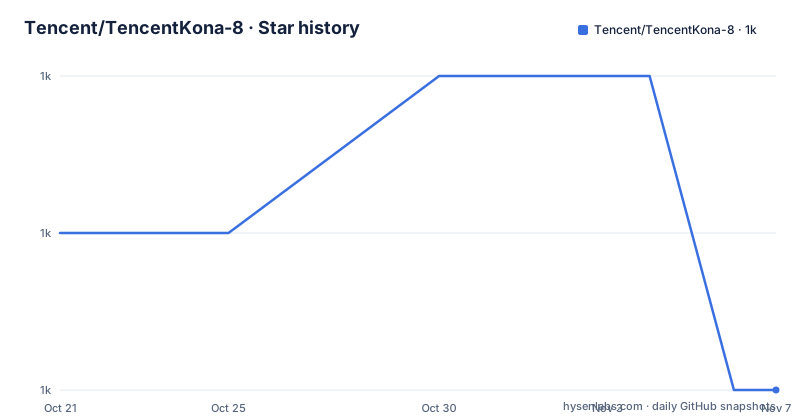
- Tencent/TencentKona-81,004 ★ · -1
| Repository | 2026-10-21 | 2026-11-07 |
|---|---|---|
| Tencent/TencentKona-8 | 1k | 1k |
-1 Stars in the last 17 days, measured from the daily GitHub snapshot. Compare with other projects
Editorial analysis
The repository is a complete JDK source tree, not a wrapper
The top level of the repository looks like OpenJDK itself, because that is what it is. The entries include `hotspot/`, `jdk/`, `langtools/`, `common/`, `make/`, `configure`, `nashorn/`, `corba/`, `jaxp/`, `jaxws/`, `test/` and `doc/`, alongside `SECURITY.md`, `THIRD_PARTY_README` and a file called `ASSEMBLY_EXCEPTION`.
Those directory names are the JDK subsystems, and their presence tells you what building this repository involves. `hotspot/` is the virtual machine, `langtools/` is the compiler, `langtools/` and `jdk/` together are most of the class library, and `nashorn/`, `corba/`, `jaxp/` and `jaxws/` are the components that belong to the Java 8 era specifically. The `configure` script at the root and the `make/` directory are the standard OpenJDK build machinery.
This is worth saying plainly for anyone arriving with a Java-library mindset: there is no `pom.xml`, no `build.gradle` and no published artifact. Kona is delivered as a JDK, built from this tree and distributed as binaries on the releases page. Adopting it means adopting a runtime, and every consequence of a runtime applies, including the need to build it yourself if you want a platform the project does not publish.
The `SECURITY.md` file at the root and the `THIRD_PARTY_README` are the two artefacts that indicate the project takes the upstream obligations seriously, since a fork that vendors third-party code has to track what is in it.
No cost, quarterly updates, and a claim about production use
The README describes Tencent Kona as a "no-cost, production-ready distribution of the Open Java Development Kit (OpenJDK)", with long-term support and quarterly updates. Three separate claims are packed into that sentence and they are worth separating.
The no-cost part is about the distribution: there is no support contract attached to the download. The production-ready part is a statement about the vendor's own use, which the next paragraph backs up. The quarterly updates part is a cadence claim, and the release list supports it: 8.0.27-GA was published on 2026-07-27, 8.0.26-GA on 2026-04-28 and 8.0.25-GA on 2026-01-30, which is a little under three months between tags each time.
The usage claim is the strongest signal in the README. Kona "serves as the default JDK at Tencent internally", and the README says it is optimized for the scale of big data, machine learning and cloud computing workloads. It is also used to build and maintain a Tencent-supported version of OpenJDK for customers and partners who want to run their applications on OpenJDK. So the fork has an internal deployment scale behind it, and a public distribution built from the same source.
The strategic statement in the licence section is that Tencent intends to contribute as many enhancements as possible to the continuous success of Java and upstream. That is the friendly fork model: carry local changes, push the acceptable ones back to OpenJDK, and keep the local delta small enough to rebase on each quarterly update.
SM2, SM3, SM4 and TLCP are the additions that are not upstream
The only feature the README describes in technical detail is the cryptography. It states that Kona implements China's cryptographic algorithms, including SM2, SM3 and SM4, and the secure communication protocol TLCP, also referred to as SMSSL, and points to a reference guide for details.
For a Java application that needs these, the value is not an extra library on the classpath but availability from the runtime itself. SM3 is a hash function, SM4 is a block cipher, SM2 is the elliptic curve public key scheme, and TLCP is the transport protocol that ties them into a secure channel. The README's claim is that these are part of the JDK build, not an optional module you have to enable, and the reference guide is where the supported algorithms, key sizes and provider names are written down.
This is also the part of the fork most likely to be upstreamed, which is why the Tencent contribution commitment matters. The rest of the fork, the internal tuning for large-scale cloud and data workloads, is less likely to be accepted upstream, so it is the part you will be carrying as a local delta for the lifetime of your adoption.
The README does not enumerate the tuning that is claimed. There is no list of JVM flags, no benchmark data and no description of which workloads see which improvements, so the performance side of the claim is asserted rather than documented in the visible text.
Four platform combinations, and no Apple Silicon build
The platform support is stated in one line: Linux/x86_64, Linux/Aarch64, Windows/x86_64 and Mac/x86_64.
Three of those are unremarkable for a JDK. The fourth is the interesting one, because Mac/x86_64 means Intel Macs, and there is no Mac/Aarch64 in the list. For a team that develops on Apple Silicon, the consequence is that the JDK they run locally is not the JDK they ship, or that they run the x86_64 build under translation on machines that are not. Neither is a good answer for a runtime, and the gap is not explained anywhere in the README.
The Aarch64 entry on Linux is the one that matters most in practice, since it is the architecture of Graviton-class servers and of ARM-based cloud instances. It is listed without any caveat, which suggests it is a first-class target rather than an experimental one.
The installation path is deliberately thin. The README directs readers to the GitHub releases page for the binaries and to the project wiki for the introduction, installation guide and user guide. There is no package repository, no installer script and no container image described in the visible documentation, so the operational work of adopting a Kona JDK across a fleet is yours to build on top of the release artifacts.
Licensed like OpenJDK, but the repository is classified as a custom licence
The licence section says Kona is under the same licensing terms as the upstream OpenJDK project, and calls it a "friendly fork". The build system agrees. The top of the `Makefile` in this repository carries Oracle's own notice, which states that the code is free software under the GNU General Public License version 2 only, as published by the Free Software Foundation, and that Oracle designates the file as subject to the Classpath exception as provided by Oracle in the LICENSE file that accompanied the code.
There is a discrepancy worth flagging. GitHub's metadata classifies the repository licence as a custom licence that it cannot categorise, which is a different signal from a clean GPL-2.0-with-Classpath-exception label. That is not necessarily a problem, since the Classpath exception itself sits outside what automated classifiers can match, but it does mean you should read the LICENSE file rather than infer the terms from a badge. The README itself says "Please read the file: LICENSE".
For a distribution you intend to ship inside a product or a container, the point to confirm is what the third-party components in the tree bring with them, which is what `THIRD_PARTY_README` is there to record.
Where Kona 8 is the wrong choice
The first and simplest case is a project that needs a current Java. This repository is the Java 8 line. The GA tags are 8.0.x, the tree still contains `nashorn/` and `corba/`, and nothing in the README suggests that anything beyond Java 8 is in scope here. Choosing Kona 8 means choosing Java 8 and giving up records, sealed classes, pattern matching, virtual threads and everything else the newer lines provide.
The second case is Apple Silicon development, for the reason above. If your team works on Macs with ARM processors, the platform list does not cover the machine in front of you, and the README does not say whether a Mac/Aarch64 build exists elsewhere or is planned.
The third case is a team that wants a supported JDK with a support contract. Kona is no-cost and the README points to a Tencent-supported OpenJDK build for customers and partners, but the free distribution itself is not described as carrying support. If your process requires a vendor commitment with a response time, this repository is not the artefact you sign up for.
The fourth is an organisation that cannot absorb a fork's upgrade work. A quarterly cadence with a local delta means a recurring merge and validation exercise, and the internal tuning that makes Kona worth choosing is exactly the part that will not merge cleanly upstream. The crypto additions are the low-risk half; the workload tuning is the maintenance half.
Editorial conclusion
Adopt Tencent Kona 8 when you need an OpenJDK 8 build with the Chinese cryptographic algorithms and TLCP available in the JDK itself, or when you want the same distribution Tencent runs on its own cloud workloads. Do not adopt it if you need a current Java feature line, since this repository is the 8 branch, or if you run Apple Silicon, because Mac/x86_64 is the only Mac target listed. Before you install, read the LICENSE file rather than relying on the repository's licence label, and plan for a quarterly upgrade cadence matched to the GA tags such as 8.0.27-GA.
Frequently asked questions
What is Tencent Kona 8?
It is a no-cost, production-ready distribution of the OpenJDK, with long-term support and quarterly updates. The README says it serves as the default JDK at Tencent internally and is optimized for big data, machine learning and cloud computing workloads.
Does Tencent Kona 8 support Apple Silicon?
The README lists the supported platforms as Linux/x86_64, Linux/Aarch64, Windows/x86_64 and Mac/x86_64. Mac/Aarch64 is not among them, and the README does not explain that gap.
Which Chinese cryptographic algorithms does Kona implement?
The README states that Kona implements SM2, SM3 and SM4, along with the TLCP secure communication protocol, also called SMSSL, and links to a reference guide for the details.
How do I install Tencent Kona 8?
The README points to the GitHub releases page for the binary downloads and to the project wiki for the introduction, installation guide and user guide. It does not describe a package repository or an installer script.
Official sources
Add this badge to your README
If you maintain this project, the badge below links readers to this analysis and shows its maintenance status from the daily GitHub snapshot. Paste the markdown into your README; add ?metric=license or ?metric=stars to the image URL for a different field.

[](https://hysenlabs.com/projects/tencent-tencentkona-8)Star history chart for your README
[](https://hysenlabs.com/projects/tencent-tencentkona-8)Was this useful?