ruoyi-vue-pro keeps three Spring Boot majors in three branches, and master is the oldest one
The officially recommended, fully rebuilt and optimized Pro version of RuoYi-Vue. An admin backend plus WeChat mini program built on Spring Boot, MyBatis Plus and Vue & Element, supporting dynamic RBAC permissions, data permissions, SaaS multi-tenancy, Flowable workflow, third-party login, payments, SMS, an online store, CRM, ERP, MES, IM, large AI models, IoT and more.
At a glance
- What is it?
- ruoyi-vue-pro is an MIT-licensed Java admin platform whose business features live in twenty yudao-module directories, while the same codebase exists three times over, once per Spring Boot major. The decisions that matter before you write code are which branch you clone, which frontend you commit to, and whether the lite edition is enough.
- Who is it for?
- Take ruoyi-vue-pro if you want a broad, permissively licensed admin platform and can commit to one Spring Boot branch, one UI kit, and the Chinese cloud vendors in its payment, SMS, and storage paths. Skip it if you need microservices or a deployment that avoids Aliyun, Tencent, Alipay, and WeChat.
- Can I use it commercially?
- Yes. MIT is a permissive licence: you can use, modify and sell software built on it, as long as you keep its copyright and licence notices.
- Is it still maintained?
- Yes. The repository last received commits 1 day ago.
- What is it written in?
- Mainly Java, according to GitHub's language statistics.
Answers come from the project's GitHub data, last synced on November 14, 2026, and from our analysis. They are not legal advice.
Star history
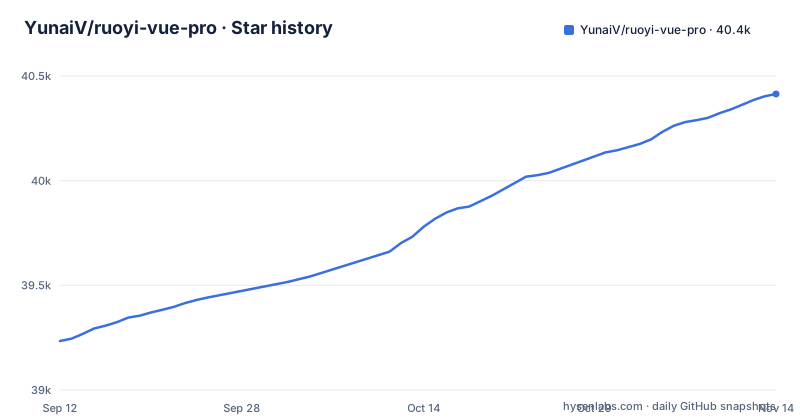
- YunaiV/ruoyi-vue-pro40,414 ★ · +1,180
| Repository | 2026-09-12 | 2026-11-14 |
|---|---|---|
| YunaiV/ruoyi-vue-pro | 39.2k | 40.4k |
1,180 Stars in the last 63 days, measured from the daily GitHub snapshot. Compare with other projects
Editorial analysis
master is the JDK 8 build, and it is what a plain clone gives you
Three Spring Boot majors live in three long-lived branches. The `master` branch runs JDK 8 with Spring Boot 2.7, `master-jdk17` runs JDK 17/21 with Spring Boot 3.5, and `master-jdk25` runs JDK 25 with Spring Boot 4.x, and `master` is the default branch. A plain clone therefore hands you the oldest supported stack rather than the newest. What the branch layout cannot offer is one codebase that spans all three, because moving up means switching branches and reconciling whatever you changed. The consequence for a reader picking a starting point is that the choice is not a preference to defer: a team standardizing on Spring Boot 3.5 has to move to `master-jdk17` before writing code. The v2026.10 releases are tagged separately for jdk8/11, jdk17/21, and jdk25 on 2026-10-31, so track one line and treat the others as parallel copies.
Five separate frontend repositories, each a different long-term bet
The admin console is not one codebase. The desktop side ships as Vue3 with element-plus, Vue3 with vben on top of ant-design-vue, and Vue2 with element-ui, each in its own repository beside the backend. The mobile side uses uni-app so one codebase covers APP, mini program, and H5. Three hosted demos are linked so you can compare element-plus, vben, and element-ui before choosing. What this layout cannot do is let you mix, and a component written against one UI kit will not transfer to another. The consequence is that your UI choice becomes a dependency decision with a long tail, and the frontends are versioned separately from the Java backend, so a backend capability can land before any interface for it exists.
The lite edition is not a smaller full edition, and the migration runs one way
yudao-boot-mini is offered alongside the full ruoyi-vue-pro on the same three branches, and the difference is scope rather than size. The lite edition carries only system functions and infrastructure. Workflow, payment, reports, the WeChat official account, the mall, the member center, ERP, WMS, CRM, MES, HRM, FMS, PMS, OA, AI large models, IoT, and IM are all excluded, seventeen areas in total. A migration document says selected modules can be moved from the full edition to the lite edition in five to ten minutes. The migration document covers moving from the full edition to the lite edition. If your roadmap touches any of those areas, start with the full edition, since the five to ten minute figure is for the full-to-lite move.
Feature boundaries are Maven modules, so the tree doubles as the catalog
The repository root is the feature list. Twenty yudao-module directories cover the advertised areas (yudao-module-ai1-springai sits beside yudao-module-ai): system, infra, bpm, pay, report, mp, mall, member, erp, wms, crm, mes, hrm, fms, pms, oa, ai, iot, and im, alongside yudao-framework, yudao-dependencies, yudao-server, and yudao-ui. The latest v2026.10 release is titled as extending xinchuang and multi-database compatibility, adding audio and video calls on the App, and improving system stability; OA and PMS already appear as their own modules. The repository is not archived and was last pushed on 2026-11-02. The modules sit in one multi-module Maven project (pom.xml at the root) with shared sql and script directories. The consequence is that adopting the platform means checking whether the ERP, MES, and IoT modules you do not need still land in your build.
Seven databases and five message queues are offered without a stated default
Supported databases are listed as MySQL, Oracle, PostgreSQL, SQL Server, MariaDB, and domestic databases such as DM, KingbaseES, openGauss, HighGo, OceanBase and TiDB, and message queues as Event, Redis, RabbitMQ, Kafka, and RocketMQ. The only stack named concretely is MySQL with MyBatis Plus, plus Redis with Redisson. The README states MySQL is the default database and that the sql directory ships initialization scripts for MySQL, Oracle, PostgreSQL, SQL Server, DM, KingbaseES, openGauss, HighGo and OceanBase, while other databases need converted scripts that must be adjusted and tested. It names no default message queue. What the list cannot do is show that a given combination works together. The consequence is that the platform reads as database-flexible on paper while your first non-MySQL deployment becomes the real test, and the message queue abstraction is described once while the Spring Boot major changes underneath it on the other two branches. Pick MySQL and one queue first, and treat the rest of the list as untested surface area.
Multi-module is not microservices, and the microservices path is a different repository
The backend is described as a Spring Boot multi-module architecture, and the project relations table lists yudao-cloud separately as the project built on Spring Cloud microservices. Those are different things living in different repositories. A multi-module layout is a packaging and dependency structure inside one running service, and it does not give you service boundaries, independent deployment, or a gateway. What ruoyi-vue-pro cannot hand you is the Spring Cloud path, so if service decomposition is the architecture you need, you are looking at a second codebase. Spring-Boot-Labs is listed as a companion for learning Spring Boot and Cloud rather than a component to deploy. The consequence is that choosing this repository is a commitment to a modular monolith, and the module boundaries in the tree are build boundaries, not network boundaries.
Aliyun, Tencent, Alipay, and WeChat cover the edges, and only MinIO is self-hosted
Third-party coverage is broad but geographically narrow. SMS runs through Aliyun and Tencent Cloud. Object storage is offered as MinIO, Aliyun, Tencent Cloud, and Qiniu. Payments and refunds integrate Alipay and WeChat. Third-party login covers the WeChat mini program, the WeChat official account, WeCom, and DingTalk. Of that set, only MinIO is something you host yourself. A deployment that must avoid these vendors cannot use the bundled channels as they ship. The consequence is a fork across the pay and messaging modules before go-live rather than a configuration change, and that fork cost belongs in the comparison against assembling those integrations yourself.
WebSocket rides on the same token, so Redis sits on the login path
Real-time features use Spring WebSocket with built-in token identity validation and support for WebSocket clustering. Authentication uses Spring Security with a token and Redis, with dynamic permission menus, button-level permission control, and Redis caching for performance. That is coherent, but it means Redis sits under both the login session and the permission cache. A Redis outage would therefore reach logged-in users, not only a background job. The consequence for an operator is that Redis stops being an optional cache and becomes part of the availability chain, which means it needs its own monitoring, and a failover plan.
Editorial conclusion
Take ruoyi-vue-pro if you want a broad, permissively licensed admin platform and can commit to one Spring Boot branch, one UI kit, and the Chinese cloud vendors in its payment, SMS, and storage paths. Skip it if you need microservices or a deployment that avoids Aliyun, Tencent, Alipay, and WeChat. Before starting, confirm which branch your JDK matches, read the quick start at doc.iocoder.cn, and check whether the modules you do not want still land in your build.
Frequently asked questions
Is ruoyi-vue-pro free for commercial use?
It is released under the MIT License, and the maintainer states there will never be a commercial version and that all code is open sourced. The README says individuals and companies can use it 100% free of charge.
Which ruoyi-vue-pro branch should I use?
The default `master` branch is JDK 8 with Spring Boot 2.7. For JDK 17 or 21 with Spring Boot 3.5 use `master-jdk17`, and for JDK 25 with Spring Boot 4.x use `master-jdk25`. The lite edition yudao-boot-mini follows the same three branch names.
Does ruoyi-vue-pro include ERP, CRM, and MES modules?
The full edition lists ERP, WMS, CRM, MES, HRM, FMS, PMS, OA, AI large models, IoT, and IM among its features, and the repository carries a matching yudao-module directory for each. The lite edition yudao-boot-mini ships only system functions and infrastructure, so none of those modules are present there.
How do I get started with ruoyi-vue-pro?
The README points to the quick start documentation at doc.iocoder.cn/quick-start/ and to a video tutorial at doc.iocoder.cn/video/. It also links three hosted demos so you can compare the element-plus, vben, and element-ui admin interfaces before picking a frontend.
Official sources
Add this badge to your README
If you maintain this project, the badge below links readers to this analysis and shows its maintenance status from the daily GitHub snapshot. Paste the markdown into your README; add ?metric=license or ?metric=stars to the image URL for a different field.

[](https://hysenlabs.com/projects/yunaiv-ruoyi-vue-pro)Star history chart for your README
[](https://hysenlabs.com/projects/yunaiv-ruoyi-vue-pro)Was this useful?