Weaviate's quickstart is four minors behind its own release
Weaviate is an open-source vector database that stores both objects and vectors, allowing for the combination of vector search with structured filtering with the fault tolerance and scalability of a cloud-native database.
At a glance
- What is it?
- Weaviate is a Go vector database that stores objects and vectors together, combining similarity search with keyword filtering, retrieval-augmented generation and reranking behind REST, gRPC and GraphQL interfaces. Its getting-started file pins a server image several minors behind the current release and pairs the database with a small static-embedding model rather than a transformer.
- Who is it for?
- Weaviate fits a team that wants semantic search with structured filtering in one database, with multi-tenancy, replication and role-based access built in rather than bolted on. It does not fit someone who needs one obvious answer about which version to run, because the getting-started image and the current release are several minors apart.
- Can I use it commercially?
- Check first. The repository uses a licence we do not classify automatically, so read its LICENSE file before any commercial use.
- Is it still maintained?
- Yes. The repository received new commits within the last day.
- What is it written in?
- Mainly Go, according to GitHub's language statistics.
Answers come from the project's GitHub data, last synced on November 13, 2026, and from our analysis. They are not legal advice.
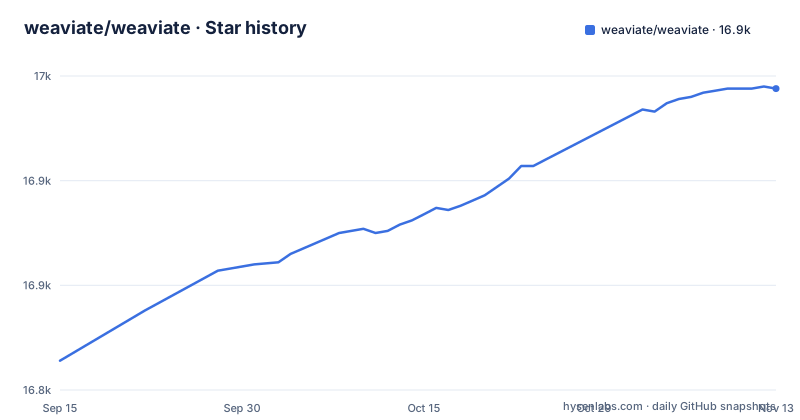
Star history
- weaviate/weaviate16,944 ★ · +130
| Repository | 2026-09-15 | 2026-11-13 |
|---|---|---|
| weaviate/weaviate | 16.8k | 16.9k |
130 Stars in the last 59 days, measured from the daily GitHub snapshot. Compare with other projects
Editorial analysis
The development compose file tells you not to use it, and collides on a port
The compose file in the repository root opens with a note that is worth quoting in full, because it changes how you read everything below it. It says the file is intended only for Weaviate development by contributors and is not meant for end users, that it should not be used directly with the compose command, and that contributors should use the scripts under the development tools directory instead, with a link to the installation documentation. So what follows is a contributor's bench, and it shows. There is a word-context service, a pinned metrics stack, a dashboards tool with a mounted configuration and a provisioned datasource, and an identity provider with a default administrator account and an imported realm file. Two of them publish on the same port, so the bench cannot be started as published. That is a development-environment bug rather than a deployment hazard, and it is exactly what the banner is warning you about.
The getting-started file pins a server image three minors behind
The installation section is where a new user starts, and the image it names is not the current one. The compose snippet points at a specific server image tagged 1.36.0, while the current releases are 1.40.3 and, a day earlier, patches on the 1.39 and 1.38 lines. So a reader who copies the tutorial gets a server several minors old. That is ordinary drift in a fast-moving project and it is easy to miss, because the tutorial looks authoritative and the version number in it looks deliberate. The practical instruction is to treat the tutorial as a shape and the release list as the version, and to pin whatever you choose explicitly in your own compose file rather than inheriting one that was written months ago.
The file also shows what the local setup looks like, a server on two ports and a separate inference service it points at:
services:
  weaviate:
    image: cr.weaviate.io/semitechnologies/weaviate:1.36.0
    ports:
      - "8080:8080"
      - "50051:50051"
which you then start with the compose command and reach through the Python client.
The tutorial's vectoriser is a small static model, not a transformer
The getting-started compose file runs two services: the database, and a separate inference service named for a lightweight vectorisation approach, on its own port, with the database configured to use it. The image tag it uses names a model in the tens of millions of parameters. That is a static embedding model, and it behaves nothing like a hosted sentence embedding: it is fast, it runs locally, and its notion of similarity is coarser, which is exactly why a tutorial reaches for it. The example code makes the alternative visible in a comment, where the collection is configured either to generate vectors during import with that model or to accept vectors you computed yourself. So the choice is real and it is made in the collection definition, not in a settings file. The tutorial picks the cheap option so that the example runs on a laptop, and the relevance you see there is not the relevance you will ship.
Three server interfaces behind one database, on two ports
The server exposes three ways in: a REST interface, a gRPC interface and a GraphQL interface, and the compose file publishes two ports, one for the HTTP surface and one for gRPC. Around that there are first-party client libraries for five languages, Python, JavaScript and TypeScript, Java, Go and C#, plus a list of community-maintained ones. Three interfaces over one store is a real design decision: the one you choose for your first query is the one your code will be shaped by. The tutorial sidesteps the question by using the Python client against a local connection, which hides which interface you are actually on. If you are evaluating this for a service, the interface list is a better filter than the feature list, because the features are described once and have to be reachable through all three.
Access control is a policy engine, and credentials are hashed deliberately
The production claims in the file are multi-tenancy, replication, horizontal scaling and fine-grained role-based access control, and the dependency list shows what sits underneath. There is a policy engine library for authorization, an OpenID Connect client and a JSON web token library for identity, and a memory-hard password hashing library for credentials. So the access model is not a token check with roles attached in application code; it is an external identity provider plus a policy decision layer, which is the right shape for a multi-tenant database and also more machinery to configure than most projects need. The cloud SDKs in the same list include a managed runtime service and a managed inference service on one cloud, and object storage clients for three clouds.
A deprecations directory at the top of a Go server
One entry in the repository root is unusual enough to name on its own. There is a deprecations directory. In a project that ships a wire protocol to five client languages and is at a one-point-forty release, a directory for tracking removals means the project treats client-visible deprecation as an artefact with a lifecycle rather than as a line in a changelog. That is a meaningful signal about who the project expects to be coupled to it, and it is the first thing to read if you are about to build a client. Around it sit the other signs of a project with external users: a citation file, two licence files side by side, a release configuration, a mock generation configuration, a protocol buffer lint configuration, a static analysis properties file, and a separate module file for the generated protocol code, which is why the container build copies two sets of module files rather than one.
The build retries module downloads five times and forces HTTP/1.1
The container build contains the most human detail in the repository, and it is in the dependency download step. There is a loop that tries the download up to five times with a growing delay, and the comment above it explains two things: it is there to ride out transient failures at the module proxy, and the environment variable forcing the client to HTTP/1.1 avoids a class of stream errors seen mid-download over HTTP/2. Both halves of that are the kind of knowledge that only exists because somebody lost an afternoon to it, and both are now in the file for the next person. The same build stage takes the target architecture, a CGO switch defaulting on, and four build arguments for the branch, revision, build user and date, which are injected into the binary as version metadata. The image is labelled as a development image in its own header, with a pointer to the development documentation.
Editorial conclusion
Weaviate fits a team that wants semantic search with structured filtering in one database, with multi-tenancy, replication and role-based access built in rather than bolted on. It does not fit someone who needs one obvious answer about which version to run, because the getting-started image and the current release are several minors apart. Before you deploy, pin the server image deliberately rather than copying the tutorial compose file, and choose the embedding approach on purpose, since the tutorial's inference service is a lightweight static model rather than a transformer and will not tell you what relevance looks like in your data. Then pick one of the three server APIs and stay on it, and read the deprecations directory before writing client code, because this project tracks client-visible removals as files rather than as release notes.
Frequently asked questions
what is weaviate vector database
It is an open-source vector database, written in Go, that stores objects and vectors together. It combines vector similarity search with keyword filtering, retrieval-augmented generation and reranking in one query interface, and you can either have it vectorize data at import with an integrated model provider or bring your own pre-computed embeddings.
what is weaviate used for
The project lists retrieval-augmented generation systems, semantic and image search, recommendation engines, chatbots and content classification, and it describes itself as built for semantic search at scale. The same section covers hybrid semantic and keyword search, filtering in a single call, reranking, and horizontal scaling with multi-tenancy and replication for production.
how to install weaviate locally
The project publishes a local quickstart and a compose file that runs the server on two ports together with a separate vectorisation service, started with the compose command. It also lists Docker, Kubernetes, a hosted service, and marketplace guides for two clouds, and points at its installation documentation for the rest.
is weaviate free to use
The project describes itself as open source, and the repository carries two licence files at the root, though the repository's own licence metadata field carries no identifier. A hosted service is offered separately alongside the self-hosted options.
Official sources
Where this project is recommended
Add this badge to your README
If you maintain this project, the badge below links readers to this analysis and shows its maintenance status from the daily GitHub snapshot. Paste the markdown into your README; add ?metric=license or ?metric=stars to the image URL for a different field.

[](https://hysenlabs.com/projects/weaviate-weaviate)Star history chart for your README
[](https://hysenlabs.com/projects/weaviate-weaviate)Was this useful?