CloudBase AI Toolkit gives coding agents a backend, in three layers
Backend for AI coding agents on CloudBase — database, auth, functions via Plugin, Skills & MCP.
At a glance
- What is it?
- Tencent's integration layer for Cursor, Claude Code, Codex and CodeBuddy ships an MCP server, a set of agent skills and per-IDE plugins that install together. The interesting parts are the ones the changelog admits to: a tool surface that got smaller, a CloudRun rule about PORT, and two install routes you must not mix.
- Who is it for?
- Adopt the Plugin route if you want the whole stack in one install, and pick Skills alone when you only want the conventions and none of the write access. Before you trust an agent with this, confirm you have your own CloudBase environment, since nothing here provisions one, and keep reviewing the sensitive actions it proposes.
- Can I use it commercially?
- Yes. MIT is a permissive licence: you can use, modify and sell software built on it, as long as you keep its copyright and licence notices.
- Is it still maintained?
- Yes. The repository last received commits 2 days ago.
- What is it written in?
- Mainly TypeScript, according to GitHub's language statistics.
Answers come from the project's GitHub data, last synced on November 13, 2026, and from our analysis. They are not legal advice.
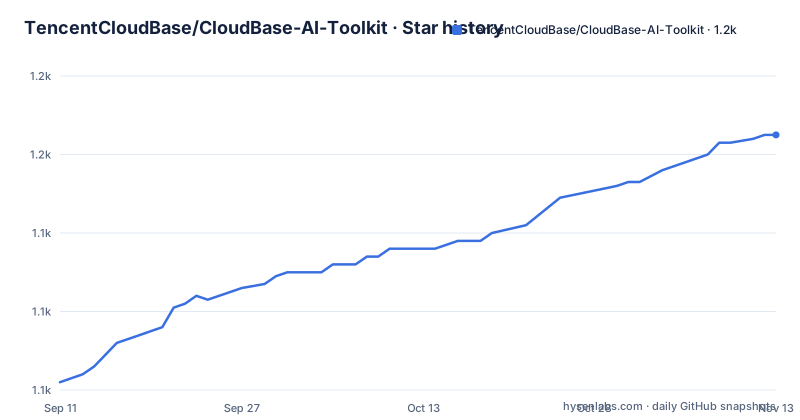
Star history
- TencentCloudBase/CloudBase-AI-Toolkit1,165 ★ · +63
| Repository | 2026-09-11 | 2026-11-13 |
|---|---|---|
| TencentCloudBase/CloudBase-AI-Toolkit | 1.1k | 1.2k |
63 Stars in the last 63 days, measured from the daily GitHub snapshot. Compare with other projects
Editorial analysis
Three layers, and none of them provisions your environment
The Toolkit is three things that install together rather than one program. The Plugin carries the MCP server, the agent skills and the hooks in a single unit, which removes most of the per-IDE wiring. Agent Skills are scenario guides for web, mini program, database, auth and functions work. The MCP layer is what actually operates things: login, query and change data, manage functions and hosting, read logs, all from the conversation. What ships from this repository is the npm package @cloudbase/cloudbase-mcp, the skills, and the AI plugins.
Two limits are stated plainly and they are the ones to internalise. You still need your own CloudBase environment; nothing in the toolkit creates one. And you are expected to confirm the sensitive actions the agent proposes, because the toolkit is framed as offering capability and a path rather than judgement. CloudBase itself is Tencent Cloud's backend offering, covering database, storage, auth, cloud functions and Cloud Run.
Pick one install route, not both
The ecosystem is spread across several repositories and there is an explicit warning about combining them. For an IDE with a native marketplace, add this repository as the marketplace and install from there. The Open Plugin Spec route is a separate command, `npx plugins add TencentCloudBase/cloudbase-plugin`, and the instruction is not to also run that on a tool already served by the marketplace. The stated preference is Plugin for the full stack and Skills alone when you only want knowledge constraints.
The fast path avoids a terminal entirely. You paste a prompt into the agent and it fetches the setup document itself:
Set up CloudBase for me:
1. Open https://docs.cloudbase.net/skill.md and complete the setup following its instructions.
2. Tell me when you're done, and suggest the most relevant next step.
Beyond those two, sibling repositories cover narrower ground: a DeepSeek Harness plugin with an MCP bridge and a database, storage and auth panel; a sites plugin for creating and deploying a Vite web app; a skills collection; and a per-skill install catalog that also publishes on skills.sh and takes a `--skill <name>` argument so you install one skill rather than the set.
The tool surface got smaller by deferring two catalogs
A 43-tool MCP server sends its whole tool list on every tools/list call, and the v2.34.x notes describe the fix: the inline skill catalog and the OpenAPI catalog behind searchKnowledgeBase now load on demand. The README puts the effect at a 9.1% cut to that 43-tool surface on every tools/list, which is the cost paid by every client on every connection rather than a one-off saving.
That is a real trade rather than a free win, and the same release line shows the pattern elsewhere. CallCloudApi is not a fixed list of endpoints either: its service allowlist has been widened to 57, with built-in version mapping so most services need nothing extra, while multi-version services such as tke, mongodb and vod require an explicit version argument. A wider allowlist with a version field bolted on means the schema grows in one dimension while shrinking in another. Agents reading these tools are being handed a narrower first page and a larger table behind it.
cloudbaserc.json is a fallback, not an override
Environment identity is resolved in stages and the precedence matters when a deploy lands in the wrong place. Starting in v2.33.x, cloudbaserc.json acts as a field-level fallback for envId, region and site, with values that can be either literals or `{{env.KEY}}` references resolved from the environment. Field-level is the important word: it falls back per field, so a config file carrying only site does not blank out an envId you passed on the command line.
The v2.34.x entries show the same concern from the tool side. queryEnv now reports the region actually applied, rather than the one you asked for, and domains honours an envId that was passed in. Both changes exist because a silent mismatch between requested and applied environment was the failure mode. International routing got its own treatment: full localization of tool copy driven by an instance-level lang, plus site and region parameters on auth so that logging in against the international site and resolving region routing both work. CloudBase runs separate domestic and international sites, and hosts have to be rewritten between them.
A cloud function must not bind PORT itself
The runtime notes name a mistake worth knowing before you write the first function. In CloudRun Function mode the function framework binds PORT, and the service must not bind it too. The same entry adds a credential decision gate that names CLOUDBASE_APIKEY, which is a prompt for the agent to state where the credential comes from rather than assume one is present.
Hosting has its own edge case: paths and prefixes are normalized so that a leading slash can no longer be read as an empty directory. Deploy code was tightened in the same place. The cloud upload channel is described as completing end to end, with deployApp accepting the cosTimestamp that getUploadUrl returns and getBuildLog accepting the build ID a deploy returns, and gateway route creation verifying the upstream exists before writing anything. The pattern across these entries is defensive: check what you were handed, then check what you are about to point at. An earlier release added custom container-image deploys for cloud functions with asynchronous status query, and declarative deploy through deployPlan and deployApply.
Four READMEs and two hook systems share one repository
The tree explains the scope better than any single document. Four README files sit at the root, README.md, README-EN.md, README-ZH.md and README.zh-CN.md, and a package script named check:readme-sync exists to keep them honest. Each supported IDE gets its own directory: .claude-plugin, .claude, .codebuddy, .cursor-plugin, .cursor, .cnb, .agents and .vscode, alongside gemini-extension.json, glama.json and marketplace.json as separate manifests. Hooks are handled twice, through both a .husky directory and lefthook.yml.
The build is a workspace of pnpm at 10.8.0 that generates rather than hand-maintains large parts of its own surface. Visible scripts produce a tools JSON file, a tools document, prompts data, a compat config, a skill manifest, the international connector, an activity card and a Tencent Cloud action index, and most of them have a check counterpart so drift fails a build. Alongside them sit check:i18n-coverage, check:internal-refs, check:compat-diff and a pair of Claude skills mirror scripts. Directories for evals, specs, platform-kit, connectors, plugin, plugins, skills, dsh-plugin and a single example directory, cloudbase-auth-endpoint-with-feishu, complete the picture. A .internal-sync-ignore file suggests some content is deliberately kept out of sync.
The root package reads 1.7.3 while releases say v2.34.8
Version identity is the first thing to sort out. The published MCP package is installed as @cloudbase/cloudbase-mcp at latest, and the release tags run v2.34.6, v2.34.7 and v2.34.8. The repository's own package.json is named cloudbase-ai-toolkit and carries version 1.7.3. That file describes the workspace root rather than the thing you install, but nothing in the metadata says so, and it is the number you see if you clone and read the manifest.
The tag order is odd as well. v2.34.8 is dated 2026-09-30T05:59:21Z and v2.34.7 is dated 2026-09-30T05:59:24Z, so the patch release was published three seconds after the minor one, and v2.34.6 sits nine days earlier. Ordering tools by tag date rather than semver will get this wrong. The repository itself is healthy, with 1,130 stars, 146 forks and a single open issue, and the last push to main landed on 2026-10-02, one day before this was written. The metadata homepage points at docs.cloudbase.net/ai/cloudbase-ai-toolkit/, and the agent-driven setup path reads a separate skill.md document hosted on the same domain.
Editorial conclusion
Adopt the Plugin route if you want the whole stack in one install, and pick Skills alone when you only want the conventions and none of the write access. Before you trust an agent with this, confirm you have your own CloudBase environment, since nothing here provisions one, and keep reviewing the sensitive actions it proposes. Read the CloudRun Function note before you write a cloud function, since binding PORT yourself is the documented way to break it, and check which release you actually have, because the repository package version and the published MCP version do not match.
Frequently asked questions
Do I need my own CloudBase environment to use the CloudBase AI Toolkit?
Yes. The toolkit provides capability and the path to use it, but you still need your own CloudBase environment, and it does not provision one for you.
Can I install both the CloudBase Plugin and npx plugins add on the same tool?
No. For marketplace IDEs you are told to use this repository as the marketplace and not to also run npx plugins add on the same tool. Prefer Plugin for the full stack, and Skills alone when you only need knowledge constraints.
How many tools does the CloudBase AI Toolkit MCP server expose?
The v2.34.x notes describe a 43-tool surface, and they say the inline skill and OpenAPI catalogs behind searchKnowledgeBase now load on demand, cutting that surface by 9.1% on every tools/list call.
Should a CloudBase cloud function bind the PORT environment variable?
No. In CloudRun Function mode the function framework binds PORT, so the function must not bind it itself. The same release notes mention a credential decision gate that names CLOUDBASE_APIKEY.
What version of the CloudBase AI Toolkit should I install?
The npm package is @cloudbase/cloudbase-mcp and the recent tags are v2.34.6 through v2.34.8. The repository root package.json reads cloudbase-ai-toolkit at 1.7.3, which is a different package from the one you install.
Official sources
Add this badge to your README
If you maintain this project, the badge below links readers to this analysis and shows its maintenance status from the daily GitHub snapshot. Paste the markdown into your README; add ?metric=license or ?metric=stars to the image URL for a different field.

[](https://hysenlabs.com/projects/tencentcloudbase-cloudbase-ai-toolkit)Star history chart for your README
[](https://hysenlabs.com/projects/tencentcloudbase-cloudbase-ai-toolkit)Was this useful?