Termio keeps every agent in one daemon and copies a single binary to your VPS
A terminal-first agentic development environment for agentic coding. Build for CLI/TUI agent. Runtime for Coding Agent, Tmux alternative
At a glance
- What is it?
- A macOS terminal application for running coding agents side by side, built on a Swift client that only ever attaches to a daemon holding the sessions. The interesting decisions are structural: quitting the app detaches instead of killing, remote setup never rewrites your ssh configuration, and the file editor and diff pane are deliberately read-only about anything that commits.
- Who is it for?
- Termio suits someone running several agents at once on machines they ssh into, because the detach model is the difference between closing a laptop and killing four jobs. Two things to weigh.
- Can I use it commercially?
- Yes. MIT is a permissive licence: you can use, modify and sell software built on it, as long as you keep its copyright and licence notices.
- Is it still maintained?
- Yes. The repository last received commits 4 days ago.
- What is it written in?
- Mainly Swift, according to GitHub's language statistics.
Answers come from the project's GitHub data, last synced on November 14, 2026, and from our analysis. They are not legal advice.
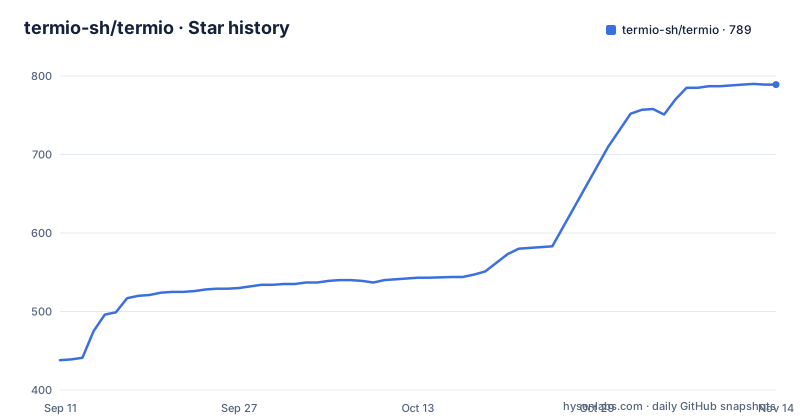
Star history
- termio-sh/termio789 ★ · +351
| Repository | 2026-09-11 | 2026-11-14 |
|---|---|---|
| termio-sh/termio | 438 | 789 |
351 Stars in the last 64 days, measured from the daily GitHub snapshot. Compare with other projects
Editorial analysis
Sessions live in a daemon, and clients only attach
The architectural claim is one sentence: every session lives in a daemon, clients only attach, and closing a client does not kill the agent.
That is what separates this from a terminal multiplexer dressed up as an application. The usual advice is to learn a session manager, and this project positions itself as the alternative to learning one, on the grounds that the shells it holds belong to agents rather than to you.
The consequence is stated concretely. Quitting the application only detaches. Close the laptop, reopen the application, and the agent is where you left it, as the same process with the same scrollback. The only thing that ends a session is an explicit close command, so there is exactly one destructive action and it is bound to a shortcut.
The diagram shows one protocol with only the pipe changing. A Mac application and a forthcoming terminal client connect over a local socket or an ssh tunnel. A phone, and a forthcoming Android client, connect over a websocket. Both paths terminate at the same daemon, which owns the pseudo-terminal, which owns the shell and the agent.
The routing detail matters more than it looks: the phone connects to the daemon on the box, not through the Mac. So the Mac is a client rather than a relay, which is what lets a session on a remote machine behave identically to a local one and lets the phone work while the laptop is shut.
The product's whole job is telling you which agent wants you
The premise is stated first, and it is a prediction rather than a description: when agents write most of the code, the environment's job is to run them and to tell you which one needs you.
That reduces to a three-state model per session: working, idle, and needs you. The third state is the one the whole interface is built around, and it surfaces in three places at once. There is a mark on every row in the sidebar, a menu bar tray that rings when a session is blocked, and the same signal on your phone. The identical list is available from the command line, so the question has one answer regardless of where you ask it.
The integration is by hooks rather than by wrapping. Each agent's own hooks are wired up on first launch, which is why eleven agents are named as supported, from the well known coding agents through several editor-embedded ones, plus the promise that any other command line agent works.
That approach has a trade. Hooks are the least stable interface an agent vendor exposes, since they change when the vendor wants them to, and a tool that depends on eleven vendors' hook formats will accumulate breakage. The alternative, driving each agent through its own protocol, would multiply the work but survive upstream changes better.
The command line is the real interface, and one example is cut off
The command line is not an afterthought here. The documentation's claim is that it drives the running application, and that an agent inside the application can spawn a sibling, hand it a task, and read back the reply.
The visible commands cover the whole session lifecycle: open the current directory as a project, list sessions with their states, spawn an agent session on a prompt, run a plain terminal session on a command, send a message to a session by identifier, print what is on a session's screen with a line count, and watch the session list as it changes.
That send command is the interesting one. The example sends the character one to a session, and the comment says it answers a sibling's permission prompt. So an agent that needs permission can be answered programmatically by another agent, and a human is only involved when nothing does it for you.
Four flags are then described. One blocks until the turn settles and returns both the final status and the range of the transcript worth reading, which is the flag that makes the tool usable from a script. One makes the session commands machine readable. One chooses which agent a spawn starts. And two decide where a new pane lands and how large it is.
The command list has a defect, though. The final line of the block is truncated after two characters, so the last example is unusable as printed:
termio sessions watch                       # stream status changes as they happen
te
Everything above that cut-off line is complete.
Remote setup copies one binary and leaves your ssh config alone
The remote story is the part that makes this more than a local window manager.
The target is any Linux machine you can reach over ssh. Setup reads your ssh configuration to find the host and, in the documentation's word, never rewrites it. Then it copies a single binary into a local bin directory on that machine over ssh, starts the daemon there, and installs the agents' hooks on that machine.
One binary is a good constraint. It means the remote side has no package manager requirement, no runtime to install and no interpreter, so the same host that runs a build server is a valid target. It also means there is no update mechanism described for the remote copy beyond running setup again.
What that buys is stated precisely: local and remote sessions run through the same host, and the session lives on the box rather than in the connection. Drop the link and the agent keeps working. Reattach and the screen is exactly as it was, because there was never a stream to lose, only a client that stopped watching.
That last property is the difference from running an agent inside a local terminal and sshing out to a remote shell, which is the arrangement most people have today and which dies with the network.
The app ships an editor and a diff pane and refuses to own committing
There is a file editor and a changes pane in the feature list, and both come with the same caveat.
The editor opens a file from the tree, with syntax highlighting and autosave, and the documentation adds that the terminal stays the place where you commit. The changes pane is a read-only view of the current unified diff, and again commit, push and pull requests stay in the terminal. The command palette is for splitting, focusing and anything you would otherwise hunt for in a menu, and search jumps from a project-wide content match to the matching line in the editor.
So the application deliberately stops short of the three operations it could have implemented easily. An editor that autosaves is already writing files, so the boundary is drawn at version control rather than at file writing.
The organising model underneath is projects. One project per checkout, holding its terminals and agents, with chats sitting above that as scratch sessions that belong to no project. Git worktrees are created from the sidebar, one branch per parallel task, and they nest under the project they came from rather than sitting in a flat list, so the tree of checkouts mirrors the tree of work.
Splitting is two shortcuts, one for a vertical split and one for horizontal, so an agent, a development server and a shell fit in one window.
The control skill is installed into agent folders and refreshed on every launch
How the tool teaches agents to drive it is worth reading, because it is the same pattern the whole product depends on.
Session control installs an agent skill into each agent's skills folder, with two paths named, and keeps it current on every launch. Any other agent installs the same skill from the repository with a one-line package manager command.
Two consequences. The first is that this application edits configuration directories owned by other tools, on every launch, which means the skill's freshness depends on the app running. The second is that the repository carries a lock file for those skills, so the installed set is pinned and reviewable rather than whatever the last launch happened to fetch.
The phone side is a full mirror rather than a notification app. It shows every session live with the whole terminal interface, puts escape, tab, control and the arrow keys on a bar above the keyboard so you can actually drive a full-screen application from a phone, and offers hold-to-speak that transcribes into the prompt. Pairing is by scanning a code from the settings panel on the Mac.
A live mirror with a full keyboard bar is a much stronger claim than remote terminal apps usually make, and it is also the feature that depends most on the daemon architecture: nothing is mirrored through the Mac, so the phone works while the laptop is closed.
The roadmap is a list of clients, and one of them already has a directory
The roadmap is entirely about clients rather than features, which is what you would expect from a project whose daemon is finished and whose interface is the work.
Six items are listed. A terminal client that attaches the way you would to a session manager. A graphical rendering of agent sessions on the phone, described as optional and built on top of the live mirror. An Android companion. A native Windows application on the same core. Web access with terminals you can share by link. And issue triage inside the application for three trackers, with issues handed straight to an agent.
That last one is the most interesting and the least like a terminal tool. Reading an issue and starting an agent on it without leaving the application is the workflow the whole product exists to enable, and putting it in the roadmap rather than the feature list means it is not built yet.
Two things in the repository suggest work that the roadmap does not describe. There is a web directory at the top level, alongside a hosting ignore file, which is either the beginning of the web client or a site for the documentation and changelog. And the project states plainly that it is looking for long-term maintainers, which is unusual to see in a file rather than a discussion.
The rest of the housekeeping is conventional and thorough: five readme languages, separate files for the agent conventions and the voice guide, a Swift lint configuration, a security policy, and three releases in three days around the minor fifty-four and fifty-five marks.
Editorial conclusion
Termio suits someone running several agents at once on machines they ssh into, because the detach model is the difference between closing a laptop and killing four jobs. Two things to weigh. It is a macOS application today, with Windows named as future work and a TUI client not yet shipped, so a remote workflow currently starts from a Mac. And it installs hooks into agent skill folders on every launch, which means it is editing configuration in the directories your other tools also write to.
Frequently asked questions
What happens to Termio agents when the app is quit?
Nothing. Every session lives in a daemon and clients only attach, so quitting the app detaches. Closing the laptop and reopening restores the same process and the same scrollback, and only an explicit close-session action ends one.
Which coding agents does Termio support?
Eleven are named, including Claude Code, Codex, OpenCode, Cursor, Copilot, Amp, Kimi, Crush, Grok and others, plus any other command line agent. Integration happens through each agent's own hooks, which are installed on first launch.
How does Termio set up a remote machine?
It reads your ssh configuration and never rewrites it, then copies a single binary into a local bin directory on the remote host over ssh, starts the daemon there, and installs the agents' hooks on that machine.
Can an agent drive other agents in Termio?
Yes. The command line can spawn a sibling session on a prompt, read back what is on its screen, and send it a message, including answering a permission prompt programmatically, with a wait flag that returns once the turn has settled.
Does Termio have a terminal and browser client today?
Not yet. Both a terminal client and a browser client with shareable terminals are on the roadmap, alongside an Android companion, a native Windows application and a graphical rendering of sessions on the phone.
How does the Termio iPhone app connect?
It attaches to the daemon on the machine running the sessions rather than through the Mac, over a websocket, mirroring every session live with a key bar for escape, tab, control and arrow keys and hold-to-speak transcription. Pairing is by scanning a code in the Mac app's settings.
Official sources
Add this badge to your README
If you maintain this project, the badge below links readers to this analysis and shows its maintenance status from the daily GitHub snapshot. Paste the markdown into your README; add ?metric=license or ?metric=stars to the image URL for a different field.

[](https://hysenlabs.com/projects/termio-sh-termio)Star history chart for your README
[](https://hysenlabs.com/projects/termio-sh-termio)Was this useful?