Terser: the uglify-es fork for ES6+ and the CLI rules that decide whether your code survives
🗜 JavaScript parser, mangler and compressor toolkit for ES6+
At a glance
- What is it?
- Terser is a JavaScript parser, mangler and compressor toolkit that forked uglify-es to keep minifying modern syntax. This analysis covers its fork lineage, command line behaviour, mangling hazards, source maps and what it deliberately no longer does.
- Who is it for?
- Choose terser when you need to minify ES6+ code from the command line or from Node and want API and CLI continuity with uglify-es. Leave property mangling off unless you control every name it will touch, and do not rely on it for beautifying output.
- Can I use it commercially?
- Check first. The repository uses a licence we do not classify automatically, so read its LICENSE file before any commercial use.
- Is it still maintained?
- Yes. The repository last received commits 8 days ago.
- What is it written in?
- Mainly JavaScript, according to GitHub's language statistics.
Answers come from the project's GitHub data, last synced on November 14, 2026, and from our analysis. They are not legal advice.
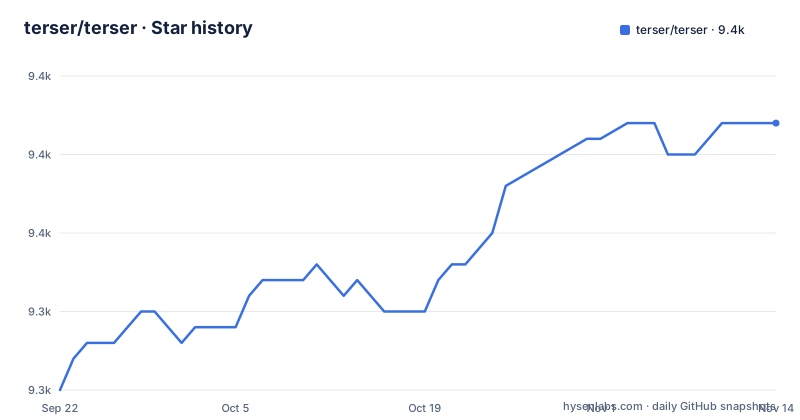
Star history
- terser/terser9,357 ★ · +17
| Repository | 2026-09-22 | 2026-11-14 |
|---|---|---|
| terser/terser | 9.3k | 9.4k |
17 Stars in the last 53 days, measured from the daily GitHub snapshot. Compare with other projects
Editorial analysis
Terser exists because uglify-es stopped and uglify-js never learned ES6+
The project's own reasoning is short. uglify-es is no longer maintained, and uglify-js does not support ES6+. Terser is a fork of uglify-es that mostly retains API and CLI compatibility with both uglify-es and uglify-js@3.
The word mostly matters. If you are migrating a build script that calls uglify-es or uglify-js@3, expect the same shape of command line and the same style of options, but do not assume every flag and return value is identical. Test the minified output of your own code before you swap the package.
The description in the GitHub listing calls terser a JavaScript parser, mangler and compressor toolkit for ES6+. That is the scope: it parses source, renames identifiers, and rewrites code to be smaller. It also recommends using RollupJS to bundle your modules first, because bundling produces smaller code overall. Terser compresses what it is given and does not resolve module graphs itself.
Input files share one global scope, and option order can eat your filenames
Terser accepts multiple input files and parses them in sequence in the same global scope. A reference from one file to a variable or function declared in another is matched properly, so concatenation order affects how the files are read as a unit.
The documented habit is to pass input files first, then options. If you want options first, separate the two with a double dash, otherwise a filename can be consumed as an option argument:
terser --compress --mangle -- input.jsWith no input file, terser reads from STDIN. With no output option, the result goes to STDOUT, and -o or --output declares an output file instead.
Options such as --parse, --compress, --mangle and --format take a comma-separated list of overrides:
terser input.js --compress ecma=2015,computed_props=falseThe parse option set also includes bare_returns, which allows a return outside of functions. The help text says this is useful when minifying CommonJS modules and userscripts.
Compress and mangle are separate switches, and toplevel names are not touched by default
Nothing is compressed unless you pass --compress or -c, and nothing is mangled unless you pass --mangle or -m. Running terser on a file with neither flag does not apply those steps.
Compress options take the form foo=bar, or just foo, which is shortcut for foo=true:
terser file.js -c toplevel,sequences=falseMangle has two options that default to false. toplevel mangles names declared in the top level scope. eval mangles names visible in scopes where eval or with are used. The consequence of the toplevel default is that a script's global function and variable names survive minification unless you opt in, which keeps other scripts that call them working but leaves bytes on the table.
To protect specific names while mangling, pass --mangle reserved with a list of names. The README example keeps the require, exports and $ names intact. The list syntax is shown with the list in square brackets after reserved=, and shell quoting rules apply to the quotes and brackets.
Property mangling will break your code, and the README says so in capitals
Variable mangling and property mangling are different steps. Properties are renamed only when you pass --mangle-props. The README warns in capitals that this will break your code, and says not to use it unless you know exactly how it works and have read the section to the end.
The least dangerous way to use it is the regex option:
terser example.js -c -m --mangle-props regex=/_$/That mangles all properties ending with an underscore, so it suits internal methods named by convention. The reason this is risky is that property names are shared with the outside world. A name used by a library, by JSON you load, by the DOM, or by another bundle will be renamed in your files but not elsewhere, and the program fails at run time rather than at build time.
The practical rule is to scope it with a naming convention that you control, as the regex example does, and to run your tests against the minified output, not only the source.
Source maps are opt in, and a missing url option changes what the output file says
To get a source map, pass --source-map together with --output. With an output of output.js, the map is written to output.js.map. Further sub options go inside the quoted --source-map value: filename for the map name, root for the URL where original files can be found, and url for the URL where the map can be found.
The url option controls the trailing directive. Without it, terser assumes the HTTP X-SourceMap header is in use and omits the sourceMappingURL comment. If you serve static files without that header, set url or the browser will not find the map.
For code produced by another compiler, such as CoffeeScript, mapping back to the intermediate JavaScript is not very useful. Terser accepts an input source map so that it can generate a map from the original language to the compressed output. Use --source-map "content='/path/to/input/source.map'" for a file, or --source-map "content=inline" when the map is embedded in the sources.
Beautifying has been undocumented and is being removed
The README says beautification has been undocumented and is being removed from terser, and recommends prettier instead. The package.json description still reads "JavaScript parser, mangler/compressor and beautifier toolkit for ES6+", so the old wording survives in the metadata even though the README points elsewhere.
The consequence is straightforward. If your workflow uses terser to reformat code for readability, treat that as a feature on its way out and move the formatting step to prettier. Keep terser for the size-reducing steps that the CLI documents: parse, compress, mangle, and format of the final output.
The same README also records a funding change. The Patreon page is shut down in favour of opencollective, and PATRONS.md lists first tier patrons. That is a project housekeeping fact, but it is why a stale link to Patreon in older articles leads nowhere.
ESM and CommonJS entry points, a small dependency list, and licence metadata that disagrees
Install it globally for the command line, or locally for programmatic use:
npm install terser -gnpm install terserThe README asks you to have the latest node.js installed, while package.json declares engines node >=10. The package has "type": "module". Its exports map sends import to main.js and require to dist/bundle.min.js, and it ships types from tools/terser.d.ts and a terser binary at bin/terser. Runtime dependencies are @jridgewell/source-map, acorn, commander and source-map-support. The acorn dependency lines up with the acorn parse option listed in the CLI help.
The package version is 5.51.2, and the last push to the master branch was on 2026-10-05. The repository has no GitHub releases, so use CHANGELOG.md for version history. Licence metadata differs by source: package.json says BSD-2-Clause, while the GitHub listing shows NOASSERTION. Read the LICENSE file in the repository if licence terms matter to you.
Editorial conclusion
Choose terser when you need to minify ES6+ code from the command line or from Node and want API and CLI continuity with uglify-es. Leave property mangling off unless you control every name it will touch, and do not rely on it for beautifying output. Before upgrading, read CHANGELOG.md, since the repository does not publish GitHub releases.
Frequently asked questions
What is terser?
Terser is a JavaScript parser, mangler and compressor toolkit for ES6+. It is a fork of uglify-es that mostly keeps API and CLI compatibility with uglify-es and uglify-js@3.
How to install terser?
Run npm install terser -g to use it as a command line app, or npm install terser to use it programmatically. The package.json declares node >=10.
How to use terser from the command line?
Run terser with input files first, then options, for example terser input.js --compress ecma=2015,computed_props=false. Add -c to compress and -m to mangle, and -o to write an output file.
What is the difference between terser and uglify?
uglify-es is no longer maintained and uglify-js does not support ES6+. Terser is a fork of uglify-es that adds ES6+ support while mostly keeping API and CLI compatibility.
Official sources
Add this badge to your README
If you maintain this project, the badge below links readers to this analysis and shows its maintenance status from the daily GitHub snapshot. Paste the markdown into your README; add ?metric=license or ?metric=stars to the image URL for a different field.

[](https://hysenlabs.com/projects/terser-terser)Star history chart for your README
[](https://hysenlabs.com/projects/terser-terser)Was this useful?