The camera component is small, the permission flow and the Android model download are not
A high performance, easy to use, rock solid camera library for React Native apps.
At a glance
- What is it?
- react-native-camera-kit hands you a Camera view with barcode and face detection attached, refuses to own the permission prompt, and resolves TypeScript source for Metro while its type declarations come out of a compiled dist directory.
- Who is it for?
- This package is a camera view with three things attached: a barcode reader pinned to the middle of the screen, real time face detection that needs Apple Vision on iOS and a Play Services download on Android, and nothing beyond that. Before you take it, work through three checks.
- Can I use it commercially?
- Yes. MIT is a permissive licence: you can use, modify and sell software built on it, as long as you keep its copyright and licence notices.
- Is it still maintained?
- Yes. The repository last received commits 104 days ago.
- What is it written in?
- Mainly Swift, according to GitHub's language statistics.
Answers come from the project's GitHub data, last synced on November 15, 2026, and from our analysis. They are not legal advice.
Star history
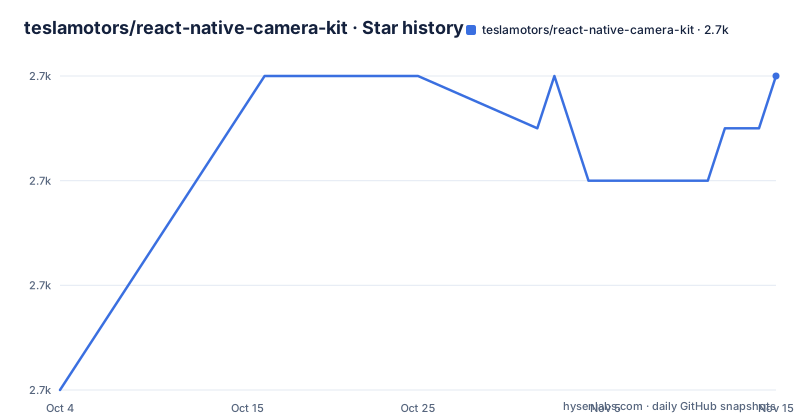
- teslamotors/react-native-camera-kit2,712 ★ · +6
| Repository | 2026-10-04 | 2026-11-15 |
|---|---|---|
| teslamotors/react-native-camera-kit | 2.7k | 2.7k |
6 Stars in the last 42 days, measured from the daily GitHub snapshot. Compare with other projects
Editorial analysis
A blank preview means the permission prompt never ran
The first thing to know about this library is what happens when you skip permissions. If you fail to prompt for permission, the camera will appear blank or black, and the fix is not inside the package. You must use a separate library for prompting the user before rendering the `<Camera .../>` component, and the one recommended is zoontek's react-native-permissions.
The reasoning sits under the heading that asks why there is no permissions API. Permissions look simple, granted or denied, but the reality is more complicated because of privacy enhancements on iOS and Android, and the project would rather not duplicate that user experience inside a camera library. To make the point it reproduces a box-drawn flow chart from react-native-permissions's own README, and that chart stops partway down its third branch, ending on a line that reads `Is t`.
There is a migration note as well. Earlier versions of react-native-camera-kit did hand out permissions through an API, and those APIs will be removed. No version is named for that removal, and the only replacement the README points at is the separate library.
Android and iOS declare different permissions in different files
The two platforms need separate declarations in separate files, and the strings in the example read like samples. On Android, `AndroidManifest.xml`, usually found at `android/src/main/`, takes the camera permission and the storage write permission:
<uses-permission android:name="android.permission.CAMERA" />
<uses-permission android:name="android.permission.WRITE_EXTERNAL_STORAGE"/>
On iOS, `Info.plist`, usually found at `ios/PROJECT_NAME/`, takes two usage descriptions:
<key>NSCameraUsageDescription</key>
<string>For taking photos</string>

<key>NSPhotoLibraryUsageDescription</key>
<string>For saving photos</string>
The Android storage permission and the iOS photo library usage description cover the same intent from different directions, which makes saving a captured file a platform-specific step rather than one both ends share. No guidance on wording comes with the two iOS strings.
On Android the face model arrives after the app is installed
Face detection runs in real time, and the two implementations share nothing. iOS uses Apple Vision, Android uses Google ML Kit, and one requirement is set in bold: Android requires a Google Play Store device. The Android side depends on the unbundled `play-services-mlkit-face-detection` variant, so the model is downloaded by Google Play Services rather than bundled in the APK. By default that download happens on first use, and `onFaceDetectionInstallStatus` reports where it got to, with states running from `pending` and `downloading` through `installing` and `ready`, plus `failed` and `unavailable`.
The download can be moved off first use by asking Play Services to fetch it after installation:
<application ...>
  <meta-data
      android:name="com.google.mlkit.vision.DEPENDENCIES"
      android:value="face" />
</application>
On a device without Google Play Services, `onFaceDetectionInstallStatus` fires once with `unavailable` and there is no second attempt, so face detection is simply off on hardware that has no Play Services.
The scanner reads only the rectangle at the center of the screen
Barcode and QR scanning is a property of the same Camera component, switched on by `scanBarcode` and reported through an optional `onReadCode`. Three more props decide what the reader looks like while it works: `showFrame`, default false, `laserColor`, default red, and `frameColor`, default white.
Those defaults matter because the frame is not a region you position. It is always at the center of the screen, the code is read on that area only, and turning the frame on starts an animation that stops once a code has been found. An interface that wants the reader somewhere other than dead center has to cover the rest of the preview itself.
<Camera
  ...
  scanBarcode={true}
  onReadCode={(event) => Alert.alert('QR code found')} // optional
  showFrame={true} // (default false) optional, show frame with transparent layer (qr code or barcode will be read on this area ONLY), start animation for scanner, that stops when a code has been found. Frame always at center of the screen
  laserColor='red' // (default red) optional, color of laser in scanner frame
  frameColor='white' // (default white) optional, color of border of scanner frame
/>
Metro reads src/index while main and types point into dist
Four entry fields in `package.json` point at two different trees. `main` and `module` both say `dist/index.js`, `types` says `dist/index.d.ts`, and the `react-native` field says `src/index`, which is what Metro resolves, so an app compiles the TypeScript sources itself rather than the compiled output. The published file list carries `android`, `dist`, `ios` and `src`, with negations that keep build directories, `xcuserdata` and `xcuserstate` out of the package and out of the source.
The scripts settle which tree is authoritative. `build` runs `tsc` against `tsconfig.json`, `clean` removes `dist/`, and `release` chains clean, build, `yarn version` and `npm publish`. `prepack` deletes `android/build` and `build`, so the tarball is packed from a clean state after the compile step instead of from whatever sat in the working copy. `release:beta` runs the same chain under the beta tag, and `release:local` packs a tarball and opens it in the macOS file browser, so at least one release path assumes a Mac.
The iOS path wants a Mac, Ruby, CocoaPods and Homebrew
The repository root carries a toolchain per platform. `Brewfile` and `Brewfile.lock.json` pin Homebrew dependencies, `.swiftlint.yml` configures the Swift linter, `.nvmrc` pins the Node version, `.watchmanconfig`, `metro.config.js` and `babel.config.js` configure the bundler, and `.eslintrc.js`, `.eslintignore` and `.prettierrc.js` handle the JavaScript side. Under `example/` there is a `Gemfile`, a `Gemfile.lock` and a `.ruby-version`, because the iOS half runs CocoaPods through Ruby.
The bootstrap script says as much:
cd example/ && bundle install && yarn && cd ios/ && bundle exec pod installThat is what `yarn bootstrap` runs, and it needs bundler, CocoaPods and a Mac. A shorter script sits beside it for the other case, one that only runs yarn inside `example/`. The example itself is then driven with `yarn example ios` or `yarn example android`, while the root `start` script calls watchman and then `node node_modules/react-native/local-cli/cli.js`, a different entry into the React Native CLI than the one the `codegen` script uses.
package.json and the repository describe the library differently
The version story is consistent. `package.json` reads 18.0.1, the newest tag is v18.0.1 published on 2026-08-03, and the last push to master carries that same date, so the tag and the branch head are one build. Before it come v18.0.0 on 2026-05-12 and v17.0.1 on 2026-01-12, and the single major step in that window took about four months.
The self-description is not the same in the two places it appears. The repository calls itself a high performance, easy to use, rock solid camera library for React Native apps, and the README headline repeats that wording. `package.json` describes the same package as a high performance, fully featured, rock solid camera library for React Native applications. Easy to use in one place, fully featured in the other.
The release titles carry nothing beyond the bare version string, so the pitch lives entirely in those two descriptions. The repository names Swift as its primary language, and the LICENSE file in the root is MIT.
Editorial conclusion
This package is a camera view with three things attached: a barcode reader pinned to the middle of the screen, real time face detection that needs Apple Vision on iOS and a Play Services download on Android, and nothing beyond that. Before you take it, work through three checks. Confirm your app can run a separate permission flow, because the camera renders blank or black without one, and the permission API that older versions of this package carried is on its way out with no date attached. Confirm your Android devices have Google Play Services, since face detection reports unavailable otherwise and the ML Kit model is not in the APK. And confirm your build can live with a source entry point, because Metro compiles src/index while the type declarations come from dist.
Frequently asked questions
Is react-native still good in 2026?
The repository takes no position on the framework. What it records is narrower: MIT licensed, Swift as the primary language, version 18.0.1 in package.json, install steps written for React Native above 0.60, the last push on 2026-08-03, and releases v18.0.0 on 2026-05-12 and v17.0.1 on 2026-01-12.
Can react-native use Vision Camera to detect faces?
Face detection in this package does not go through Vision Camera. The README states that iOS uses Apple Vision and Android uses Google ML Kit, with the Android path depending on the unbundled play-services-mlkit-face-detection variant that Google Play Services downloads after install. No third party vision library is named anywhere in the repository.
Is react-native only for phones?
This library names two targets and one extra: cross platform iOS and Android, plus camera preview support in the iOS simulator. It claims nothing beyond that, and the component it exports is the Camera view with its barcode and face detection props attached.
Does react-native-camera-kit ask for camera permission itself?
No, and the README presents that as deliberate. It says you must use a separate library to prompt before rendering the Camera component, recommends zoontek's react-native-permissions, and warns that failing to prompt leaves the camera blank or black. The stated reason is the privacy flows on iOS and Android, which the project does not want to duplicate.
How do I run the example app for this camera kit?
Two commands from the repository root: yarn bootstrap, then yarn example ios or yarn example android. Bootstrap moves into example/ for bundle install and yarn, then into ios/ for bundle exec pod install. For Linux the package scripts carry a shorter bootstrap-linux that only runs yarn inside example/.
Official sources
Add this badge to your README
If you maintain this project, the badge below links readers to this analysis and shows its maintenance status from the daily GitHub snapshot. Paste the markdown into your README; add ?metric=license or ?metric=stars to the image URL for a different field.

[](https://hysenlabs.com/projects/teslamotors-react-native-camera-kit)Star history chart for your README
[](https://hysenlabs.com/projects/teslamotors-react-native-camera-kit)Was this useful?